How to Identify Duplicate Entries in Seconds

Call CA Tally HelpDesk +91 9205471661, 7428779101
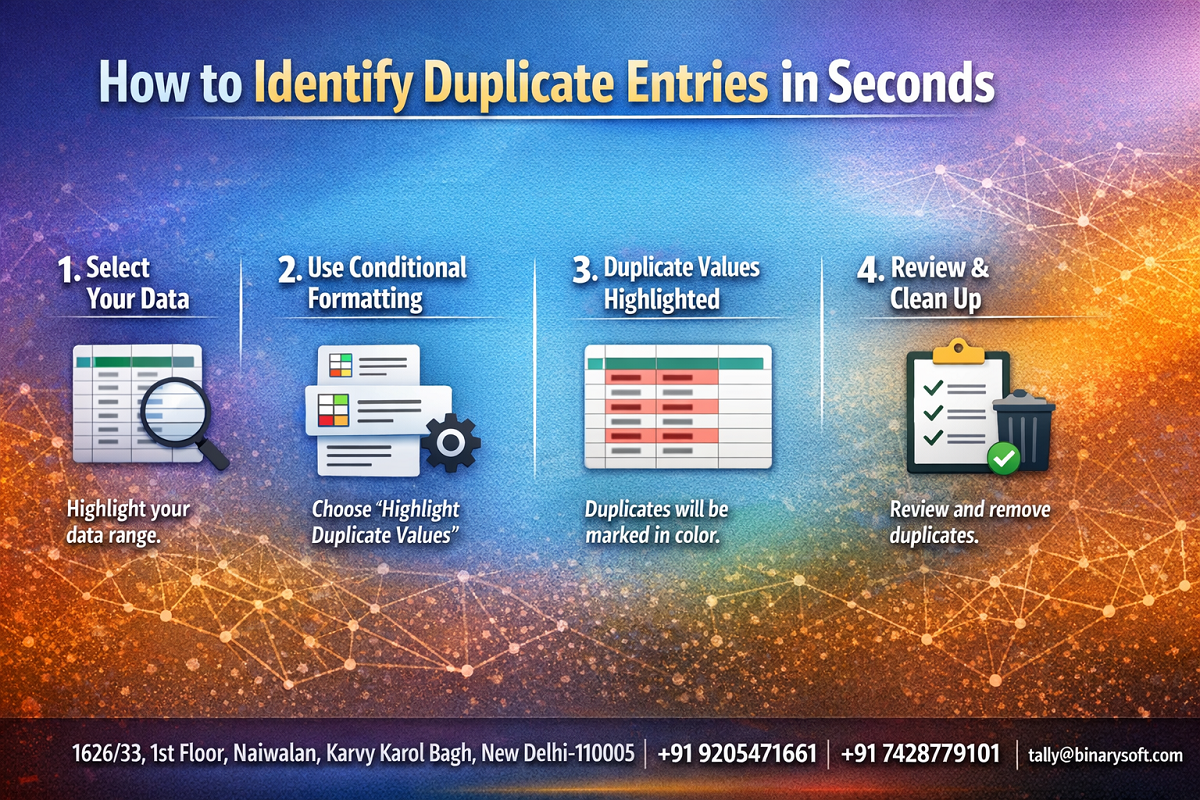
How to Identify Duplicate Entries in Seconds
By CA. Arvindh Khetwaani   |   Published on: 17-04-2026 | 10 min read

Accounting errors are no longer just internal issues—they directly impact GST filings, audit outcomes, and even business credibility. With automated systems, bulk imports, and multi-user data entry becoming the norm, duplicate entries have quietly become one of the biggest hidden risks in financial records. A single duplicate invoice can distort reports, inflate expenses, and trigger compliance mismatches. The challenge is speed—manual checking is too slow, and by the time duplicates are found, the damage is already done. This is why modern businesses and CAs are shifting to instant detection methods that identify duplicate entries in seconds, not hours. If you’re still relying on manual verification, you’re not just wasting time—you’re risking accuracy, compliance, and trust.


Why Duplicate Entries Are a Serious Problem

Duplicate entries may seem small, but their impact is significant:

  • Incorrect financial reports
  • Overstated expenses or revenues
  • GST mismatches and ITC issues
  • Audit complications
  • Loss of business credibility

In high-volume accounting environments, even a few duplicates can lead to major discrepancies.


Common Causes of Duplicate Entries

Understanding the root causes helps prevent them:

  • Manual data entry errors
  • Multiple users entering the same transaction
  • Re-importing Excel data without validation
  • System synchronization issues
  • Lack of proper internal controls

How to Identify Duplicate Entries Quickly

1. Use Filtered Reports

Modern accounting tools allow filtering based on:

  • Voucher number
  • Date
  • Amount
  • Party name

By sorting and grouping data, duplicates become visible instantly.


2. Check Voucher Number Repetition

Duplicate voucher numbers are a clear sign of repeated entries.
Run a quick check:

  • Sort vouchers by number
  • Look for identical sequences

3. Compare Transaction Amounts

Duplicate entries often have:

  • Same amount
  • Same date
  • Same party

Grouping transactions by amount helps identify suspicious patterns.


4. Use Built-In Duplicate Detection Tools

Advanced accounting software provides:

  • Automatic duplicate detection alerts
  • Exception reports
  • Data validation checks

These tools reduce manual effort significantly.


5. Audit Trail & Log Analysis

Audit trails help track:

  • Who entered the data
  • When it was entered
  • Whether it was modified

This helps identify and resolve duplicates quickly.


Real-Life Story: A Small Error, Big Impact

Pooja, an accountant managing multiple client accounts, once faced a serious issue during GST filing. A vendor invoice had been entered twice—once manually and once through Excel import.

At first, it seemed like a minor mistake.

But during reconciliation, the mismatch triggered confusion, delayed filing, and nearly led to ITC rejection.

After this incident, Pooja changed her process. She started using quick filters and system-based checks to identify duplicates instantly.

What once took hours now took seconds.

More importantly, she regained confidence in her data accuracy.


How TallyPrime Helps Detect Duplicate Entries

TallyPrime offers smart features to identify duplicates efficiently:

  • Voucher-wise reports with sorting and filtering
  • Day Book and Ledger views for quick comparison
  • Audit trail for tracking changes
  • Data consistency checks during entry
  • Easy search and drill-down functionality

With these tools, duplicate detection becomes fast and reliable.


Best Practices to Prevent Duplicate Entries

1. Use Unique Voucher Numbering

Ensure each transaction has a unique identifier

2. Restrict Multiple Entries

Assign clear roles to avoid duplication by different users

3. Validate Data Imports

Always check Excel or external data before importing

4. Regular Data Review

Perform periodic checks to catch duplicates early

5. Enable Audit Features

Use audit tools to monitor data entry activities


Benefits of Quick Duplicate Detection

  • Accurate financial reporting
  • Faster GST reconciliation
  • Reduced audit risks
  • Improved business credibility
  • Time and effort savings

Contact Details

Powered by Binarysoft Technologies – Authorized Tally Partner
1626/33, 1st Floor, Naiwalan, Karol Bagh,
New Delhi – 110005, INDIA

Contact Us:
+91 9205471661
+91 7428779101

Email:
tally@binarysoft.com

Working Hours:
10:00 AM – 6:00 PM (Mon–Fri)


Conclusion

Duplicate entries are silent errors that can create major financial and compliance issues if ignored. In today’s fast-paced accounting environment, identifying them quickly is not optional—it’s essential. By using smart tools like TallyPrime and following simple best practices, businesses and professionals can detect duplicates in seconds and maintain accurate, reliable financial data.


Frequently Asked Questions

What are duplicate entries in accounting?

Duplicate entries are repeated transactions recorded more than once in the accounting system.

How can I quickly identify duplicate entries?

By using filters, sorting data, and checking voucher numbers, amounts, and dates.

Does TallyPrime help in detecting duplicates?

Yes, it provides reports, filters, and audit tools to identify duplicate entries easily.

Why are duplicate entries dangerous?

They can distort financial reports, cause compliance issues, and lead to audit problems.

About the Author

Written by CA. Arvindh Khetwaani • 17-04-2026

CA. Arvindh Khetwaani is a Chartered Accountant with experience in financial reporting, compliance management, and accounting software implementation. He has assisted businesses in adopting structured inventory and billing practices, and his articles focus on accuracy, controls, and sustainable business growth.

Verified Content 10 min read Support: +91 9205471661, 7428779101

Need Quick Support for Tally Prime?

For Tally Prime discount schemes and product inquiries, connect with our team.

+91 9205471661 | +91 7428779101

Subscribe For Product Updates

Opt-in Subscription

Tally Prime Auditor Renewal (One Year)

Applicable for CAs / Firms Using GOLD (Multi User ) Only
Renew your license now and upgrade from Tally ERP 9 to Tally Prime for Free!
Rs 6750 + 18% GST (Rs 1215)
Continue Here >>

Tally Prime Auditor Renewal (Two Years)

Applicable for CAs / Firms Using GOLD (Multi User ) Only
Renew your license now and upgrade from Tally ERP 9 to Tally Prime for Free!
Rs 12150 + 18% GST (Rs 2187)
Offer Continue Here >>

Tally Prime Gold Renewal (One Year)

Unlimited Multi-User Edition For Multiple PCs on LAN Environment
Renew your license now and upgrade from Tally ERP 9 to Tally Prime for Free!
Rs 13500 + 18% GST (Rs 2430)
Continue Here >>

Tally Prime Gold Renewal (Two Years)

Unlimited Multi-User Edition For Multiple PCs on LAN Environment
Renew your license now and upgrade from Tally ERP 9 to Tally Prime for Free!
Rs 24300 + 18% GST (Rs 4374)
Offer Continue Here >>

Tally Prime Silver Renewal  (One Year)

Single User Edition For Standalone PCs ( Not applicable for Rental License )
Renew your license now and upgrade from Tally ERP 9 to Tally Prime for Free!
Rs 4500 + 18% GST (Rs 810)
Continue Here >>

Tally Prime Silver Renewal  (Two Years)

Single User Edition For Standalone PCs ( Not applicable for Rental License )
Renew your license now and upgrade from Tally ERP 9 to Tally Prime for Free!
Rs 8100 + 18% GST (Rs 1458)
Offer Continue Here >>

Tally On Cloud

Tally On Cloud ( Per User Annual)
Now access Tally Prime anytime from anywhere – Just Deploy your Tally License and Tally Data on our Cloud Solution.
Rs 7000 + 18% GST (Rs 1260)
Continue Here >>

Tally Prime Gold

Unlimited Multi-User Edition
For EMI options, please Call: +91 742 877 9101 or E-mail: tally@binarysoft.com (10:00 am – 6: 00 pm , Mon-Fri)
Rs 67500 + 18% GST (Rs 12150)
Continue Here >>

Tally Prime Silver to Tally Prime Gold

Unlimited Multi-User Edition For Multiple PCs on LAN Environment
Renew your license now and upgrade from Tally ERP 9 to Tally Prime for Free!
Rs 45000 + 18% GST (Rs 8100)
Continue Here >>

Tally Prime Silver

Single User Edition For Standalone PCs
For EMI options, please Call: +91 742 877 9101 or E-mail: tally@binarysoft.com (10:00 am – 6: 00 pm , Mon-Fri)
Rs 22500 + 18% GST (Rs 4050)
Continue Here >>

Tally On AWS Cloud Personal (For 1 user)

(Per User/One Year)
TallyPrime latest release pre-installed
Rs 7200 + 18% GST (Rs 1296)
Continue Here >>

Tally On AWS Cloud Regular (Upto 2 users)

(Two Users/One Year)
TallyPrime latest release pre-installed
Rs 14400 + 18% GST (Rs 2592)
Continue Here >>

Tally On AWS Cloud Regular Plus (Upto 4 users)

(Four Users/One Year)
TallyPrime latest release pre-installed
Rs 21600 + 18% GST (Rs 3888)
Continue Here >>

Tally On AWS Cloud Regular Pro (Upto 8 users)

(Eight Users/One Year )
TallyPrime latest release pre-installed
Rs 43200 + 18% GST (Rs 7776)
Continue Here >>

Tally On AWS Cloud Performance (Upto 12 users)

(Twelve Users/One Year)
TallyPrime latest release pre-installed
Rs 64800 + 18% GST (Rs 11664)
Continue Here >>

Tally On AWS Cloud Performance Plus (Upto 16 users)

(Sixteen Users/One Year)
TallyPrime latest release pre-installed
Rs 86400 + 18% GST (Rs 15552)
Continue Here >>

Latest Articles

Accounting and Inventory Software for Defence Colony Market & Khan Market – Manage Sales, Purchases and Taxation
Businesses are operating in an environment where speed, accuracy, and compliance directly impact pro...
Read More →
Smart Business Operations Management Software for Karol Bagh Market & Gaffar Market – GST Billing and Process Automation
Business owners are facing a new set of operational challenges. Rising compliance requirements, incr...
Read More →
Wholesale Inventory & Billing Software for Lajpat Nagar Central Market & Sarojini Nagar Market – Real-Time Stock Control
In 2026, wholesale businesses are operating in a far more competitive and data-driven environment th...
Read More →
Billing Software for Manufacturing Units in Okhla Industrial Area & Mohan Cooperative Industrial Estate – GST, Production & Inventory Management
Manufacturing businesses across India are facing a new reality in 2026. Rising raw material costs, s...
Read More →
Best Garment Billing Software in Lajpat Nagar Central Market & Sarojini Nagar Market for Fashion Retailers and Wholesalers
The garment and fashion retail industry has experienced significant changes in 2026. In recent month...
Read More →
Real-Time Accounting Management Software for Kamla Nagar Market & Hudson Lane Commercial Hub
In 2026, businesses can no longer afford to wait until the end of the week or month to understand th...
Read More →
Get How to Identify Duplicate Entries in Seconds
Call us at +91 7428779101, 8368262875.

Tally Query | Discounted Tally New License | Discounted Tally Renewal