Call CA Tally HelpDesk
+91 9205471661,
7428779101
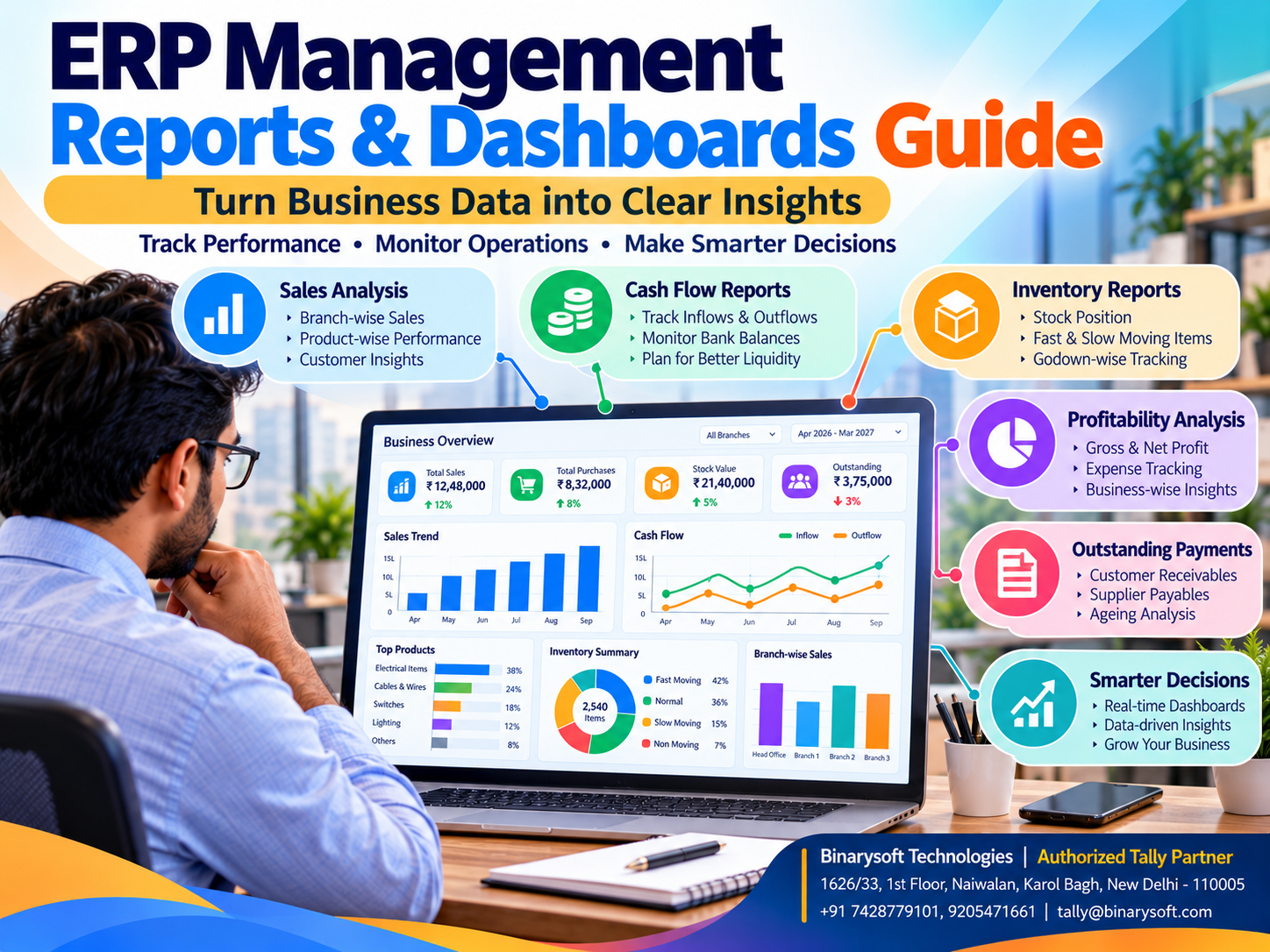
ERP Management Reports and Dashboards: A Complete Guide to Smarter Business Decisions with Tally Prime
Introduction: Why Business Owners Need More Than Sales Figures
Every business generates information through daily activities.
Sales invoices, purchase transactions, customer payments, supplier bills, inventory movements and operating expenses create valuable financial and operational records.
However, simply maintaining these records is not enough.
Business owners need to understand what the information reveals about profitability, cash flow, inventory efficiency and overall performance.
A company may report increasing sales while its available cash continues to decline.
A retailer may have a warehouse full of products but struggle to fulfill orders for popular items.
A manufacturer may experience growing revenue while rising production expenses reduce profitability.
These situations demonstrate why Enterprise Resource Planning (ERP) management reports and dashboards are important.
ERP reporting tools organize business information into meaningful financial and operational insights.
Dashboards provide visual summaries of important indicators, while detailed reports allow management to investigate individual transactions and business activities.
For Indian small and medium enterprises, Tally Prime provides accounting, inventory, outstanding, cash flow and financial reporting capabilities that support everyday business decisions.
Depending on the software release and configuration, its reporting and dashboard capabilities can help business owners monitor performance without manually compiling information from multiple records.
This guide explains the most important ERP management reports, how dashboards work and how businesses can use Tally Prime to strengthen financial control.
A Business Owner's Story: When Growing Sales Hid a Serious Financial Problem
Rohit owned an electronics distribution business in Nehru Place, New Delhi.
His company supplied computer accessories, networking equipment and electronic components to retailers across North India.
Over several years, the business expanded steadily.
Monthly sales increased, new customers joined and employees handled a growing number of transactions.
Rohit believed the business was performing well.
However, one afternoon, an important supplier requested payment for several overdue invoices.
Rohit contacted his accountant and discovered that the company did not have sufficient available cash.
He was surprised.
Sales had increased significantly during the previous quarter.
Why was the business struggling to pay suppliers?
The accountant reviewed customer outstanding balances and inventory records.
Several large customers had delayed payments.
Meanwhile, the company had invested heavily in products that were moving slowly.
Rohit realized that he had been monitoring sales revenue without regularly reviewing cash flow, receivables and inventory.
That evening, he sat in his office examining financial statements and stock reports.
He felt disappointed that the warning signs had been present in the records but had gone unnoticed.
He decided to introduce a weekly management reporting routine.
Every Monday, the accounting team prepared a concise review of sales, customer outstanding balances, inventory movement and cash requirements.
The business also established clearer procedures for following up overdue payments and reviewing slow-moving products.
Over time, Rohit gained a more complete understanding of financial performance.
He learned that increasing sales did not automatically mean increasing financial stability.
This illustrative story highlights an important lesson:
A successful business owner must understand not only how much the company sells, but also how much it earns, collects, spends and retains.
What Are ERP Management Reports?
ERP management reports are structured summaries of financial and operational information generated from business records.
They help organizations monitor performance, identify problems and support management decisions.
Depending on the software, ERP reports may cover accounting, sales, purchases, inventory, manufacturing, taxation and customer relationships.
Common examples include profit and loss statements, balance sheets, stock summaries, sales analysis and outstanding receivables.
The objective is to convert recorded transactions into useful information.
For example, a sales report may reveal that one product category generates substantial revenue but contributes relatively little profit.
An inventory report may show that certain products remain unsold for extended periods.
Management can use these insights to review pricing, purchasing and operational strategies.
What Is an ERP Dashboard?
An ERP dashboard is a visual interface that displays selected business performance indicators.
Dashboards may use charts, tables, summaries and other visual elements to present information.
A business owner may use a dashboard to monitor:
Some ERP systems provide interactive dashboards that allow users to investigate the underlying records.
The exact capabilities depend on the software.
Dashboards should be viewed as management tools rather than substitutes for detailed accounting reports.
Difference Between ERP Reports and Dashboards
ERP reports and dashboards serve related but different purposes.
| Feature | ERP Reports | ERP Dashboards |
|---|
| Purpose |
Detailed analysis |
Quick performance overview |
| Presentation |
Tables and financial statements |
Visual summaries and charts |
| Information |
Detailed transactions and balances |
Selected key indicators |
| Usage |
Investigation and reconciliation |
Regular monitoring |
| Users |
Accountants, managers and auditors |
Business owners and department heads |
| Example |
Customer outstanding report |
Receivables summary |
Businesses benefit from using both.
Dashboards help identify areas requiring attention, while detailed reports help explain the underlying causes.
1. Profit and Loss Report
The profit and loss statement is one of the most important financial reports for any business.
It summarizes income and expenses for a selected accounting period.
Business owners use it to understand whether operations are generating profit or loss.
Why It Matters
Increasing sales do not necessarily result in higher profitability.
A business may experience rising purchase costs, employee expenses or operating overheads.
The profit and loss statement helps management evaluate these changes.
How Tally Prime Helps
Tally Prime provides profit and loss reporting based on recorded accounting transactions.
Users can review relevant figures and investigate underlying ledger information.
The accuracy of the report depends on correct accounting entries and classifications.
2. Balance Sheet Report
A balance sheet presents the financial position of a business at a particular date.
It includes assets, liabilities and capital or equity.
Business Benefits
A balance sheet helps management understand the organization's financial structure.
It can support reviews of borrowings, receivables, payables and available resources.
Tally Prime Application
Tally Prime generates balance sheets from accounting records.
Business owners can use the report alongside other financial statements to evaluate financial health.
3. Cash Flow Report
Cash flow reporting helps businesses understand cash inflows and outflows.
A profitable company may still experience financial difficulties if customers delay payments.
Why Cash Flow Reporting Matters
Businesses must maintain sufficient funds for salaries, rent, supplier payments and other obligations.
Regular cash flow reviews help identify potential pressure on working capital.
Using Tally Prime
Tally Prime provides cash flow-related reporting capabilities.
Management can review recorded cash movements and investigate relevant transactions.
Businesses requiring advanced predictive cash flow forecasting may need additional analytical tools.
4. Sales Management Reports
Sales reports help businesses understand revenue performance.
Management may want to analyze sales by period, product, customer or other supported classifications.
Practical Example
A wholesaler sells electrical accessories across several product categories.
A sales analysis reveals that one category contributes substantial revenue while another has experienced declining demand.
The owner can investigate pricing, customer preferences and purchasing requirements.
Tally Prime Support
Tally Prime provides sales-related accounting and inventory reports.
The available analysis depends on transaction details and software configuration.
5. Purchase Management Reports
Purchase reports help businesses review procurement activities and supplier transactions.
These reports can support cost control and purchasing decisions.
For example, management may compare purchasing patterns across periods to identify significant changes.
Businesses can also review supplier balances and payment obligations.
Tally Prime Application
Tally Prime maintains purchase transaction records and related accounting information.
These records can support procurement analysis and supplier account reviews.
6. Inventory Management Reports
Inventory reporting is particularly important for wholesalers, retailers, distributors and manufacturers.
Businesses need to understand which products are available, where they are stored and how inventory values change.
Stock Summary
A stock summary provides information about recorded inventory quantities and values.
Godown-Wise Inventory
Businesses using multiple storage locations can maintain godown-wise inventory records.
Stock Movement Analysis
Inventory movement information helps management investigate purchasing and sales patterns.
Why It Matters
Excess stock ties up working capital.
Insufficient stock can cause missed sales opportunities.
Accurate inventory reporting supports more disciplined purchasing decisions.
7. Customer Outstanding Reports
Customer outstanding reports help businesses monitor unpaid invoices and receivables.
This information is essential for credit control.
Example
A distributor supplies products to retailers on credit.
Without regular outstanding reviews, delayed payments may remain unnoticed.
By reviewing customer balances, the accounts team can identify invoices requiring follow-up.
Tally Prime Support
Tally Prime supports bill-wise accounting and outstanding reporting where appropriately configured.
Businesses can use these reports to review customer dues and payment status.
8. Supplier Outstanding Reports
Supplier outstanding reports help organizations understand their payment obligations.
These reports support payment planning and supplier relationship management.
A business may have several invoices due within the same week.
Reviewing supplier balances alongside available cash helps management plan payments.
Tally Prime provides payable-related reporting based on recorded transactions.
9. GST-Related Reports
GST reporting is an important requirement for Indian businesses.
Accurate tax records help organizations review applicable transactions and prepare compliance information.
Important Considerations
Businesses should verify tax classifications, invoice details and statutory requirements.
ERP-generated reports should be reconciled with relevant records before compliance submissions.
Tally Prime Application
Tally Prime supports GST-related transaction recording and reporting.
Available features depend on the software release and configuration.
Software reports assist compliance but do not eliminate the need for verification.
10. Expense Management Reports
Expense reports help businesses understand where money is being spent.
Operating expenses may include rent, salaries, transportation, electricity and administrative costs.
Regular expense analysis can reveal cost increases.
For example, a manufacturer may discover that transportation expenses have increased faster than sales.
Management can investigate the causes and evaluate possible improvements.
Tally Prime supports expense accounting and related financial reporting.
11. Branch-Wise Management Reports
Businesses operating multiple locations need information about individual branches.
Management may want to compare revenue, expenses and inventory across locations.
Using Cost Centres
Tally Prime supports cost centres that can help allocate selected income and expenses.
Using Godowns
Godown management supports location-wise inventory records.
However, godowns and cost centres serve different purposes.
A godown does not automatically represent an independent accounting branch.
Complete branch profitability reporting may require additional configuration.
12. Manufacturing and Cost Analysis Reports
Manufacturing businesses need information about raw materials, finished goods and production-related costs.
Relevant inventory records can help management monitor material movements.
Tally Prime supports selected manufacturing-related inventory capabilities, including bills of materials and manufacturing vouchers where appropriately configured.
Organizations requiring advanced production costing or shop-floor analytics may need specialized applications.
Key Performance Indicators Every SME Should Monitor
Key Performance Indicators, commonly called KPIs, help organizations measure progress toward business objectives.
Important KPIs may include:
Revenue Growth: Measures changes in sales over time.
Gross Profit Margin: Indicates the relationship between gross profit and revenue.
Net Profit Margin: Shows the proportion of revenue remaining after relevant expenses.
Receivables Aging: Identifies how long customer invoices remain unpaid.
Inventory Turnover: Helps assess how efficiently inventory is sold or consumed.
Operating Expense Ratio: Compares operating expenses with revenue.
Cash Availability: Helps management understand available funds.
Working Capital: Provides insight into short-term financial resources and obligations.
Not every KPI is available as a standard dashboard tile in every ERP application.
Some indicators may require calculations, customized reports or external analytical tools.
How Tally Prime Supports Management Reporting
Tally Prime provides practical financial and operational reporting capabilities for many Indian SMEs.
Financial Statements
Business owners can review profit and loss statements, balance sheets and other accounting reports.
Accounting Analysis
Ledger and voucher information helps accountants investigate transactions.
Inventory Reporting
Stock summaries and godown-related reports support inventory management.
Outstanding Management
Receivables and payables reports help organizations monitor pending amounts.
Cash and Bank Information
Relevant accounting reports support cash and bank balance reviews.
Dashboard Capabilities
Tally Prime includes dashboard functionality in applicable releases, allowing users to review selected business information.
The availability of particular views, customization options and reporting features depends on the installed version.
Additional Analytics
Businesses requiring specialized visual dashboards, automated KPI calculations or advanced predictive analysis may explore compatible reporting applications and integrations.
These features should not be assumed to be included automatically in every Tally Prime installation.
Case Study 1: Management Reporting for an Electronics Distributor
Business Type: Electronics wholesale distribution
Location: Nehru Place, New Delhi
Primary Challenges: Delayed customer payments, excess inventory and limited financial visibility.
Business Background
Consider a distributor handling approximately 3,000 products and supplying hundreds of retailers.
The business records accounting transactions but rarely reviews detailed management reports.
Sales are increasing, yet cash availability remains inconsistent.
Reporting Strategy
The company introduces a weekly management reporting process.
Accounts staff review customer outstanding balances, supplier obligations and financial performance.
Inventory employees prepare stock summaries.
Management identifies slow-moving products and monitors purchasing decisions.
Illustrative Outcomes
The business gains clearer visibility into working capital requirements.
Customer payment follow-ups become more organized.
Inventory purchasing receives greater management attention.
Financial discussions become more focused on verified information.
Key Learning
Regular management reporting can help businesses identify financial problems before they become operational emergencies.
This is an illustrative case study, not a verified customer implementation.
Case Study 2: Financial Dashboards for a Manufacturing SME
Business Type: Industrial components manufacturing
Location: Faridabad, Haryana
Primary Challenges: Rising expenses, inconsistent material records and delayed performance reviews.
Business Background
Consider a manufacturer supplying components to industrial customers.
The company maintains accounting and inventory records but relies on manually prepared summaries for management meetings.
This delays financial analysis.
Reporting Strategy
The organization standardizes its accounting classifications.
Relevant inventory transactions are recorded systematically.
Management begins reviewing profitability, expenses, material movements and customer outstanding balances.
Selected performance indicators are prepared for monthly management meetings.
Illustrative Outcomes
The company gains more consistent financial information.
Management can investigate expense changes earlier.
Inventory and accounting teams coordinate more effectively.
Decision-making becomes less dependent on informal estimates.
Key Learning
Reliable management reports can improve operational discipline even without complex analytical technology.
How to Design an Effective ERP Dashboard
An effective dashboard should focus on information that helps users make decisions.
Step 1: Identify Business Objectives
Determine whether the priority is profitability, cash flow, inventory efficiency or another operational goal.
Step 2: Select Relevant KPIs
Avoid displaying excessive information.
Choose indicators that reflect the organization's most important concerns.
Step 3: Establish Accurate Data Sources
Dashboards should use reliable and consistently maintained records.
Step 4: Define Reporting Periods
Management should understand whether figures represent daily, monthly, quarterly or annual performance.
Step 5: Assign Responsibility
Employees should know who maintains the information and who reviews it.
Step 6: Review the Dashboard Regularly
A dashboard is valuable only when management uses the information.
Step 7: Investigate Unusual Results
Unexpected changes should be examined through detailed reports and supporting transactions.
Common ERP Reporting Mistakes
Focusing Only on Sales
Revenue does not provide a complete picture of profitability or financial stability.
Ignoring Outstanding Payments
Uncollected customer balances can create cash flow problems.
Using Incorrect Accounting Data
Reports cannot be more reliable than the records used to generate them.
Monitoring Too Many Indicators
Excessive dashboard information can distract users from important decisions.
Failing to Compare Periods
A single reporting period may not reveal meaningful trends.
Ignoring Inventory Reports
Slow-moving and excess inventory can reduce available working capital.
Confusing Dashboard Estimates with Verified Figures
Calculated indicators should be reconciled with underlying accounting records.
Assuming Every ERP Has the Same Features
Reporting capabilities vary between software products and versions.
ERP Dashboards vs Excel Reporting
Many SMEs use Excel to prepare management summaries.
Excel can be useful for calculations, analysis and customized reporting.
However, manual spreadsheet preparation may require repeated data extraction and reconciliation.
An ERP dashboard can reduce some of this effort by presenting information from the business system.
Nevertheless, advanced Excel analysis may still be useful for specialized requirements.
The most suitable approach depends on the organization's data quality, reporting needs and available technology.
How Often Should Businesses Review ERP Reports?
Different reports serve different management purposes.
Daily Reviews
Businesses may review sales, cash balances and critical inventory information.
Weekly Reviews
Management can examine customer outstanding balances, supplier obligations and stock movements.
Monthly Reviews
Profitability, expenses, cash flow and operational performance can be evaluated.
Quarterly Reviews
Businesses can analyze broader financial trends and strategic performance.
Annual Reviews
Management can examine financial results, business growth and long-term operational priorities.
The appropriate frequency depends on business size and transaction volume.
The Future of ERP Management Dashboards
Business reporting technology continues to evolve.
Modern systems increasingly emphasize visual analytics, connected workflows and accessible information.
Artificial intelligence may help organizations identify unusual trends, summarize performance and estimate future outcomes.
However, AI-generated insights require careful verification.
For Indian SMEs, the immediate priority should be maintaining accurate records and developing consistent reporting practices.
Advanced dashboards become more useful when the underlying accounting and inventory information is reliable.
Conclusion
ERP management reports and dashboards help businesses transform everyday transaction records into useful financial and operational information.
They provide visibility into profitability, sales, purchases, inventory, outstanding payments, expenses and cash flow.
For small and medium businesses, regular reporting can help identify financial risks, improve operational discipline and support informed decisions.
Tally Prime provides important accounting, inventory and financial reporting capabilities that support many management requirements.
Its reports and applicable dashboard features can help business owners review performance more efficiently.
However, successful reporting depends on accurate data, appropriate configuration and consistent management review.
A dashboard cannot replace financial judgment, but it can help business owners recognize issues that deserve attention.
The real value of ERP reporting is not the number of charts displayed on a screen.
It is the ability to understand business performance clearly and take the right action at the right time.
Powered by Binarysoft Technologies
Authorized Tally Partner
Location: 1626/33, 1st Floor, Naiwalan, Karol Bagh, New Delhi – 110005, INDIA
Contact: +91 7428779101, 9205471661
Email: tally@binarysoft.com
Business Hours: 10:00 AM – 6:00 PM, Monday to Friday
Frequently Asked Questions
How can Binarysoft Technologies help with Tally Prime reporting?
Binarysoft Technologies, an Authorized Tally Partner, can assist businesses with Tally Prime configuration, accounting and inventory reporting, dashboard requirements and related implementation support.
How often should management review ERP reports?
Critical information may require daily or weekly review, while broader financial performance can be evaluated monthly or quarterly.
Can businesses analyze branch performance using Tally Prime?
Cost centres, godowns and appropriate accounting structures can support selected branch-related analysis.
What KPIs should a small business monitor?
Common indicators include revenue, profitability, customer outstanding balances, inventory turnover and cash availability.
CA. Aditya Khatod focuses on accounting automation, taxation, and financial reporting for MSMEs. He helps businesses organize transactions, improve reconciliation processes, and maintain structured records for compliance and management purposes.