Call CA Tally HelpDesk
+91 9205471661,
7428779101
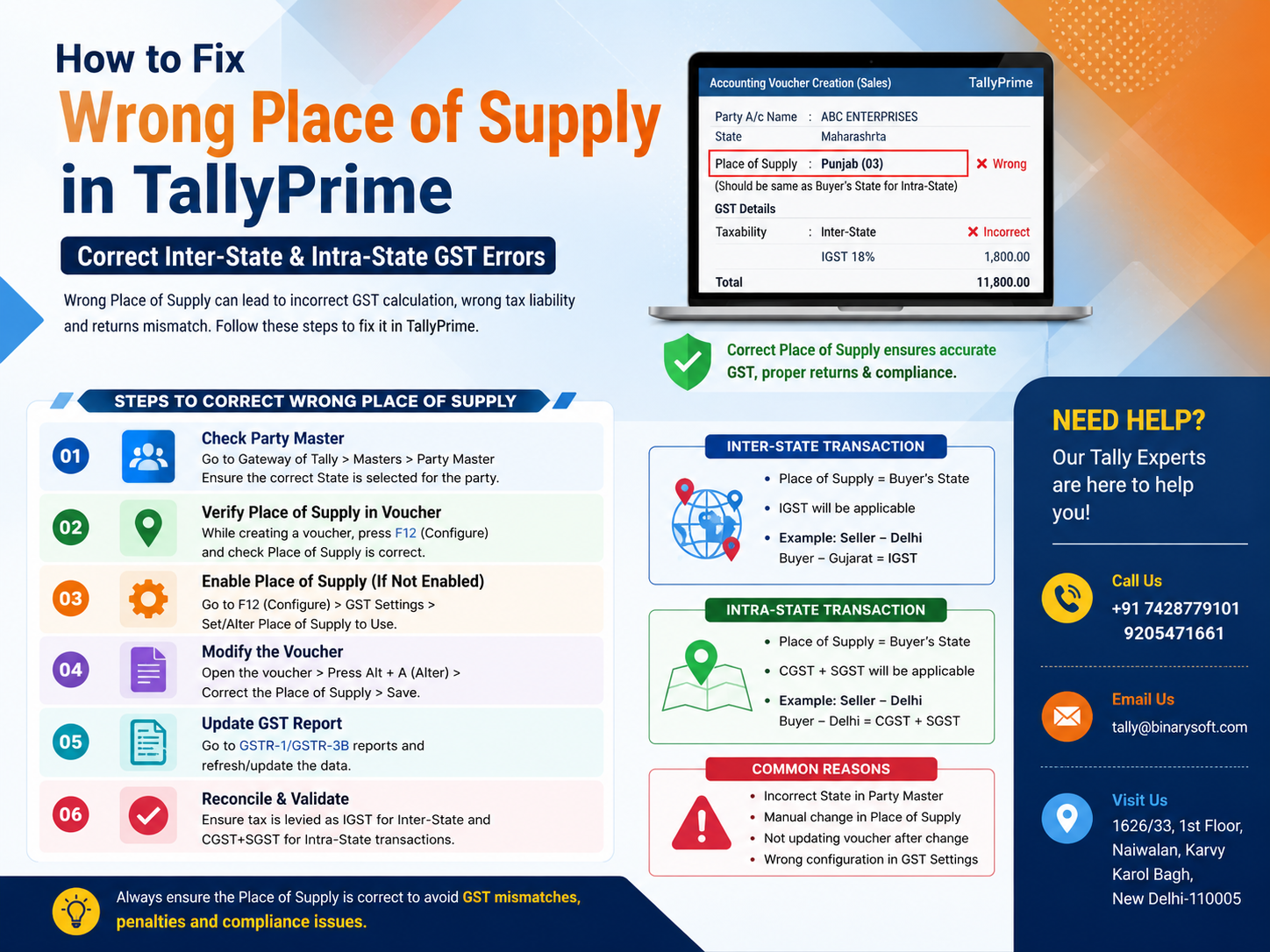
Wrong Place of Supply in TallyPrime? Why This GST Error Matters More in 2026
In 2026, businesses are paying closer attention to GST invoice accuracy as digital compliance, e-Invoicing, e-Way Bills, return reconciliation, and GST data validation become increasingly connected. One seemingly small mistake—the wrong Place of Supply in TallyPrime—can change an entire transaction from intra-state to inter-state, or the other way around. That can mean charging CGST + SGST instead of IGST, or IGST where local GST should have applied. The pressure often appears later, when accountants reconcile GSTR data, customers question Input Tax Credit, or an invoice does not match the expected GST treatment. The benefit of catching the error early is significant: cleaner GST records, more accurate tax calculation, smoother reconciliation, and fewer corrections at return-filing time. TallyPrime provides businesses with the information and controls needed to review GST details, identify incorrect transactions, and correct the underlying invoice or master data before the mistake spreads across subsequent reports.
Understanding Place of Supply Under GST
Place of Supply is one of the most important pieces of information for determining whether a GST transaction should generally be treated as an inter-state supply or an intra-state supply.
It can directly influence whether an invoice attracts:
CGST + SGST/UTGST
or
IGST
For a typical domestic transaction, if the location of the supplier and the applicable Place of Supply are in the same state, the transaction will generally be treated as an intra-state supply, subject to applicable GST provisions.
If the supplier's location and Place of Supply are in different states, it will generally be an inter-state transaction, and IGST may apply.
However, businesses should remember that GST Place of Supply rules can vary according to the nature of the transaction, particularly for services, exports, imports, SEZ transactions and certain special categories of supply.
Therefore, simply looking at the customer's address is not always enough.
Inter-State vs Intra-State GST: Simple Example
Suppose a Delhi-based business sells taxable goods to a customer and the applicable Place of Supply is Delhi.
The transaction would ordinarily be intra-state.
For an 18% GST item, the tax may be divided as:
Taxable Value: ₹1,00,000
CGST @ 9%: ₹9,000
SGST @ 9%: ₹9,000
Invoice Value: ₹1,18,000
Now suppose the same Delhi supplier makes a supply for which the Place of Supply is Haryana.
It would ordinarily become an inter-state transaction:
Taxable Value: ₹1,00,000
IGST @ 18%: ₹18,000
Invoice Value: ₹1,18,000
The total tax is ₹18,000 in both examples, but the type of GST is completely different.
That difference is exactly why an incorrect Place of Supply should not be ignored.
What Causes Wrong Place of Supply in TallyPrime?
A Place of Supply problem may originate from the transaction itself or from information used while creating the transaction.
Common situations include:
- Incorrect state selected in the customer ledger
- Wrong mailing or registration details entered for the party
- Incorrect GSTIN or GST registration information
- Place of Supply selected incorrectly during invoice entry
- Customer's state changed but ledger information was not updated
- Transaction treated as local instead of inter-state
- Transaction treated as inter-state instead of local
- Wrong tax ledger selected manually
- Invoice copied from an earlier transaction without checking GST details
- Incorrect party or consignee details
- Data imported from another system with incomplete GST information
- Voucher alteration without reviewing its GST impact
The key is not just to replace CGST/SGST with IGST manually. You should first understand why TallyPrime is treating the transaction as inter-state or intra-state.
A wholesale trader had been regularly supplying goods to customers in Delhi and nearby states. His accountant was comfortable entering dozens of sales invoices every day.
One afternoon, an order came from a customer outside Delhi.
The invoice value was significant, but the accountant was in a hurry. The customer's ledger had been created using information copied from another account, and the state details were not reviewed carefully.
The invoice was saved.
Everything looked normal.
The total was correct. The GST percentage was correct. The customer name was correct. The stock had reduced correctly.
Weeks later, during GST reconciliation, the accountant noticed something uncomfortable.
The transaction that should have been treated as inter-state was appearing with local GST treatment.
The tax amount itself initially made the mistake difficult to notice. An 18% tax was still 18%. But instead of IGST, the accounting records showed CGST and SGST.
The accountant immediately wondered: "How many more invoices have the same problem?"
That question created far more anxiety than the original entry.
The team reviewed the customer's GST details, corrected the relevant information, checked the Place of Supply and altered the affected voucher with the appropriate GST treatment.
The experience changed one habit permanently.
From then on, every newly created customer ledger was checked for GSTIN, state and registration details before the first invoice was generated.
That small control saved hours of reconciliation later.
How to Identify Wrong Place of Supply in TallyPrime
Before making corrections, identify whether the problem belongs to the party master, voucher, GST classification, tax ledger or transaction details.
Step 1: Open the Relevant Sales Voucher
Open TallyPrime and locate the transaction where you suspect an incorrect Place of Supply.
Go to the relevant sales voucher through your reports or voucher alteration screen.
Check:
- Party name
- Party GSTIN
- Party registration type
- State
- Place of Supply
- Taxable value
- GST rate
- Tax ledgers
- CGST amount
- SGST amount
- IGST amount
Do not focus only on the final invoice value.
A ₹1,18,000 invoice can still total ₹1,18,000 whether ₹18,000 is charged as IGST or divided into ₹9,000 CGST and ₹9,000 SGST.
That makes tax-component verification essential.
Step 2: Check the Customer Ledger
Review the party ledger used in the transaction.
Verify that the customer's basic and GST-related information is correct, including:
- State
- Country
- GST registration status
- GSTIN/UIN, where applicable
- Mailing details
- Other GST-related information relevant to the transaction
A single incorrect state selection can influence how a transaction is interpreted.
If the ledger itself is wrong, correcting only one invoice may not solve the underlying problem.
Future invoices could continue carrying incorrect GST treatment.
Step 3: Verify the GSTIN
A GSTIN contains state-related information, so businesses should ensure that the GSTIN entered in TallyPrime corresponds with the customer's actual registration details.
For example, the first two digits of a GSTIN represent the state/UT code.
If the GSTIN and selected state do not correspond appropriately, investigate the customer master instead of simply proceeding with the invoice.
Do not guess the correct GSTIN.
Verify it against reliable customer documentation or the appropriate GST records.
Step 4: Check Place of Supply in the Voucher
Open the transaction and review its GST-related details.
Confirm the Place of Supply according to the actual nature of the transaction and applicable GST rules.
If it has been selected incorrectly, update it to the appropriate state or territory.
This step is particularly important where the customer's billing address, shipping location and Place of Supply are not necessarily identical.
Step 5: Determine Whether the Supply Is Inter-State or Intra-State
Once you have established the correct Place of Supply, determine the correct tax treatment.
Intra-State Supply
Where the supplier's location and applicable Place of Supply are within the same state, the transaction will ordinarily attract:
CGST + SGST
For example:
Supplier: Delhi
Place of Supply: Delhi
GST rate: 18%
Tax treatment would generally be:
CGST: 9%
SGST: 9%
Inter-State Supply
Where the supplier's location and applicable Place of Supply are in different states, the transaction will ordinarily attract:
IGST
For example:
Supplier: Delhi
Place of Supply: Uttar Pradesh
GST rate: 18%
Tax treatment would generally be:
IGST: 18%
Always consider the specific GST rules applicable to the supply rather than relying exclusively on this simplified test.
Step 6: Remove the Wrong GST Ledgers
Suppose an inter-state invoice was mistakenly entered using:
CGST 9%
SGST 9%
but the correct treatment should be:
IGST 18%
After verifying that the transaction should legally be treated as inter-state, alter the voucher and apply the appropriate IGST treatment.
Similarly, if IGST has been applied to a transaction that should correctly attract CGST and SGST, correct the tax treatment accordingly.
Do not mechanically replace tax ledgers without first checking the Place of Supply and underlying GST information.
Step 7: Recalculate and Verify the Tax
After correcting the transaction, verify the calculation again.
For example:
Taxable amount: ₹2,00,000
GST rate: 18%
For an inter-state supply:
IGST @ 18% = ₹36,000
Total invoice value:
₹2,36,000
For an intra-state supply at the same overall rate:
CGST @ 9% = ₹18,000
SGST @ 9% = ₹18,000
Total GST = ₹36,000
Total invoice value:
₹2,36,000
Again, the final total can remain exactly the same.
Therefore, never use the invoice total alone to decide whether GST has been calculated correctly.
Step 8: Review GST Reports After Correction
After altering the voucher, review the relevant GST reports in TallyPrime.
Check whether:
- Transaction is appearing under the expected GST treatment
- Taxable value is correct
- IGST is correct
- CGST is correct
- SGST is correct
- GST rate is correct
- Party GSTIN is correct
- Place of Supply is correct
- Transaction classification is appropriate
If TallyPrime identifies GST-related exceptions or incomplete information, investigate those transactions before proceeding with return preparation.
Step 9: Check GSTR-1 Information
Place of Supply is particularly important for outward supply reporting.
Review the transaction information that will contribute to your GSTR-1 data.
Pay particular attention to:
- B2B transactions
- B2C transactions where Place of Supply matters
- Credit notes
- Debit notes
- Export transactions
- SEZ supplies
- Interstate transactions
- GSTIN
- Taxable value
- Rate of tax
- Tax amounts
The objective is simple: the accounting voucher and GST return information should reflect the actual transaction correctly.
Step 10: Check Whether an E-Invoice Has Already Been Generated
This is an important distinction.
If you identify an error before generating an e-Invoice, correcting the voucher may be relatively straightforward.
If an IRN has already been generated, however, do not assume that simply altering the TallyPrime voucher will automatically change the information already reported through the Invoice Registration Portal.
The treatment may depend on whether cancellation is still permitted and on the applicable e-Invoicing rules and timelines.
Businesses should verify the current GST/e-Invoice requirements before taking corrective action.
Step 11: Check the E-Way Bill Impact
The same principle applies to e-Way Bills.
If the invoice information has already been used for an e-Way Bill, check whether the correction affects information already reported.
An accounting correction inside TallyPrime does not necessarily mean that every externally generated compliance document has automatically been corrected.
Review the applicable e-Way Bill rules and make the appropriate correction where permitted.
Wrong Place of Supply After Filing GSTR-1
This situation requires greater care.
Suppose an invoice was recorded with the wrong Place of Supply and the related return information has already been filed.
You should not simply alter historical accounting records and assume that GST portal data will automatically update.
Depending on the nature of the mistake and applicable GST rules, a correction or amendment may need to be reflected through the appropriate return mechanism.
Businesses should coordinate with their accountant, GST practitioner or tax professional when correcting transactions that have already been reported.
Example 1: CGST + SGST Charged Instead of IGST
Assume:
Seller location: Delhi
Correct Place of Supply: Haryana
Taxable value: ₹5,00,000
GST rate: 18%
Wrong treatment:
CGST @ 9% = ₹45,000
SGST @ 9% = ₹45,000
Correct treatment would ordinarily be:
IGST @ 18% = ₹90,000
The overall tax amount remains ₹90,000, but its classification changes completely.
This is why businesses need to check tax heads, not merely GST totals.
Example 2: IGST Charged Instead of CGST + SGST
Assume:
Seller location: Maharashtra
Correct Place of Supply: Maharashtra
Taxable value: ₹3,00,000
GST rate: 18%
Wrong:
IGST = ₹54,000
Correct treatment would ordinarily be:
CGST @ 9% = ₹27,000
SGST @ 9% = ₹27,000
Total GST remains ₹54,000.
Yet the GST treatment is different.
Why Place of Supply Errors Happen During Busy Billing Hours
Many GST mistakes are operational rather than intentional.
Consider a distributor processing hundreds of invoices every week.
Staff members are handling:
Sales orders
Stock availability
Dispatch details
Transport information
Customer calls
Credit limits
GST invoices
E-Way Bills
Payments
A customer calls and says, "Please dispatch this order urgently."
The operator creates the ledger quickly, enters a GSTIN and starts billing.
One wrong state selection at that moment can become the foundation for several incorrect invoices.
That is why good accounting software must be supported by good master-data discipline.
Correct the Master, Not Just the Voucher
This is one of the most important lessons for TallyPrime users.
If the error originated in the customer ledger, correcting only the affected invoice addresses the symptom.
Correct the source information as well.
Review:
Party ledger
GSTIN
Registration type
State
Address information
GST details
Once the master information is correct, verify new transactions carefully.
Place of Supply for Goods vs Services
Businesses should also understand that Place of Supply rules are not identical for every type of transaction.
For goods, the applicable location may depend on factors such as movement and delivery of goods.
For services, Place of Supply can depend on:
- Type of service
- Location of supplier
- Location of recipient
- Place where a service is performed
- Property-related rules
- Event-related rules
- Transportation-related rules
- Other special GST provisions
Therefore, a service business should not automatically use the customer's state as the Place of Supply without understanding the relevant GST rule.
Place of Supply and Bill-to/Ship-to Transactions
Bill-to/ship-to arrangements can create additional complexity.
For example:
Buyer A instructs Supplier B to deliver goods directly to Customer C.
The billing party and physical delivery destination may differ.
In such transactions, businesses should determine Place of Supply according to the applicable GST provisions rather than simply choosing the state shown in the shipping address.
This is an area where professional GST advice can be valuable.
Place of Supply for SEZ Transactions
Supplies involving Special Economic Zones require particular attention.
A business should not treat an SEZ transaction as an ordinary local transaction simply because both entities happen to be geographically located within the same state.
SEZ-related GST provisions can result in different treatment.
Verify:
SEZ status
GSTIN
Type of supply
Applicable GST treatment
Documentation
Place of Supply
Place of Supply for Export Transactions
Exports also require specific GST treatment.
Check:
Country
Customer registration details
Export nature of transaction
Place of Supply treatment
Currency, where applicable
Shipping information
LUT/Bond or payment-of-tax treatment, as applicable
An export invoice should not accidentally be treated like an ordinary domestic sale because of incorrect party configuration.
How Wrong Place of Supply Can Affect Input Tax Credit
Incorrect tax classification can create problems beyond the seller's books.
The buyer may rely on correctly reported invoice information for GST reconciliation and Input Tax Credit.
If the supplier reports an invoice incorrectly, differences may arise between:
Supplier records
Customer records
GST return data
Invoice details
That can lead to unnecessary communication between accounts teams.
Correct invoicing at the source is far easier than resolving mismatches later.
How to Prevent Place of Supply Errors in TallyPrime
Prevention should begin before the first invoice is created.
A useful internal checklist is:
Before creating a new customer
Verify legal name
Verify GSTIN
Verify registration type
Verify state
Verify billing address
Verify shipping information
Before saving a sales invoice
Verify party
Verify Place of Supply
Verify GST rate
Verify CGST/SGST/IGST treatment
Verify taxable value
Before GST return preparation
Review GST reports
Review exceptions
Check unusual transactions
Reconcile major customers
Review interstate and intrastate classification
These checks can significantly reduce correction work.
Create a Monthly GST Error Review Process
Businesses processing large transaction volumes should not wait until the return deadline to identify mistakes.
Create an internal monthly or periodic review.
For example:
Review high-value invoices separately.
Check new customer ledgers.
Review interstate sales.
Review transactions where tax treatment was manually altered.
Check GSTIN and state mismatches.
Review credit and debit notes.
Check e-Invoice and e-Way Bill transactions.
Review GST reports before return preparation.
A 30-minute preventive review can sometimes save several hours of correction and customer follow-up.
TallyPrime and GST Data Accuracy
TallyPrime can help businesses manage accounting, inventory and GST-related transaction information in an integrated environment.
However, software accuracy still depends heavily on correct inputs.
Think of it this way:
Correct customer master + correct transaction + correct Place of Supply + correct GST rate = better GST reporting.
If the source information is wrong, even a well-configured accounting system may produce an outcome that does not reflect the actual transaction.
Common Mistakes to Avoid
Do not assume the GST percentage alone confirms correct taxation.
Do not assume a correct invoice total means the tax heads are correct.
Do not blindly select IGST for every out-of-state customer.
Do not blindly select CGST and SGST merely because the customer has an address in your state.
Do not alter tax ledgers without identifying the actual Place of Supply.
Do not ignore bill-to/ship-to arrangements.
Do not overlook SEZ transactions.
Do not assume a voucher alteration automatically corrects an already generated e-Invoice or e-Way Bill.
Do not assume changing TallyPrime data automatically changes a GST return that has already been filed.
A Quick Troubleshooting Checklist
If you see the wrong GST type in TallyPrime, check the following in order:
- Open the affected invoice.
- Verify customer GSTIN.
- Verify customer state.
- Verify GST registration details.
- Check Place of Supply.
- Determine whether the supply is actually interstate or intrastate.
- Review the tax ledgers.
- Correct CGST/SGST/IGST treatment where appropriate.
- Recalculate the invoice.
- Review GST reports.
- Check GSTR-1 impact.
- Check e-Invoice status.
- Check e-Way Bill status.
- Determine whether the transaction has already been included in a filed return.
- Obtain professional GST advice if the transaction involves a special Place of Supply rule.
Why Businesses Should Fix These Errors Early
The earlier an incorrect Place of Supply is identified, the easier the correction process generally becomes.
An error found while preparing an invoice may take minutes to resolve.
The same error discovered after:
Goods have been dispatched,
the invoice has been sent,
payment has been received,
an e-Invoice has been generated,
an e-Way Bill has been generated,
and GST returns have been filed
can require considerably more review.
The best GST correction strategy is therefore prevention followed by early detection.
Need Help Correcting GST Transactions in TallyPrime?
Businesses sometimes know that a GST invoice is wrong but are uncertain whether the issue comes from the party ledger, Place of Supply, GST ledger, voucher configuration or transaction classification.
Binarysoft Technologies can assist businesses with TallyPrime-related setup, implementation, configuration and support requirements.
Powered by Binarysoft Technologies
Authorized Tally Partner
Binarysoft Technologies
1626/33, 1st Floor, Naiwalan, Karol Bagh,
New Delhi – 110005, INDIA
Contact: +91 7428779101, 9205471661
Email: tally@binarysoft.com
Support Hours: 10:00 AM – 6:00 PM, Monday to Friday
Conclusion
A wrong Place of Supply in TallyPrime can appear to be a small data-entry mistake, but it can change the GST character of an invoice from intra-state to inter-state or vice versa.
The most dangerous part is that the final GST amount may still look correct.
An invoice carrying ₹18,000 in CGST and SGST combined may have the same total tax as an invoice carrying ₹18,000 of IGST. Only a detailed review reveals that the tax has been allocated incorrectly.
The safest approach is to verify the customer GSTIN, state, Place of Supply, registration details and actual nature of the supply before changing tax ledgers.
If the transaction has already been used for an e-Invoice, e-Way Bill or filed GST return, businesses should also consider the relevant external compliance impact rather than making only an accounting alteration.
Accurate master data, disciplined invoice checking and regular GST reconciliation can prevent the same error from recurring across hundreds of transactions.
Frequently Asked Questions
What is Place of Supply in TallyPrime?
Place of Supply represents the location relevant for determining the GST treatment of a transaction. It plays an important role in deciding whether IGST or CGST plus SGST/UTGST may apply.
CA. Priya Tanvi specializes in accounting compliance, GST advisory, and business reporting for small and growing enterprises. She works with business owners to improve record-keeping and financial clarity. Her articles focus on practical compliance solutions and operational discipline.