Call CA Tally HelpDesk
+91 9205471661,
7428779101
Why Businesses Need Both Inventory and Accounting Software in 2026
Running a successful business in 2026 requires more than maintaining sales records and tracking products. Business owners must understand what they have in stock, how much they are spending, what customers owe and whether their operations are generating profits.
For retailers, wholesalers, manufacturers, distributors and growing small businesses, two essential technologies help manage these responsibilities: inventory management software and accounting software.
Although both systems support business operations, they perform different functions.
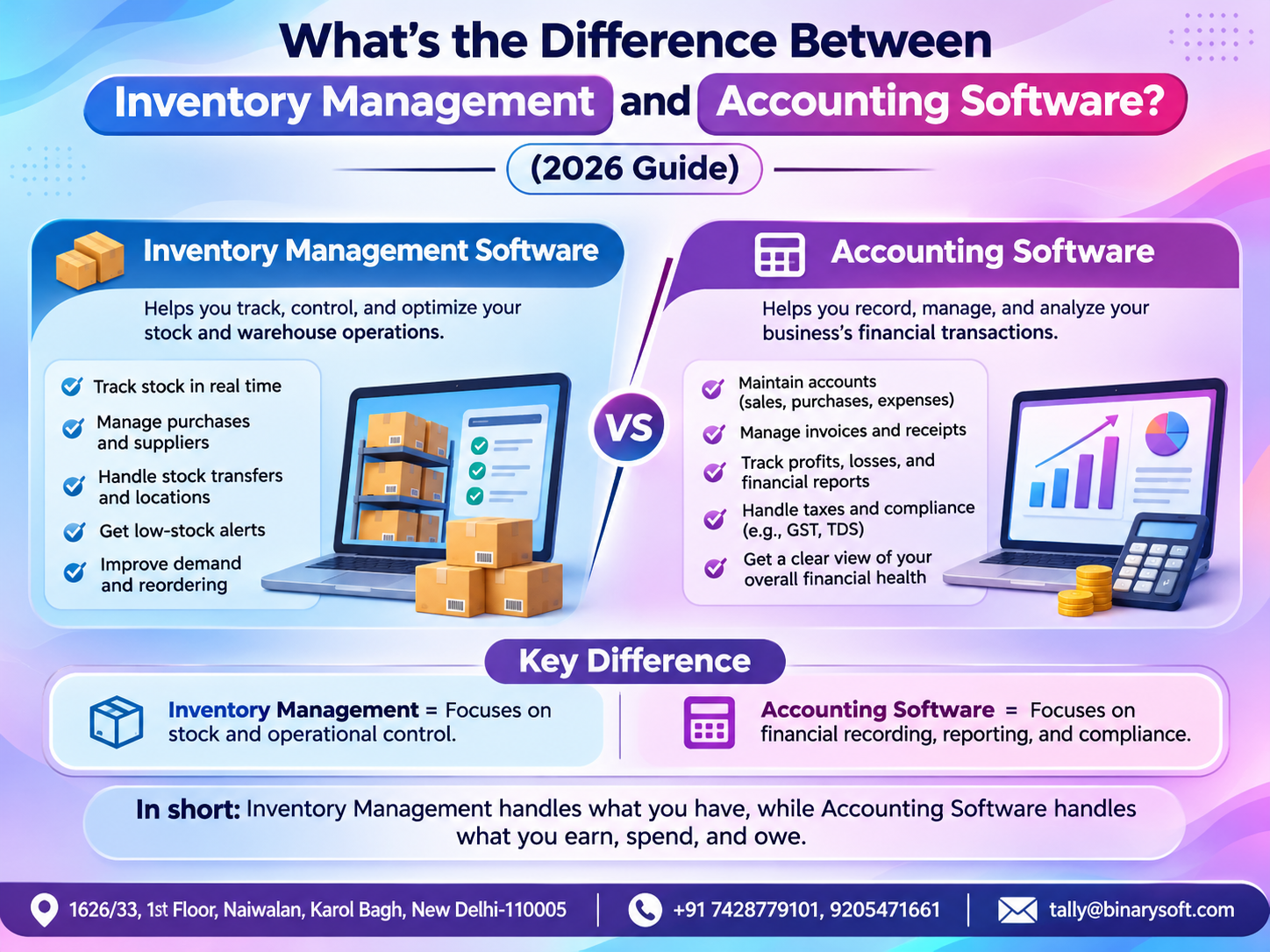
Inventory management software focuses on tracking products, stock quantities, storage locations and inventory movements. Accounting software focuses on recording financial transactions, managing income and expenses, calculating taxes and preparing financial statements.
Many business owners initially believe that purchasing one application automatically solves every operational problem. However, using separate systems without proper integration can create additional administrative work.
Imagine a retailer who knows exactly how many products are available but cannot determine whether the business is profitable. Alternatively, consider a wholesaler who maintains accurate financial accounts but repeatedly loses sales because popular products are unavailable.
Both situations demonstrate why inventory and accounting must work together.
Modern business management solutions such as Tally Prime help connect stock management with financial accounting, enabling businesses to maintain consistent records and make more informed decisions.
This guide explains the key differences, benefits, limitations and practical applications of inventory management and accounting software, including two illustrative case studies and a relatable business story.
What Is Inventory Management Software?
Inventory management software is a digital system used to monitor, organize and control products throughout their movement within a business.
It helps businesses understand which products are available, where they are stored, how much stock remains and when additional purchases may be necessary.
Inventory management begins when goods are purchased or produced and continues through storage, transfers, sales and other stock movements.
Key Functions of Inventory Management Software
1. Real-Time Stock Tracking
Inventory software updates stock quantities as transactions are recorded, helping businesses monitor available products.
2. Purchase and Reorder Planning
Businesses can establish reorder levels and identify products that may require replenishment.
3. Warehouse Management
Companies operating multiple storage locations can maintain location-wise stock records.
4. Batch and Expiry Tracking
Businesses dealing with medicines, food products or other batch-controlled goods can monitor batch information and expiry dates where supported.
5. Stock Valuation
Inventory software helps determine the value of available stock using configured valuation methods.
6. Inventory Reporting
Stock summaries, movement reports and ageing analysis can help identify fast-moving and slow-moving products.
Who Needs Inventory Management Software?
Inventory management is particularly valuable for grocery stores, garment retailers, electronics distributors, manufacturing companies, pharmaceutical traders, hardware suppliers and e-commerce businesses.
Any organization that purchases, stores, manufactures or sells physical goods can benefit from maintaining accurate inventory records.
What Is Accounting Software?
Accounting software is a digital application designed to record, organize, process and report financial transactions.
It helps businesses maintain financial records and understand their overall economic performance.
Instead of preparing financial statements manually, businesses can use accounting software to maintain ledgers, record transactions and generate reports.
Key Functions of Accounting Software
1. Sales and Purchase Accounting
Record customer invoices, supplier bills, sales returns and purchase returns.
2. Income and Expense Management
Monitor operating expenses, business income and other financial transactions.
3. Customer and Supplier Balances
Track receivables, payables and outstanding invoices.
4. Tax Accounting
Maintain relevant tax records and support applicable GST, VAT and other statutory reporting requirements.
5. Banking and Cash Management
Record receipts, payments, transfers and bank reconciliation information.
6. Financial Reporting
Generate Profit and Loss Accounts, Balance Sheets, Trial Balances and cash-related reports.
Who Needs Accounting Software?
Accounting software is useful for almost every business, including retailers, manufacturers, consultants, service providers, wholesalers, contractors and professional firms.
Even businesses that do not maintain physical inventory require reliable financial accounting.
Inventory Management vs Accounting Software: Key Differences
The main difference lies in the information each system manages.
Inventory software primarily answers questions about products and quantities. Accounting software answers questions about money, financial obligations and business performance.
|
Feature
|
Inventory Management Software
|
Accounting Software
|
|---|
|
Primary purpose
|
Manage stock and products
|
Manage financial transactions
|
|
Main focus
|
Quantities and stock movement
|
Income, expenses and balances
|
|
Purchase tracking
|
Goods received and inventory changes
|
Purchase values and supplier liabilities
|
|
Sales tracking
|
Quantity of goods sold
|
Sales revenue and customer balances
|
|
Stock valuation
|
Inventory value and costing
|
Financial reporting of inventory values
|
|
Tax management
|
Usually limited or integration-based
|
Supports applicable tax accounting
|
|
Warehouse management
|
Common core capability
|
Depends on integrated inventory features
|
|
Financial statements
|
Usually requires integration
|
Core functionality
|
|
Reorder planning
|
Common feature
|
Depends on inventory module
|
|
Business profitability
|
Product-level insights where supported
|
Overall financial profitability
|
Both systems contribute to business management, but neither should be evaluated solely by the number of features it offers.
The best solution depends on the company's operational requirements.
Why Inventory Management and Accounting Software Work Better Together
When inventory and accounting systems operate independently, employees may need to record the same transaction multiple times.
For example, a business might record a purchase in inventory software and separately enter its financial value in accounting software.
If one entry is missed or entered incorrectly, the stock and financial records may not match.
An integrated system connects these activities.
When a properly configured purchase invoice is recorded in Tally Prime, the transaction can update relevant stock quantities, inventory values, supplier balances and accounting ledgers.
Similarly, a sales invoice can reduce stock quantities while recording sales revenue and customer receivables.
This connection helps businesses maintain consistent information, although physical stock counts, reconciliation and regular data verification remain necessary.
How Tally Prime Combines Inventory Management and Accounting
Tally Prime provides integrated business management capabilities that help organizations manage inventory and financial records within one system.
1. Integrated Sales and Purchase Management
Businesses can record purchases and sales while maintaining the associated accounting and inventory information.
A wholesaler purchasing 500 units can record the purchase and update stock availability through the appropriate voucher.
When products are sold, the related stock and financial records can be updated together.
2. Stock Groups and Categories
Tally Prime allows businesses to organize products using stock groups, categories and individual stock items.
A garment retailer can maintain separate classifications for shirts, trousers, jackets and seasonal collections.
This improves product organization and reporting.
3. Godown and Location Management
Businesses operating multiple warehouses can maintain location-wise stock records.
For example, a distributor can monitor inventory stored in Delhi, Gurugram and Noida.
Stock transfer records help track movements between locations.
4. Batch-Wise Inventory Tracking
Businesses handling batch-controlled products can maintain batch details, including manufacturing and expiry information where applicable.
This is useful for food distributors, pharmaceutical traders and other businesses requiring product traceability.
5. Reorder Level Management
Tally Prime supports reorder-level configuration and relevant inventory reports.
Businesses can identify products that require replenishment before stock shortages affect customer orders.
6. Inventory Valuation
Tally Prime supports multiple stock valuation methods, including FIFO and average cost.
Businesses should select an appropriate method and apply it consistently according to their accounting policies and applicable standards.
7. GST Billing and Compliance
Tally Prime connects applicable GST details with sales and purchase transactions.
Businesses can maintain GST-related records and prepare information for relevant returns.
Correct GST classification, reconciliation and professional review remain important.
8. Financial Reporting
Tally Prime provides Profit and Loss Accounts, Balance Sheets, Trial Balances, receivables, payables and inventory reports.
These reports help owners evaluate financial performance alongside operational stock information.
Case Study 1: A Delhi Electronics Distributor Reduces Stock Confusion
Illustrative case study based on common distribution business challenges.
A growing electronics distributor in Delhi supplied mobile accessories, computer components and electrical products to retailers.
The business used spreadsheets for stock tracking and separate accounting software for financial transactions.
As order volumes increased, employees frequently encountered differences between warehouse quantities and accounting records.
The Challenge
Sales staff sometimes confirmed orders without checking the latest warehouse information.
Products were occasionally unavailable despite appearing in stock reports.
The owner also struggled to identify slow-moving products and outstanding customer payments.
The Tally Prime Approach
The distributor introduced integrated inventory and accounting procedures using Tally Prime.
Products were organized into stock groups, opening balances were verified and customer ledgers were updated.
Sales and purchase transactions were recorded regularly, and warehouse staff coordinated physical stock verification with the accounts department.
The Results
The improved process helped employees access more consistent stock information.
The owner could review outstanding customer balances, inventory movement and financial performance from connected records.
Purchasing decisions became more structured, and the business reduced its dependence on disconnected spreadsheets.
The case demonstrates how integrated systems can improve operational visibility without requiring a complete change in business operations.
Case Study 2: A Garment Manufacturer Improves Production Cost Visibility
Illustrative case study.
A garment manufacturing company in Jaipur produced shirts, trousers and uniforms for wholesalers.
The business purchased fabric, buttons, zippers and packaging materials from several suppliers.
Although the accounts department maintained purchase and expense records, the production team separately tracked raw material consumption.
The Challenge
Management struggled to understand how much material was consumed during production and whether finished products were generating sufficient margins.
Differences between production records and accounting information delayed monthly reporting.
The Tally Prime Approach
The manufacturer configured raw material and finished goods inventory in Tally Prime.
Relevant production processes were recorded using suitable inventory and manufacturing vouchers.
The accounts team reviewed purchase costs, material consumption and financial reports.
The Results
Management gained clearer visibility into raw material movement and finished goods quantities.
The company could compare production-related costs with sales information and identify areas requiring further investigation.
The improved process supported better coordination between production, purchasing and accounting teams.
This example highlights why manufacturers benefit from connecting physical inventory movement with financial information.
A Business Owner's Story: When Growing Sales Created Unexpected Financial Stress
The following fictional story illustrates the challenges many small-business owners experience.
For nearly eighteen years, Mohan operated a small wholesale business in Delhi.
He began with a rented shop, limited savings and a determination to provide a comfortable future for his family.
Over time, his business expanded.
He hired employees, increased product varieties and began supplying customers across the city.
From the outside, everything appeared successful.
Sales were increasing, customers were placing larger orders and suppliers were offering additional credit.
But Mohan noticed something troubling.
Despite growing sales, the business frequently struggled to maintain sufficient cash.
Some products remained unsold for months, while popular items repeatedly went out of stock.
Supplier payments were approaching their deadlines, and customers were taking longer to settle invoices.
One evening, Mohan sat alone in his shop reviewing handwritten registers.
His wife called and asked whether he would be home for dinner.
He looked at the papers scattered across his desk and replied, "I don't know where all the money is going."
That sentence stayed with him.
The next morning, Mohan decided to improve his business records.
He began using an integrated accounting and inventory system.
With Tally Prime, his team organized products, recorded purchases and sales consistently, and reviewed outstanding balances.
Over time, Mohan discovered that a significant amount of working capital was tied up in slow-moving inventory.
He also identified customers whose payments required immediate follow-up.
Instead of purchasing more products simply because suppliers offered discounts, he began reviewing stock movement and available cash.
Several months later, Mohan was still working hard, but his decisions were based on clearer information.
One evening, he closed his shop on time and returned home for dinner.
His family noticed the difference.
Mohan realized that the greatest benefit of better business management was not simply knowing how much stock he owned.
It was understanding how his business was performing and gaining confidence about its future.
The lesson: Increasing sales does not automatically create financial stability. Businesses also need control over inventory, receivables, expenses and cash flow.
Inventory Management vs Accounting Software: Which Should You Choose?
The correct choice depends on your business model.
A consulting firm with no physical stock may require comprehensive accounting software without advanced inventory capabilities.
A retailer or wholesaler generally needs both inventory management and accounting.
A manufacturer may require additional features for raw materials, production, work-in-progress and finished goods.
Businesses with complex warehouse operations may also need specialized warehouse management or barcode-based systems integrated with their accounting software.
For many small and medium-sized businesses, an integrated solution such as Tally Prime can provide a practical starting point.
How to Implement Tally Prime for Inventory and Accounting
A structured implementation helps reduce disruption.
Step 1: Assess your business requirements. Identify products, warehouses, transaction volumes, tax obligations and reporting needs.
Step 2: Create your company. Configure company details, financial year and relevant accounting settings.
Step 3: Enable inventory features. Set up stock groups, stock items, units of measurement and godowns.
Step 4: Configure accounting ledgers. Create customer, supplier, expense, cash and bank ledgers.
Step 5: Enter opening balances. Verify opening stock quantities, stock values and financial balances.
Step 6: Configure GST. Enter applicable GST information and verify product classifications and tax rates.
Step 7: Start recording transactions. Maintain regular sales, purchases, receipts, payments and inventory movements.
Step 8: Review reports. Monitor stock summaries, outstanding balances and profitability.
Step 9: Maintain controls. Conduct physical stock verification, manage user access and maintain secure backups.
Important Business Software Trends in 2026
Businesses increasingly expect inventory and accounting software to work together.
Cloud-hosted access, connected banking, automated reporting and integration with e-commerce platforms are becoming important considerations.
Businesses are also exploring AI-assisted forecasting and exception detection, although the availability and reliability of these capabilities vary by product.
The most important priority remains accurate data.
Even sophisticated software cannot produce dependable reports when transactions are incomplete or incorrectly classified.
Why Choose Binarysoft Technologies for Tally Prime?
Binarysoft Technologies, an Authorized Tally Partner, assists businesses with Tally Prime-related requirements.
Businesses can seek guidance on software licensing, installation, inventory configuration, GST accounting, data migration and employee training.
For organizations moving from spreadsheets or disconnected systems, professional implementation can help establish consistent accounting and inventory procedures.
Conclusion: Better Business Decisions Begin with Connected Inventory and Accounting
Inventory management software and accounting software serve different but closely related purposes.
Inventory management helps businesses control products, stock quantities and warehouse operations.
Accounting software helps organizations maintain financial records, manage taxes, track payments and evaluate profitability.
When these functions operate together, businesses gain a clearer understanding of both physical stock and financial performance.
Tally Prime provides integrated inventory, accounting, GST billing and reporting capabilities suitable for many retailers, wholesalers, distributors and manufacturers.
For businesses planning digital transformation in 2026, the goal should be to choose software that supports accurate records, practical workflows and long-term growth.
Contact Binarysoft Technologies to explore how Tally Prime can help simplify inventory management, accounting and GST compliance for your business.
Powered by Binarysoft Technologies
Authorized Tally Partner
Location: 1626/33, 1st Floor, Naiwalan, Karol Bagh, New Delhi – 110005, INDIA
Contact Us: +91 7428779101, 9205471661
Email Us: tally@binarysoft.com
Business Hours: 10:00 AM – 6:00 PM, Monday to Friday
Frequently Asked Questions
What is the main difference between inventory management and accounting software?
Inventory management software tracks products, quantities, stock movement and storage locations. Accounting software records financial transactions, income, expenses, assets, liabilities and profitability.
Can accounting software manage inventory?
Yes. Some accounting applications include inventory features. Tally Prime provides integrated inventory and accounting functionality.
CA. Yashvardhan Kedia focuses on taxation, business accounting, and compliance management for MSMEs. He helps business owners understand financial information and establish practical processes for maintaining accurate books.