Call CA Tally HelpDesk
+91 9205471661,
7428779101
What Changed in 2026: Businesses Need More Than Basic Accounting
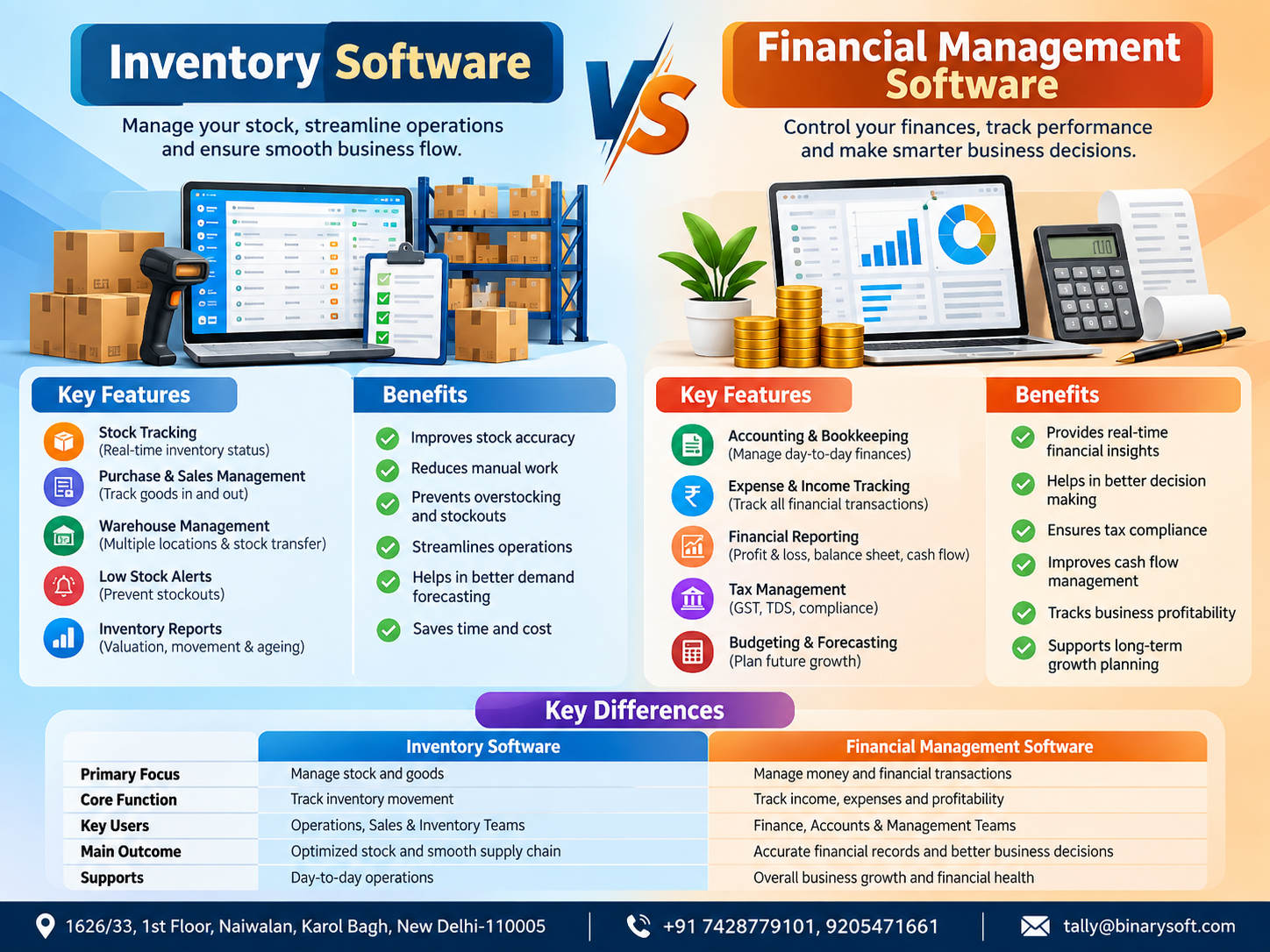
In 2026, businesses are under growing pressure to know not only how much money they have made, but also exactly what is happening to their stock, purchases, sales, receivables and cash flow. Faster order cycles, GST compliance, multi-location operations and tighter margins mean that relying on spreadsheets or disconnected records can create costly information gaps. This is why the difference between inventory software and financial management software has become increasingly important. Inventory software primarily helps businesses control stock quantities, movement, valuation and reorder decisions, while financial management software focuses on accounting, expenses, receivables, payables, profitability and financial reporting. For a growing business, choosing the right system can reduce manual work, improve decision-making and provide greater control over daily operations. In many cases, the strongest approach is not choosing one over the other, but integrating inventory and financial management into one connected business workflow.
What Is Inventory Software?
Inventory software is designed to help a business monitor and manage goods from the time they are purchased or manufactured until they are sold, transferred or consumed.
Its primary focus is stock visibility and control.
For a wholesaler, retailer, distributor or manufacturer, inventory represents a major investment. If the business does not know what is physically available, what is selling quickly and what has remained unsold for months, working capital can become trapped in the wrong products.
Modern inventory management software provides businesses with structured information about stock quantities, product movement and inventory values.
Instead of checking warehouses manually or maintaining separate Excel sheets, businesses can use inventory records to understand their stock position more efficiently.
Major Features of Inventory Software
Real-Time Stock Tracking
Inventory software records stock inward and outward movements and helps users identify available quantities.
Whenever purchases, sales, transfers or other inventory transactions are recorded correctly, the stock position can be updated accordingly.
This is particularly useful for businesses dealing with hundreds or thousands of products.
Stock Item and Category Management
Businesses can classify products according to groups, categories, brands, sizes, models or other relevant characteristics.
A hardware trader, for example, may have thousands of items from different manufacturers. Proper classification makes stock analysis easier than maintaining an unstructured product list.
Batch and Expiry Management
For industries such as pharmaceuticals, food products, FMCG and certain chemicals, batch and expiry information can be extremely important.
Inventory software can help businesses track batches and identify products according to their applicable manufacturing or expiry information where supported and properly configured.
Multiple Godown or Location Management
A growing business may store goods in several warehouses, branches or godowns.
Inventory management systems can provide location-wise visibility, helping management understand where specific goods are stored and how much stock is available at each location.
Reorder-Level Management
Running out of a fast-moving product can mean losing a customer.
At the same time, purchasing excessive quantities can lock valuable working capital into inventory.
Reorder-level information helps businesses identify products approaching predefined stock thresholds so purchasing decisions can be planned more effectively.
Inventory Valuation
Knowing the quantity of stock is only half the story.
Management also needs to understand its monetary value.
Inventory systems can support applicable valuation methods and provide reports that help businesses evaluate how much capital is currently tied up in goods.
What Is Financial Management Software?
Financial management software focuses primarily on the monetary side of business operations.
It helps organisations record, organise and analyse transactions involving income, expenses, assets, liabilities, customers, suppliers, banks and taxes.
While inventory software answers:
"What stock do we have?"
Financial management software answers:
"What is happening to our money and financial position?"
A financial management system can therefore provide management with a broader picture of business performance.
Key Features of Financial Management Software
Accounting and Ledger Management
Financial software maintains systematic records of transactions through ledgers and accounting vouchers.
Sales, purchases, receipts, payments, expenses and other transactions ultimately contribute to the company's financial books.
Accounts Receivable
Making a sale does not necessarily mean receiving money immediately.
Financial management software helps businesses monitor customer outstanding amounts and identify receivables that remain unpaid.
This can improve collection planning and working-capital management.
Accounts Payable
Businesses also need visibility into amounts payable to suppliers.
A proper system can help track outstanding bills, due dates and vendor liabilities so payments can be planned more effectively.
Cash-Flow Visibility
Profit and cash are not the same.
A company may report healthy sales but still struggle to pay suppliers because customers have not yet settled their invoices.
Financial management reports can help decision-makers understand cash and bank positions along with receivables and payables.
Profit and Loss Statement
A Profit and Loss Account helps management understand revenue, direct and indirect expenses, and the resulting profit or loss for a selected period.
This is essential for analysing actual business performance.
Balance Sheet
A Balance Sheet presents the financial position of the organisation by showing assets, liabilities and capital at a particular point in time.
It provides information that stock reports alone cannot deliver.
GST and Tax-Related Accounting
For Indian businesses, accounting and tax compliance are closely connected.
Financial management software can help organise GST-related transaction data, tax ledgers and reports, depending on the capabilities and configuration of the selected solution.
Inventory Software vs Financial Management Software: Key Differences
| Area | Inventory Software | Financial Management Software |
|---|
| Primary Purpose |
Manage goods and stock |
Manage financial transactions |
| Main Focus |
Quantity, movement and stock value |
Income, expenses, assets and liabilities |
| Stock Tracking |
Core function |
May be included in integrated solutions |
| Accounting |
Usually limited |
Core function |
| Receivables |
Limited or integrated |
Detailed tracking |
| Payables |
Limited or integrated |
Detailed tracking |
| Profit & Loss |
Usually not primary |
Core financial report |
| Balance Sheet |
Usually not primary |
Core financial report |
| Warehouse Management |
Major function |
Depends on solution |
| Reorder Management |
Common feature |
Usually inventory-dependent |
| Cash-Flow Analysis |
Limited |
Important function |
| GST Accounting |
May be limited |
Often a major requirement in India |
| Best For |
Stock-intensive operations |
Financial control and accounting |
A Business Owner Who Had Sales but No Clear Answer
Consider the story of a growing electrical-goods distributor.
Orders were increasing, and the owner felt the company was performing well. The warehouse was full, sales invoices were being generated every day, and employees remained busy.
Yet every month ended with the same uncomfortable question:
"If sales are growing, why is there never enough cash?"
The inventory team maintained stock records separately. The accountant maintained financial records in another system. Sales staff had their own outstanding-payment sheets.
Nobody was necessarily doing anything wrong.
But nobody could see the complete picture.
One afternoon, an important customer placed an urgent order for a high-value electrical component. The internal sheet showed sufficient stock.
The warehouse team searched.
The quantity was not actually available.
Part of the recorded stock had already been dispatched but had not been updated correctly. Meanwhile, several cartons of a slow-moving model had been sitting untouched for months.
The customer purchased the urgent material elsewhere.
For the owner, losing that order hurt. But what worried him more was discovering how little visibility he had into his own growing business.
He decided to connect inventory records with accounting and financial information.
Gradually, management could see not only what was selling, but what remained unsold, which customers owed money, which suppliers needed payment and where working capital was getting blocked.
The lesson was simple:
Sales growth without operational and financial visibility can create the illusion of progress while problems quietly accumulate underneath.
Benefits of Inventory Management Software
The biggest advantage is control.
When inventory information is maintained accurately, businesses can reduce dependence on assumptions and manual stock checking.
Management can identify fast-moving and slow-moving products, monitor warehouse stock, plan purchases more intelligently and reduce the risk of unnecessary overstocking.
Better inventory visibility can also improve customer service.
If the sales team knows whether a product is actually available, customers can receive more reliable delivery commitments.
Benefits of Financial Management Software
Financial software gives management visibility into the financial consequences of business activity.
Instead of judging performance only by sales turnover, owners can examine profitability, outstanding receivables, supplier liabilities, expenses, cash positions and other financial indicators.
This becomes increasingly important as a business grows.
A company with ₹10 lakh in monthly sales and a company with ₹1 crore in monthly sales may face completely different challenges.
Higher sales can mean higher inventory investment, larger receivables, greater tax exposure and increased supplier obligations.
Financial management software helps organise this complexity.
Which Software Does a Small Business Need?
The answer depends on the nature of the business.
A professional consultancy with almost no physical products may have relatively little need for advanced inventory management. Accounting, billing, receivables and financial reporting may be much more important.
A wholesaler, retailer or distributor, however, may require both.
Manufacturers may need even deeper inventory functionality because raw materials, work-in-progress and finished products all need appropriate control.
This is why businesses should evaluate their actual workflows rather than selecting software simply because it is popular.
Why Integrated Inventory and Accounting Can Be Better
For many product-based businesses, the ideal situation is not inventory software versus financial management software.
It is:
Inventory management + financial management.
Imagine recording a sales transaction and having the same business system update the relevant stock records, customer account, sales value and applicable tax information.
That reduces duplicate data entry.
More importantly, operational information and financial information become connected.
Management can ask better questions:
Which products generate strong sales but weak margins?
How much money is locked in slow-moving inventory?
Which customers purchase regularly but pay slowly?
Which product groups are growing?
How much stock is available at each location?
Which suppliers have outstanding balances?
These questions connect inventory decisions with financial decisions.
TallyPrime for Inventory and Financial Management
For businesses looking for an integrated approach, TallyPrime can support accounting and inventory management within the same business environment.
Depending on the business configuration and applicable features, organisations can manage areas such as:
Accounting
Inventory records
Sales and purchase transactions
Receivables and payables
Stock groups and stock items
Godowns or locations
Batch-related inventory
GST-related business processes
Banking-related accounting
Financial statements
Business reports
The important point is not simply installing software.
The system needs to be configured according to the actual business process.
Stock groups, units of measurement, ledgers, GST details, godowns, voucher configurations and reporting requirements should reflect how the organisation genuinely operates.
Poor configuration can turn even powerful software into another source of confusion.
When Should a Business Upgrade Its Current System?
Certain warning signs can indicate that existing processes are becoming inadequate.
For example, management may repeatedly discover differences between physical stock and system stock.
The accounts team may spend hours combining multiple Excel files.
Salespeople may need to call the warehouse before confirming every order.
Customer outstanding amounts may be difficult to identify.
Management may receive profit information weeks after the month has ended.
Another common sign is excessive dependence on one employee who understands all the spreadsheets.
When these problems begin affecting customer service, purchasing decisions or cash flow, the cost of continuing with disconnected systems may exceed the cost of upgrading.
Inventory Management Is Really Working-Capital Management
Inventory is not simply merchandise sitting on a shelf.
It represents money.
If a business buys ₹20 lakh worth of goods and ₹6 lakh remains unsold for months, that ₹6 lakh of capital is effectively tied up.
The company may simultaneously be borrowing money, delaying supplier payments or struggling with operating expenses.
Better inventory analysis can help identify these situations.
That is why inventory management should be viewed as part of financial management rather than merely warehouse administration.
Financial Reports Need Operational Context
The opposite is also true.
A financial report might show declining margins, but it may not immediately explain why.
Inventory information could reveal that the business is discounting old products, carrying excessive slow-moving stock or selling certain product categories at weak margins.
Combining financial and inventory information can therefore give decision-makers a more complete picture.
How to Choose the Right Solution
Before selecting software, a business should map its requirements.
Consider the number of stock items, users, branches, warehouses and daily transactions.
Evaluate whether the organisation requires batch tracking, manufacturing features, GST processes, receivables, payables, remote access, multi-user working, reporting or integration with other applications.
Businesses should also consider future growth.
Software that meets today's requirements but becomes difficult to manage after opening another branch or adding thousands of products can create another migration problem later.
The objective should be to create a reliable information system that supports both current operations and future expansion.
Conclusion
The difference between inventory software and financial management software comes down to two fundamental questions.
Inventory software tells you what is happening to your goods.
Financial management software tells you what is happening to your money.
For service businesses, financial management may be the primary requirement. For retailers, wholesalers, distributors and manufacturers, inventory control can be equally critical.
But modern business management increasingly requires both perspectives.
A business owner should be able to understand stock availability, inventory value, customer outstanding amounts, supplier liabilities, sales, expenses, profitability and cash position without piecing together information from several disconnected sources.
An integrated solution such as TallyPrime can help businesses bring accounting and inventory information together, provided the system is properly configured according to business requirements.
The ultimate objective is not simply to digitise records. It is to turn everyday transactions into useful information that helps management protect cash flow, control inventory and make faster, better-informed decisions.
Frequently Asked Questions
What is the main difference between inventory software and financial management software?
Inventory software primarily manages products, quantities, warehouses, stock movements and inventory values. Financial management software focuses on accounting, income, expenses, receivables, payables, assets, liabilities and financial reports.
Can inventory software replace accounting software?
Usually not completely. Dedicated inventory software may manage stock extremely well but may not provide the complete accounting, taxation and financial-reporting functionality required by a business.
CA. Raghav Mundhra focuses on business accounting, GST reporting, and financial reconciliations. He works with organizations to strengthen accounting processes and maintain reliable financial information for compliance and decision-making.