Call CA Tally HelpDesk
+91 9205471661,
7428779101
What Changed in 2026: CA Firms Need More Than Spreadsheets, Emails and Manual Follow-Ups
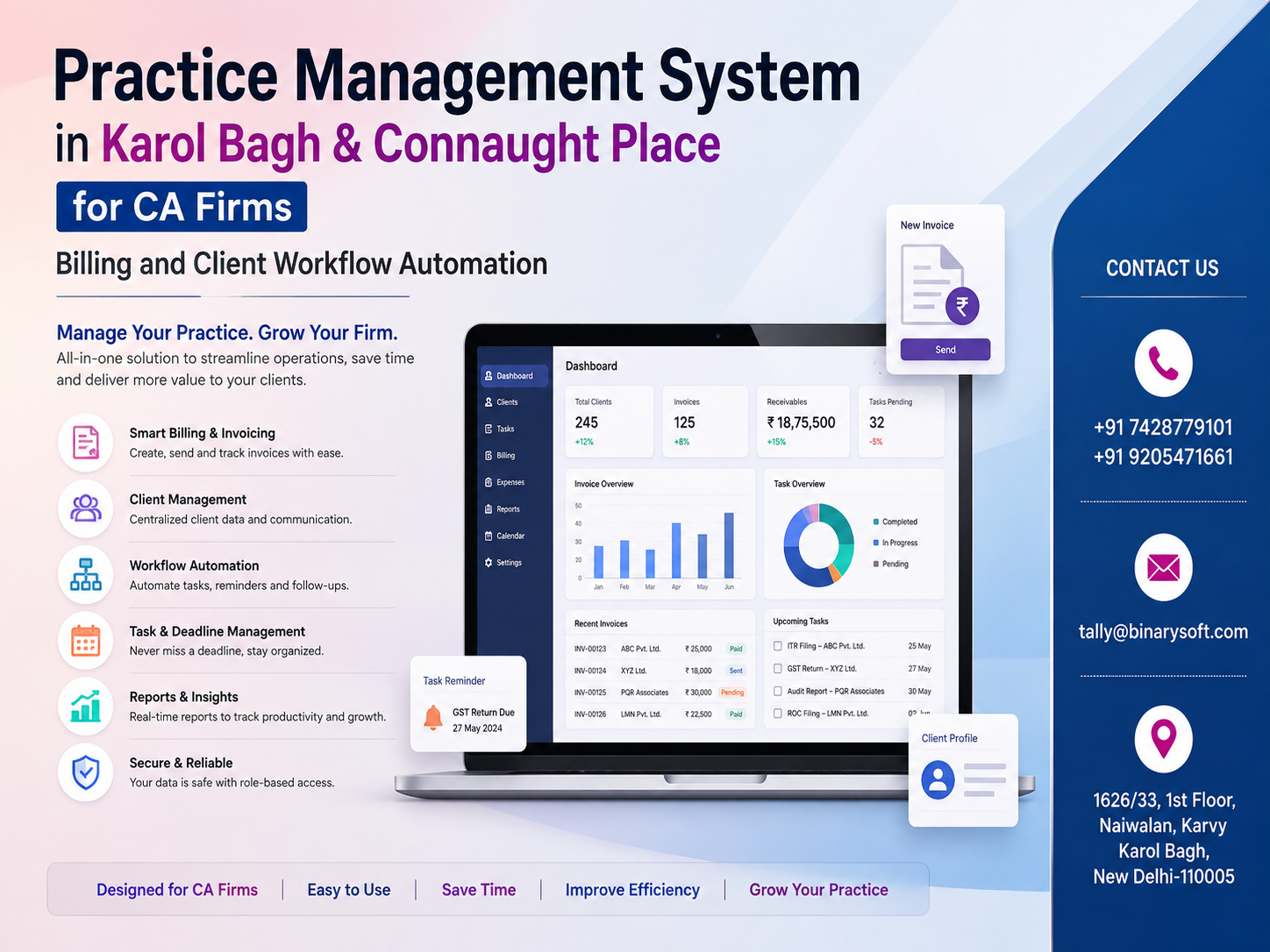
In 2026, Chartered Accountant firms are handling a growing mix of GST compliance, income-tax assignments, audits, accounting, payroll, company-law work, client documents, billing and recurring statutory deadlines. For CA practices in busy commercial locations such as Karol Bagh and Connaught Place, the pressure is not simply about getting more work—it is about controlling that work without missing deadlines, losing documents or delaying client billing. Recent months have made workflow visibility, digital records and faster client communication increasingly important. A modern Practice Management System can bring client profiles, assignments, employee responsibilities, due dates, documents, invoices, outstanding fees and management reporting into one structured environment. Instead of partners repeatedly asking, “What is pending?” or staff searching through spreadsheets and message threads, the firm can see work status centrally. The benefit is practical: better control, faster follow-up, improved billing discipline and a more scalable CA practice.
Why CA Firms in Karol Bagh and Connaught Place Need Practice Management Software
Karol Bagh and Connaught Place are among Delhi's prominent commercial areas, surrounded by businesses operating across retail, trading, professional services, hospitality, distribution, manufacturing and other sectors.
CA firms serving such businesses can manage hundreds or even thousands of individual assignments during a financial year.
A single client may require several services, including:
- Accounting and bookkeeping
- GST return preparation
- GST reconciliation
- Income Tax Return filing
- Tax audit
- Statutory audit
- TDS compliance
- Payroll processing
- ROC and company compliance
- Financial statements
- Management reports
- Tax planning support
- Notices and assessment support
- Certification work
- Advisory and consultancy
- Client billing and collection follow-up
When these activities are managed through separate Excel sheets, emails, physical files, WhatsApp conversations and individual employee records, maintaining complete visibility becomes difficult.
A Practice Management System provides a structured digital environment where client work can be created, assigned, monitored, reviewed, billed and reported.
What Is a Practice Management System for CA Firms?
A Practice Management System is a centralized business application designed to help professional firms manage clients, employees, assignments, deadlines, billing, documents and internal workflows.
For a CA firm, the system can work as a central operational platform connecting different areas of the practice.
Instead of maintaining one spreadsheet for GST clients, another for ITR work, another for outstanding payments and another for employee assignments, the practice can maintain structured information within a centralized system.
Partners and managers can obtain a clearer picture of:
Client → Service → Assignment → Employee → Due Date → Work Status → Review → Billing → Collection
This creates accountability and gives management a better understanding of what is happening across the firm.
From Client Registration to Payment Collection: Complete Workflow
A well-designed CA Practice Management System can support the complete lifecycle of professional work.
1. Client Master Management
The client master becomes the foundation of the practice management system.
The firm can maintain information such as:
- Client name
- Contact person
- Mobile number
- Email address
- PAN
- GSTIN
- Client category
- Constitution
- Address
- Assigned relationship manager
- Services provided
- Billing information
- Engagement details
- Important notes
- Document references
Instead of repeatedly searching different records, authorized employees can access relevant client information from one location.
2. Service Management
Every CA practice offers multiple professional services.
The system can maintain a standardized service master covering services such as GST, Income Tax, TDS, audit, accounting, payroll, ROC compliance and advisory assignments.
Each client can then be mapped to the services applicable to them.
This makes it easier to identify exactly what work needs to be performed for every client.
3. Assignment and Task Creation
Once services are defined, individual assignments can be created.
For example:
Client: ABC Enterprises
Service: GST Compliance
Assignment: GSTR-3B – July 2026
Assigned To: Employee A
Reviewer: Manager B
Due Date: Defined according to the firm's workflow
Status: In Progress
This approach turns professional work into measurable and trackable assignments.
4. Employee Work Allocation
One common challenge in growing CA firms is uneven distribution of work.
Some employees may be overloaded while others have capacity available.
A Practice Management System can help managers view employee-wise assignments and distribute work more systematically.
Management can monitor:
- Tasks assigned
- Tasks completed
- Pending assignments
- Overdue work
- Work awaiting review
- Employee-wise workload
- Client-wise responsibility
This can improve productivity without relying entirely on verbal instructions.
The Story of a Deadline That Almost Became a Client Loss
Consider a fictional CA firm operating near Karol Bagh.
The firm had built a strong reputation over many years. Its partners knew most long-standing clients personally, and employees were committed to completing their assignments.
But the practice had grown.
One senior employee maintained GST status in Excel. Another employee tracked income-tax work separately. Client documents arrived through email and messaging applications, while billing information was maintained by accounts staff.
One evening, a long-standing client called.
“Has our work been completed? We sent the documents several days ago.”
The partner confidently replied that he would check.
He asked the concerned employee.
The employee thought another team member was handling it.
The second employee believed some documents were still pending.
The client insisted everything had already been submitted.
For the next half hour, the team searched through email, messages and internal records.
The documents were eventually found—but the assignment had never been properly allocated.
The client was disappointed, not because the firm lacked technical expertise, but because the workflow lacked visibility.
That evening became an important lesson for the practice.
The problem was not the people.
The problem was that important information existed in too many places.
After introducing a structured practice-management workflow, every new assignment received an owner, due date and status. Documents were linked to the relevant client, managers could identify pending work, and completed assignments moved for review before closure.
A few months later, the same partner no longer needed to walk from desk to desk asking what was pending.
He could see it.
That is the real purpose of practice management automation: giving professional expertise a stronger operational system behind it.
Client Workflow Automation for CA Firms
Workflow automation is one of the most valuable components of a Practice Management System.
A typical workflow may look like:
Assignment Created → Documents Requested → Documents Received → Work Started → Work in Progress → Sent for Review → Corrections Required → Approved → Completed → Client Informed → Invoice Generated → Payment Follow-Up → Closed
Different workflows can be created for different professional services.
An audit assignment will naturally require a different process from a GST return or monthly bookkeeping assignment.
The objective is not to force every service into the same process. It is to standardize the appropriate process for each service.
Deadline and Compliance Management
CA practices work around deadlines.
Missing an important due date can affect both the client relationship and the firm's reputation.
A practice-management solution can maintain due dates against assignments and help employees identify:
- Today's work
- Upcoming deadlines
- Overdue assignments
- High-priority tasks
- Work awaiting client documents
- Assignments awaiting review
- Completed work
- Unbilled completed work
A dashboard can provide partners with an immediate view of the firm's compliance workload.
Document Management and Client Records
Professional assignments often involve significant documentation.
Depending on the engagement, records may include:
- Financial statements
- Bank statements
- GST reports
- Purchase and sales records
- TDS information
- Previous returns
- Audit documents
- Client declarations
- Supporting documents
- Working papers
- Signed reports
- Correspondence
A structured document-management approach reduces dependence on individual employee computers or scattered folders.
Documents can be associated with the relevant client, financial year and assignment so authorized users can locate information more efficiently.
Billing Management for CA Firms
Completing professional work is only one part of running a successful CA practice.
The work must also be billed.
A common operational problem occurs when an assignment is completed but the invoice is not raised immediately.
This creates revenue leakage and delays collection.
A Practice Management System can connect work completion with billing.
For example:
Assignment Completed → Billing Approval → Invoice Raised → Payment Due → Follow-Up → Payment Received
Management can identify:
- Completed but unbilled assignments
- Invoice-wise outstanding amounts
- Client-wise receivables
- Overdue invoices
- Payments received
- Billing by service
- Billing by client
- Billing by period
This creates better financial visibility.
Integration with Accounting and TallyPrime
For firms already using TallyPrime for accounting, GST-related processes, financial records or internal bookkeeping, a Practice Management System can complement the accounting environment.
The practice-management application can focus primarily on operational areas such as:
Clients + Tasks + Employees + Workflow + Documents + Deadlines + Billing Control
while accounting software can handle relevant accounting and financial-record requirements.
Depending on the implementation and technical requirements, data exchange or integration possibilities can also be evaluated.
The appropriate architecture should be determined after understanding the CA firm's actual workflow.
Management Dashboard for Partners
Partners do not necessarily need hundreds of reports.
They need answers to important questions.
A management dashboard can help answer questions such as:
- How many assignments are currently pending?
- What is due today?
- What will become due this week?
- Which assignments are overdue?
- Which employees have the highest workload?
- Which clients have not provided documents?
- How much work is awaiting partner review?
- How much completed work remains unbilled?
- What amount is outstanding from clients?
- Which services generate the most billing?
This converts operational data into management information.
Employee Performance and Accountability
Practice management should not simply become an employee surveillance mechanism.
Its primary objective should be clarity and accountability.
When responsibilities are clearly assigned, employees know:
- What work they own
- When it is due
- What its priority is
- Who will review it
- Whether documents are available
- What stage comes next
Managers, meanwhile, can identify bottlenecks before they become serious problems.
This creates a more transparent workflow.
Multi-Level Review and Approval
CA firms frequently require review at different levels.
A junior employee may prepare the work, a senior may verify it, and a partner may provide final approval.
The software can support a structured hierarchy such as:
Prepared By → Reviewed By → Approved By → Completed
This is particularly useful for assignments where internal quality control is essential.
The system can also maintain appropriate status history so management can understand how an assignment progressed.
Client Communication and Follow-Up
A significant amount of employee time can be consumed by repeatedly asking clients for documents and information.
A practice-management workflow can help maintain records of:
- Documents requested
- Date requested
- Documents received
- Pending information
- Follow-up status
- Client communication notes
This gives another employee the context required to handle a client query even when the original staff member is unavailable.
Recurring Assignment Automation
Many CA firm assignments repeat every month, quarter or year.
Examples include:
Monthly: Accounting, GST, payroll and selected TDS activities.
Quarterly: Certain compliance reviews, reconciliations and reporting assignments.
Annual: Income-tax returns, audits, financial statements, annual ROC-related assignments and other recurring professional work.
Instead of manually recreating every recurring assignment, the system can be configured to generate or schedule tasks according to the firm's approved workflow.
This can significantly reduce administrative work.
Role-Based User Access
Not every employee should have access to every piece of information.
A professional Practice Management System should therefore support role-based access.
Possible roles can include:
- Partner
- Administrator
- Manager
- Senior employee
- Staff member
- Accounts team
- Billing team
Permissions can be configured according to responsibilities.
For example, employees may see their assigned clients while partners may have wider practice-level visibility.
Practice Management System for Multi-Branch CA Firms
If a CA firm operates from multiple locations, centralized management becomes even more valuable.
The application can potentially support:
- Branch-wise clients
- Branch-wise employees
- Centralized assignments
- Branch-wise billing
- Consolidated dashboards
- Partner-level reporting
- Location-wise workload analysis
This allows the firm to retain local responsibility while giving management centralized visibility.
Why Excel Alone Becomes Difficult as a CA Practice Grows
Excel remains a useful business tool and can continue to serve many analytical requirements.
The problem arises when spreadsheets become the primary workflow engine for a large professional practice.
Typical difficulties include:
- Multiple versions of the same file
- Manual status updates
- Limited workflow controls
- Difficulty establishing task ownership
- Scattered client documents
- Limited automated reminders
- No direct connection between work and billing
- Difficulty monitoring employee workload
- Historical information spread across files
A Practice Management System does not necessarily eliminate Excel. It reduces dependence on Excel for processes better managed through a centralized workflow application.
Practice Management System for Karol Bagh CA Firms
CA firms serving Karol Bagh businesses may handle clients from sectors such as trading, retail, automotive, jewellery, electronics, garments, hospitality and professional services.
Such businesses can generate substantial accounting, GST, income-tax and compliance work.
A centralized system can help a CA practice manage this workload more efficiently while retaining client-wise control.
For firms expanding their client base, digital workflow management can also make growth easier because operational knowledge becomes part of a system rather than remaining entirely dependent on individual employees.
Practice Management System for Connaught Place CA Firms
Connaught Place and its surrounding commercial areas contain companies, consultants, professional firms, retailers and corporate offices with varied accounting, tax and compliance requirements.
CA practices serving these clients may need a stronger combination of assignment tracking, review controls, billing management and reporting.
A well-designed Practice Management System can give partners a consolidated view while enabling employees to focus on their assigned responsibilities.
Benefits of Practice Management Automation
The value of practice-management software comes from connecting different operational processes.
Important benefits can include:
Centralized Client Information
Maintain important client details in one structured system.
Better Deadline Control
Track upcoming, current and overdue assignments.
Clear Responsibility
Every assignment can have an accountable employee or team.
Improved Review Process
Move work through preparation, review and approval stages.
Faster Document Retrieval
Associate records and documents with clients and assignments.
Better Billing Discipline
Identify completed work that has not yet been billed.
Outstanding Management
Track unpaid invoices and follow-up requirements.
Employee Workload Visibility
Understand how work is distributed across the practice.
Management Reporting
Provide partners with operational and financial insights.
Scalable Operations
Build structured processes that can support future growth.
Selecting the Right Practice Management System
CA firms should avoid selecting software solely because it offers a long feature list.
The system should match the firm's real workflow.
Before implementation, consider:
- How many clients does the firm manage?
- What services are provided?
- How many employees and partners will use the system?
- How are assignments currently allocated?
- How are statutory and internal deadlines monitored?
- Where are client documents stored?
- How does partner review currently work?
- How are invoices generated?
- How are outstanding fees followed up?
- Is TallyPrime or another accounting application already being used?
- Are multiple branches involved?
- What reports do partners require?
- What information should employees be permitted to access?
- Which recurring activities should be automated?
These answers help define the right implementation.
Implementation Approach for a CA Firm
A successful implementation should be gradual and structured.
Stage 1: Understand Existing Processes
Map how the firm currently manages clients, assignments, documents, billing and approvals.
Stage 2: Prepare Client and Service Masters
Clean and organize client information before migration.
Stage 3: Define Workflows
Determine the stages applicable to GST, Income Tax, audit, accounting, TDS, ROC and other services.
Stage 4: Define Employee Roles
Set responsibilities and access permissions.
Stage 5: Configure Dashboards and Reports
Identify what partners, managers and employees need to see.
Stage 6: Import Relevant Data
Existing client and assignment data can be migrated according to the implementation plan.
Stage 7: User Training
Employees should understand not just how to use the software but why statuses and workflows need to be updated consistently.
Stage 8: Review and Improve
After practical use begins, workflows can be refined according to actual operational requirements.
Why 2026 Is a Good Time for CA Firms to Automate Practice Management
Digital accounting has already changed how businesses maintain financial information.
The next major opportunity for many professional firms is the digitization of their own internal operations.
Clients increasingly expect faster responses, clearer communication and efficient handling of records. Employees expect better visibility into responsibilities. Partners require accurate management information without manually collecting updates from multiple people.
Practice Management Systems address these requirements by connecting the operational side of professional practice.
For CA firms in Karol Bagh, Connaught Place and other parts of Delhi, this can mean moving from person-dependent operations toward process-driven management.
Practice Management System with Binarysoft Technologies
Binarysoft Technologies can help businesses and professional firms evaluate accounting, billing and workflow requirements according to their operational needs.
For CA firms, the objective should be to develop an environment where professional work can be systematically allocated, monitored, reviewed, completed and billed.
A suitable solution may include requirements relating to:
- Client management
- Employee management
- Assignment tracking
- Workflow automation
- Deadline monitoring
- Document organization
- Billing management
- Outstanding tracking
- Management dashboards
- Role-based access
- Reports
- Accounting workflow requirements
- TallyPrime-related requirements
The exact configuration should depend on the firm's size, services, existing systems and internal processes.
Conclusion
A CA firm's most valuable asset is professional expertise, but expertise alone does not automatically create an efficient practice. As the number of clients, employees and compliance assignments increases, internal coordination becomes equally important.
A Practice Management System in Karol Bagh & Connaught Place for CA firms can provide a structured way to manage client information, employee responsibilities, deadlines, documents, billing and workflow automation.
Instead of relying on scattered spreadsheets, individual inboxes and repeated verbal follow-ups, partners can build a centralized operational system where responsibilities and progress are visible.
The goal is not simply to install another piece of software. It is to create a more disciplined professional workflow.
For a growing CA practice, that can translate into fewer missed follow-ups, better billing control, faster management decisions and a stronger client experience.
Frequently Asked Questions
What is a Practice Management System for a CA firm?
A Practice Management System is software designed to organize client records, assignments, employees, deadlines, workflows, documents, billing and management reporting in a centralized environment.
Can a Practice Management System manage GST and Income Tax assignments?
Yes. Different services can be configured as workflows so that GST, Income Tax, TDS, audit, accounting and other assignments can be allocated and tracked systematically.
CA. Rohin Mehtaal is a Chartered Accountant with experience in accounting systems, audit support, and GST compliance. He has assisted businesses in adopting structured financial processes and improving inventory accuracy. His writing emphasizes clarity, control, and data-driven decision making.