Call CA Tally HelpDesk
+91 9205471661,
7428779101
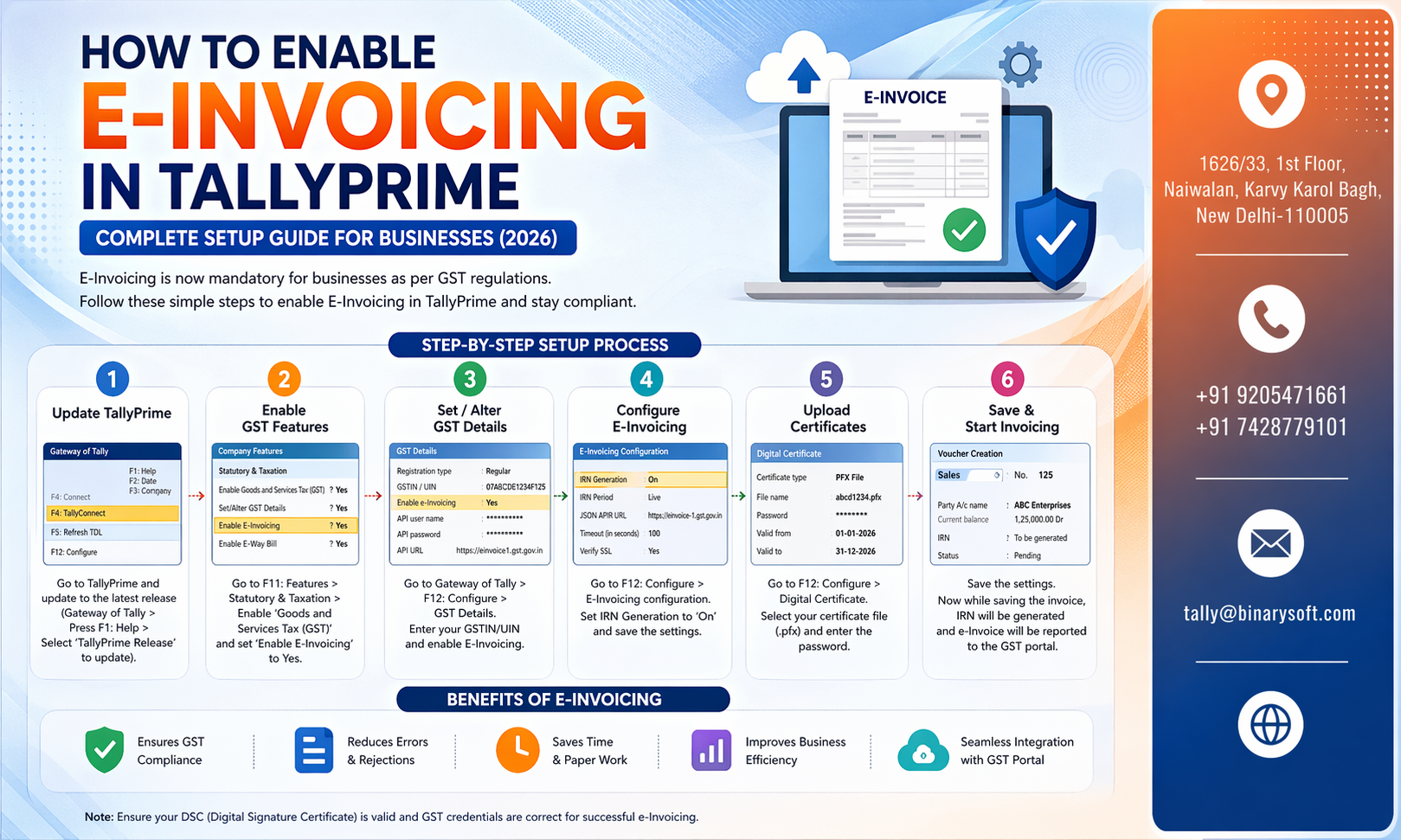
In 2026, GST compliance in India has tightened further, and e-invoicing is no longer optional for many growing businesses. With stricter validation rules, faster IRN generation requirements, and increased scrutiny on mismatches between books and GST returns, businesses that delay e-invoicing risk penalties, blocked input tax credit, and operational delays. The latest updates have made automation essential—not just for compliance, but for speed and accuracy. Enabling e-invoicing in TallyPrime helps businesses generate invoices directly linked with the GST portal, reducing manual errors and saving valuable time. If your business is scaling or already crossing turnover thresholds, this guide will help you activate e-invoicing quickly, avoid common mistakes, and stay fully compliant in 2026.
Why E-Invoicing is Important in 2026
E-invoicing under GST ensures that every invoice is validated by the government’s Invoice Registration Portal (IRP). Once validated, an Invoice Reference Number (IRN) is generated along with a QR code.
Key Benefits:
- Real-time GST compliance
- Automatic IRN generation
- Reduced manual data entry
- Faster return filing
- Better audit readiness
Businesses using TallyPrime can seamlessly integrate with GST systems and automate the entire process.
Prerequisites Before Enabling E-Invoicing
Before setup, ensure the following:
- GST Registration Active
- Turnover Eligibility (as per latest GST rules)
- Valid Credentials on Invoice Registration Portal (IRP)
- Updated Version of TallyPrime
- Internet Connectivity for Real-time Sync
Step-by-Step: How to Enable E-Invoicing in TallyPrime
Step 1: Enable GST in TallyPrime
- Go to Gateway of Tally → F11 (Features) → Statutory & Taxation
- Enable GST
- Enter correct GSTIN and business details
Step 2: Activate E-Invoicing Feature
- Navigate to F11 (Features) → GST Details
- Set Enable e-Invoicing = Yes
- Provide Company Details correctly
Step 3: Configure API Access
- Go to GST Portal → Register for e-Invoice
- Generate Client ID & Client Secret
- Enter these credentials in TallyPrime
Step 4: Set Up Ledger & Stock Items
- Ensure all ledgers have:
- Correct GST classification
- HSN/SAC codes
- Tax rates
Step 5: Create Sales Invoice
- Go to Accounting Vouchers → Sales
- Enter transaction details
- Use proper party GSTIN and item details
Step 6: Generate IRN
- After saving invoice:
- Press Alt + Z (e-Invoice)
- Select Generate IRN
- System connects to IRP and generates:
Step 7: Print or Share E-Invoice
- Invoice will now include:
- Share with customer or upload to portal
Real Story: A Small Business That Avoided a Major GST Penalty
In early 2026, a Delhi-based electronics distributor was struggling with GST mismatches. Their accountant manually uploaded invoices, and delays caused multiple notices from the department. One missed IRN submission nearly led to a heavy penalty and blocked input credit.
After switching to TallyPrime with e-invoicing enabled, everything changed. Invoices were generated instantly with IRN, errors dropped to zero, and GST filing became smooth. Within two months, they cleared all compliance issues and regained confidence in their accounting system.
This shift wasn’t just technical—it removed stress, reduced risk, and helped the business focus on growth instead of compliance headaches.
Common Mistakes to Avoid
- Incorrect GSTIN of party
- Missing HSN/SAC codes
- Using outdated version of TallyPrime
- Not validating invoice before IRN generation
- Network/API configuration errors
Tips for Faster E-Invoicing
- Keep master data clean and updated
- Use automation features in TallyPrime
- Regularly sync with GST portal
- Train staff for correct data entry
- Monitor failed IRN reports
Contact Details
Powered by Binarysoft Technologies – Authorized Tally Partner
1626/33, 1st Floor, Naiwalan, Karol Bagh,
New Delhi – 110005, INDIA
Contact Us:
+91 9205471661
+91 7428779101
Frequently Asked Questions
What is e-invoicing in GST?
E-invoicing is a system where invoices are authenticated electronically through the GST Invoice Registration Portal (IRP). Once validated, an IRN (Invoice Reference Number) and QR code are generated for each invoice.
Is e-invoicing mandatory in 2026?
E-invoicing is mandatory for businesses crossing the turnover threshold defined by GST authorities. The limit has been reduced over time, so even mid-sized businesses must now comply.
Can I enable e-invoicing in TallyPrime without GST registration?
No, GST registration is compulsory. You must have a valid GSTIN to enable and use e-invoicing.
CA. Vishal Mehta is a Chartered Accountant specializing in accounting compliance, GST advisory, and business process optimization. He has assisted businesses in transitioning to structured accounting and inventory systems. His articles focus on accuracy, compliance, and sustainable business growth.