Call CA Tally HelpDesk
+91 9205471661,
7428779101
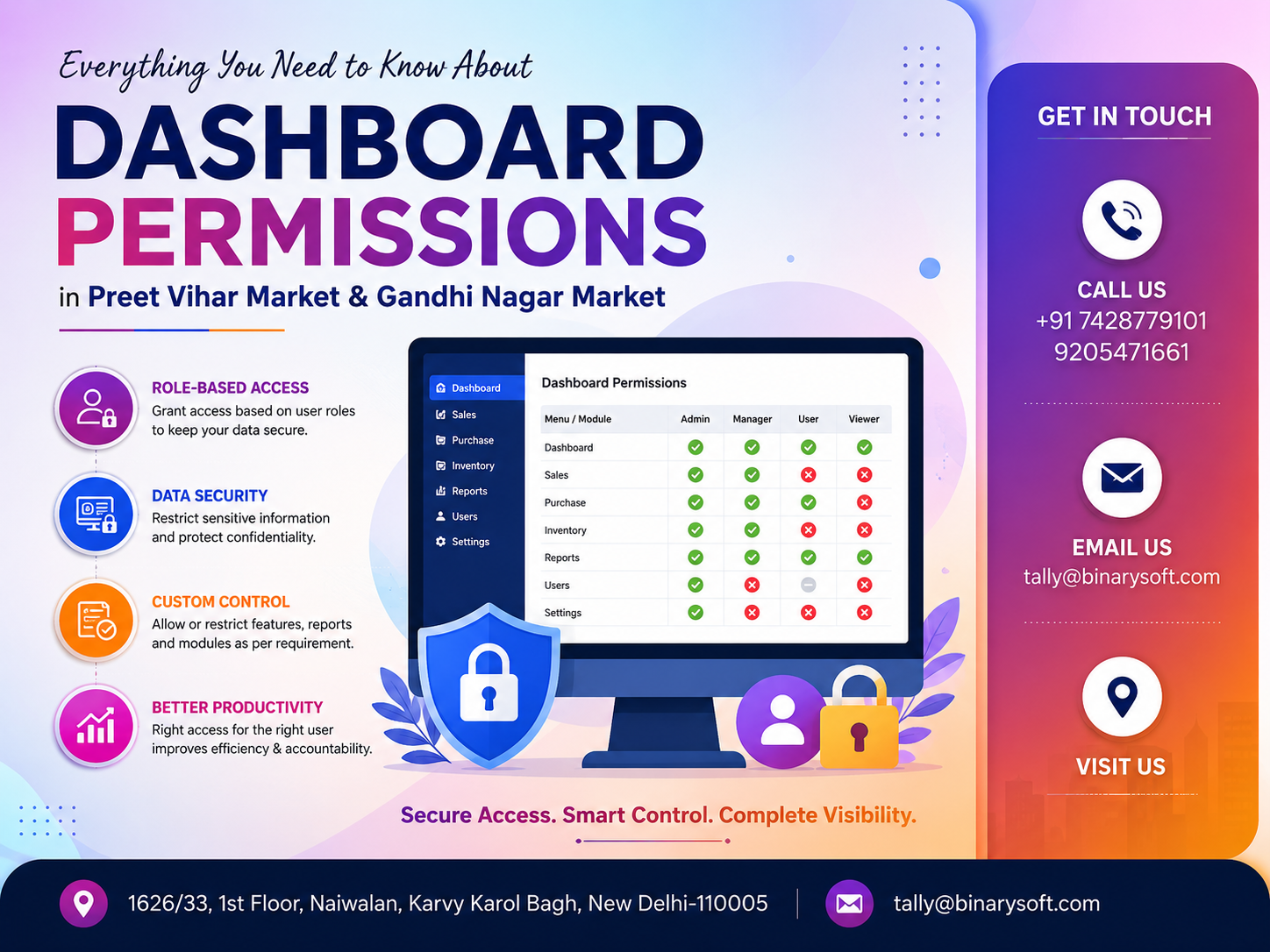
Dashboard Permissions in 2026: Why Businesses Need Better Control Now
In 2026, businesses in Preet Vihar Market and Gandhi Nagar Market are handling more digital information than ever before—from sales and purchases to GST records, outstanding payments, inventory, banking information and management reports. As more employees use business software and dashboards, one question has become increasingly important: who should be allowed to see, enter, edit, approve or delete business data? Giving every user unrestricted access may appear convenient, but it can expose a business to accidental changes, unauthorized transactions and confidential-data leakage. Recent months have therefore pushed growing businesses toward structured dashboard permissions and role-based access. A properly configured permission system allows owners to give employees only the access required for their responsibilities while keeping sensitive financial information protected. For traders, wholesalers, retailers and distributors, better dashboard permissions can mean stronger security, clearer accountability and smoother day-to-day operations without slowing employees down.
What Are Dashboard Permissions?
Dashboard permissions are access controls that determine what an individual user can see and do after logging into a business application, accounting platform, ERP, inventory system or management dashboard.
Instead of providing every employee with complete access, businesses can assign permissions according to responsibilities.
For example, a billing operator may need access to sales invoices but may not need access to profit reports. A store employee may need inventory information but should not necessarily be permitted to modify accounting records. A senior accountant may require GST, banking, ledger and reporting access, while the business owner may require complete administrative control.
A well-planned dashboard permission structure therefore answers five important questions:
Who can view the information?
Who can create transactions?
Who can modify transactions?
Who can approve important activities?
Who can delete or permanently alter records?
These questions become increasingly important as a business grows.
Why Dashboard Permissions Matter for Preet Vihar Market Businesses
Preet Vihar is home to retailers, service providers, restaurants, professional offices, distributors and numerous other businesses.
A small business may initially have only one person handling billing and accounts. But as operations expand, responsibilities are usually distributed among several employees.
A business may have separate people responsible for:
Sales billing
Purchases
Inventory
Accounts
Bank reconciliation
GST compliance
Customer outstanding management
Management reporting
Administration
If every employee receives unrestricted dashboard access, unnecessary risks can develop.
For example, a billing employee who only needs to create invoices should not automatically have permission to view complete profitability information or change security settings.
Dashboard permissions help create boundaries without preventing employees from completing their work.
Why Dashboard Permissions Are Important for Gandhi Nagar Market
Gandhi Nagar in Delhi is widely known as a major garment and wholesale trading area. Businesses operating in a high-volume wholesale environment may process substantial numbers of invoices, purchases, stock movements, supplier transactions and customer payments.
In such an environment, several people may work simultaneously.
One employee may prepare invoices.
Another may manage stock.
Another may record purchases.
An accountant may manage GST and ledgers.
A manager may monitor outstanding receivables.
The owner may review overall financial performance.
Without properly defined dashboard permissions, employees may accidentally or intentionally access information unrelated to their responsibilities.
Role-based permissions create a controlled environment where every employee receives appropriate access.
The Difference Between Login Access and Dashboard Permissions
Businesses sometimes assume that providing individual usernames and passwords is enough.
It is not.
Login access answers:
“Can this person enter the system?”
Dashboard permissions answer:
“What can this person do after entering the system?”
This difference is critical.
Imagine a business has five employees, and all five have separate usernames. If every username provides complete administrator access, the company still has a significant access-control problem.
A stronger system assigns permissions after authentication.
For example:
Billing User — Sales access
Purchase User — Purchase access
Store User — Inventory access
Accountant — Accounting and taxation access
Manager — Reporting and approval access
Administrator — Complete configuration access
This approach is generally called role-based access control.
What Is Role-Based Access Control?
Role-Based Access Control, commonly known as RBAC, is a permission-management approach where access is assigned according to a user's job role.
Instead of manually deciding every permission for every employee, businesses can create predefined roles.
For example, a business could create the following roles:
Billing Executive
Store Manager
Purchase Executive
Accountant
Sales Manager
Finance Manager
Administrator
Business Owner
Each role receives its own permissions.
When a new employee joins, the administrator assigns the appropriate role rather than configuring the complete system from the beginning.
This makes permission management easier and more consistent.
Important Types of Dashboard Permissions
View Permission
View permission allows employees to see specific information without changing it.
For example, a salesperson may be permitted to view customer outstanding balances but not edit ledger transactions.
View-only access is useful when employees require information for decision-making but should not modify the underlying records.
Create Permission
Create permission allows users to add new transactions or records.
Examples include:
Creating sales invoices
Entering purchase transactions
Adding customers
Creating orders
Recording receipts
Entering stock movements
This permission should be provided according to the employee's operational responsibilities.
Edit Permission
Edit permission allows users to change existing information.
This is considerably more sensitive than simple create permission.
A billing operator, for example, may need permission to create invoices but businesses should carefully decide whether that person should also be able to modify old invoices.
Delete Permission
Delete access should be controlled carefully.
Deleting transactions can affect financial statements, inventory quantities, outstanding balances, GST information and audit trails.
In many businesses, deletion rights should remain limited to authorized senior employees or administrators.
Approval Permission
Some organizations use approval-based workflows.
An employee creates a transaction, but a manager approves it before the process is considered complete.
This approach can be particularly useful for:
Large purchases
Discount approvals
Credit transactions
Payments
Refunds
Stock adjustments
High-value transactions
Approval workflows introduce another level of internal control.
Export Permission
Exporting information is sometimes overlooked when dashboard permissions are configured.
However, exporting can be highly sensitive.
A person who cannot change records may still be able to download customer lists, sales information, outstanding reports or financial reports.
Businesses should therefore consider whether particular users actually need Excel, PDF, CSV or other export permissions.
Administrative Permission
Administrative access is usually the highest level of access.
Administrators may be able to:
Create users
Change passwords
Assign roles
Modify permissions
Configure software
Change company settings
Manage integrations
Access sensitive reports
Because of the power associated with administrator access, it should be limited to trusted personnel.
An Emotional Business Story: The Report That Should Never Have Been Changed
Consider a fictional garment wholesaler operating in Gandhi Nagar Market.
For years, the owner, Rajesh, managed most of the business personally. He knew his suppliers, customers and employees and rarely thought about software permissions.
As the business expanded, his son introduced a centralized business dashboard so employees could work faster.
Billing became easier.
Inventory visibility improved.
Customer outstanding information became instantly accessible.
But there was one problem.
Almost everyone had been given broad access.
One evening, just before an important supplier meeting, Rajesh opened his reports and noticed that several figures did not match what he remembered.
He became worried.
His first thought was that money had gone missing.
His accountant stayed late, checking transactions one by one.
Eventually, they discovered that a new employee had edited several older entries while trying to correct a billing mistake. There was no malicious intention—the employee simply had access to functions he did not understand.
The financial records were restored, but Rajesh remembered the anxiety of those few hours.
The next morning, he changed the way the business operated.
Billing employees received billing permissions.
Inventory staff received stock permissions.
Accountants received accounting permissions.
Only senior authorized users could modify critical historical records.
The lesson was simple: trust employees, but design software access according to responsibility.
That change did not make the business slower.
It made everyone more confident about what they were responsible for.
Dashboard Permissions and Internal Business Control
Dashboard permissions should not be considered merely an IT feature.
They are part of internal business control.
Internal controls help companies reduce mistakes, protect information and establish responsibility.
Suppose an employee creates a purchase transaction and the same employee can approve, modify and delete it without oversight.
There is very little separation of responsibility.
A more controlled workflow might be:
Purchase Executive creates transaction
Manager reviews transaction
Accounts verifies financial information
Authorized user approves payment
Management reviews reports
The exact workflow depends on the size and complexity of the organization, but dashboard permissions make such separation possible.
Protecting Sensitive Financial Information
Not every employee needs to know everything about the business.
Sensitive information may include:
Profit margins
Bank balances
Cash position
Supplier pricing
Customer credit limits
Employee salaries
GST reports
Purchase costs
Management reports
Outstanding receivables
Outstanding payables
Business profitability
Confidential financial information should only be available to employees who genuinely require it.
This is especially important when businesses employ sales staff, temporary employees, billing operators or external consultants.
Dashboard Permissions for Billing Staff
Billing operators usually require quick access because customers should not have to wait while invoices are generated.
Typical permissions may include:
Create sales invoices
View customer information
Select inventory items
Apply authorized tax rates
Print invoices
View stock availability
Depending on business policy, they may not require access to:
Profit and loss reports
Bank information
Purchase costs
Administrative settings
User management
Historical transaction deletion
The objective is not to restrict productivity. The objective is to provide exactly the permissions necessary for the job.
Dashboard Permissions for Inventory Teams
Inventory employees may require access to:
Stock availability
Godown information
Stock transfers
Item details
Units of measurement
Reorder information
Inventory reports
However, they may not require access to complete financial reports or banking information.
A properly designed dashboard keeps inventory operations focused while protecting accounting information.
Permissions for Accountants
Accountants generally require broader access.
Depending on their responsibilities, they may need:
Ledger access
Voucher entry
Banking information
GST reports
Purchase information
Sales information
Outstanding reports
Financial statements
Reconciliation tools
Tax-related reports
Even then, administrator-level access should not automatically be provided unless necessary.
Accounting access and system-administration access are different responsibilities.
Permissions for Business Owners
Owners generally require the broadest visibility.
Their dashboards may include:
Sales performance
Purchase analysis
Profitability
Cash flow
Banking
Receivables
Payables
Inventory position
GST information
Business trends
Management reports
User activities
However, even owners can benefit from separate daily-use and administrative accounts where the software supports such an arrangement.
This can reduce accidental configuration changes.
Dashboard Permissions and TallyPrime
Businesses using TallyPrime can use security and user-management capabilities to control access according to organizational requirements.
Rather than allowing every user unrestricted access to company data, businesses should evaluate the responsibilities of each employee and configure access accordingly.
For businesses implementing or reviewing TallyPrime, an Authorized Tally Partner can help assess how users interact with accounting and business data and recommend an appropriate configuration.
The objective should always be straightforward:
Provide employees with the information and functionality they need while protecting areas they do not need.
Why the Principle of Least Privilege Matters
One of the most useful concepts in permission management is the “principle of least privilege.”
It means users should receive the minimum level of access required to perform their responsibilities effectively.
For example, if an employee only needs to view stock quantities, there is little reason to provide permission to delete inventory records.
If an employee only creates sales invoices, that person may not need access to banking configuration.
If a manager only reviews financial reports, editing permissions may not be necessary.
Least-privilege access reduces unnecessary exposure.
Common Dashboard Permission Mistakes
Giving Everyone Administrator Access
This is one of the most common mistakes.
Administrator access may seem convenient, particularly in smaller businesses, but it removes many of the protections that permissions are designed to provide.
Sharing Usernames and Passwords
When multiple employees use the same login, accountability becomes difficult.
If something changes, management may not know who performed the action.
Individual user accounts are therefore preferable.
Providing Delete Access Without Need
Deleting financial or inventory records can have serious consequences.
Delete access should be restricted wherever practical.
Forgetting Former Employees
When an employee leaves the organization, their access should be disabled promptly.
Inactive accounts should not remain available unnecessarily.
Ignoring Export Permissions
Downloading reports can expose valuable business information even when the user cannot edit the original records.
Never Reviewing Permissions
Employees change roles.
Responsibilities change.
Businesses grow.
Therefore, permissions that were appropriate one year ago may no longer be appropriate today.
Conduct Regular Permission Reviews
Businesses should periodically review:
Active users
Inactive users
Administrator accounts
Employee roles
View permissions
Create permissions
Edit permissions
Delete permissions
Export rights
Approval rights
Sensitive-report access
Former employee accounts
Periodic reviews help ensure that access reflects current responsibilities.
What Happens When an Employee Changes Departments?
Suppose an employee moves from billing to inventory management.
The employee's old billing permissions should be reviewed rather than simply adding inventory access on top of existing permissions.
Otherwise, employees gradually accumulate unnecessary privileges.
A good practice is:
Review existing role
Remove unnecessary permissions
Assign new role
Verify access
Document the change
This keeps permissions clean and manageable.
Dashboard Permissions for Multi-User Businesses
Permissions become even more important when multiple users work simultaneously.
Consider a wholesale business where ten employees access business information during the day.
Without clear permissions, users may unintentionally interfere with each other's responsibilities.
A structured system can separate responsibilities between:
Billing
Purchases
Inventory
Accounts
Management
Administration
This becomes particularly valuable as transaction volumes increase.
How Dashboard Permissions Improve Employee Productivity
Permissions are sometimes viewed as barriers.
Properly configured permissions can actually simplify dashboards.
An employee who only handles billing does not necessarily need dozens of financial and administrative options.
Showing employees only relevant features can make software easier to understand.
They spend less time navigating unnecessary menus and have less risk of selecting the wrong function.
Therefore, good permission design balances security with usability.
Dashboard Permissions and Accountability
Imagine a transaction was changed yesterday.
Management wants to know:
Who changed it?
When was it changed?
What was changed?
Why did the user have access?
Individual user accounts combined with appropriate permissions and available audit capabilities make investigation easier.
Shared accounts make accountability considerably more difficult.
This is why growing businesses should move away from “one password for everyone.”
Building a Permission Matrix
A permission matrix is a simple but powerful planning document.
Businesses can list roles vertically and functions horizontally.
For example:
| Business Function | Billing Staff | Inventory Staff | Accountant | Manager | Owner |
|---|
| Create Sales Invoice |
Yes |
No |
Yes |
Yes |
Yes |
| View Stock |
Yes |
Yes |
Yes |
Yes |
Yes |
| Modify Stock |
Limited |
Yes |
Limited |
Yes |
Yes |
| View Banking |
No |
No |
Yes |
Yes |
Yes |
| View Profitability |
No |
No |
Limited |
Yes |
Yes |
| Delete Transactions |
No |
No |
Limited |
Limited |
Yes |
| Manage Users |
No |
No |
No |
Limited |
Yes |
The exact matrix should be customized according to business requirements.
A small amount of planning at this stage can prevent confusion later.
Step-by-Step Approach to Setting Dashboard Permissions
First, identify every person who uses the business software.
Second, document their actual responsibilities.
Third, identify sensitive information within the system.
Fourth, create roles based on business functions.
Fifth, provide the minimum required permissions.
Sixth, restrict administrative and deletion rights.
Seventh, use individual login credentials.
Eighth, test each role before implementation.
Ninth, train employees regarding their access responsibilities.
Tenth, review permissions periodically.
This structured approach is considerably safer than assigning permissions randomly whenever someone requests access.
Why Training Matters Alongside Permissions
Software permissions alone cannot solve every problem.
Employees should understand:
Why permissions exist
Why passwords should not be shared
Why confidential reports should not be downloaded unnecessarily
How to report access problems
Whom to contact when additional permissions are required
Why unauthorized account sharing creates risks
When employees understand the reason behind controls, they are more likely to follow them properly.
Dashboard Permission Strategy for Small Businesses
Small businesses do not necessarily require complicated security structures.
Even a company with three or four software users can benefit from basic separation.
For example:
Owner — Full visibility
Accountant — Accounting and compliance
Billing Employee — Sales billing
Store Employee — Inventory
This simple structure can already reduce unnecessary access significantly.
Dashboard Permission Strategy for Growing Businesses
As organizations grow, permissions should become more structured.
Growing businesses can consider:
Department-based roles
Approval workflows
Restricted deletion
Manager-level authorization
Individual accounts
Regular access reviews
Sensitive-report restrictions
User activity monitoring where available
Documented employee onboarding and exit procedures
The permission model should evolve with the organization.
Employee Onboarding and Dashboard Permissions
Whenever a new employee joins, access should be assigned based on the job description.
A basic onboarding process may include:
Create individual account
Assign department
Select role
Configure required permissions
Test login
Explain security policy
Confirm access
This prevents the common practice of copying another employee's account without checking whether the same access is actually required.
Employee Exit and Access Removal
Employee offboarding is equally important.
When an employee leaves:
Disable account access
Review outstanding responsibilities
Change shared credentials if any were used
Reassign workflows
Review sensitive information access
Confirm removal of administrative permissions
Access removal should be part of the employee exit process rather than an afterthought.
Dashboard Permissions and Business Growth in 2026
Digital business operations continue to expand.
Even traditional market businesses now depend heavily on software for:
Billing
Accounting
Inventory
GST
Banking
Reporting
Customer management
Supplier management
Business analytics
As more information becomes centralized, access control becomes more important.
A growing business cannot depend indefinitely on informal arrangements such as “everyone knows the password.”
Professional access management should grow alongside digital adoption.
Benefits of Proper Dashboard Permissions
A carefully designed permission structure can help businesses achieve:
Better financial-data protection
Reduced accidental changes
Clear employee accountability
Controlled access to confidential information
Safer multi-user operations
Simpler employee dashboards
Improved internal controls
Better separation of responsibilities
More organized onboarding and offboarding
Greater confidence in business information
The biggest benefit is control without unnecessary complexity.
How Binarysoft Technologies Can Help
Businesses in Preet Vihar Market, Gandhi Nagar Market and other locations can contact Binarysoft Technologies for assistance related to Tally solutions, implementation, licensing, configuration, support and business software requirements.
Permission configuration should be based on the actual working structure of the business rather than a generic template.
Binarysoft Technologies can help businesses understand how their teams use accounting and operational information and determine an appropriate setup.
Powered by Binarysoft Technologies
Binarysoft Technologies
Authorized Tally Partner
Location:
1626/33, 1st Floor, Naiwalan,
Karol Bagh, New Delhi – 110005, INDIA
Contact Us:
+91 7428779101
9205471661
Email:
tally@binarysoft.com
Business Hours:
10:00 AM – 6:00 PM, Monday to Friday
Conclusion
Dashboard permissions are no longer something only large organizations need to consider. In 2026, even small and medium-sized businesses increasingly depend on digital systems for billing, inventory, GST, accounting, banking and management reporting.
For businesses in Preet Vihar Market and Gandhi Nagar Market, the key question is not simply whether employees should have software access. The more important question is what each employee should be allowed to do after logging in.
Role-based access, individual user accounts, limited deletion rights, controlled exports, appropriate approval workflows and regular permission reviews can create a much safer working environment.
The goal should not be to restrict employees unnecessarily. It should be to give every person exactly the tools and information required for their responsibilities.
When dashboard permissions are planned correctly, owners gain stronger control, employees gain clearer responsibilities and the organization becomes better prepared for future growth.
Frequently Asked Questions
What are dashboard permissions?
Dashboard permissions determine what a user can view, create, edit, approve, export or delete after logging into business software.
Why are dashboard permissions important for small businesses?
Small businesses also handle confidential financial, customer and inventory information. Permissions prevent employees from accessing functions that are unrelated to their responsibilities.
CA. Praneet Bansaal is a Chartered Accountant with experience in taxation, accounting controls, and financial process reviews. He has advised businesses on aligning inventory movement with accounting and GST requirements. His content focuses on compliance, accuracy, and long-term sustainability.