Call CA Tally HelpDesk
+91 9205471661,
7428779101
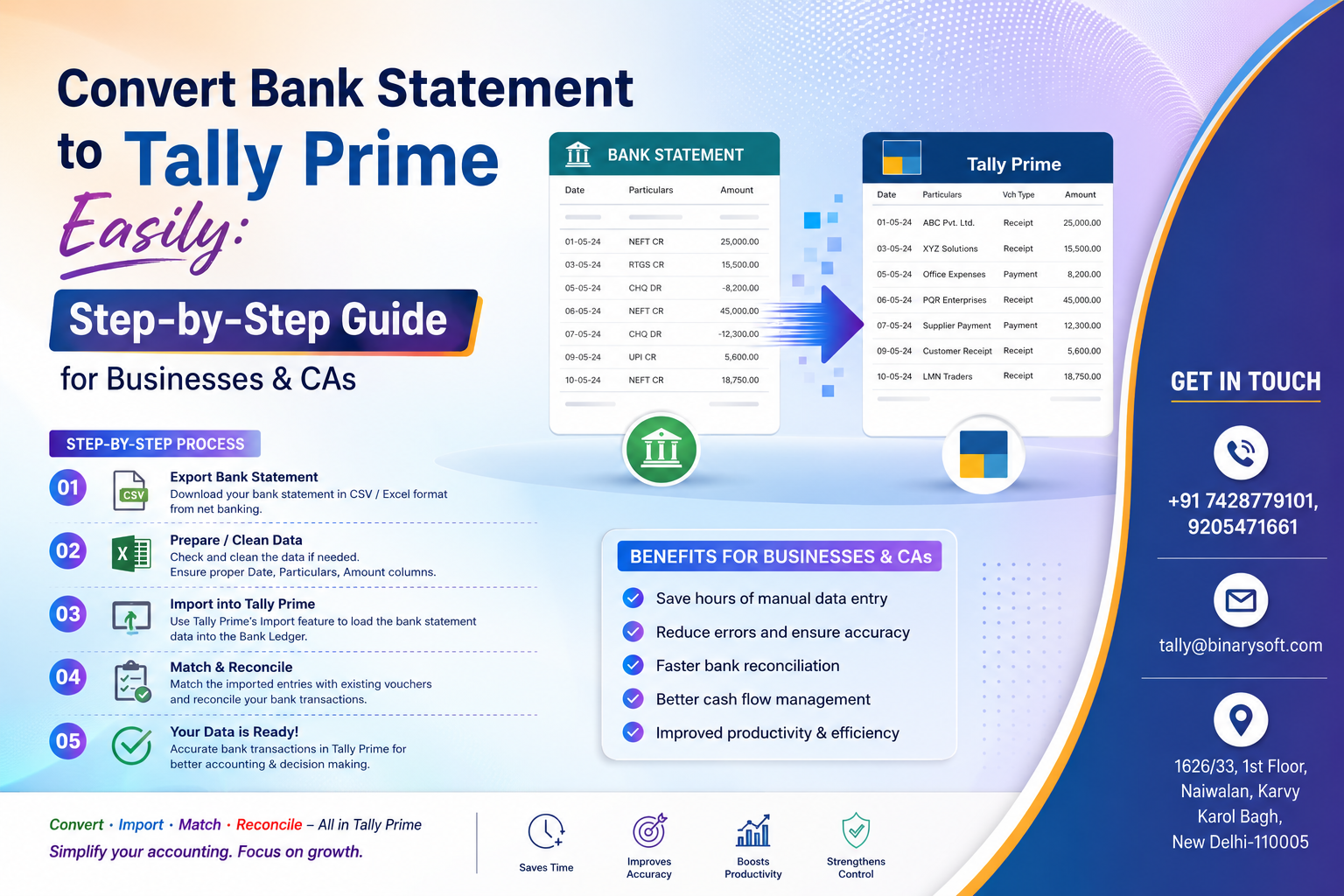
Businesses and Chartered Accountants are under increasing pressure to complete accounting, GST reconciliation, and bank verification faster than ever before. Over the last few months, many companies have started automating bank entry imports because manual accounting is becoming too slow, error-prone, and risky. Thousands of businesses still spend hours typing bank transactions manually into Tally Prime, leading to duplicate entries, reconciliation issues, and missed compliance deadlines. With increasing transaction volumes, digital payments, UPI collections, and multi-bank operations, manual accounting is no longer practical for growing businesses.
A CA firm in Delhi recently handled more than 20 client bank statements every week. Staff members were staying late at night entering transactions manually into Tally Prime. After adopting automated bank statement conversion tools, the same firm reduced accounting time dramatically and improved accuracy within days. In recent months, businesses using bank-to-Tally automation have improved efficiency, reduced errors, and accelerated GST and financial reporting — making automation one of the most valuable accounting upgrades in 2026.
What Does “Convert Bank Statement to Tally Prime” Mean?
Converting a bank statement to Tally Prime means importing bank transactions directly into Tally software instead of entering them manually one by one.
This process allows businesses to:
- Import bank entries automatically
- Reduce manual accounting work
- Save time
- Improve data accuracy
- Speed up bank reconciliation
- Maintain proper accounting records
Businesses can import transactions from:
- Excel bank statements
- PDF bank statements
- CSV files
- Online banking exports
into Tally Prime quickly and efficiently.
Why Businesses Need Automated Bank Statement Import in 2026
Modern businesses process hundreds or even thousands of transactions every month.
Manual entry creates problems such as:
- Human errors
- Duplicate entries
- Missing transactions
- Incorrect ledger posting
- Delayed accounting
- Reconciliation mismatches
Automation solves these issues and improves accounting speed.
Major Benefits of Bank Statement Conversion to Tally Prime
1. Save Massive Accounting Time
Manual accounting consumes several hours daily.
Automated conversion helps businesses:
- Import thousands of entries in minutes
- Reduce repetitive work
- Complete monthly accounting faster
This allows accountants to focus on analysis rather than data entry.
2. Improve Accuracy
Manual typing often causes:
- Wrong amounts
- Incorrect dates
- Duplicate vouchers
- Missing transactions
Automated import significantly reduces these errors.
3. Faster Bank Reconciliation
Bank reconciliation becomes easier because imported entries match actual bank transactions.
This helps businesses:
- Detect mismatches quickly
- Track pending payments
- Verify collections efficiently
4. Better GST & Financial Reporting
Imported bank entries improve:
- Financial statements
- GST reconciliation
- Audit preparation
- Cash flow analysis
Accurate accounting helps businesses make better decisions.
5. Support for Multiple Banks
Modern conversion tools support statements from:
- SBI
- HDFC Bank
- ICICI Bank
- Axis Bank
- Punjab National Bank
- Kotak Mahindra Bank
- Bank of Baroda
- Yes Bank
and many other banks.
Step-by-Step Guide to Convert Bank Statement into Tally Prime
Step 1: Download Bank Statement
Download your bank statement in:
- Excel format
- CSV format
- PDF format
from internet banking.
Step 2: Prepare the Statement
Check:
- Date format
- Debit/Credit columns
- Narration details
- Transaction amount accuracy
Clean formatting improves import success.
Step 3: Use Bank-to-Tally Conversion Tool
Use a reliable conversion utility or Tally-compatible import tool.
The software converts:
- Bank data
into
- Tally XML or import-ready format
This prepares the statement for Tally Prime.
Step 4: Import Data into Tally Prime
In Tally Prime:
- Open Company
- Go to Import Data
- Select the generated XML file
- Start import process
Transactions will automatically appear in Tally vouchers.
Step 5: Verify Ledger Mapping
Check whether:
- Bank ledger is correct
- Expense ledgers are mapped properly
- Customer/vendor entries are accurate
This ensures clean accounting records.
Step 6: Reconcile Bank Transactions
After import:
- Compare Tally records with bank statement
- Verify balances
- Complete reconciliation
Your accounting process becomes faster and more accurate.
Types of Businesses That Benefit Most
Chartered Accountant Firms
CA firms can:
- Handle multiple clients quickly
- Reduce staff workload
- Improve accuracy
- Deliver faster accounting services
Trading Businesses
Importing bank entries helps traders manage:
- Daily receipts
- Supplier payments
- UPI transactions
- GST reconciliation
efficiently.
Manufacturing Companies
Manufacturers often handle:
- Vendor payments
- Salary transfers
- Bulk banking transactions
Automation reduces accounting delays.
Retail Businesses
Retail stores processing:
- Online payments
- QR code collections
- Card payments
can easily manage transaction entries using automation.
Common Problems During Manual Bank Entry
Duplicate Entries
Manual posting increases duplicate transaction risks.
Wrong Ledger Selection
Incorrect ledger posting affects final reports.
Time Consumption
Large bank statements require extensive accounting effort.
Missed Transactions
Manual entry sometimes skips important entries.
Reconciliation Delays
Errors make reconciliation difficult and time-consuming.
Features to Look for in Bank Statement Conversion Software
Before choosing a solution, businesses should verify:
- Tally Prime compatibility
- Support for multiple banks
- Automatic ledger mapping
- Bulk transaction import
- Excel & PDF support
- Duplicate entry detection
- Fast import speed
- Error reporting system
Choosing the right tool improves long-term accounting efficiency.
Story: How Automation Helped a Small CA Firm
A small CA office in Karol Bagh handled accounting for more than 50 clients. During GST season, staff members spent entire weekends entering bank transactions manually into Tally Prime. The workload became so stressful that employees started leaving the office late at night almost every day.
One day, a client recommended automated bank statement conversion software. Initially, the team doubted whether automation would work correctly. But after implementation, thousands of bank transactions were imported within minutes. The office suddenly had more time for GST review, tax planning, and client consultation.
The firm owner later admitted that automation not only improved productivity but also reduced stress for the entire staff. Instead of worrying about data entry mistakes, the team could focus on growing the practice and serving clients better.
Why Automation Is Essential in 2026
Business transactions are increasing rapidly because of:
- UPI payments
- Online banking
- QR collections
- Digital accounting systems
- Multi-bank operations
Manual accounting methods are becoming outdated and inefficient.
Automation helps businesses:
- Work faster
- Reduce costs
- Improve compliance
- Increase accounting accuracy
Advantages for Chartered Accountants
CAs can benefit from:
- Faster client accounting
- Reduced workload
- Better audit preparation
- Improved reconciliation
- Faster GST filing
This helps firms handle more clients efficiently.
Cloud & Remote Accounting Integration
Modern bank conversion solutions also support:
- Cloud-based Tally access
- Remote accounting teams
- Multi-user accounting
- Real-time data sharing
This improves operational flexibility for businesses and accounting firms.
Security Considerations During Import
Businesses should always:
- Use secure software
- Protect banking data
- Maintain backups
- Verify imported entries
- Use authorized accounting tools
Data security is extremely important in financial operations.
Future of Accounting Automation
The accounting industry is rapidly moving toward:
- AI-assisted bookkeeping
- Automated bank reconciliation
- Smart ledger mapping
- Real-time accounting integration
Businesses adopting automation today will gain long-term operational advantages.
Contact Details
Powered by Binarysoft Technologies – Authorized Tally Partner
1626/33, 1st Floor, Naiwalan, Karol Bagh,
New Delhi – 110005, INDIA
Contact Us:
+91 9205471661
+91 7428779101
Email:
tally@binarysoft.com
Working Hours:
10:00 AM – 6:00 PM (Mon–Fri)
Conclusion
Converting bank statements into Tally Prime is one of the smartest ways for businesses and Chartered Accountants to improve accounting efficiency in 2026. Automation reduces manual work, improves accuracy, speeds up reconciliation, and helps businesses manage growing transaction volumes with ease.
Whether you are a small business owner, trader, manufacturer, retailer, or CA firm, adopting bank-to-Tally automation can save valuable time, reduce stress, and improve overall financial management. Businesses that embrace automation today will be better prepared for the future of digital accounting.
Frequently Asked Questions
Can bank statements be imported directly into Tally Prime?
Yes. Bank statements can be converted and imported into Tally Prime using compatible tools and XML import formats.
Is manual data entry still required after import?
Minimal manual checking may be required for ledger verification and reconciliation.
Does bank statement conversion reduce errors?
Yes. Automated import significantly reduces manual typing mistakes and duplicate entries.
Can Chartered Accountants use bank import automation for clients?
Absolutely. CA firms use automation to handle multiple client accounts efficiently.
CA. Arvindh Khetwaani is a Chartered Accountant with experience in financial reporting, compliance management, and accounting software implementation. He has assisted businesses in adopting structured inventory and billing practices, and his articles focus on accuracy, controls, and sustainable business growth.







