Call CA Tally HelpDesk
+91 9205471661,
7428779101
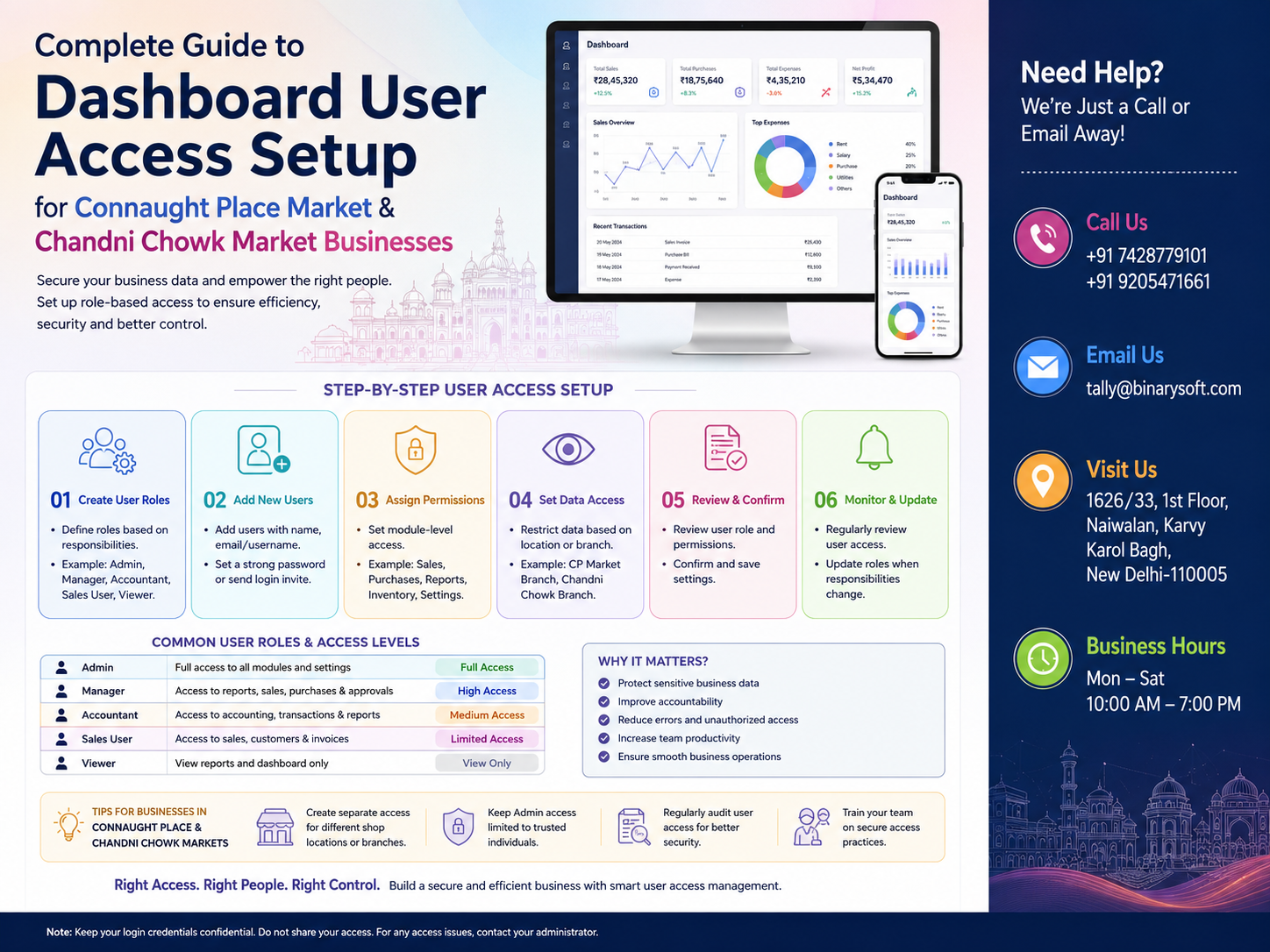
Why Dashboard User Access Has Become a Business Priority in 2026
The business environment in 2026 has become more digital than ever. Retailers, wholesalers, distributors, and service providers are increasingly relying on cloud-based accounting, inventory management, GST billing, and business dashboards to manage daily operations. Businesses in Connaught Place Market and Chandni Chowk Market, where multiple employees often handle billing, inventory, finance, purchasing, and customer management simultaneously, can no longer afford to give every user unrestricted access to business data. A single unauthorized change, accidental deletion, or financial mistake can disrupt operations and create compliance issues. Modern dashboard user access systems help businesses assign role-based permissions so every employee sees only the information relevant to their job. This improves security, reduces human errors, protects confidential financial information, strengthens internal controls, and allows business owners to monitor operations in real time without compromising efficiency or productivity.
A Business Story That Highlights the Importance of User Access
Ramesh owns a wholesale textile business in Chandni Chowk Market. His company had grown from a small family business into a large organization with more than twenty employees. Everyone used the same login credentials because it seemed easier.
Initially, everything worked smoothly.
However, as business expanded, problems began to appear.
An employee accidentally modified customer outstanding balances while updating invoices.
Another staff member deleted inventory entries thinking they were duplicate records.
Sales executives could see confidential purchase prices and supplier payment details.
Management struggled to determine who had made changes because every employee shared the same account.
The situation became stressful. Customer complaints increased, stock mismatches became frequent, and financial reconciliation took much longer.
After implementing role-based dashboard access, every employee received an individual login with permissions specific to their responsibilities.
Sales staff accessed only sales functions.
Warehouse employees managed inventory.
Accountants handled finance.
Managers reviewed reports.
Owners retained complete administrative control.
Within a few weeks, operational errors reduced significantly, accountability improved, and management gained confidence in the accuracy of business data.
What Is Dashboard User Access?
Dashboard User Access is a security feature that controls which sections of business software each employee can access.
Instead of providing complete system access to everyone, businesses define permissions based on roles and responsibilities.
This ensures:
- Better security
- Controlled information sharing
- Improved accountability
- Accurate data management
- Reduced operational risk
Why User Access Control Is Essential for Modern Businesses
As businesses grow, multiple departments work on the same software simultaneously.
These may include:
- Sales
- Accounts
- Purchase
- Inventory
- Warehouse
- Customer Support
- HR
- Management
Without access control, employees may unintentionally modify information outside their responsibilities.
Role-based permissions eliminate this risk.
Challenges Faced by Businesses Without User Access Management
Many businesses still operate using shared login credentials.
This creates several issues:
- Unauthorized changes
- Data leaks
- Accidental deletion
- Duplicate entries
- Financial manipulation
- Difficulty tracking user activities
- Poor audit control
Modern dashboard access solves these problems.
Why Connaught Place Businesses Need Dashboard User Access
Connaught Place is home to corporate offices, retailers, consultants, restaurants, IT companies, financial firms, and professional service providers.
These businesses often require:
- Multiple departments
- Remote employees
- Branch operations
- Management reporting
- Secure financial information
Dashboard user access allows each department to work independently while maintaining centralized control.
Dashboard User Roles
Different employees require different levels of access.
Common user roles include:
Administrator
The administrator has complete system control.
Permissions include:
- User creation
- Role management
- System settings
- Reports
- Security controls
- Configuration
Business Owner
Owners generally require access to:
- Sales reports
- Financial statements
- Inventory
- Profit analysis
- GST reports
- Business dashboard
- User monitoring
Accountant
Accountants usually access:
- Ledgers
- Vouchers
- GST
- Bank reconciliation
- Outstanding reports
- Financial reports
They normally do not modify system settings.
Sales Executive
Sales teams generally access:
- Customer details
- Sales invoices
- Quotations
- Product availability
- Customer payment status
Sensitive accounting information remains restricted.
Purchase Department
Purchase teams manage:
- Vendor details
- Purchase orders
- Purchase invoices
- Supplier payments
- Stock receipts
Warehouse Staff
Warehouse personnel handle:
- Stock movement
- Godown transfers
- Barcode scanning
- Dispatch
- Stock verification
They usually cannot access accounting information.
Customer Support Team
Support executives may access:
- Customer profiles
- Service requests
- Warranty records
- Complaint history
- Service reports
Why Chandni Chowk Businesses Need Better User Permissions
Chandni Chowk businesses often deal with:
- Wholesale trading
- Textile distribution
- Jewellery
- Electronics
- Dry fruits
- Packaging materials
- Chemicals
- FMCG products
Thousands of invoices are generated every month.
Different employees perform different tasks.
Proper dashboard access ensures every department works efficiently without exposing confidential financial data.
Benefits of Dashboard User Access
Improved Data Security
Only authorized users can access sensitive information.
Employee Accountability
Every transaction is linked to an individual user.
Management can easily identify:
- Who created records
- Who modified entries
- Who approved transactions
Better Internal Control
Managers can approve important transactions before they become final.
Reduced Human Errors
Employees only work within their assigned modules.
Mistakes decrease naturally.
Faster Operations
Employees view only relevant dashboards, making navigation simpler and more efficient.
Features of Modern Dashboard Access
Advanced dashboard systems include:
- Role-based permissions
- Individual user accounts
- Password protection
- Login history
- Session management
- Two-factor authentication
- Activity logs
- Approval workflows
- IP restrictions
- Device monitoring
Module-Level Permissions
Businesses can restrict access module by module.
Examples include:
Sales Module
- Create invoices
- Edit invoices
- Delete invoices
- Print invoices
Purchase Module
- Create purchase entries
- Modify purchases
- Vendor management
Accounts Module
- Ledger creation
- Voucher posting
- Payment processing
- GST reports
Inventory Module
- Stock adjustment
- Warehouse transfer
- Barcode management
- Batch tracking
Reports Module
- Profit and Loss
- Balance Sheet
- Stock Summary
- Sales Analysis
- Purchase Reports
Approval-Based Workflow
Modern businesses often require approvals for:
- Purchase orders
- High-value invoices
- Discount approvals
- Credit limits
- Expense reimbursements
- Vendor payments
Dashboard user access supports multi-level approval systems that reduce financial risk and improve governance.
Remote Access for Management
Business owners travelling outside the office can securely access:
- Daily sales
- Cash flow
- Inventory status
- Customer collections
- Purchase summaries
- Business performance dashboards
This allows informed decisions without being physically present.
Audit Trail and Activity Logs
Every action performed within the system can be recorded.
Examples include:
- Login time
- Logout time
- Record creation
- Record modification
- Record deletion
- Approval history
These logs improve transparency and simplify internal audits.
Integration with Business Software
Dashboard user access integrates seamlessly with:
- Accounting software
- Inventory management
- GST billing
- CRM systems
- Payroll
- HR management
- Manufacturing software
- Cloud applications
This creates a unified and secure digital workplace.
Best Practices for Dashboard User Access
Businesses should follow these recommendations:
- Create unique login credentials for every employee.
- Avoid sharing administrator accounts.
- Assign permissions based on job responsibilities.
- Review user roles periodically.
- Disable accounts of former employees immediately.
- Enable two-factor authentication wherever possible.
- Monitor login activity regularly.
- Maintain approval workflows for critical transactions.
- Back up business data routinely.
- Conduct periodic access audits.
Common Mistakes Businesses Should Avoid
Many organizations unintentionally weaken their security by:
- Using a single shared login for all staff.
- Granting full administrator rights to every employee.
- Never updating passwords.
- Ignoring audit logs.
- Allowing inactive users to remain active.
- Failing to review user permissions after role changes.
- Not documenting approval processes.
Avoiding these mistakes helps maintain both operational efficiency and data integrity.
Future of Dashboard User Access
Business software continues to evolve with advanced security capabilities such as:
- AI-assisted anomaly detection for unusual login behavior.
- Biometric authentication.
- Mobile-based approval workflows.
- Cloud synchronization across branches.
- Real-time security alerts.
- Granular permission settings for specific reports and actions.
These advancements help businesses stay secure while supporting growth and remote work.
Conclusion
Businesses in Connaught Place Market and Chandni Chowk Market manage high transaction volumes, multiple departments, and sensitive financial information every day. As operations become increasingly digital, implementing structured dashboard user access is no longer optional—it is a critical business requirement. Role-based permissions, individual user accounts, audit trails, and approval workflows help safeguard confidential data, improve accountability, reduce operational errors, and streamline collaboration across teams. By establishing a well-planned user access framework, organizations can protect their business information, strengthen internal controls, and build a secure foundation for sustainable growth in 2026 and beyond.
Frequently Asked Questions
What is dashboard user access?
Dashboard user access is a security system that assigns permissions to users based on their roles, ensuring employees can access only the modules and information required for their work.
Why should businesses avoid shared login credentials?
Shared logins reduce accountability, increase the risk of unauthorized changes, make audits difficult, and expose sensitive business information to unnecessary users.
Can different employees have different access levels?
Yes. Businesses can assign role-based permissions for administrators, owners, accountants, sales executives, warehouse staff, purchase teams, and customer support personnel.
What is an audit trail?
An audit trail records important user activities such as logins, record creation, edits, deletions, and approvals, making it easier to track changes and investigate issues.
CA. Aarav Bhandari specializes in GST compliance, accounting systems, and business advisory services. He regularly writes about tax updates, accounting automation, and financial best practices to help businesses improve efficiency and maintain statutory compliance.







