Call CA Tally HelpDesk
+91 9205471661,
7428779101
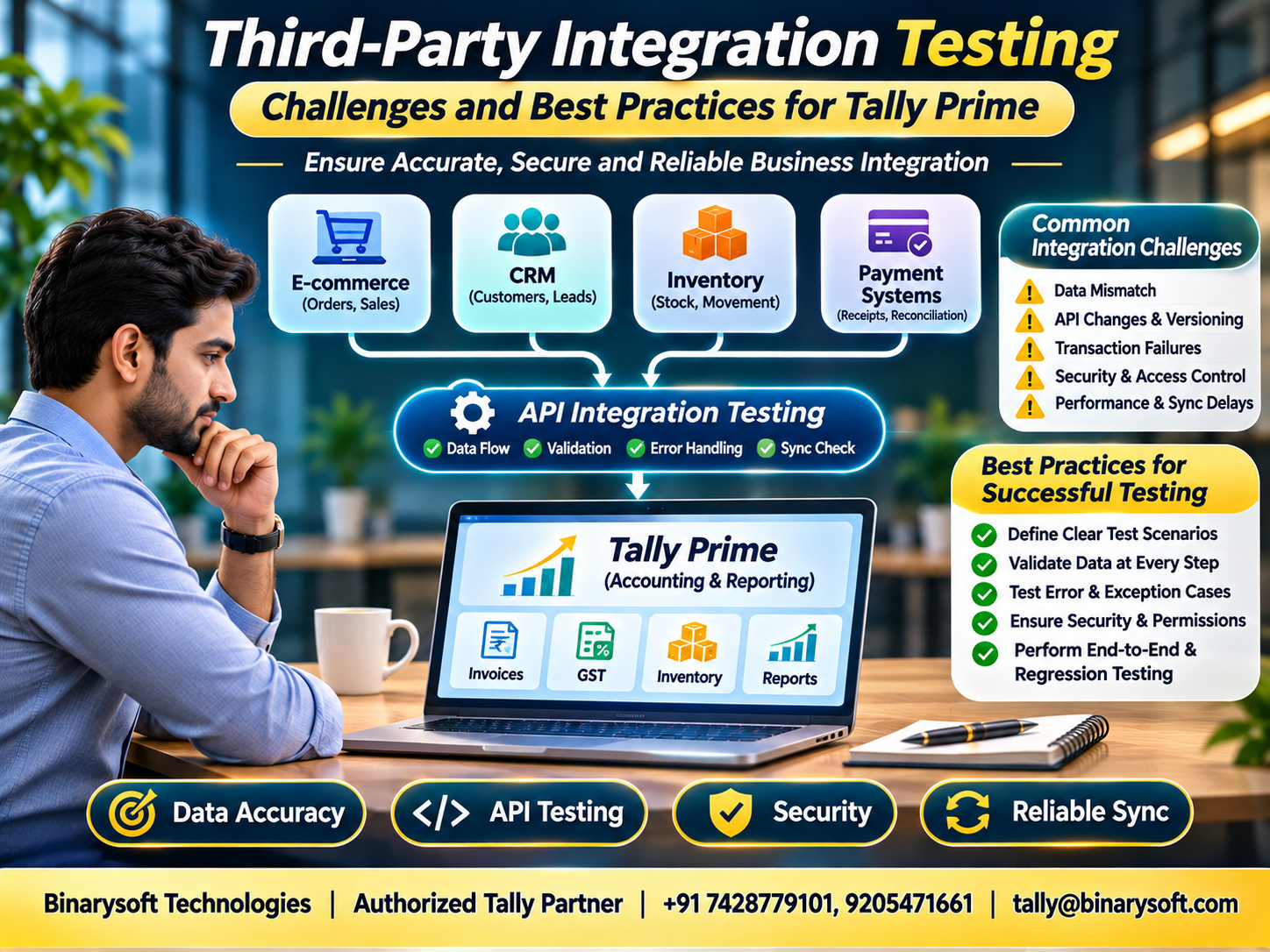
Introduction: Why Software Integration Testing Matters
Imagine a growing business receiving hundreds of online orders every day.
Its e-commerce platform manages customer purchases, an inventory application monitors stock, and accounting software records sales and payments.
Everything appears connected.
One morning, however, the finance manager discovers that several orders have been recorded twice. Some payments are missing, and inventory quantities no longer match actual stock.
The applications are working individually, but the information exchanged between them is incorrect.
This is where third-party integration testing becomes essential.
Third-party integration testing verifies whether independently developed software applications exchange data accurately, securely and consistently.
Modern businesses rely on multiple applications for accounting, customer relationships, inventory, payments and reporting.
When these applications communicate incorrectly, the consequences can include financial discrepancies, operational delays and dissatisfied customers.
For businesses using Tally Prime, properly tested integrations can support dependable data exchange with compatible external systems.
Understanding integration testing helps organizations protect financial accuracy while improving business efficiency.
1. What Is Third-Party Integration Testing?
Third-party integration testing is the process of verifying communication between an application and external software, services or platforms.
These external systems may be developed, maintained or hosted by different organizations.
For example, a business might connect:
-
An e-commerce website with accounting software.
-
A customer relationship management system with invoicing.
-
A warehouse application with inventory records.
-
A payment platform with receipt processing.
-
A reporting application with financial information.
Each integration involves exchanging information through supported interfaces.
Testing confirms that information is transferred correctly and that unexpected situations are handled appropriately.
It also verifies whether the applications continue functioning reliably when external services become unavailable.
The objective is not simply to establish connectivity.
Successful integration requires correct data, dependable processing and predictable error handling.
2. Why Businesses Need Reliable Software Integrations
As businesses grow, manual data entry becomes increasingly difficult.
Employees may need to copy customer details, invoice amounts and payment references between several applications.
This process consumes time and introduces opportunities for mistakes.
Integration can reduce repetitive work by allowing systems to exchange information automatically.
However, automation introduces new responsibilities.
An incorrect integration may reproduce the same error across hundreds of transactions.
Important Business Benefits
Reduced Manual Entry: Employees spend less time transferring information.
Improved Consistency: Connected systems can use common transaction references.
Faster Processing: Approved workflows can move information between applications.
Better Visibility: Management can compare information across departments.
Operational Scalability: Businesses can process growing transaction volumes more efficiently.
These benefits depend on integration quality, appropriate controls and regular monitoring.
3. Understanding How Third-Party Integrations Work
Software integrations commonly use application programming interfaces, or APIs.
An API defines how one application can request information or submit data to another.
For example, an online ordering system may send a completed sales transaction to an accounting application.
The receiving system must interpret the information and create the appropriate accounting record.
Other integration methods include structured file exchange, middleware and scheduled synchronization.
A typical integration workflow involves five stages.
Data Generation: The source application creates information.
Data Validation: Required fields and formats are checked.
Data Transformation: Information is converted into a compatible structure.
Data Transmission: The information is sent to the receiving application.
Confirmation: The receiving system reports whether processing succeeded.
Testing must verify every stage.
A successful network response does not necessarily mean that the correct accounting transaction was created.
4. Major Challenges in Third-Party Integration Testing
Different Data Structures
Applications may represent customers, products, taxes and transactions differently.
For example, one system may identify a customer using a numerical ID while another uses a ledger name.
Incorrect mapping can create duplicate records or failed transactions.
External Service Availability
Third-party services may experience maintenance periods, outages or network interruptions.
API Changes
External providers may introduce new fields, authentication requirements or interface versions.
Authentication Problems
Expired credentials and incorrect permissions can interrupt communication.
Inconsistent Error Messages
Some systems return detailed failure information, while others provide limited explanations.
Performance Limitations
Large transaction volumes can expose processing delays and resource constraints.
Incomplete Documentation
Missing technical details make it harder to understand expected integration behavior.
These challenges make structured testing necessary before production deployment.
5. Functional Testing: Does the Integration Work Correctly?
Functional testing verifies whether an integration performs its intended business operations.
Suppose an e-commerce platform sends a sales order to an accounting system.
The test should verify more than successful transmission.
It should confirm the customer, items, quantities, amounts and tax information.
Important test scenarios include valid transactions, missing fields, incorrect values and unsupported data.
Businesses should also test whether duplicate submissions create unwanted duplicate records.
For example, if a network interruption occurs after an invoice is created but before confirmation reaches the source system, the source may attempt to submit it again.
A dependable integration should have an appropriate strategy for identifying repeated requests.
This may involve unique transaction identifiers and duplicate-prevention logic.
Functional testing helps ensure that automation follows established business rules.
6. Data Integrity and Synchronization Testing
Data integrity means preserving the accuracy and consistency of information.
When systems exchange financial records, small discrepancies can become significant.
Consider a transaction containing five stock items.
If only four items reach the accounting system, the invoice may be incomplete.
Similarly, incorrect tax mapping can affect financial records.
Important Validation Areas
Customer Information: Verify that customer details match the intended records.
Transaction Amounts: Confirm totals, discounts and applicable taxes.
Inventory Quantities: Compare item quantities across systems.
Transaction References: Preserve identifiers needed for reconciliation.
Dates and Periods: Verify that dates are interpreted correctly.
Processing Status: Confirm whether transactions succeeded, failed or require review.
Testing should also cover synchronization delays and conflicting updates.
For financial integrations, reconciliation is essential.
7. An Emotional Story: When a Software Error Threatened a Family Business
Rohan managed a family-owned garment distribution company in Delhi.
His father had started the business with a small warehouse and a handful of customers.
Over the years, the company expanded into online sales.
Rohan introduced an e-commerce platform and connected it to the company's accounting workflow.
Initially, the automation appeared successful.
Orders arrived quickly, and employees spent less time entering transaction details.
Then, during a busy festive season, customers began reporting incorrect invoice amounts.
The accounting team discovered that certain discounts had not transferred correctly between applications.
Rohan felt overwhelmed.
He remembered how carefully his father had built relationships with customers.
Now, a technical mistake threatened the trust that had taken decades to establish.
Instead of blaming employees, Rohan gathered the accounting and technical teams.
They reviewed the integration, identified the mapping problem and tested corrected transactions.
The team also introduced reconciliation checks and a procedure for handling failed transfers.
Affected customers received corrected information and appropriate assistance.
One evening, Rohan told his father what had happened.
His father replied that technology could make work faster, but responsibility still belonged to the people running the business.
Rohan realized that reliable integration testing was not simply a technical requirement.
It was a way to protect customer trust, employee confidence and his family's years of hard work.
This fictional story illustrates the importance of validating business integrations before depending on them.
8. How Tally Prime Supports Third-Party Integrations
Tally Prime provides accounting, invoicing, inventory management and financial reporting capabilities.
It also offers supported mechanisms for exchanging information with compatible external applications.
Depending on the implementation, integrations may use XML-based data exchange, HTTP communication, Tally Definition Language customization and supported import or export features.
These capabilities can help organizations connect accounting workflows with other business systems.
E-Commerce Integration
A properly designed integration may transfer sales information from an online platform into Tally Prime.
Customer Management Integration
Approved customer information may be mapped between a CRM system and accounting ledgers.
Inventory Integration
Compatible warehouse systems may exchange stock-related information through a suitable integration.
Payment Reconciliation
External payment information may be processed and matched with accounting records through custom integration logic.
Business Reporting
Supported data exchange can help organizations develop reporting workflows involving external applications.
Each use case requires technical design, compatibility verification and appropriate testing.
Tally Prime should not be assumed to provide ready-made native connectors for every external platform.
9. Testing Tally Prime Integration Workflows
Businesses should evaluate integration behavior using representative accounting transactions.
Test Master Data
Verify customer ledgers, supplier details, stock items and other required masters.
Test Voucher Creation
Confirm that incoming transactions produce the intended voucher types and values.
Test Tax Calculations
Review taxable amounts, tax classifications and applicable GST treatment.
Test Duplicate Prevention
Ensure repeated requests do not unintentionally create duplicate accounting entries.
Test Invalid Transactions
Check how the integration handles missing ledgers, incorrect item names and unsupported values.
Test Transaction Updates
Verify the intended behavior when an existing transaction changes.
Test Reconciliation
Compare source-system records with the corresponding Tally Prime information.
A successful test should establish both technical correctness and accounting accuracy.
10. Case Study One: E-Commerce and Accounting Integration
Illustrative Case Study
Business Background
An electronics retailer sells products through an online marketplace and maintains accounting records in Tally Prime.
The Challenge
Employees manually enter marketplace transactions into accounting software.
The business wants to automate approved transaction transfers.
The Integration Approach
A technical team designs an integration that maps marketplace orders to the appropriate accounting information.
Before deployment, the team tests customer identification, item mapping, discounts, taxes and transaction references.
Duplicate submissions and interrupted transfers are also tested.
Expected Outcome
The business can reduce repetitive entry while maintaining procedures for identifying discrepancies.
Business Lesson
Automating transactions is useful only when the integration preserves financial accuracy and supports reconciliation.
11. Case Study Two: Connecting Inventory and Accounting Systems
Illustrative Case Study
Business Background
A manufacturing company uses a warehouse management application alongside Tally Prime.
The Challenge
Stock information is maintained across separate systems.
Differences in item codes and units create occasional reconciliation problems.
The Integration Approach
The company establishes a common item-mapping process.
Its technical team tests stock quantities, units of measurement, transaction dates and rejected records.
The implementation includes monitoring and exception-handling procedures.
Expected Outcome
The organization can improve consistency between approved inventory workflows and accounting records.
Business Lesson
Reliable integration depends on consistent master data, clear ownership and regular reconciliation.
Both case studies are illustrative and do not represent verified customer results.
12. Security Testing for Third-Party Integrations
Integrations may exchange confidential customer and financial information.
Security testing is therefore essential.
Authentication
Verify that only approved applications and users can access integration interfaces.
Authorization
Ensure that credentials permit only the operations required.
Secure Communication
Use appropriate transport security and protect sensitive information in transit.
Credential Management
Store passwords, tokens and other secrets securely.
Input Validation
Reject malformed or unauthorized requests.
Logging
Record relevant technical events without unnecessarily exposing confidential information.
Access Review
Periodically review permissions granted to external systems.
Businesses should also evaluate the security practices of integration providers.
A connected application can introduce risks even when the accounting software itself is properly configured.
13. Performance and Reliability Testing
An integration may work correctly with ten transactions but struggle with several thousand.
Performance testing evaluates behavior under expected and demanding workloads.
Important scenarios include:
Normal Load: Typical daily transaction volumes.
Peak Load: High-volume periods such as seasonal sales.
Large Transactions: Records containing numerous items or details.
Concurrent Requests: Multiple transactions submitted simultaneously.
Network Interruptions: Temporary communication failures.
Recovery Testing: Resuming operations after a disruption.
Testing should measure processing time, error frequency and resource usage.
Businesses should also establish appropriate limits for transaction retries.
Repeated requests without proper controls can create duplicate records or overload receiving systems.
14. Why Negative Testing Is Important
Negative testing examines situations where information or conditions are incorrect.
Many integration failures occur outside normal operating scenarios.
For example, what happens if a customer ledger does not exist?
What if the external system sends an invalid date?
What if a transaction contains an unsupported tax classification?
What if the receiving application becomes unavailable halfway through processing?
These scenarios should be tested deliberately.
A dependable integration should reject invalid information safely and provide enough diagnostic detail for authorized personnel to investigate.
It should also avoid silently accepting incomplete financial transactions.
Negative testing helps businesses prepare for situations that may otherwise emerge unexpectedly during production operations.
15. Automation and Continuous Integration Testing
Manual testing is useful for exploratory checks and complex accounting scenarios.
However, repeatedly testing the same integration workflows can consume significant time.
Automated testing can help verify predictable behavior.
A suitable test suite may check data mapping, validation rules, expected responses and duplicate-prevention logic.
Automated tests can run after changes to integration code.
They can also help identify compatibility problems introduced by external interface updates.
However, automation does not eliminate the need for accounting review.
Financial integrations should still undergo reconciliation and representative end-to-end testing.
A balanced strategy combines automated technical checks with informed business validation.
16. Best Practices for Successful Integration Testing
Organizations should establish a repeatable testing process.
Define Clear Requirements
Document the purpose, data fields and expected outcomes of each integration.
Maintain Representative Test Data
Use realistic but appropriately protected sample records.
Separate Testing from Production
Avoid experimenting directly with live financial information.
Validate Both Systems
Check source information and receiving-system results.
Test Failure Scenarios
Include outages, invalid values and repeated requests.
Maintain Transaction References
Use suitable identifiers to support reconciliation and investigation.
Document Changes
Record integration versions, configuration changes and known limitations.
Monitor Production Operations
Track failures, delays and unusual transaction patterns.
Establish Recovery Procedures
Define how failed or incomplete transfers should be investigated and corrected.
These practices help organizations maintain dependable integrations as business requirements evolve.
17. Common Mistakes Businesses Should Avoid
A frequent mistake is assuming that a successful API response proves that accounting information is correct.
Another is testing only valid transactions.
Businesses may also overlook duplicate requests, inconsistent master data and differences between test and production environments.
Insufficient logging makes failures difficult to investigate.
Weak authentication can expose confidential business information.
Finally, organizations sometimes deploy integrations without assigning responsibility for monitoring and maintenance.
Avoiding these mistakes requires cooperation between developers, accountants, operations teams and management.
Technical success and business correctness must be evaluated together.
18. The Future of Business Software Integration Testing
Business applications are becoming increasingly connected.
Organizations use multiple platforms to manage sales, customers, inventory, payments and reporting.
This creates opportunities for automation but also increases the importance of dependable integration testing.
Automated validation, improved monitoring and better error detection can help organizations identify problems earlier.
Artificial intelligence may assist with generating test scenarios and analyzing technical logs.
However, financial accuracy still requires clear business rules, reliable reconciliation and appropriate human oversight.
For Tally Prime users, carefully designed integrations can support efficient accounting workflows while preserving the integrity of business records.
The objective is not to connect every application.
It is to create connections that are genuinely useful, secure and dependable.
Conclusion
Third-party integration testing plays an essential role in modern business software environments.
It helps organizations verify that connected applications exchange information accurately, handle unexpected situations and protect sensitive data.
Important testing areas include functionality, data integrity, security, performance, error handling and reconciliation.
For businesses using Tally Prime, supported integration mechanisms can help connect accounting workflows with compatible external systems.
However, successful implementation requires careful design, technical validation and accounting expertise.
Businesses should test integrations before deployment and continue monitoring them as software and operational requirements change.
Reliable integration is not measured only by how quickly information moves between applications. It is measured by whether businesses can trust that information when making important decisions.
Powered by Binarysoft Technologies
Authorized Tally Partner
Binarysoft Technologies helps businesses improve accounting efficiency through Tally Prime implementation, customization, technical support and suitable integration solutions.
Our services support organizations seeking dependable accounting workflows, accurate financial records and improved business operations.
Location:
1626/33, 1st Floor, Naiwalan, Karol Bagh, New Delhi – 110005, INDIA
Contact Us:
+91 7428779101, 9205471661
Email:
tally@binarysoft.com
Business Hours:
10:00 AM – 6:00 PM, Monday to Friday
Frequently Asked Questions
How can businesses prevent duplicate accounting transactions?
Integrations should use suitable transaction identifiers, duplicate checks, controlled retries and reconciliation procedures.
What is the best approach to reliable Tally Prime integration?
Define clear requirements, use supported interfaces, validate accounting data, test failure scenarios and monitor production operations.
How can businesses prevent duplicate accounting transactions?
Integrations should use suitable transaction identifiers, duplicate checks, controlled retries and reconciliation procedures.
What is data synchronization testing?
It verifies that information transferred between systems remains accurate, consistent and appropriately updated.
CA. Lakshit Chordia works with MSMEs on accounting automation, tax compliance, and financial reporting. His approach focuses on practical solutions that improve accounting accuracy and provide business owners with clearer financial information.









