Call CA Tally HelpDesk
+91 9205471661,
7428779101
Introduction: Why Inventory Management Can Make or Break Your Business
Imagine receiving a large customer order, only to discover that the required products are unavailable.
Or opening your warehouse and finding thousands of rupees worth of goods that have remained unsold for months.
For many Indian businesses, these situations are not unusual.
Inventory is one of the largest investments for retailers, wholesalers, distributors and manufacturers. Yet many organizations struggle to maintain accurate stock records, monitor product movements and make timely purchasing decisions.
Poor inventory management can result in stock shortages, excess purchases, damaged goods, delayed deliveries and unnecessary financial pressure.
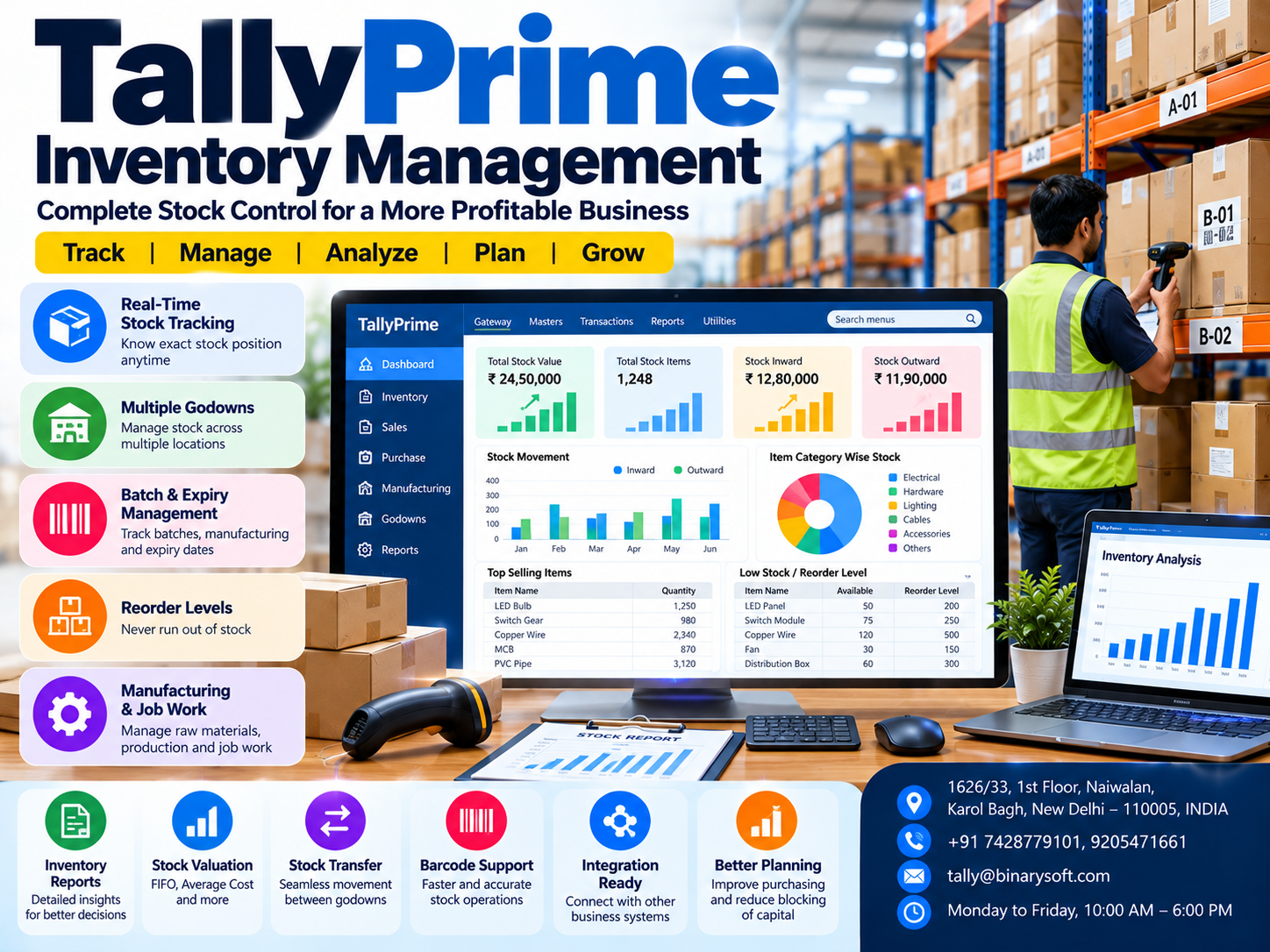
TallyPrime Inventory Management helps businesses organize stock records, monitor inventory movements, manage multiple warehouses, track batches and evaluate inventory costs through an integrated accounting system.
From small retail shops to growing manufacturing companies, TallyPrime provides tools for maintaining accurate inventory information and improving operational visibility.
Its features include stock groups, categories, godowns, flexible units of measurement, reorder levels, stock valuation, manufacturing journals and inventory analysis.
This guide explains how these capabilities work, how businesses can use them effectively and why organized inventory management is essential for sustainable growth in 2026.
A Business Owner's Story: The ₹5 Lakh Stock Mistake That Changed Everything
At 8:30 PM, Ramesh was sitting alone inside his wholesale electrical goods warehouse in Delhi.
His business had been operating for twelve years.
He supplied switches, cables, lighting products and electrical accessories to retailers across Delhi NCR.
Sales were increasing, but something was wrong.
Despite generating substantial revenue, the company frequently struggled with cash flow.
One afternoon, a customer placed an urgent order for electrical cables worth ₹2 lakh.
Ramesh immediately accepted the order because his stock register showed sufficient inventory.
However, when the warehouse team began preparing the shipment, they discovered that the required cable was unavailable.
The register had not been updated after several earlier deliveries.
The customer cancelled the order.
Later that week, Ramesh discovered another problem.
A large quantity of outdated electrical accessories had remained in storage for months.
The company had continued purchasing similar products without checking existing inventory.
When Ramesh reviewed the warehouse, he estimated that nearly ₹5 lakh was tied up in slow-moving and unnecessary stock.
He felt helpless.
His employees were working hard, but the business lacked a reliable inventory management system.
That evening, his son asked why he looked so worried.
Ramesh replied, "We have products, customers and sales, but I don't know where our money is going."
The next month, he introduced TallyPrime inventory management.
His team created stock groups, organized product records and configured godowns.
Purchase and sales transactions were recorded consistently.
Management began reviewing Stock Summary, Movement Analysis and reorder reports.
Gradually, the business developed better visibility into stock availability and purchasing requirements.
Ramesh could identify slow-moving items before placing additional orders.
He could also review warehouse balances before confirming customer deliveries.
The business did not become successful overnight.
But the owner finally understood where inventory-related problems were occurring.
The lesson was simple: inventory is not just stock stored in a warehouse. It is business capital that must be managed carefully.
This fictional story illustrates common inventory challenges faced by growing businesses.
What Is Inventory Management in TallyPrime?
Inventory management is the process of recording, monitoring and controlling goods purchased, stored, transferred, manufactured and sold by a business.
TallyPrime provides inventory management features that connect stock transactions with accounting records.
Businesses can maintain product information, track quantities, monitor warehouse movements and review inventory reports.
Important Inventory Management Capabilities
-
Stock item creation and classification
-
Stock groups and categories
-
Multiple godown management
-
Flexible units of measurement
-
Batch-wise inventory tracking
-
Manufacturing and expiry date management
-
Stock transfers and adjustments
-
Reorder level management
-
Inventory valuation
-
Manufacturing journals
-
Bill of Materials
-
Job work management
-
Inventory reports and movement analysis
These capabilities help businesses establish more organized inventory procedures.
1. Stock Item Management: Build an Organized Product Database
Every inventory system begins with accurate product information.
TallyPrime allows businesses to create individual stock items representing products purchased, sold or manufactured.
A stock item may include relevant information such as its name, unit of measurement, opening balance and inventory classification.
Practical Example
An electrical distributor sells:
LED bulbs, switches, copper cables, distribution boards and electrical accessories.
Instead of maintaining these products in spreadsheets, the company creates separate stock items in TallyPrime.
Each item can be assigned to an appropriate stock group.
This helps employees select the correct product while recording transactions.
Benefits
Proper stock item management reduces confusion between similar products.
It also supports consistent inventory reporting and helps businesses monitor individual product quantities.
2. Stock Groups and Categories: Organize Thousands of Products
Businesses handling large product ranges need a structured classification system.
TallyPrime supports stock groups and stock categories.
Stock Groups
Stock groups organize items according to a common classification.
For example:
Electrical Products may contain Lighting, Cables, Switches and Accessories.
Stock Categories
Stock categories provide an additional way to classify products according to shared characteristics.
For example, a clothing distributor may classify products by brand, size or other relevant attributes.
Why Classification Matters
Organized classifications make inventory reports easier to understand.
Management can review stock information by product group or category rather than examining every individual item.
This becomes especially valuable when a business handles hundreds or thousands of products.
3. Multiple Godown and Warehouse Management
Many businesses store inventory at more than one location.
A distributor may operate a central warehouse and several branch stores.
A manufacturer may maintain separate locations for raw materials, work-in-progress and finished goods.
TallyPrime supports multiple godowns or inventory locations.
How Godown Management Works
Businesses can create separate locations and allocate stock to the appropriate godown.
Inventory transactions can record movements between these locations.
Practical Example
A wholesale distributor operates three warehouses:
Delhi Warehouse, Noida Warehouse and Gurugram Warehouse.
The business maintains stock information separately for each location.
When products are transferred from Delhi to Noida, the movement can be recorded using a Stock Journal.
The company can then review godown-wise stock availability.
Benefits
Godown management helps businesses identify where products are stored.
It supports better stock allocation, warehouse coordination and order fulfilment.
Accurate location-wise reporting depends on recording transactions against the correct godown.
4. Flexible Units of Measurement
Businesses purchase and sell products using different units.
A grocery distributor may purchase rice in kilograms.
A cable distributor may purchase material in metres.
A beverage distributor may maintain products in bottles, cartons or cases.
TallyPrime supports simple, compound and alternate units of measurement.
Practical Example
A distributor purchases products in cartons but sells them in individual pieces.
Appropriate unit configuration can help maintain consistent inventory quantities.
Business Benefits
Flexible units reduce the need for repeated manual conversions.
They also help businesses manage products sold in different packaging quantities.
The conversion rules must be configured correctly to avoid quantity discrepancies.
5. Batch-Wise Inventory Management
Batch tracking is especially important for businesses dealing with products that have different manufacturing dates, expiry dates or purchase costs.
TallyPrime allows businesses to maintain inventory using batches.
Industries That Benefit
Pharmaceutical distributors, food suppliers, cosmetics businesses and manufacturers frequently require batch-wise inventory records.
Practical Example
A pharmaceutical distributor purchases 500 units of a product.
The purchase contains two batches with different expiry dates.
By recording the appropriate batch information, the business can review available quantities separately.
Employees can identify products approaching expiry and prioritize them according to company policy.
Benefits
Batch tracking improves product traceability.
It also helps businesses investigate returned, damaged or expired products.
For regulated products, businesses must additionally follow applicable legal and industry requirements.
6. Manufacturing and Expiry Date Management
Products with limited shelf life require careful monitoring.
Expired goods can result in financial losses and customer dissatisfaction.
TallyPrime supports recording manufacturing and expiry dates for applicable batch-managed items.
Practical Applications
A food distributor can maintain batch information for packaged products.
A cosmetics business can track stock according to relevant manufacturing and expiry dates.
A pharmaceutical wholesaler can review batch-wise inventory details.
Why It Matters
Businesses can use batch reports and ageing information to identify products requiring attention.
However, software reports should be supported by physical verification and appropriate stock rotation procedures.
7. Reorder Level Management: Avoid Stock Shortages
Stock shortages can result in lost sales.
Excessive stock can unnecessarily block working capital.
TallyPrime provides reorder level management to help businesses plan replenishment.
What Is a Reorder Level?
A reorder level is a stock quantity at which a business should consider purchasing additional inventory.
Practical Example
An electrical retailer sells approximately 100 LED bulbs every week.
The owner determines that stock should be replenished when available quantities fall below a selected level.
The reorder settings can be configured according to the business's requirements.
TallyPrime provides reorder-related reports to help identify items requiring attention.
Benefits
Reorder planning helps reduce stock shortages and supports more disciplined purchasing.
However, reorder levels should consider supplier lead times, demand fluctuations and available working capital.
8. Stock Valuation: Understand the Value of Your Inventory
Inventory valuation affects financial reporting and profitability analysis.
TallyPrime supports multiple stock valuation methods.
Depending on the configuration, available methods include Average Cost, FIFO, LIFO and other supported approaches.
Why Stock Valuation Matters
Suppose a business purchases the same product at different prices during the year.
The selected valuation method influences the reported inventory value and cost calculations.
Practical Example
A distributor purchases 100 units at ₹500 each.
Later, another 100 units are purchased at ₹550 each.
The accounting treatment of remaining inventory depends on the selected valuation method and transaction records.
Important Consideration
The valuation method used for statutory financial reporting must comply with applicable accounting standards and regulations.
A method available within software is not automatically permissible for every reporting purpose.
9. Manufacturing Inventory Management
Manufacturing businesses must track raw materials, production activities and finished goods.
TallyPrime provides inventory features that support manufacturing-related transactions.
Raw Material Tracking
Businesses can maintain stock records for materials used in production.
Manufacturing Journal
Manufacturing journals help record consumption of components and production of finished goods.
By-Products and Scrap
Relevant manufacturing transactions can account for by-products and scrap.
Finished Goods
Manufactured products can be recorded as inventory.
Benefits
Manufacturing inventory records help businesses monitor material movements and evaluate production-related information.
Accurate reporting requires consistent transaction recording and suitable inventory configuration.
10. Bill of Materials: Improve Production Planning
A Bill of Materials, commonly called BoM, defines the components and quantities required to manufacture a product.
TallyPrime supports Bills of Materials for relevant manufacturing workflows.
Practical Example
A furniture manufacturer produces office desks.
Each desk requires wooden panels, metal fittings, screws and other components.
A BoM can define the standard quantities required for production.
Business Benefits
The manufacturer can use this information to organize material requirements and record manufacturing transactions.
BoM records also help establish consistency in production-related inventory calculations.
Actual material consumption may differ from standard quantities because of wastage, defects or production variations.
11. Job Work Management
Many manufacturers outsource selected production activities.
For example, a garment manufacturer may send fabric to another business for stitching.
A metal components manufacturer may outsource polishing or coating.
TallyPrime supports relevant job work inventory transactions.
Principal Manufacturer
A business sending materials for processing can maintain records of material movements.
Job Worker
A business receiving materials for processing can maintain appropriate inventory information.
Benefits
Job work records help businesses monitor materials sent, received and consumed.
They also support better visibility into outstanding material movements.
Applicable GST and statutory requirements should be reviewed separately.
12. Stock Transfers and Physical Stock Verification
Stock movement does not happen only through purchases and sales.
Goods may be transferred between warehouses, returned by customers, damaged during transportation or adjusted after physical verification.
TallyPrime provides inventory vouchers for recording these movements.
Stock Journal
A Stock Journal can be used to record stock transfers between godowns and other supported inventory movements.
Physical Stock Voucher
A Physical Stock voucher helps businesses record differences identified during physical stock verification.
Practical Example
A warehouse register shows 250 units of a product, but physical verification identifies only 245 units.
The business should investigate the difference and determine whether it resulted from damage, missing transactions or another reason.
After verification, an appropriate adjustment can be recorded.
Business Benefits
Regular physical verification helps maintain accurate inventory information and identify discrepancies before they become larger financial problems.
13. Inventory Reports for Better Business Decisions
Inventory reports help business owners understand what products are available, which items are selling and where working capital is invested.
TallyPrime provides several useful inventory reports.
Stock Summary
Displays stock quantities, rates and values.
Movement Analysis
Helps analyze inward and outward stock movements.
Stock Ageing Analysis
Provides information useful for identifying stock that has remained in inventory for extended periods.
Godown Summary
Shows inventory information across different storage locations.
Reorder Status
Helps identify products requiring replenishment according to configured reorder levels.
Stock Category Summary
Provides inventory information based on product classifications.
Why Inventory Reports Matter
A business may have ₹20 lakh invested in inventory but still experience shortages of popular products.
Inventory reports help identify such imbalances.
Management can use the information to improve purchasing, stock allocation and working capital planning.
14. Inventory Management and Cash Flow
Inventory directly affects business cash flow.
Money invested in unsold products remains tied up until those products are sold and payment is collected.
Excessive inventory can increase storage costs, insurance expenses and the risk of damage or obsolescence.
Insufficient inventory can cause lost sales.
TallyPrime helps businesses review stock balances, inventory movements and product costs.
These reports can support purchasing decisions and reduce unnecessary stock accumulation.
Practical Example
A distributor discovers that a particular product has remained unsold for several months.
Instead of purchasing more of the same product, management can review demand and consider appropriate sales strategies.
This helps protect working capital.
Case Study 1: Electrical Distributor Improves Inventory Visibility
Illustrative case study.
Business Background
A Delhi-based electrical goods distributor supplied products to retailers and contractors.
The company maintained inventory records in spreadsheets.
Challenges
Employees frequently encountered differences between recorded and actual stock.
Some products were overstocked, while popular items became unavailable.
Management struggled to identify slow-moving inventory.
TallyPrime Implementation
The company introduced TallyPrime inventory management.
Stock groups and stock items were created.
Separate godowns were configured for different storage locations.
Reorder levels were established for selected products.
Employees began recording stock movements consistently.
Results
Management gained better visibility into inventory quantities and warehouse balances.
Purchasing decisions became more organized.
The company could identify products requiring replenishment and investigate slow-moving stock.
Key Learning
Accurate inventory records help businesses improve purchasing decisions and reduce avoidable stock-related problems.
Case Study 2: Food Distributor Improves Batch and Expiry Management
Illustrative case study.
Business Background
A food distribution company supplied packaged products to supermarkets and local retailers.
The business handled products with different manufacturing and expiry dates.
Challenges
Warehouse employees sometimes struggled to identify which batches should be dispatched first.
The company also lacked a convenient method for reviewing stock approaching expiry.
TallyPrime Implementation
The distributor configured batch-wise inventory tracking.
Relevant manufacturing and expiry dates were recorded.
Employees were trained to select the correct batches during transactions.
Management began reviewing batch and inventory reports regularly.
Results
The company developed better visibility into batch-wise stock quantities.
Warehouse staff could identify products approaching expiry more easily.
Management improved its stock rotation procedures.
Key Learning
Batch tracking can help businesses reduce avoidable expiry-related losses and improve product traceability.
15. How to Start Inventory Management in TallyPrime
Businesses can establish inventory management through a structured setup process.
Step 1: Create or select your company. Open the appropriate company in TallyPrime and verify the financial year and basic configuration.
Step 2: Configure inventory features. Press F11 to review relevant company features, including batch and inventory options where applicable.
Step 3: Create stock groups. Use Alt+G (Go To), select Create Master and create suitable Stock Groups.
Step 4: Create units of measurement. Define units such as Nos, Kg, Mtr or Box according to your products.
Step 5: Create stock items. Use Alt+G → Create Master → Stock Item. Enter the item name, group, unit and applicable opening balance.
Step 6: Configure godowns. Create separate inventory locations if your business stores products in multiple warehouses.
Step 7: Enable batch tracking where required. Configure batch information for products that need manufacturing-date or expiry-date tracking.
Step 8: Record purchases. Enter purchase transactions using the appropriate voucher and inventory details.
Step 9: Record sales. Create sales vouchers and select the correct stock items, quantities and locations.
Step 10: Review inventory reports. Use Alt+G to access Stock Summary, Movement Analysis, Godown Summary and other relevant reports.
Menu options may vary according to the installed release and company configuration.
16. TallyPrime Inventory Management on Cloud
Businesses operating from different locations may require remote access to accounting and inventory information.
TallyPrime can be deployed in a suitable cloud-hosted environment.
This can allow authorized employees to access a centralized accounting system from supported locations.
Potential Benefits
Cloud hosting can support remote working, shared access and centralized inventory information.
A business owner travelling outside the office may be able to review inventory reports through the hosted environment.
Employees at different locations can work with shared records according to their permissions.
However, cloud hosting is a separate infrastructure service. Performance, availability and security depend on the hosting arrangement and internet connectivity.
17. Common Inventory Management Mistakes to Avoid
Even powerful inventory software requires accurate data and consistent procedures.
Businesses should avoid creating duplicate stock items, entering incorrect units, ignoring warehouse transfers and delaying purchase or sales entries.
Other common problems include incorrect opening balances, inconsistent batch information and failure to conduct physical stock verification.
A business should establish clear responsibilities for recording transactions and reviewing reports.
Inventory records should be reconciled with actual stock periodically.
18. Why Choose Binarysoft Technologies for Inventory Management?
Binarysoft Technologies is an Authorized Tally Partner providing assistance with TallyPrime licensing and related business requirements.
Businesses planning to introduce inventory management can seek guidance on software selection, configuration and implementation needs.
Whether your organization operates in retail, wholesale distribution, manufacturing or professional services, an appropriate inventory structure can improve operational visibility.
For businesses considering cloud-based accounting, hosting and remote-access requirements can also be evaluated separately.
The objective should be to establish an inventory system that supports accurate records, efficient operations and long-term business growth.
Conclusion: Transform Inventory into a Source of Business Strength
Inventory management is not simply about counting products.
It is about protecting working capital, fulfilling customer orders, reducing unnecessary purchases and understanding product movement.
Poor inventory control can create financial losses even when sales are increasing.
TallyPrime provides tools for managing stock items, product categories, godowns, batches, reorder levels, manufacturing transactions and inventory valuation.
Its reporting capabilities help businesses review stock availability, identify slow-moving products and improve purchasing decisions.
Manufacturers can use Bills of Materials and manufacturing journals to maintain production-related inventory information.
Distributors can track stock across warehouses, while businesses handling perishable goods can maintain batch and expiry details.
However, software alone cannot guarantee inventory accuracy.
Successful inventory management requires proper configuration, timely transaction entry, physical verification and regular management review.
With TallyPrime, businesses can move from reactive stock handling to more organized, informed and efficient inventory management.
Contact Binarysoft Technologies
Powered by Binarysoft Technologies
Authorized Tally Partner
Location: 1626/33, 1st Floor, Naiwalan, Karol Bagh, New Delhi – 110005, INDIA
Contact Us: +91 7428779101, 9205471661
Email: tally@binarysoft.com
Business Hours: Monday to Friday, 10:00 AM – 6:00 PM
Frequently Asked Questions
Is TallyPrime suitable for wholesale distributors?
Yes. TallyPrime provides inventory, warehouse and accounting features useful for distribution businesses.
What stock valuation methods are available?
TallyPrime supports several valuation methods, including Average Cost, FIFO and other available methods. The selected approach should comply with applicable accounting requirements.
Does TallyPrime support manufacturing inventory?
Yes. TallyPrime supports manufacturing-related inventory transactions, including Manufacturing Journals and Bills of Materials.
What is inventory management in TallyPrime?
Inventory management in TallyPrime helps businesses record stock transactions, monitor quantities, manage warehouses and analyze inventory information.
CA. Raghav Mundhra focuses on business accounting, GST reporting, and financial reconciliations. He works with organizations to strengthen accounting processes and maintain reliable financial information for compliance and decision-making.









