Call CA Tally HelpDesk
+91 9205471661,
7428779101
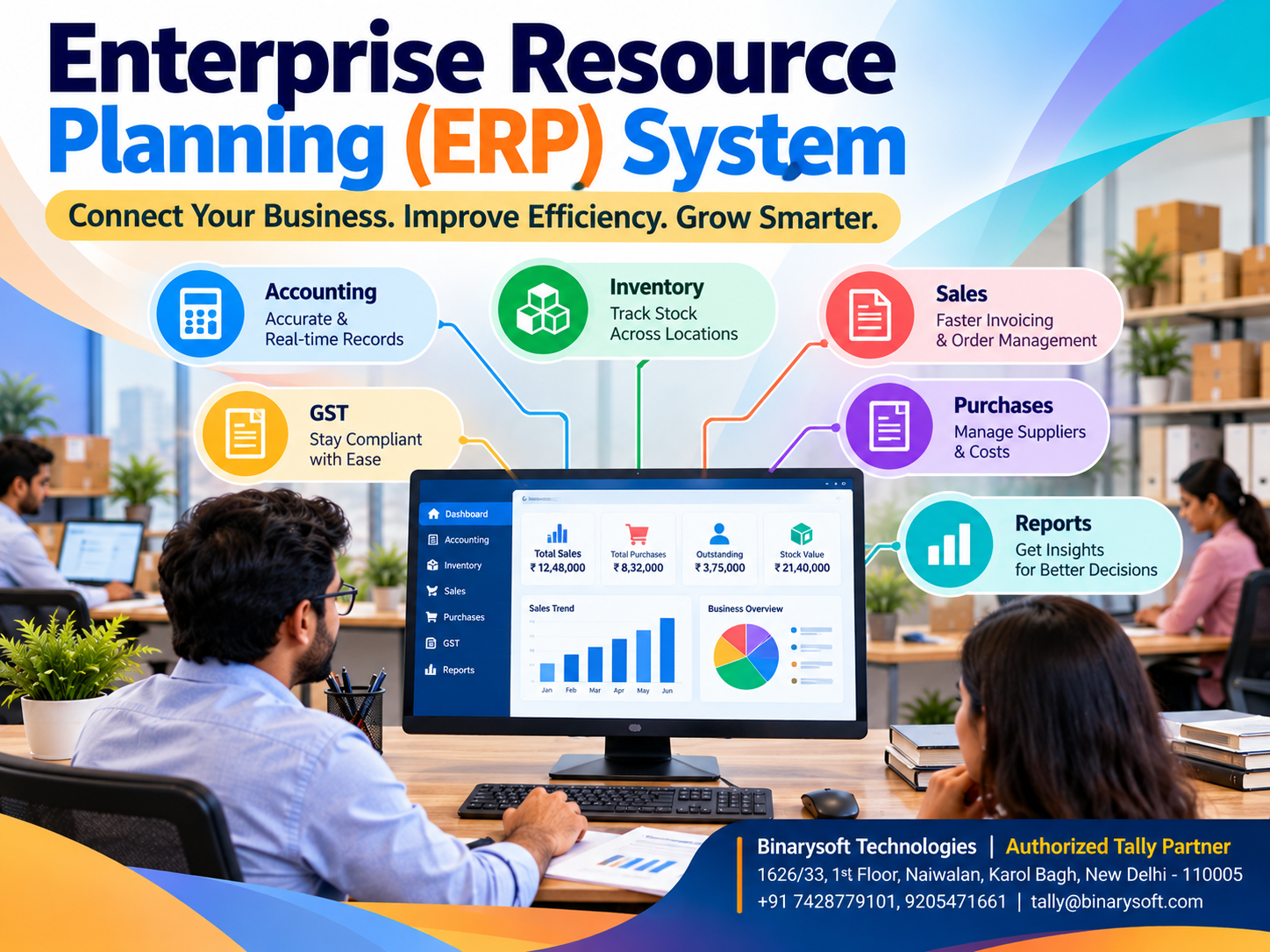
What Is an Enterprise Resource Planning (ERP) System? Features, Benefits, Types and How It Helps Businesses Grow
Introduction: Why Modern Businesses Cannot Depend on Disconnected Systems
Imagine running a growing business where every department maintains separate records.
Your sales team prepares invoices using one application. Your accountant records financial transactions in another system. Your warehouse staff updates stock quantities in spreadsheets, while your purchase manager tracks suppliers through handwritten registers.
Everything appears manageable until an important customer requests an urgent delivery.
The sales department confirms the order, but the warehouse discovers that the required products are unavailable.
Meanwhile, the accounts department identifies several overdue customer payments that nobody followed up on.
These situations create financial losses, customer dissatisfaction and unnecessary pressure on employees.
For thousands of Indian small and medium businesses, disconnected information is one of the biggest obstacles to sustainable growth.
This is where an Enterprise Resource Planning (ERP) system becomes important.
ERP software brings essential business activities into a coordinated environment, helping organizations maintain accurate records, improve operational efficiency and make informed decisions.
From accounting and inventory management to sales, purchases, taxation and financial reporting, ERP systems can transform how businesses operate.
For businesses seeking integrated accounting and inventory capabilities, Tally Prime provides practical tools that support daily financial and operational management.
Understanding ERP systems is the first step toward building a more organized, profitable and scalable business.
A Business Owner's Story: The Day Everything Went Wrong
Amit owned a wholesale electrical equipment business in Bhagirath Palace, Delhi.
His father had established the business more than twenty years earlier.
What began as a small trading shop gradually expanded into a distribution operation supplying electrical products to retailers and contractors across North India.
Amit was proud of the business.
He employed twelve people, maintained thousands of stock items and handled substantial monthly transactions.
However, behind the growing sales figures, the company faced serious operational problems.
Inventory records were maintained in Excel.
Customer payments were tracked through separate registers.
Purchase orders were communicated through telephone calls and messaging applications.
Accounting information was updated at the end of each day.
One morning, a major customer placed an urgent order for electrical components.
The sales team confirmed availability based on an outdated spreadsheet.
When warehouse employees began preparing the shipment, they discovered that nearly half the required products were unavailable.
The customer cancelled the order.
That evening, Amit sat in his office reviewing pending payments, supplier balances and inventory records.
He realized that his business was growing, but his management processes had not evolved.
He was spending more time correcting mistakes than planning expansion.
The situation became a turning point.
Amit decided to organize his business information through integrated accounting and inventory software.
After reviewing existing records, correcting stock balances and training employees, his company began recording transactions through standardized processes.
Sales, purchases, inventory and accounting information became easier to review.
The business did not become perfect overnight, but employees gained greater confidence in their records.
Amit could finally spend more time developing customer relationships and planning future growth.
This illustrative story highlights an important lesson:
Business growth requires more than increasing sales. It requires accurate information, financial discipline and coordinated operations.
What Is an Enterprise Resource Planning System?
Enterprise Resource Planning, commonly called ERP, is a software-based approach to managing and integrating important business processes.
An ERP system allows organizations to coordinate activities such as:
Rather than maintaining separate records across departments, an ERP system aims to provide a consistent flow of information.
For example, when a business records a sale, an appropriately configured ERP system can update related accounting records, inventory balances and customer receivables.
This reduces duplicate data entry and improves operational visibility.
However, ERP systems differ in scope. Some offer extensive enterprise-wide modules, while others concentrate on accounting, inventory and commercial transactions.
The right solution depends on the organization's size, industry and operational requirements.
How Does an ERP System Work?
An ERP system connects business processes through shared data and integrated workflows.
Consider a wholesale distributor receiving an order for 100 products.
Step 1: Customer Order
The sales department records the customer order.
Relevant product details, quantities and prices are entered into the system.
Step 2: Inventory Verification
Employees check the available inventory before confirming the order.
This helps reduce the possibility of accepting orders for unavailable products.
Step 3: Sales Invoice
Once the transaction is ready for billing, the sales invoice is prepared.
Applicable taxes and commercial details are recorded.
Step 4: Accounting Update
The transaction updates the appropriate financial records according to the system configuration.
Customer receivables and sales accounts reflect the recorded transaction.
Step 5: Inventory Update
The corresponding stock movement is recorded.
This helps maintain accurate inventory balances.
Step 6: Management Reporting
Business owners can review sales, receivables, inventory and financial reports.
The integrated workflow reduces the need to repeatedly transfer information between separate systems.
Key Features of an ERP System
1. Financial Accounting Management
Financial accounting is a fundamental component of most ERP systems.
Businesses need accurate records of income, expenses, assets, liabilities and financial transactions.
Accounting capabilities may include ledger management, journal entries, accounts receivable, accounts payable, financial statements and bank reconciliation.
Tally Prime provides accounting tools that help businesses maintain financial records and review their performance.
2. Inventory Management
Inventory management helps organizations track goods throughout purchasing, storage and sales activities.
Important capabilities include stock item management, inventory classification, stock valuation, godown tracking and stock movement reporting.
Tally Prime supports inventory records that can be integrated with accounting transactions.
This is particularly useful for wholesalers, distributors, retailers and manufacturers.
3. Sales and Purchase Management
ERP software helps businesses organize sales and procurement activities.
Depending on the product, users can manage quotations, orders, invoices, supplier transactions and related records.
Tally Prime supports various sales and purchase workflows, subject to configuration.
These capabilities improve transaction visibility and help maintain organized commercial records.
4. GST and Tax Management
Tax compliance is an important requirement for Indian businesses.
ERP software can assist organizations with maintaining tax-related records and preparing reports.
Tally Prime supports GST invoicing, tax accounting and relevant compliance reporting features.
Businesses must still verify applicable tax rates, classifications and statutory requirements.
5. Customer and Supplier Management
Businesses regularly interact with customers and suppliers.
Maintaining accurate account balances is essential for financial stability.
ERP systems can help organizations monitor customer dues, supplier payments and transaction histories.
Tally Prime supports bill-wise accounting and outstanding reports that help businesses review pending payments.
6. Manufacturing Management
Manufacturing businesses need information about raw materials, finished goods and production-related inventory movements.
Advanced ERP systems may include production planning, material requirements planning, capacity management and shop-floor control.
Tally Prime supports selected manufacturing-related inventory processes, including bills of materials and manufacturing vouchers where appropriately configured.
Organizations requiring advanced production automation may need additional specialized applications.
7. Human Resource and Payroll Management
Some ERP systems include employee administration, attendance, payroll and workforce management.
Tally Prime provides payroll-related capabilities for supported business requirements.
The availability and suitability of specific features depend on the software configuration and operational needs.
8. Reporting and Business Intelligence
Business decisions should be supported by reliable information.
ERP systems help management review operational and financial performance.
Common reports include:
-
Profit and loss statements
-
Balance sheets
-
Trial balances
-
Stock summaries
-
Sales reports
-
Purchase reports
-
Customer outstanding reports
-
Supplier outstanding reports
-
Cash flow statements
Tally Prime provides several financial and inventory reports that support business analysis.
Different Types of ERP Systems
ERP systems can be categorized according to their deployment models.
On-Premises ERP
On-premises ERP software operates on infrastructure maintained by the business.
Organizations generally manage their own servers, networking, backups and security arrangements.
This approach may suit businesses requiring greater direct control over their infrastructure.
Cloud ERP
Cloud ERP systems operate on infrastructure hosted by a service provider.
Authorized users can access supported services through internet connectivity.
Cloud deployment can reduce the need to maintain certain types of local infrastructure.
However, organizations must evaluate hosting security, availability, data ownership and service costs.
Hybrid ERP
Hybrid ERP combines elements of on-premises and cloud infrastructure.
Some business processes or data remain on local systems while other services operate in the cloud.
This approach can support organizations with specialized operational or regulatory requirements.
Industry-Specific ERP
Certain ERP solutions are designed for particular industries, including manufacturing, healthcare, construction, distribution and retail.
These systems may provide specialized workflows that are not included in general-purpose business software.
Benefits of ERP Software for Indian Businesses
Improved Operational Efficiency
Integrated processes reduce repetitive data entry and unnecessary administrative work.
Employees can spend more time on productive activities.
Better Financial Control
Accurate accounting information helps business owners monitor income, expenses, liabilities and profitability.
Stronger Inventory Visibility
Inventory reports help businesses understand recorded stock quantities and movements.
This supports purchasing and sales decisions.
Improved Customer Service
Organized transaction records help employees respond more confidently to customer enquiries.
Better Cash Flow Monitoring
Receivables and payables reports help businesses identify pending payments and financial obligations.
Reduced Data Duplication
Integrated systems minimize the need to maintain identical information across multiple applications.
Support for Business Expansion
Structured processes help organizations manage increasing transaction volumes and operational complexity.
More Informed Decision-Making
Reliable financial and operational reports support planning, budgeting and performance evaluation.
How Tally Prime Supports ERP-Related Business Requirements
Tally Prime is widely used for accounting and business management activities.
Although it should not be assumed to provide every module found in a comprehensive enterprise ERP suite, it supports many essential requirements of Indian businesses.
Accounting and Bookkeeping
Businesses can record financial transactions and maintain ledgers through a structured accounting system.
Integrated Inventory Records
Inventory-related transactions can be maintained alongside financial accounts.
This improves consistency between stock movements and accounting records.
GST Billing
Businesses can prepare GST-related invoices and maintain relevant tax records.
Credit and Outstanding Management
Customer and supplier outstanding reports help organizations monitor financial obligations.
Financial Reporting
Profit and loss statements, balance sheets and other reports help management review business performance.
Multi-User Operations
Appropriate licensing and infrastructure arrangements allow authorized employees to work concurrently.
Cloud-Hosted Access
Businesses can use suitable hosting arrangements to access Tally Prime remotely, subject to licensing, connectivity and security requirements.
Case Study 1: Wholesale Trading Business in Sadar Bazar, Delhi
Business Type: Household products wholesale distribution
Location: Sadar Bazar, New Delhi
Primary Challenges: Inventory discrepancies, delayed payments and inefficient reporting.
Business Background
Consider a wholesale distributor handling approximately 3,000 products and supplying more than 400 retailers.
The business initially maintains inventory records in spreadsheets while accounting transactions are recorded separately.
Employees frequently spend time reconciling stock quantities.
Customer outstanding balances are reviewed irregularly.
ERP-Related Improvements
The distributor implements Tally Prime for accounting and inventory management.
Products are organized into stock groups.
Purchase and sales transactions are recorded systematically.
Customer accounts are maintained with bill-wise information.
Management begins reviewing inventory and outstanding reports regularly.
Illustrative Outcomes
The business experiences better coordination between accounting and warehouse operations.
Employees can review recorded stock quantities more efficiently.
The owner gains clearer visibility into customer receivables.
Financial reporting becomes more organized.
These outcomes are illustrative and do not represent independently verified performance measurements.
Key Learning
Integrated accounting and inventory processes can help trading businesses improve operational discipline.
Case Study 2: Manufacturing Company in Faridabad
Business Type: Industrial component manufacturing
Location: Faridabad, Haryana
Primary Challenges: Material tracking, production-related records and financial visibility.
Business Background
Consider a small manufacturing company producing industrial machine components.
The company purchases raw materials, manufactures finished products and supplies industrial customers.
Initially, material consumption records are maintained separately from financial accounts.
Management finds it difficult to review inventory-related costs consistently.
Implementation
The company introduces Tally Prime to organize accounting and relevant inventory processes.
Raw materials and finished goods are classified into appropriate stock groups.
Applicable bills of materials and manufacturing voucher features are configured.
Purchase, sales and expense transactions are recorded systematically.
Illustrative Outcomes
The business gains better visibility into recorded material movements.
Accounting staff can prepare reports with less manual consolidation.
Management can review financial performance and inventory information more consistently.
Key Learning
Integrated business records can improve financial control in manufacturing organizations.
Advanced production scheduling and shop-floor management may still require additional specialized systems.
ERP System vs Traditional Accounting Software
ERP and accounting software serve related but different purposes.
Traditional accounting software primarily focuses on financial transactions and reporting.
ERP software generally covers a broader range of organizational processes.
A comprehensive ERP system may integrate accounting, inventory, manufacturing, human resources, procurement and supply chain activities.
Modern accounting applications can also include substantial inventory and business management capabilities.
Therefore, the distinction depends on the actual functions provided rather than the product category alone.
Tally Prime combines accounting with several inventory, taxation and operational capabilities.
For many SMEs, this integrated approach may satisfy important business management requirements without introducing the complexity of a large enterprise ERP implementation.
How to Choose the Right ERP System
Businesses should evaluate software based on practical requirements.
First, identify operational problems that need to be solved.
Second, determine which functions are essential.
Third, evaluate whether the software supports current business processes.
Fourth, consider implementation, training and ongoing support.
Fifth, review licensing and infrastructure costs.
Sixth, examine data security and backup arrangements.
Finally, consider whether the system can accommodate future business expansion.
Selecting software solely because it offers the largest number of features may create unnecessary complexity.
The best system is one that employees can use effectively and that supports reliable business decisions.
Common Challenges During ERP Implementation
Implementing ERP software can create challenges when organizations do not prepare adequately.
Inaccurate Existing Data
Incorrect opening balances, customer details and stock records can affect the reliability of the new system.
Businesses should review and correct information before migration.
Employee Resistance
Employees accustomed to manual procedures may require additional training.
Clear instructions and practical demonstrations can improve adoption.
Inadequate Planning
Businesses should define implementation responsibilities and operational procedures before introducing new software.
Security Concerns
Access permissions, backup procedures and infrastructure security require careful attention.
Unrealistic Expectations
ERP software cannot automatically correct poor management practices.
Successful implementation depends on accurate data, consistent processes and regular management review.
The Future of ERP Systems in India
Indian businesses are increasingly adopting digital technologies to improve efficiency.
Cloud infrastructure, workflow automation, connected business services and advanced reporting are influencing ERP development.
Artificial intelligence may also help organizations analyze information and automate selected administrative activities.
However, not every ERP application currently includes these capabilities.
Businesses should evaluate available features carefully and avoid assuming that emerging technologies are automatically supported.
For SMEs, the priority should remain accurate records, operational reliability and meaningful financial visibility.
Conclusion
Enterprise Resource Planning systems play an important role in modern business management.
They help organizations coordinate information, reduce disconnected processes and improve visibility across essential operations.
For Indian small and medium businesses, the need for integrated management becomes more important as transaction volumes and operational complexity increase.
ERP software can support accounting, inventory, sales, purchases, taxation, manufacturing and reporting, depending on the selected solution.
Tally Prime provides practical accounting, inventory and financial management capabilities that can address many everyday requirements of growing businesses.
With appropriate planning, configuration, employee training and reliable data management, organizations can build stronger operational processes.
The real value of an ERP system lies not simply in automation, but in helping business owners understand their operations and make better decisions.
Powered by Binarysoft Technologies
Authorized Tally Partner
Location: 1626/33, 1st Floor, Naiwalan, Karol Bagh, New Delhi – 110005, INDIA
Contact: +91 7428779101, 9205471661
Email: tally@binarysoft.com
Business Hours: 10:00 AM – 6:00 PM, Monday to Friday
Frequently Asked Questions
How can Binarysoft Technologies help with Tally Prime?
Binarysoft Technologies, an Authorized Tally Partner, can assist businesses with selecting appropriate Tally Prime solutions, configuration, implementation planning, training and related support.
Is ERP software suitable for startups?
ERP software can benefit startups that need structured financial and operational processes. The selected solution should match their size, budget and complexity.
Can Tally Prime manage accounting and inventory together?
Can Tally Prime manage accounting and inventory together?
Does ERP software improve cash flow?
ERP software can improve visibility into receivables, payables and financial transactions, helping businesses make better cash flow decisions.
CA. Arinav Chakraborty advises businesses on taxation, accounting systems, and financial planning. His professional interests include digital transformation, compliance management, and improving business efficiency through technology.









