Call CA Tally HelpDesk
+91 9205471661,
7428779101
Introduction: Why Understanding ERP Software Matters More Than Ever in 2026
Running a business in 2026 involves much more than selling products, generating invoices and maintaining accounting records. Businesses must manage inventory, customer relationships, purchases, taxation, financial reporting, employee responsibilities and operational expenses while maintaining accuracy and efficiency.
When these activities operate through separate systems, business owners often struggle with duplicated data, delayed reporting, inaccurate stock information and poor coordination between departments.
Enterprise Resource Planning (ERP) software helps address these challenges by connecting important business processes within an integrated environment.
However, not every ERP solution works in the same way.
Some ERP systems operate entirely on local computers, while others use cloud infrastructure. Certain solutions are developed for large enterprises, whereas others focus on the practical requirements of small and medium-sized businesses.
Understanding the different types of ERP software systems helps business owners select technology that matches their operational requirements, available resources and future growth plans.
For Indian businesses, solutions such as Tally Prime provide integrated accounting, GST compliance, inventory management, banking and financial reporting capabilities that can form an important part of an efficient business management environment.
This guide explains the major ERP software categories, their advantages, limitations, business applications and how Tally Prime can support everyday operations.
1. What Is an ERP Software System?
Enterprise Resource Planning software is a business management solution designed to integrate information and processes across multiple operational functions.
Instead of maintaining separate records for accounting, purchases, sales and inventory, an ERP system allows relevant departments to work with connected business information.
A comprehensive ERP system may include:
-
Financial accounting and management
-
Sales and purchase management
-
Inventory and warehouse operations
-
Manufacturing and production planning
-
Customer relationship management
-
Human resource management
-
Procurement and supplier management
-
Business intelligence and reporting
-
Compliance and taxation
-
Supply chain management
The exact modules depend on the ERP product, its configuration and the requirements of the organization.
For example, when a trading company records a sales invoice in an integrated accounting and inventory environment, the transaction can update the customer balance, sales accounts, applicable tax information and inventory records.
This reduces the need to enter the same transaction repeatedly.
The primary purpose of ERP is to improve coordination, operational visibility and decision-making.
2. Major Types of ERP Software Systems
ERP systems can be classified according to deployment methods, organizational requirements, architecture and industry specialization.
Understanding these classifications makes software selection easier.
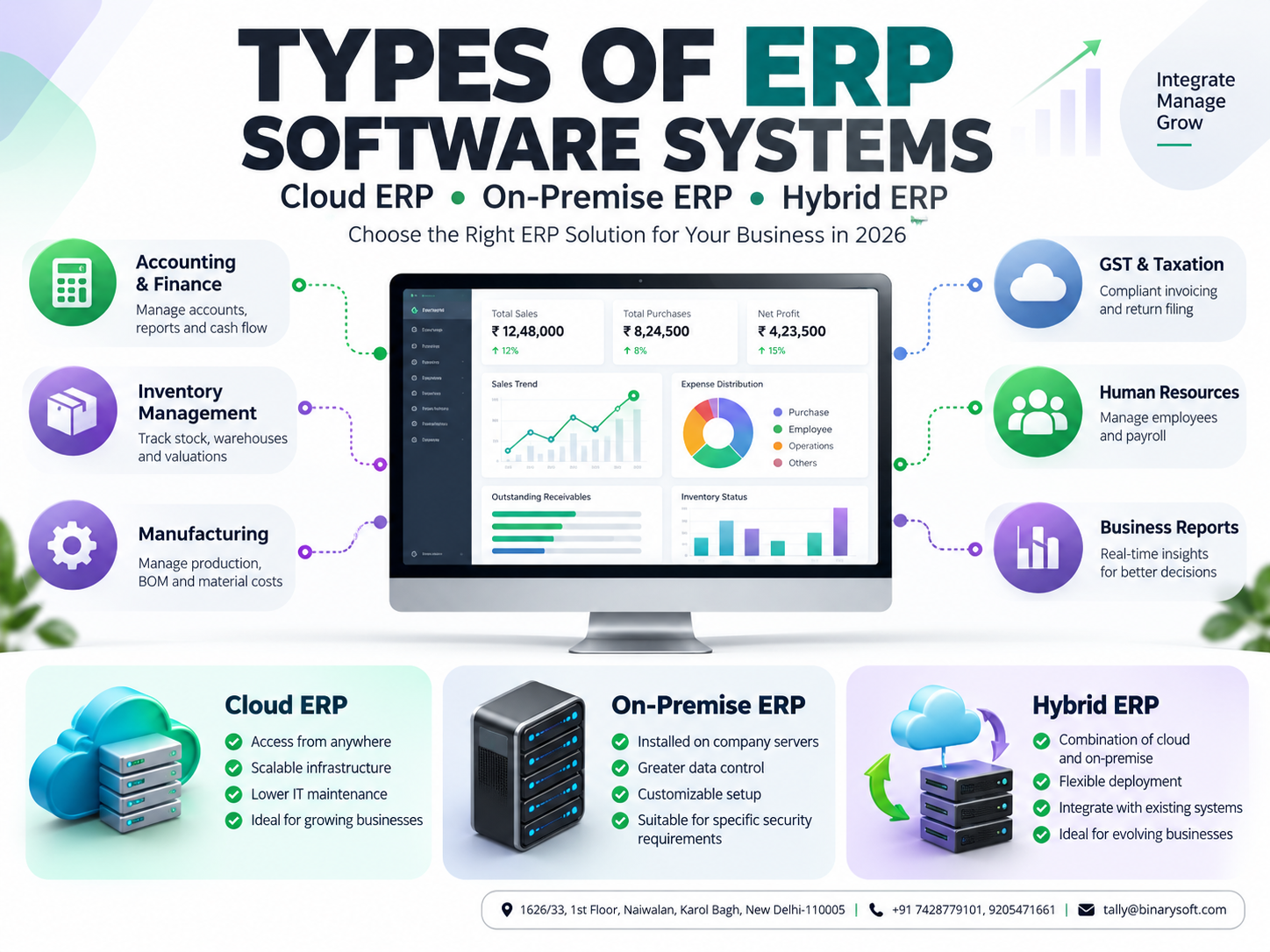
2.1 On-Premise ERP Software
On-premise ERP software is installed and operated on computers or servers controlled by the organization.
Business data is generally maintained within the company's own IT infrastructure.
Key Features
-
Locally managed software infrastructure
-
Organization-controlled data storage
-
Internal network connectivity
-
Configurable access permissions
-
Local backup and recovery arrangements
-
Greater direct control over infrastructure
Advantages
Infrastructure control: Businesses can manage their own servers, storage arrangements and internal network policies.
Customization opportunities: Depending on the product, organizations may customize workflows and integrations.
Internal data management: Companies can maintain data within infrastructure under their direct control.
Limitations
On-premise ERP may require investment in servers, maintenance, cybersecurity, backup systems and technical support.
Businesses must also plan for hardware failures, software upgrades and disaster recovery.
Suitable Businesses
On-premise ERP may be appropriate for organizations with established IT infrastructure, specific internal security requirements or operational environments where local deployment is preferred.
2.2 Cloud-Based ERP Software
Cloud ERP systems operate through infrastructure hosted by an external cloud service provider.
Authorized users access business applications and information through supported internet-connected devices.
Cloud deployment can reduce the need for businesses to maintain their own physical servers.
Key Features
-
Remote access to business information
-
Centralized hosting infrastructure
-
Scalable computing resources
-
Managed infrastructure options
-
Subscription-based commercial models
-
Support for geographically distributed teams
Advantages
Accessibility: Authorized employees can access supported applications from different locations.
Scalability: Infrastructure resources can often be adjusted as business requirements change.
Reduced infrastructure responsibilities: Depending on the service agreement, the hosting provider manages important infrastructure components.
Business continuity: Professionally configured hosting environments can support backup, recovery and availability requirements.
Limitations
Cloud ERP depends on reliable connectivity, suitable security controls and the availability of the hosting environment.
Businesses must evaluate data protection, hosting location, access management and recovery arrangements.
Tally Prime in a Cloud Environment
Tally Prime is primarily a desktop-based business management application rather than a fully browser-native cloud ERP system.
However, businesses can use compatible hosted desktop infrastructure to access Tally Prime remotely.
A properly configured Tally-on-Cloud environment can help authorized employees work with accounting and inventory information from different locations.
Businesses should verify licensing, hosting compatibility, concurrent-user requirements and data security arrangements before deployment.
2.3 Hybrid ERP Software
Hybrid ERP combines elements of on-premise infrastructure with cloud-based applications or services.
An organization may maintain sensitive operational systems locally while using cloud services for reporting, collaboration or selected business functions.
Key Features
-
Combination of local and cloud infrastructure
-
Flexible deployment arrangements
-
Integration between different applications
-
Selective remote accessibility
-
Support for gradual modernization
Advantages
Hybrid ERP allows businesses to modernize selected operations without immediately replacing every existing application.
It can also support organizations with multiple branches, different operational requirements or legacy software dependencies.
Limitations
Hybrid environments may introduce integration complexity.
Organizations must carefully manage synchronization, access permissions, security policies and consistency between systems.
Suitable Businesses
Hybrid ERP can be useful for established companies moving gradually from traditional infrastructure toward cloud-enabled operations.
3. ERP Software Based on Business Size
ERP solutions are also classified according to the scale and complexity of the organization.
3.1 ERP for Small Businesses
Small businesses generally need practical software that is affordable, easy to operate and capable of handling essential transactions.
Their requirements commonly include:
-
Sales invoicing
-
Purchase accounting
-
GST management
-
Customer and supplier balances
-
Inventory tracking
-
Banking transactions
-
Profit and loss reporting
-
Outstanding payment monitoring
For many Indian small businesses, Tally Prime provides a practical combination of these capabilities.
Rather than implementing a large enterprise platform, a business may benefit from a focused solution that handles its core accounting and operational requirements.
3.2 ERP for Medium-Sized Businesses
Medium-sized businesses often require more detailed operational controls.
Their requirements may include multiple warehouses, branch reporting, departmental accounting, inventory valuation and structured approval processes.
Such businesses should evaluate whether their software supports:
-
Multiple users
-
Cost centres
-
Multiple locations
-
Detailed management reporting
-
Inventory controls
-
Integration with other applications
-
Growing transaction volumes
Tally Prime can support many accounting and inventory requirements for medium-sized businesses, although specialized processes may require additional software or integrations.
3.3 ERP for Large Enterprises
Large enterprises frequently require comprehensive ERP platforms that connect numerous departments and locations.
These organizations may need advanced manufacturing planning, procurement automation, human resources, supply chain optimization and consolidated enterprise reporting.
Implementation generally involves extensive planning, data migration, process mapping, employee training and integration testing.
The most appropriate solution depends on operational complexity rather than company size alone.
4. Industry-Specific ERP Software Systems
Different industries have different operational requirements.
A manufacturing company does not manage its business in exactly the same way as a retail store, pharmaceutical distributor or professional services organization.
Industry-specific ERP systems are designed to address these differences.
4.1 Manufacturing ERP
Manufacturing businesses need to coordinate raw materials, production activities, finished goods and manufacturing expenses.
Common requirements include:
How Tally Prime Helps
Tally Prime supports inventory management, bills of materials and manufacturing-related inventory transactions.
Businesses can use these capabilities to record material consumption and finished goods production.
For advanced production scheduling, machine-level monitoring or manufacturing resource planning, additional specialized systems may be necessary.
4.2 Trading and Distribution ERP
Trading businesses purchase products from suppliers and sell them to retailers, wholesalers or end customers.
Their profitability depends heavily on inventory accuracy, purchase costs and customer payment collection.
Important requirements include stock tracking, sales invoicing, supplier balances, purchase analysis and outstanding receivables.
Tally Prime helps businesses maintain connected accounting and inventory records, monitor outstanding balances and prepare financial reports.
4.3 Retail ERP
Retail businesses handle frequent sales transactions, stock movement and customer billing.
An effective retail management environment should support accurate billing, inventory visibility, taxation and sales analysis.
Tally Prime can support accounting, inventory and invoicing requirements for retailers.
Businesses requiring advanced point-of-sale hardware integration, loyalty programmes or omnichannel inventory synchronization should evaluate compatible additional solutions.
4.4 Service Industry ERP
Service businesses typically focus on billing, expenses, profitability and customer collections rather than physical stock movement.
Examples include consulting firms, repair businesses, agencies and professional service providers.
Tally Prime can help manage service invoices, accounting records, GST, expense allocation and financial reporting.
4.5 Healthcare and Pharmaceutical ERP
Healthcare and pharmaceutical businesses may require specialized functions such as batch tracking, expiry monitoring, inventory controls and regulatory documentation.
Tally Prime supports inventory features such as batch-wise details and expiry-date tracking where appropriately configured.
However, hospital management, patient records, clinical workflows and specialized pharmaceutical compliance may require dedicated industry applications.
5. A Business Owner's Story: When Growth Created Financial Confusion
Rajesh operated a wholesale electrical goods business in Delhi.
For more than a decade, his company had grown through strong supplier relationships, competitive pricing and dependable customer service.
As sales increased, the business expanded its product range and began supplying customers across several cities.
But growth introduced an unexpected problem.
Rajesh could no longer confidently answer three basic questions:
How much stock was actually available?
Which customers had overdue payments?
Was the business generating sufficient profit after expenses?
His sales team maintained order information in spreadsheets.
Warehouse employees recorded stock movement separately.
The accounts department updated financial transactions later.
One evening, Rajesh discovered that his team had confirmed a large customer order for products that were not available in sufficient quantity.
The customer needed the goods urgently.
Rajesh had to arrange emergency purchases at higher prices, reducing the profit on the order.
That night, he realized that increasing sales did not automatically mean his business was becoming stronger.
He needed accurate information before making commitments.
After reviewing his requirements, Rajesh introduced a more integrated accounting and inventory workflow using Tally Prime.
The team standardized stock items, updated customer ledgers and began recording transactions consistently.
Over time, Rajesh gained clearer visibility into inventory, receivables and financial performance.
The biggest change was not simply faster accounting.
It was the confidence to make decisions using more reliable business information.
This is an illustrative story representing common challenges faced by growing businesses.
6. Case Study One: Improving Inventory Control in a Wholesale Business
Business Background
A hypothetical electrical equipment distributor manages approximately 2,500 inventory items.
The business purchases products from multiple suppliers and serves retailers across Delhi NCR.
Challenges
Before improving its accounting processes, the company experienced:
-
Differences between physical and recorded stock
-
Delayed customer billing
-
Difficulty identifying slow-moving inventory
-
Incomplete purchase records
-
Limited visibility into outstanding receivables
The company also struggled to calculate profitability across different product categories.
Solution Using Tally Prime
The business implemented a structured accounting and inventory workflow.
First, the team created standardized stock groups and stock items.
Next, employees recorded purchases and sales through appropriate vouchers.
Warehouse locations were configured using godowns, allowing stock information to be maintained by location.
The accounts team began reviewing receivables and inventory reports regularly.
Operational Improvements
The improved process helped the business:
-
Reduce duplicate transaction entry
-
Identify stock shortages earlier
-
Monitor outstanding customer payments
-
Improve purchase planning
-
Review inventory movement more consistently
Key Learning
Accurate inventory records become significantly more valuable when they are connected with purchasing, sales and financial accounting.
This illustrative case study describes a possible implementation approach; it does not represent independently measured customer results.
7. Case Study Two: Strengthening Financial Control in a Manufacturing Business
Business Background
A small manufacturing company produces packaging materials for local businesses.
Its operations involve purchasing raw materials, processing them into finished goods and supplying customers against confirmed orders.
Challenges
The company faced several difficulties.
Raw material consumption was not consistently recorded.
Production expenses were reviewed only at month-end.
Management had limited visibility into material usage and product costs.
Customer payments were also becoming increasingly difficult to monitor.
Solution Using Tally Prime
The company organized its accounting and inventory processes around Tally Prime.
Raw materials and finished goods were created as separate stock items.
Bills of materials were configured for suitable products.
Manufacturing-related inventory transactions were recorded to reflect material consumption and production.
Cost centres were used where appropriate to monitor expenses.
Customer outstanding reports were reviewed at regular intervals.
Operational Improvements
The revised process helped management understand material consumption, monitor receivables and review financial performance more systematically.
The company also established a monthly reconciliation process to identify differences between recorded and physical inventory.
Key Learning
Manufacturing profitability depends not only on sales revenue but also on accurate material accounting, expense monitoring and financial discipline.
This case study is illustrative and does not claim verified financial savings.
8. How Tally Prime Supports Integrated Business Management
Tally Prime provides several capabilities that help Indian businesses coordinate accounting and operational information.
8.1 Financial Accounting
Businesses can maintain ledgers, record vouchers and generate financial statements.
Common reports include:
-
Balance Sheet
-
Profit and Loss Account
-
Trial Balance
-
Day Book
-
Cash and Bank Books
-
Outstanding Receivables
-
Outstanding Payables
These reports help management evaluate financial performance and monitor obligations.
8.2 GST Management
GST compliance is an important requirement for many Indian businesses.
Tally Prime supports GST-related accounting, tax invoices and return preparation workflows.
Depending on the installed release, configuration and applicable services, businesses can use supported GST reconciliation and connected compliance capabilities.
Users should verify current statutory requirements and product functionality before filing returns.
8.3 Inventory Management
Tally Prime supports stock groups, stock categories, stock items, units of measurement and godown-based inventory records.
Businesses can monitor stock movement, valuation and inventory availability.
Additional capabilities such as batch-wise tracking and bills of materials can support specific business requirements.
8.4 Banking and Payment Management
Banking activities are closely connected with financial accounting.
Tally Prime supports bank-related vouchers, bank reconciliation and applicable banking workflows.
Businesses can use these features to monitor payments, receipts and bank balances.
Availability of connected banking functions depends on supported banks, product releases and service arrangements.
8.5 Business Reporting
Management reports help business owners understand operational and financial performance.
Regularly reviewing sales, expenses, profitability, outstanding balances and inventory can improve decision-making.
Tally Prime allows users to examine transaction details behind many reports, making it easier to investigate unusual balances or entries.
9. Practical Steps to Start Using Tally Prime
Businesses planning to improve their accounting and inventory processes can follow a structured implementation approach.
Step 1: Identify Business Requirements
Begin by listing the activities that need improvement.
These may include billing, accounting, GST compliance, inventory tracking, bank reconciliation or outstanding payment management.
Step 2: Create the Company
Open Tally Prime and create a company.
Enter the required business information, accounting period and applicable statutory details.
Step 3: Configure Accounting Features
Create necessary ledger groups and ledgers.
Configure GST and other relevant statutory settings based on business requirements.
Step 4: Set Up Inventory
Create stock groups, stock items and units of measurement.
Where required, configure godowns, batches or bills of materials.
Step 5: Record Transactions
Begin recording purchases, sales, receipts, payments and other business transactions through the appropriate vouchers.
Ensure employees follow consistent data-entry procedures.
Step 6: Review Reports
Use financial statements, inventory summaries and outstanding reports to evaluate business performance.
Step 7: Establish Backup Procedures
Create a reliable backup and recovery process.
For hosted environments, confirm how backups are maintained, retained and restored.
Step 8: Train Employees
Provide role-specific training so that employees understand transaction recording, reporting and basic data security.
A successful implementation depends as much on disciplined business processes as it does on software capabilities.
10. Cloud ERP vs On-Premise ERP vs Hybrid ERP
Choosing the correct deployment model requires understanding the differences.
| Feature | Cloud ERP | On-Premise ERP | Hybrid ERP |
|---|
| Hosting |
External cloud infrastructure |
Organization-managed infrastructure |
Combination |
| Remote access |
Generally supported |
Requires appropriate configuration |
Depends on architecture |
| Infrastructure maintenance |
Often provider-managed |
Primarily organization-managed |
Shared responsibilities |
| Initial infrastructure investment |
Often lower |
May be higher |
Varies |
| Scalability |
Depends on service plan |
Depends on local infrastructure |
Flexible |
| Customization |
Product-dependent |
Product-dependent |
Product-dependent |
| Internet dependency |
Generally significant |
May operate locally |
Depends on components |
| Data management |
Shared responsibility |
Primarily internal responsibility |
Shared responsibility |
No deployment model is automatically best for every organization.
The correct choice depends on budget, security requirements, internet reliability, technical resources and business continuity expectations.
11. Important Factors When Choosing ERP Software
Selecting ERP software is a long-term business decision.
Before making a purchase, organizations should evaluate several factors.
Business requirements: Identify the problems the software must solve.
Total cost: Consider licensing, implementation, hosting, training, maintenance and future upgrades.
Ease of use: Employees should be able to complete routine tasks efficiently.
Scalability: Evaluate whether the system can support additional users, transactions and locations.
Security: Review user permissions, authentication, backup and recovery arrangements.
Integration: Determine whether the software can exchange information with existing applications.
Compliance: Verify support for applicable Indian taxation and reporting requirements.
Vendor support: Reliable implementation assistance and ongoing technical support can reduce operational disruption.
Businesses should request demonstrations using their actual workflows rather than relying only on feature lists.
12. Common Mistakes Businesses Make During ERP Implementation
ERP implementation can become difficult when organizations focus only on software installation.
One common mistake is migrating inaccurate or incomplete data into the new system.
Another is introducing too many changes simultaneously without sufficient employee training.
Businesses may also underestimate the importance of inventory reconciliation, user permissions and documented procedures.
Successful implementation requires clear responsibilities, realistic timelines and periodic reviews.
Before going live, organizations should validate opening balances, stock quantities, tax settings and important reports.
A controlled implementation generally produces more dependable results than a rushed deployment.
13. The Future of ERP Software in India
ERP systems continue to evolve as businesses demand faster reporting, better connectivity and simpler workflows.
Important development areas include cloud-enabled access, automation, connected financial services, improved data analysis and integration with digital compliance systems.
Artificial intelligence may increasingly assist with identifying anomalies, analyzing financial information and reducing repetitive administrative work.
However, the usefulness of advanced technology depends on accurate underlying business data.
For Indian businesses, accounting and inventory discipline will remain essential even as software becomes more sophisticated.
Organizations that establish reliable processes today will be better positioned to adopt future technologies.
14. Conclusion
ERP software helps businesses connect important operational functions, improve information accuracy and make better-informed decisions.
Different ERP systems serve different requirements.
Cloud ERP offers flexible hosting and remote accessibility.
On-premise ERP provides direct infrastructure control.
Hybrid ERP combines selected characteristics of both approaches.
Industry-specific ERP solutions address specialized operational requirements, while comprehensive enterprise platforms support complex organizational structures.
For many Indian small and medium-sized businesses, Tally Prime provides a practical foundation for integrated accounting, GST management, inventory control, banking and financial reporting.
It is important to recognize that Tally Prime does not replace every specialized ERP module required by complex organizations.
Nevertheless, when properly configured and supported by consistent business processes, it can significantly improve visibility and efficiency across core financial operations.
The right ERP decision is not about purchasing the most complicated software.
It is about selecting a solution that meets present business requirements while providing a practical path for future growth.
Powered by Binarysoft Technologies
Authorized Tally Partner
Location: 1626/33, 1st Floor, Naiwalan, Karol Bagh, New Delhi – 110005, INDIA
Contact Us: +91 7428779101, 9205471661
Email: tally@binarysoft.com
Business Hours: 10:00 AM – 6:00 PM, Monday to Friday
Frequently Asked Questions
How should a business select the right ERP system?
A business should evaluate operational requirements, software functionality, total cost, ease of use, security, scalability, integrations and vendor support before selecting a system.
Is cloud ERP secure?
Cloud ERP can provide strong security when properly configured. Businesses should assess hosting security, access controls, encryption, backup procedures and provider responsibilities.
Does ERP software help with GST compliance?
ERP and accounting solutions with suitable GST features can support tax calculations, transaction records, reconciliation and return preparation. Businesses must ensure their software remains compatible with applicable regulations.
Is ERP software useful for manufacturing businesses?
Yes. ERP software can help manufacturing businesses coordinate purchasing, raw materials, production, inventory and financial reporting. Advanced production requirements may need specialized modules.
CA. Ankit Vardiya works closely with traders, wholesalers, and service businesses on accounting automation, GST reporting, and audit readiness. His professional exposure to day-to-day business operations allows him to translate complex accounting concepts into practical guidance for Indian business owners.









