Call CA Tally HelpDesk
+91 9205471661,
7428779101
Introduction: Why ERP Implementation Success Matters More Than Ever in 2026
Implementing Enterprise Resource Planning (ERP) software is an important investment for any growing business. Organizations expect ERP systems to improve accounting accuracy, streamline inventory management, automate repetitive tasks and provide better financial visibility.
However, ERP implementation does not always deliver the expected results.
Businesses may experience delays, inaccurate data, employee resistance, unexpected expenses and operational disruptions when implementation is poorly planned.
In 2026, Indian businesses face increasing pressure to maintain reliable financial records, manage GST compliance, improve working capital and respond quickly to customer demands.
An unsuccessful ERP implementation can affect all these activities.
The good news is that many ERP implementation problems can be prevented through proper planning, realistic expectations, employee training and systematic testing.
For small and medium-sized Indian businesses, Tally Prime provides integrated accounting, inventory, GST-related and financial reporting capabilities. A structured implementation approach can help organizations use these features effectively.
Understanding the steps to avoid ERP system failure is essential for protecting business operations and achieving long-term value from technology investments.
A Business Owner's Story: When a Software Upgrade Became a Business Nightmare
Vikram owned a successful manufacturing company in Faridabad.
For nearly eighteen years, he had worked tirelessly to build the business.
His company manufactured industrial components and supplied products to engineering companies across North India.
As the business expanded, managing accounting, inventory and production information became increasingly difficult.
Vikram decided to introduce a new ERP system.
He believed the software would automatically solve his operational problems.
The implementation started immediately.
Unfortunately, the company had not properly documented its requirements.
Employees received minimal training, inventory opening balances were transferred without adequate verification, and the new system was introduced during a busy production period.
Within two weeks, serious problems emerged.
Warehouse employees could not locate accurate stock information.
The accounting department discovered differences in customer outstanding balances.
Sales invoices were delayed because employees were unfamiliar with the new workflow.
One afternoon, Vikram received a call from an important customer asking why a confirmed order had not been dispatched.
The warehouse records showed sufficient stock, but the physical inventory was different.
The customer threatened to cancel future orders.
That evening, Vikram sat in his office reviewing implementation expenses and customer complaints.
He had invested money to improve the business, yet operations had become more difficult.
He realized that the problem was not simply the software.
The implementation had been rushed.
Vikram brought his department managers together and developed a recovery plan.
The company verified opening balances, corrected inventory records, established employee training sessions and introduced a phased implementation process.
Gradually, the system became more reliable.
Accounting reports improved, employees gained confidence and management established stronger operational controls.
Vikram learned an important lesson:
ERP success depends not only on selecting suitable software but also on preparing people, processes and business data for the change.
This fictional story illustrates common ERP implementation challenges and the importance of structured planning.
What Is ERP System Failure?
ERP system failure occurs when an ERP implementation does not achieve its intended business objectives.
Failure does not always mean that the software stops working.
An ERP project may be considered unsuccessful when it exceeds its budget, misses important deadlines, disrupts business operations or fails to deliver expected improvements.
Common indicators include inaccurate financial records, employee dissatisfaction, incomplete integrations, reporting difficulties and excessive dependence on manual workarounds.
ERP failure can occur during initial implementation or after the system becomes operational.
Understanding the underlying causes helps businesses prevent similar problems.
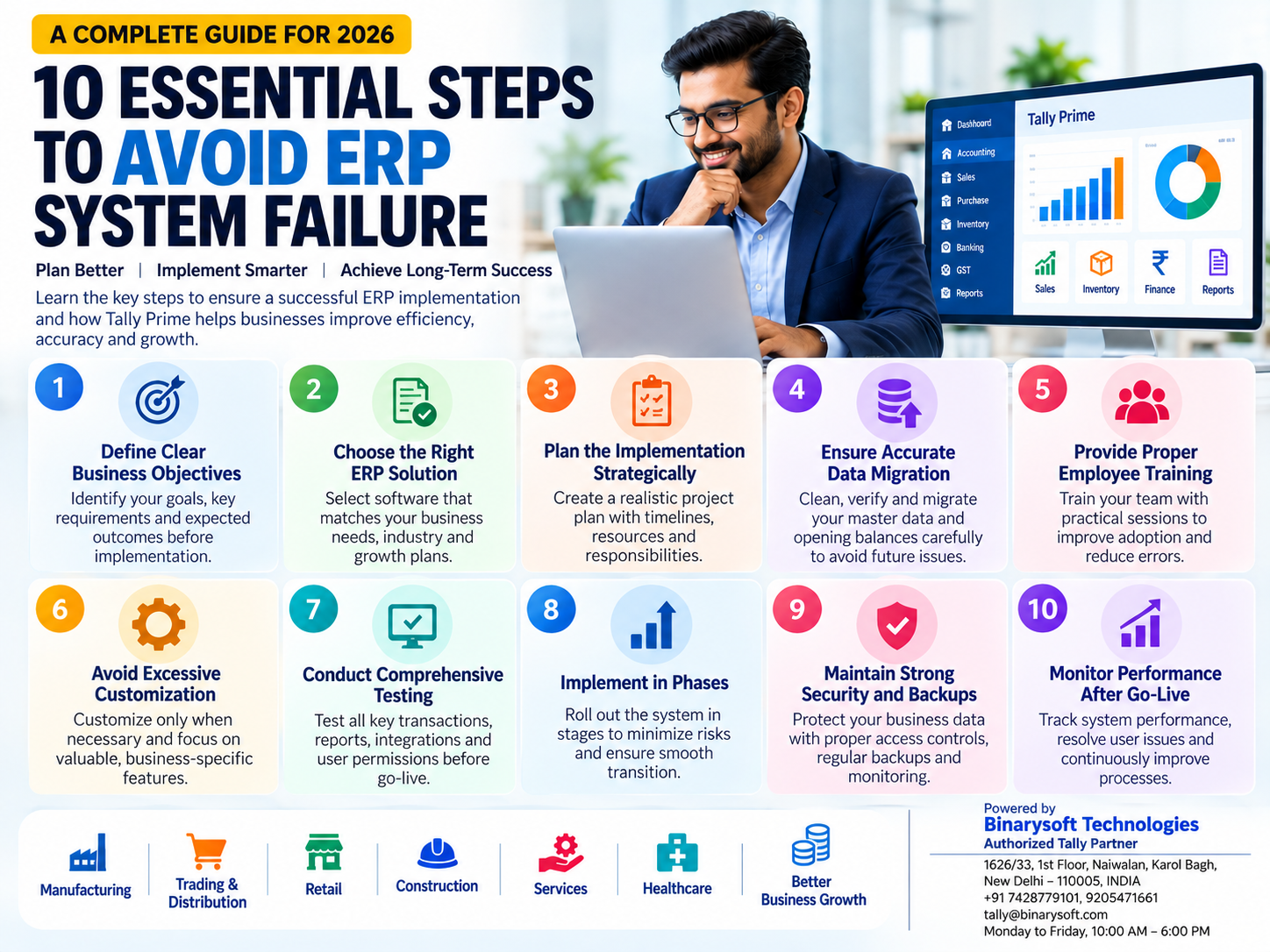
10 Essential Steps to Avoid ERP System Failure
1. Define Clear Business Objectives Before Implementation
One of the most common ERP implementation mistakes is purchasing software without identifying the problems it must solve.
Businesses sometimes focus on software features rather than operational requirements.
Before implementation, management should define measurable objectives.
Important Questions
- What problems exist in current accounting processes?
- Which activities require automation?
- Are inventory records accurate?
- How long does financial reporting take?
- Are customer payments tracked effectively?
- Which departments need integrated information?
Practical Example
A wholesale distributor experiences frequent stock discrepancies and delayed customer collections.
Instead of implementing unnecessary enterprise modules, the company should prioritize inventory management, customer outstanding tracking and accounting integration.
How Tally Prime Helps
Tally Prime provides accounting, inventory, sales, purchasing and financial reporting capabilities that address many common business requirements.
Key Recommendation
Create a written requirements document before implementation.
Clearly identify essential features, expected improvements and measurable success indicators.
2. Choose ERP Software That Matches Your Business Requirements
Selecting unsuitable software can create long-term operational difficulties.
Every business has different requirements.
A retailer may prioritize billing and stock management, while a manufacturing company may require material consumption tracking and specialized production workflows.
Important Selection Criteria
Evaluate the software's accounting capabilities, inventory functionality, reporting features, security, scalability, integration options and support requirements.
Also consider implementation costs and employee training.
Tally Prime for Indian Businesses
Tally Prime provides integrated accounting, inventory, GST-related and financial reporting features.
It is suitable for many small and medium-sized organizations.
However, businesses requiring advanced manufacturing scheduling, enterprise CRM or specialized industry workflows may need additional applications.
Key Recommendation
Evaluate software through practical demonstrations using real business scenarios.
Avoid selecting a system solely because it offers the largest number of features.
3. Establish Strong Project Planning and Management
ERP implementation involves technology, employees, data and business processes.
Without structured planning, projects can experience delays and unexpected costs.
Important Planning Activities
Businesses should establish a project timeline, define responsibilities, identify implementation milestones and allocate sufficient resources.
Management should also determine which departments will participate in testing and approval.
Practical Example
A distributor planning to implement integrated accounting and inventory management can divide the project into stages.
The first stage may involve company configuration and ledger creation.
The second stage may focus on inventory records.
Later stages can cover transaction testing, employee training and final deployment.
Key Recommendation
Assign an internal project coordinator who understands business operations and can communicate with the implementation team.
Review project progress regularly.
4. Ensure Accurate Data Migration
Data migration is one of the most critical activities in ERP implementation.
Businesses often transfer customer balances, supplier information, inventory records and financial opening balances from existing systems.
Incorrect migration can create serious accounting problems.
Common Data Migration Issues
Problems may include duplicate ledgers, incorrect opening balances, missing transactions, inconsistent inventory units and outdated customer information.
How to Prevent Problems
Before migration, businesses should clean existing records, identify duplicate information and verify opening balances.
After migration, reconcile the transferred data with approved source records.
Tally Prime Implementation
When migrating information into Tally Prime, verify ledger balances, stock quantities, customer outstanding balances and supplier obligations.
Use supported import or migration procedures appropriate to the software version and source system.
Key Recommendation
Never approve ERP go-live until critical financial and inventory balances have been verified.
5. Provide Proper Employee Training
Even well-designed ERP software can fail when employees do not understand how to use it.
Insufficient training leads to incorrect entries, inconsistent workflows and resistance to change.
Why Employee Training Matters
Employees must understand not only which buttons to use but also how transactions affect other business records.
For example, a sales invoice may influence accounting, taxation and inventory information.
Training with Tally Prime
Training should cover company navigation, ledger creation, voucher entry, inventory transactions, GST-related workflows, bank reconciliation and financial reporting.
Different departments should receive training relevant to their responsibilities.
Practical Example
A warehouse employee may need training in stock receipts, transfers and dispatch-related inventory entries.
An accountant requires more detailed knowledge of financial vouchers, reconciliations and reporting.
Key Recommendation
Provide hands-on training using realistic transactions.
Conduct refresher sessions after implementation.
6. Avoid Excessive Customization
Customization can help ERP software support specialized business requirements.
However, unnecessary customization increases implementation complexity.
Excessive modifications may also create maintenance difficulties and compatibility problems during upgrades.
Common Customization Mistakes
Businesses sometimes request specialized features without evaluating whether existing software functionality can meet their needs.
They may also automate inefficient processes instead of improving them.
How Tally Prime Helps
Tally Prime offers configurable accounting and inventory features.
Businesses should first evaluate these capabilities before developing custom integrations or applications.
Key Recommendation
Customize only when there is a clearly defined operational requirement and measurable business benefit.
Maintain proper documentation for every custom development.
7. Conduct Comprehensive Testing Before Go-Live
Testing helps businesses identify problems before they affect live operations.
ERP testing should cover routine transactions, unusual scenarios, user permissions and financial reporting.
Important Testing Areas
Accounting: Verify sales, purchases, receipts, payments and journal entries.
Inventory: Test stock receipts, sales, transfers and adjustments.
GST: Verify applicable tax calculations and transaction classifications.
Banking: Test reconciliation procedures.
Reporting: Compare financial reports with expected results.
Security: Verify employee access permissions.
Practical Example
A company should test whether recording a sales invoice correctly updates the relevant customer ledger and inventory records.
It should also verify how the system handles sales returns and corrections.
Key Recommendation
Use a separate test environment where practical.
Document testing results and resolve critical issues before deployment.
8. Implement ERP in Phases Where Appropriate
Introducing a new ERP system across every department simultaneously can increase operational risk.
A phased implementation allows employees to become familiar with new workflows.
Example Implementation Sequence
Phase 1: Company setup and accounting configuration.
Phase 2: Inventory management and master data verification.
Phase 3: Sales and purchase workflows.
Phase 4: Banking, taxation and reporting.
Phase 5: Additional integrations and specialized processes.
Benefits of Phased Implementation
A phased approach can reduce disruption, simplify troubleshooting and improve employee confidence.
However, businesses must carefully manage data consistency when old and new systems operate simultaneously.
Key Recommendation
Choose the implementation strategy according to operational complexity and business requirements.
Avoid major deployments during critical business periods unless necessary.
9. Establish Strong Security and Backup Procedures
ERP systems contain important financial and operational information.
Data loss or unauthorized access can disrupt business activities.
Important Security Measures
Businesses should establish appropriate user permissions, secure authentication, backup procedures and access reviews.
Sensitive accounting information should be accessible only to authorized employees.
Tally Prime Security
Tally Prime provides configurable security features that can help businesses manage user access.
Organizations should also protect the computers, networks and storage systems used for accounting.
Backup Strategy
Maintain regular backups and store appropriate copies securely.
Periodically test whether backup data can be restored successfully.
Key Recommendation
A backup is useful only when it is complete, protected and recoverable.
10. Monitor ERP Performance After Implementation
ERP implementation does not end when the software becomes operational.
Businesses should continuously evaluate system performance and employee adoption.
Important Performance Indicators
Monitor accounting discrepancies, invoice processing time, inventory accuracy, financial reporting delays, overdue receivables and employee support requests.
Practical Example
A distributor introduces integrated accounting and inventory management.
After implementation, management should compare inventory reconciliation effort, reporting time and outstanding payment visibility with the original project objectives.
How Tally Prime Helps
Tally Prime provides financial and operational reports that can support ongoing performance reviews.
Key Recommendation
Conduct regular post-implementation reviews and maintain a process for resolving employee issues.
Case Study 1: How a Delhi Trading Company Recovered from ERP Implementation Problems
Business Background
A medium-sized electrical equipment distributor in Delhi processed approximately 2,000 invoices every month.
The company decided to replace disconnected spreadsheets with integrated accounting and inventory management.
Initial Problems
The implementation was rushed.
Inventory opening balances were not verified, employees received limited training and reporting requirements were not clearly defined.
As a result, stock records became inconsistent and the accounting team struggled to reconcile transactions.
Corrective Action
Management introduced a structured recovery plan.
The company verified inventory balances, corrected ledger classifications, trained employees and tested common transactions.
Tally Prime was configured to support integrated accounting and inventory processes.
Illustrative Results
| Performance Area | Initial Implementation | After Corrective Measures |
|---|
| Inventory records |
Frequent discrepancies |
Improved consistency |
| Employee training |
Limited |
Structured sessions |
| Financial reporting |
Delayed |
More organized |
| Data migration |
Insufficient verification |
Reconciled balances |
| Operational confidence |
Low |
Improved |
Key Learning
ERP implementation problems can often be reduced through better planning, verified data and practical employee training.
This fictional case study illustrates common recovery measures rather than verified company results.
Case Study 2: How a Manufacturing Business Avoided ERP Failure Through Phased Implementation
Business Background
A manufacturing company in Faridabad produced industrial components for engineering businesses.
The company wanted to improve accounting, raw material tracking and financial reporting.
Implementation Challenges
The organization maintained separate production records and accounting information.
Management was concerned that introducing new software could interrupt daily operations.
Implementation Strategy
The company selected a phased approach.
First, it verified accounting records and opening balances.
Next, it organized inventory information and trained employees.
The company then tested sales, purchase and manufacturing-related inventory transactions.
Finally, management reviewed financial reports before approving routine use.
Illustrative Results
The business avoided a rushed transition and established more consistent accounting procedures.
Employees became familiar with the new workflows before implementation expanded.
Management also gained better visibility into material consumption and operating expenses.
Key Learning
A structured implementation approach can reduce operational disruption and improve employee adoption.
This case study is illustrative.
ERP Implementation Checklist for Indian Businesses
| Implementation Activity | Important Action |
|---|
| Business requirements |
Document operational objectives |
| Software selection |
Evaluate actual business needs |
| Project planning |
Assign responsibilities and milestones |
| Data preparation |
Clean and verify existing records |
| Data migration |
Reconcile opening balances |
| Employee training |
Conduct practical training sessions |
| Customization |
Avoid unnecessary modifications |
| Testing |
Verify critical transactions |
| Security |
Configure permissions and backups |
| Go-live |
Approve only after critical checks |
| Post-implementation |
Monitor performance and resolve issues |
How Tally Prime Supports Successful Business Software Implementation
Tally Prime provides integrated capabilities that can simplify accounting and business management for many Indian organizations.
Businesses can use it for financial accounting, inventory management, sales and purchase transactions, GST-related accounting, banking and financial reporting.
A successful implementation should begin with accurate company configuration and properly classified ledgers.
Inventory records should be organized using suitable stock groups, items and units of measurement.
Customer and supplier balances must be verified before routine transactions begin.
Employees should receive practical training, and management should establish regular reconciliation and reporting procedures.
Where specialized operational requirements exist, businesses may evaluate compatible external applications or integrations.
The objective should be to create a reliable accounting environment that supports daily operations without unnecessary complexity.
Common Warning Signs That an ERP Implementation Is Failing
Businesses should investigate ERP projects when they notice repeated implementation delays, increasing costs or unresolved data discrepancies.
Other warning signs include employees maintaining unofficial spreadsheets, frequent transaction corrections, incomplete reporting and growing dissatisfaction with the system.
A particularly serious warning sign occurs when management cannot trust financial or inventory information.
Organizations should address these problems promptly rather than continuing implementation without corrective action.
Early intervention can reduce operational disruption and prevent additional expenses.
The Future of ERP Implementation in 2026 and Beyond
ERP implementation practices continue to evolve as businesses adopt cloud-based applications, digital workflows and integrated financial systems.
Modern implementation strategies increasingly emphasize data quality, user experience, security and measurable business outcomes.
Automation and artificial intelligence may support selected activities such as data validation, anomaly detection and reporting analysis.
However, technology cannot replace sound project management.
Businesses still need clear requirements, accurate data, trained employees and reliable internal controls.
For Indian small and medium-sized organizations, successful ERP implementation should prioritize financial accuracy, GST-related recordkeeping, inventory visibility and operational continuity.
Conclusion: Successful ERP Implementation Begins with Planning, Not Software
ERP systems can improve accounting accuracy, inventory management, operational efficiency and financial reporting.
However, these benefits are not guaranteed.
ERP implementation failure often results from unclear objectives, unsuitable software, inaccurate data, insufficient training, excessive customization and inadequate testing.
Businesses can reduce these risks by following a structured implementation strategy.
The ten essential steps include defining business objectives, selecting suitable software, planning carefully, verifying data, training employees, controlling customization, testing thoroughly, implementing systematically, protecting information and monitoring performance.
For many Indian businesses, Tally Prime provides a practical foundation for integrated accounting and financial management.
With appropriate configuration, employee training and ongoing support, organizations can improve operational visibility and strengthen financial control.
The success of an ERP system is measured not by how quickly it is installed, but by how reliably it supports employees, protects business information and helps management make better decisions.
Powered by Binarysoft Technologies
Authorized Tally Partner
Location: 1626/33, 1st Floor, Naiwalan, Karol Bagh, New Delhi – 110005, INDIA
Contact Us: +91 7428779101, 9205471661
Email: tally@binarysoft.com
Business Hours: Monday to Friday, 10:00 AM – 6:00 PM
Frequently Asked Questions
Why is ERP implementation success important in 2026?
Successful ERP implementation helps businesses maintain reliable financial information, improve operational coordination, manage compliance responsibilities and support sustainable growth.
What should businesses do when an ERP project begins failing?
Management should identify the causes, prioritize critical issues, verify data, review project requirements and establish a corrective action plan.
What is the biggest mistake during ERP implementation?
One of the most serious mistakes is implementing software without clearly understanding business requirements and preparing reliable data.
How can businesses measure ERP implementation success?
Success can be measured through accounting accuracy, employee adoption, processing efficiency, inventory consistency, reporting time and operational improvements.
CA. Devansh Rathi works closely with wholesalers, distributors, and growing enterprises on taxation, reconciliations, and financial controls. His approach emphasizes accurate records, timely compliance, and efficient accounting systems.