Call CA Tally HelpDesk
+91 9205471661,
7428779101
Introduction: Why Choosing the Right Business Software Matters
Every growing business eventually faces an important technology decision.
Should it continue using accounting software, or is it time to invest in a complete Enterprise Resource Planning system?
For many Indian business owners, the difference is not immediately clear.
Both types of software can help manage financial information. Both may provide invoicing, inventory tracking and reporting capabilities. Some accounting applications also offer business management features commonly associated with ERP systems.
However, their primary purposes are different.
Accounting software focuses on recording financial transactions, maintaining books of accounts and generating financial reports.
ERP software is designed to coordinate a broader range of organizational activities, potentially including accounting, sales, purchasing, inventory, manufacturing, human resources and supply chain operations.
The distinction becomes important when a business expands.
A small retailer may need reliable GST billing, inventory records and customer outstanding management.
A manufacturing company operating several factories may require production scheduling, procurement planning, warehouse coordination and advanced operational reporting.
Selecting software without understanding these requirements can create unnecessary expenses or operational limitations.
Tally Prime offers accounting, inventory, invoicing, banking and other business management capabilities that can support many Indian small and medium enterprises.
However, specialized enterprise requirements may need additional applications or integrations.
This guide explains the differences between ERP and accounting software, compares their benefits and helps businesses determine which solution is appropriate.
A Business Owner's Story: When Growing Sales Created Unexpected Problems
Vikram operated an electrical components distribution business in Karol Bagh, New Delhi.
His father had started the company more than twenty years earlier.
The business initially served local retailers and contractors.
Over time, Vikram expanded operations across Delhi NCR.
He opened an additional warehouse and hired more employees.
Sales increased steadily.
Customers appreciated the company's competitive prices and dependable service.
However, managing daily operations became increasingly difficult.
The accountant maintained financial records in accounting software.
Warehouse employees tracked stock using spreadsheets.
Purchase orders were managed through email and messaging applications.
Sales employees maintained customer order information separately.
One morning, an important customer requested an urgent delivery of electrical components.
The sales team confirmed availability based on a spreadsheet.
However, the warehouse supervisor discovered that the stock had already been allocated to another order.
The customer was disappointed.
A few days later, Vikram discovered another problem.
Several supplier payments were due, but significant customer invoices remained unpaid.
Although the company was generating strong sales, cash flow was becoming unpredictable.
Vikram felt frustrated.
He had worked hard to expand the family business, yet growth seemed to create more problems than opportunities.
He began reviewing the company's software and operational procedures.
Initially, he believed the business needed an expensive enterprise system.
However, after evaluating its actual requirements, he realized that many problems could be addressed through better use of integrated accounting, inventory and outstanding management features.
The company standardized stock records, improved transaction procedures and trained employees.
Management also identified specialized order coordination requirements that might need additional software as the business expanded.
Gradually, Vikram gained better visibility into daily operations.
He learned that choosing business software was not about selecting the most expensive solution.
It was about selecting technology that addressed the organization's real challenges.
Business growth becomes sustainable when technology, employees and operating processes develop together.
This is an illustrative story based on common business challenges.
What Is Accounting Software?
Accounting software is a digital application designed to record, organize and report financial transactions.
It helps businesses maintain financial records and perform routine accounting activities.
Common functions include sales accounting, purchase accounting, expense tracking, bank reconciliation and financial reporting.
Many accounting applications also support invoicing, taxation and outstanding management.
Some products offer inventory and payroll capabilities.
Main Objectives of Accounting Software
The primary objectives are to maintain accurate financial records, support accounting procedures and provide useful financial information.
Accounting software helps businesses answer questions such as:
How much revenue did the company generate?
What are the total expenses?
How much money do customers owe?
Which supplier payments are outstanding?
What is the current financial position?
Is the business generating a profit?
For many SMEs, these capabilities form the foundation of effective financial management.
What Is ERP Software?
Enterprise Resource Planning software is designed to integrate multiple business functions within a coordinated management environment.
ERP systems typically combine financial management with broader operational processes.
Depending on the product, these may include procurement, inventory, production, sales, supply chain management, human resources and project management.
The objective is to improve coordination between departments and reduce information gaps.
Example of an ERP Workflow
Consider a manufacturing company receiving a customer order.
An ERP system may support the following activities:
-
Record the customer order.
-
Check inventory availability.
-
Evaluate material requirements.
-
Generate procurement or production requirements.
-
Track manufacturing activities.
-
Update relevant inventory records.
-
Prepare the customer invoice.
-
Record financial transactions.
-
Generate operational and financial reports.
The exact workflow depends on the ERP product and its configured modules.
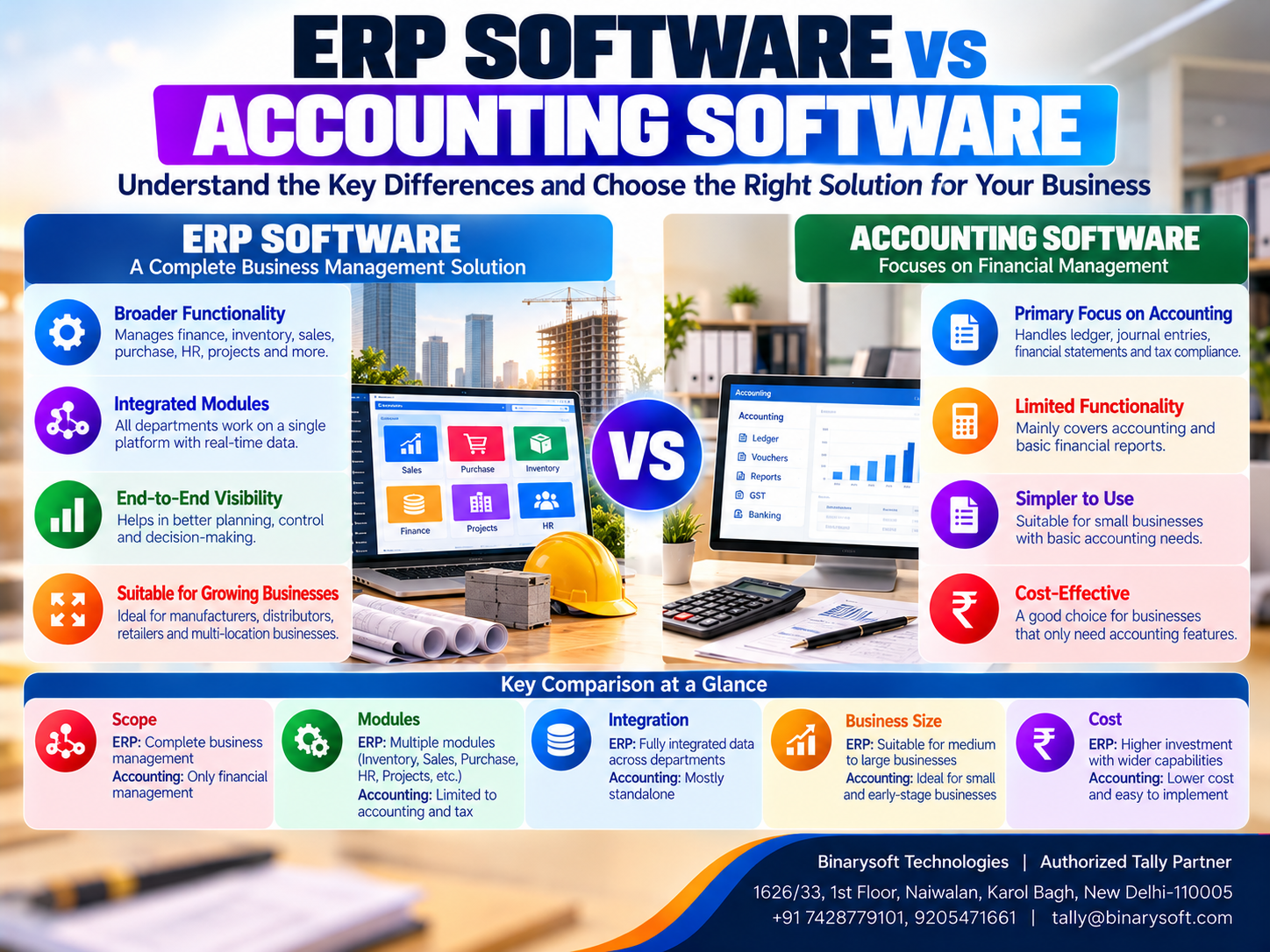
ERP Software vs Accounting Software: Key Differences
| Comparison | Accounting Software | ERP Software |
|---|
| Primary purpose |
Financial accounting and reporting |
Integrated business process management |
| Main focus |
Financial transactions |
Financial and operational activities |
| Accounting |
Core functionality |
Usually included as a module |
| Inventory |
Available in some products |
Often integrated with broader operations |
| Manufacturing |
Limited or selected capabilities |
May include advanced production management |
| Procurement |
Purchase accounting and selected workflows |
May include comprehensive procurement planning |
| Human resources |
Payroll may be available |
May include broader HR management |
| Supply chain |
Usually limited |
May include supply chain coordination |
| Reporting |
Primarily financial and selected operational reports |
Financial and cross-functional reporting |
| Implementation |
Often less complex |
Can require extensive configuration |
| Cost |
Frequently lower for basic requirements |
Often higher for comprehensive implementations |
| Scalability |
Depends on product capabilities |
Often designed for complex organizational structures |
These are general differences. Actual functionality varies considerably between products.
12 Major Differences Between ERP and Accounting Software
1. Scope of Business Operations
Accounting software primarily manages financial activities.
ERP software generally covers a wider range of organizational processes.
Accounting Software Example
A retailer records sales, purchases, expenses and customer payments.
ERP Software Example
A manufacturer coordinates purchasing, production, warehouse operations, sales and accounting.
Business Consideration
Organizations should evaluate whether their main challenges are financial or operational.
2. Integration Between Departments
ERP software is generally designed to connect information across departments.
Accounting software may also provide integrated functions, but its scope is usually narrower.
Example
A company receives a large sales order.
A comprehensive ERP system may coordinate inventory allocation, procurement planning and delivery workflows.
An accounting application may handle invoicing and stock accounting but not every operational step.
3. Inventory Management Capabilities
Many accounting applications include inventory features.
These may support stock items, quantities, valuation and warehouse records.
ERP systems may provide additional capabilities such as warehouse workflows, replenishment planning and supply chain coordination.
How Tally Prime Helps
Tally Prime supports stock items, stock groups, godowns, inventory vouchers and relevant reports.
Advanced warehouse automation or demand planning may require specialized tools.
4. Manufacturing Management
Manufacturing companies often require detailed production information.
This may include raw materials, production schedules, machine utilization and finished goods.
Some accounting applications support material consumption and basic manufacturing records.
Comprehensive ERP systems may offer more advanced manufacturing planning.
Tally Prime Application
Tally Prime supports Bills of Materials and selected manufacturing-related inventory transactions.
It should not automatically be considered a complete manufacturing execution or advanced production scheduling system.
5. Financial Reporting
Accounting software provides financial reports such as profit and loss statements, balance sheets and trial balances.
ERP software may combine financial reports with operational information.
Example
Management may want to compare manufacturing output, material consumption and financial performance.
A comprehensive ERP system may provide connected operational reporting.
Tally Prime provides financial and selected operational reports based on recorded transactions.
6. Business Process Automation
Both accounting software and ERP systems can reduce repetitive work.
Accounting software may automate selected calculations and reporting activities.
ERP systems may coordinate workflows across several departments.
Important Consideration
Automation depends on the product and implementation.
Not every ERP system automatically includes advanced workflow automation.
7. Implementation Complexity
Accounting software is often easier to implement when requirements are straightforward.
ERP implementation may involve several departments and more complex processes.
Activities may include data migration, configuration, integration, testing and employee training.
A comprehensive ERP project can therefore require more planning.
8. Software Cost
Cost is an important consideration for SMEs.
Accounting software may have lower initial and ongoing costs for basic requirements.
Comprehensive ERP systems may involve additional expenses.
These can include implementation, customization, infrastructure, integrations and technical support.
However, pricing varies significantly.
Businesses should compare total cost of ownership rather than purchase price alone.
9. Employee Training
Accounting software training typically focuses on financial and related operational tasks.
ERP training may involve employees from accounting, sales, purchasing, manufacturing, warehousing and other departments.
Training requirements increase with process complexity.
10. Business Scalability
Both accounting software and ERP systems can support growing businesses.
The appropriate choice depends on expected transaction volumes, locations, users and operational requirements.
Some accounting applications can serve growing SMEs effectively.
Other organizations may eventually require more comprehensive ERP capabilities.
11. Customization and Integration
ERP systems may offer extensive customization and integration options.
Accounting software may also support integrations, but available capabilities vary.
Businesses should avoid unnecessary customization because it can increase implementation and maintenance costs.
12. Management Decision-Making
Accounting software helps management understand financial performance.
ERP systems may provide a broader operational view.
For example, an ERP system may connect production planning with procurement and financial information.
However, both types of software depend on accurate data.
Advantages of Accounting Software
Accounting software provides several important benefits.
Easier Financial Recordkeeping
Businesses can maintain organized transaction records.
Faster Invoicing
Invoices can be prepared through structured workflows.
Outstanding Management
Customer and supplier balances can be reviewed regularly.
Financial Reporting
Management can access relevant accounting reports.
Tax-Related Recordkeeping
Applicable taxation features support transaction documentation.
Lower Complexity
For businesses with straightforward requirements, accounting software may be easier to implement and operate.
Advantages of ERP Software
ERP systems can provide broader operational benefits.
Integrated Business Processes
Departments can work with more consistent information.
Improved Operational Visibility
Management may review financial and non-financial activities together.
Better Resource Planning
Relevant modules can support purchasing, inventory and production planning.
Reduced Information Duplication
Integrated workflows may reduce repeated data entry.
Multi-Department Coordination
ERP can improve communication between business functions.
Support for Complex Operations
Comprehensive ERP systems may be suitable for organizations managing complex processes.
How Tally Prime Fits Between Accounting and ERP Software
Tally Prime is primarily known for its accounting and business management capabilities.
It also provides several functions commonly associated with ERP systems.
These include inventory management, order processing, banking, payroll, budgeting, cost centres and selected manufacturing-related inventory features.
For many Indian SMEs, these capabilities can support essential financial and operational requirements without implementing a comprehensive enterprise platform.
Accounting Management
Tally Prime supports ledgers, vouchers and financial statements.
GST Billing
Businesses can record GST-related transactions and prepare relevant invoices.
Inventory Management
Stock items, godowns and inventory reports help maintain stock records.
Banking
Relevant banking and reconciliation features support financial management.
Credit Control
Bill-wise accounting and outstanding reports help monitor customer and supplier balances.
Cost Centres
Businesses can allocate selected expenses to departments or projects.
Manufacturing-Related Inventory
Bills of Materials and relevant inventory transactions support selected manufacturing requirements.
Financial Reporting
Management can review accounting and operational reports.
Important Limitation
Tally Prime should not automatically be treated as a complete replacement for every enterprise ERP system.
Advanced production planning, enterprise HR management, complex supply chain optimization and specialized CRM requirements may need additional applications.
Case Study 1: Choosing Accounting Software for a Wholesale Distributor in Sadar Bazar
Business Type: Wholesale distribution
Location: Sadar Bazar, New Delhi
Primary Challenges: Inventory discrepancies, delayed customer payments and inconsistent accounting records.
Business Background
Consider a wholesale distributor supplying household products across Delhi NCR.
The business maintains inventory through spreadsheets and customer balances separately.
Management is considering an expensive ERP implementation.
Requirements Assessment
The company reviews its main problems.
It identifies the need for accurate stock records, invoicing, receivables management and financial reporting.
Advanced manufacturing or supply chain planning is not required.
Implementation Strategy
The business introduces structured accounting and inventory procedures using Tally Prime.
Employees receive training.
Relevant stock items and customer records are configured.
Outstanding balances are reviewed regularly.
Illustrative Outcomes
Accounting records become more consistent.
Inventory information becomes easier to monitor.
Customer payment follow-up improves.
Management avoids investing in unnecessary functionality.
Key Learning
A business should select software according to its operational requirements rather than assuming a comprehensive ERP system is always necessary.
This is an illustrative case study, not a verified customer implementation.
Case Study 2: ERP Requirements for a Manufacturing Company in Faridabad
Business Type: Industrial equipment manufacturing
Location: Faridabad, Haryana
Primary Challenges: Production scheduling, material planning, inventory coordination and financial reporting.
Business Background
Consider a manufacturing company operating several production departments.
The organization needs to coordinate material procurement, production schedules and finished goods availability.
Basic accounting and inventory records are no longer sufficient for every operational requirement.
Requirements Assessment
Management identifies the need for advanced production planning and cross-department coordination.
The company evaluates comprehensive ERP solutions.
It also reviews how its existing accounting records can be maintained or integrated.
Implementation Strategy
The organization plans a phased ERP implementation.
Production, procurement and warehouse workflows are evaluated.
Financial accounting requirements are documented.
Employees receive department-specific training.
Illustrative Outcomes
Production-related information becomes more structured.
Departments gain clearer responsibilities.
Management can review operational and financial information more systematically.
Key Learning
Comprehensive ERP software may be appropriate when a business requires advanced coordination across multiple operational functions.
This is an illustrative case study, not a verified customer implementation.
Which Software Is Better for Small Businesses?
There is no single answer for every business.
A small retailer may need accounting, GST billing, inventory and outstanding management.
A wholesale distributor may require additional purchasing and warehouse records.
A manufacturing company may need advanced production planning.
The best solution depends on operational complexity.
Choose Accounting Software When:
The business primarily needs financial accounting.
Invoicing and tax-related records are major requirements.
Inventory processes are relatively straightforward.
The organization wants a manageable implementation.
Consider Comprehensive ERP Software When:
Several departments require integrated workflows.
Production planning is complex.
Procurement and supply chain coordination are critical.
The business operates across complex organizational structures.
Management requires extensive operational reporting.
ERP vs Accounting Software: Cost Comparison
Businesses should evaluate total costs over a realistic period.
Consider two illustrative implementation scenarios.
| Expense Category | Accounting Software | Comprehensive ERP |
|---|
| Software licensing |
₹40,000 |
₹2,00,000 |
| Implementation |
₹20,000 |
₹1,50,000 |
| Training |
₹10,000 |
₹75,000 |
| Integration |
₹10,000 |
₹1,00,000 |
| Infrastructure and support |
₹20,000 |
₹75,000 |
| Illustrative Total |
₹1,00,000 |
₹6,00,000 |
These figures are hypothetical and do not represent quotations for Tally Prime or any ERP product.
Actual costs depend on requirements, licensing, deployment and service providers.
Businesses should also consider recurring expenses and expected financial benefits.
How to Choose Between ERP and Accounting Software
Step 1: Identify Business Problems
Document current operational and financial challenges.
Step 2: Define Essential Features
Separate necessary functions from optional capabilities.
Step 3: Review Existing Processes
Identify where manual work and information duplication occur.
Step 4: Evaluate Software Options
Compare actual product capabilities.
Step 5: Test Important Workflows
Conduct demonstrations using realistic transactions.
Step 6: Calculate Total Cost
Include implementation, training, hosting, support and integrations.
Step 7: Assess Future Requirements
Consider expected growth and operational complexity.
Step 8: Plan Data Migration
Verify existing accounting and inventory information.
Step 9: Train Employees
Provide practical training according to responsibilities.
Step 10: Review Implementation Results
Measure whether the selected system addresses the original problems.
Common Mistakes Businesses Should Avoid
Choosing ERP Only Because the Business Is Growing
Growth alone does not establish the need for comprehensive ERP.
Selecting Software Based Only on Price
Low initial cost may not reflect long-term requirements.
Ignoring Employee Training
Employees need to understand new workflows.
Overlooking Integration Requirements
Specialized applications may need to exchange information.
Assuming Every ERP Feature Is Included
Actual capabilities vary between products.
Failing to Test Real Transactions
Demonstrations should reflect everyday business activities.
Ignoring Data Security
Appropriate access controls and backups remain essential.
Can Accounting Software and ERP Work Together?
Yes.
Some organizations use specialized ERP applications alongside accounting software.
For example, a manufacturer may use production management software for shop-floor operations while maintaining financial accounting in another application.
Where supported, integrations can exchange relevant information.
However, businesses must carefully manage data consistency.
Duplicate transactions, incorrect mappings and reconciliation differences can create problems.
Integration requirements should be documented and tested before implementation.
Future of ERP and Accounting Software in India
Business management technology continues to evolve.
Cloud infrastructure is supporting more flexible access arrangements.
Connected banking and digital invoicing can reduce selected manual processes.
Advanced analytics may help organizations review business information more effectively.
AI-assisted capabilities are also emerging across various enterprise applications.
However, feature availability differs between products.
Businesses should avoid assuming that every accounting or ERP application includes advanced automation.
For Indian SMEs, the priority should remain accurate accounting, reliable inventory information and consistent business procedures.
Conclusion
ERP software and accounting software serve related but different purposes.
Accounting software focuses primarily on financial transactions, invoicing, outstanding management and financial reporting.
ERP software generally provides broader integration across financial and operational activities.
For small businesses with straightforward requirements, accounting software may provide sufficient functionality.
For organizations managing complex manufacturing, procurement, supply chain and multi-department operations, comprehensive ERP software may offer additional benefits.
Tally Prime provides accounting, inventory, banking, invoicing and other business management capabilities that can support many Indian SMEs.
However, advanced enterprise requirements may need specialized applications or integrations.
The right decision depends on business needs, implementation complexity, total costs and expected benefits.
The best software is not necessarily the most advanced or expensive system. It is the solution that helps a business operate efficiently, maintain accurate information and grow with confidence.
Powered by Binarysoft Technologies
Authorized Tally Partner
Location: 1626/33, 1st Floor, Naiwalan, Karol Bagh, New Delhi – 110005, INDIA
Contact: +91 7428779101, 9205471661
Email: tally@binarysoft.com
Business Hours: 10:00 AM – 6:00 PM, Monday to Friday
Frequently Asked Questions
Is ERP software better than accounting software?
Not necessarily. The better option depends on business requirements, operational complexity and implementation costs.
Is Tally Prime accounting software or ERP software?
Tally Prime is accounting and business management software with several ERP-related capabilities, including inventory, order processing and financial reporting.
Can small businesses use ERP software?
Yes. Small businesses can use suitable ERP solutions when their operational needs justify the investment.
How can Binarysoft Technologies help businesses choose Tally Prime?
Binarysoft Technologies, an Authorized Tally Partner, can assist businesses with Tally Prime requirements assessment, accounting and inventory configuration, training, implementation and related technical support.
CA. Rishubh Talrejaa specializes in GST, business accounting, and compliance advisory for growing enterprises. With experience in handling real-time transactional data and audits, he writes practical insights on inventory control, taxation, and digital transformation for Indian businesses operating in competitive markets.