Call CA Tally HelpDesk
+91 9205471661,
7428779101
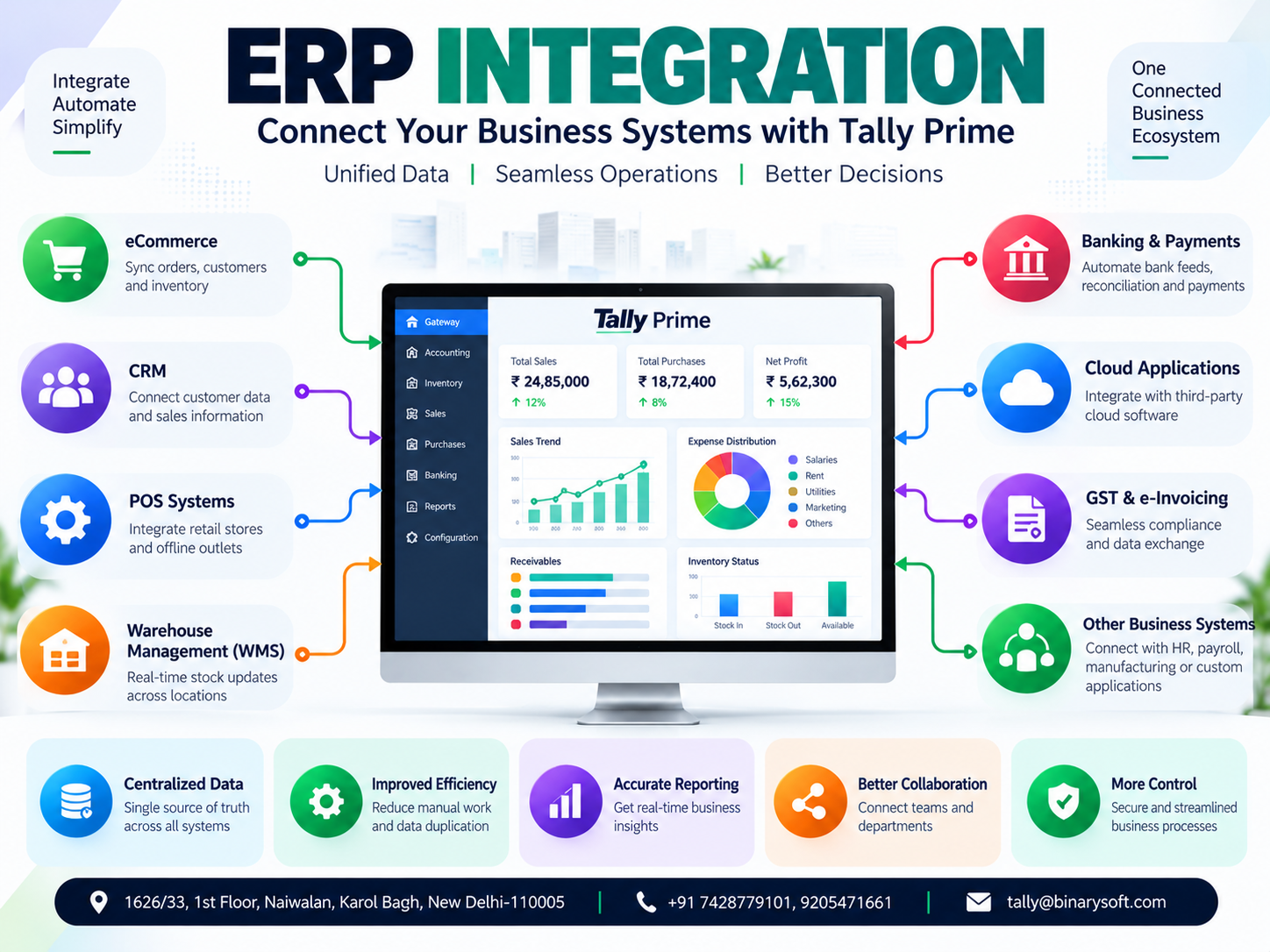
Introduction: Why ERP Integration Is Becoming Essential for Businesses in 2026
Modern businesses depend on multiple software applications to manage their daily operations.
An eCommerce company may use one platform for online orders, another application for warehouse management and separate accounting software for financial reporting.
A manufacturing company may maintain production information in a specialized system while recording purchases, sales and taxation in its accounting application.
Similarly, a service organization may use customer relationship management software, project management tools and financial accounting systems independently.
Although these applications perform important functions, disconnected software creates a serious challenge.
Employees must repeatedly enter the same information into different systems.
Sales data may not match accounting records. Inventory quantities may become inconsistent. Customer payments may remain unrecorded, and management reports may be delayed.
ERP integration helps businesses connect different applications, automate information exchange and create a more reliable operational environment.
In 2026, businesses increasingly need accurate information, efficient workflows and better coordination between departments.
For Indian organizations, Tally Prime can serve as a central accounting and financial management application connected with compatible business systems.
Through appropriately designed integrations, businesses can reduce repetitive data entry, improve reporting accuracy and strengthen financial control.
This guide explains ERP integration, its benefits, common integration methods, implementation challenges and how Tally Prime can support connected business operations.
1. What Is ERP Integration?
ERP integration is the process of connecting an Enterprise Resource Planning system with other business applications so that information can move between them.
These applications may include:
-
Accounting software
-
Customer relationship management systems
-
eCommerce platforms
-
Point-of-sale applications
-
Warehouse management systems
-
Banking applications
-
Manufacturing software
-
Human resource management systems
-
Payroll applications
-
Business intelligence tools
The purpose of integration is to reduce isolated information and improve coordination between business processes.
For example, when an online customer places an order, a properly configured integration may transfer relevant order information into an accounting system.
After validation, the accounting system can record the transaction and update applicable inventory and financial records.
Integration may operate automatically, at scheduled intervals or through controlled manual synchronization.
The appropriate method depends on the applications involved and the business requirements.
2. Why Businesses Need ERP Integration
Businesses often adopt new software as their operations expand.
Initially, each application may solve a specific problem.
However, over time, the organization may accumulate several disconnected systems.
This creates operational inefficiencies.
Repeated Data Entry
Employees spend time entering identical customer, product and transaction information into multiple applications.
Inconsistent Business Records
When data is updated in one system but not another, reports may contain conflicting information.
Delayed Financial Reporting
Accounting teams may need to collect information from several departments before preparing financial statements.
Inventory Differences
Sales and warehouse systems may display different stock quantities.
Increased Administrative Costs
Manual reconciliation and repeated data processing consume employee time.
Limited Management Visibility
Business owners may struggle to obtain a consolidated understanding of sales, expenses, profitability and outstanding payments.
ERP integration helps address these problems by creating structured connections between applications.
3. An Emotional Story: When Disconnected Software Nearly Cost a Business Its Biggest Customer
Vikram owned a growing electronics distribution company in Delhi.
His business started with a small warehouse and a handful of customers.
Over the years, he expanded into online selling and wholesale distribution.
The company used an eCommerce platform for online orders, warehouse software for stock tracking and accounting software for financial records.
Each system worked reasonably well independently.
But the systems did not communicate consistently.
One morning, Vikram received an urgent call from an important corporate customer.
The customer had placed a substantial order and expected delivery within three days.
The sales team had confirmed the order because the online system showed sufficient inventory.
However, the warehouse manager discovered that the actual available quantity was much lower.
Several recent wholesale dispatches had not been reflected in the online inventory records.
Vikram spent the day contacting suppliers and arranging emergency purchases.
The additional transportation and purchasing costs reduced the profitability of the order.
More importantly, the customer's confidence had been damaged.
That evening, Vikram sat in his office reviewing spreadsheets, sales reports and inventory records.
He realized that the company had invested in several software applications but had never established a reliable connection between them.
His employees were working hard.
The problem was the fragmented information environment.
Vikram decided to implement a structured integration process.
The business connected compatible order and inventory workflows with its accounting environment, introduced transaction validation and established reconciliation procedures.
Over time, employees spent less effort copying information between applications.
Management also gained better visibility into sales, inventory and outstanding payments.
The biggest improvement was not simply automation.
It was the confidence that different departments were working with more consistent information.
Business growth becomes easier to manage when information moves accurately between the systems employees already use.
This fictional story illustrates common challenges experienced by growing businesses.
4. Major Types of ERP Integration
ERP integration can be classified according to the applications and business processes being connected.
4.1 Accounting Integration
Accounting integration connects operational software with financial accounting applications.
For example, a sales management application may transfer approved invoice information into an accounting system.
This can reduce duplicate entry and improve consistency between operational and financial records.
4.2 eCommerce Integration
eCommerce integration connects online selling platforms with accounting and inventory systems.
Depending on the integration design, businesses may synchronize orders, customer details, product information and stock quantities.
4.3 CRM Integration
Customer relationship management integration connects customer and sales information with accounting records.
This can help sales teams review relevant customer balances and improve coordination with the finance department.
4.4 Inventory Integration
Inventory integration connects stock information across accounting, warehouse and sales applications.
It can support more consistent stock visibility and reduce reconciliation effort.
4.5 Banking Integration
Banking integration supports the exchange or processing of payment and transaction information.
Businesses may use supported bank statement import, reconciliation or connected banking services.
4.6 Manufacturing Integration
Manufacturing integration connects production-related information with accounting and inventory systems.
This may include raw material consumption, finished goods movement and production expenses.
4.7 Reporting Integration
Reporting integration transfers relevant business information into analytical applications.
This can support consolidated dashboards and management reporting.
5. How Tally Prime Supports ERP Integration
Tally Prime provides integrated accounting, inventory, taxation, banking and financial reporting capabilities.
It also supports technical interfaces that can be used for compatible integrations.
Depending on the product release and integration architecture, developers may use supported XML-based interfaces, HTTP communication and other applicable mechanisms.
Tally Definition Language, commonly known as TDL, can also be used for supported customization and extension requirements.
Integration capabilities should be evaluated against the installed release, licensing arrangements and technical documentation.
Common Integration Scenarios
Sales integration: Transfer validated sales transactions from an external application into Tally Prime.
Purchase integration: Import approved purchase information from a procurement system.
Customer integration: Exchange relevant customer master information.
Inventory integration: Synchronize selected stock information between compatible systems.
Reporting integration: Extract authorized accounting information for external dashboards.
eCommerce integration: Connect supported order-processing workflows with accounting records.
Not every integration is available as a standard built-in feature.
Many scenarios require middleware, custom development or a compatible third-party solution.
6. eCommerce Integration with Tally Prime
Online sellers frequently manage orders across multiple marketplaces and websites.
Recording every transaction manually can become difficult as order volumes increase.
An appropriately designed eCommerce integration may help transfer:
Practical Example
An online retailer receives 150 orders in one day.
Without integration, employees may need to enter the relevant accounting transactions manually.
With a compatible integration, validated transaction information can be transferred through a controlled process.
The accounting team can then focus more attention on exceptions, reconciliation and financial reporting.
Businesses must carefully handle cancellations, returns, shipping charges, marketplace commissions and settlement differences.
7. CRM Integration for Better Customer Management
Customer relationship management software helps businesses maintain customer information and manage sales activities.
Accounting software records financial transactions and customer balances.
Connecting these systems can improve coordination between sales and finance teams.
For example, a salesperson preparing a quotation may benefit from visibility into a customer's overdue invoices.
Similarly, approved customer information can be transferred between systems to reduce repeated data entry.
A well-designed integration should define which application controls each type of information.
Customer contact details may be maintained in the CRM, while financial balances remain controlled by the accounting system.
Clear ownership helps prevent conflicting updates.
8. Inventory and Warehouse Integration
Inventory integration is particularly important for distributors, manufacturers and retailers.
A business may operate multiple warehouses while selling through several channels.
Without reliable synchronization, stock quantities can become inconsistent.
A compatible integration may exchange:
However, accurate integration requires more than transferring quantities.
Businesses must establish consistent item codes, units of measurement, warehouse mappings and transaction rules.
They should also define how damaged goods, returns and reserved inventory are handled.
Inventory integration is successful when the business maintains clear rules for recording and reconciling stock movement.
9. GST and e-Invoicing Integration
GST compliance is an important consideration for Indian businesses.
Integrated workflows can help reduce repeated entry of invoice and tax information.
Depending on the software release, supported services and applicable statutory requirements, businesses may use GST-related connected features or compatible external applications.
Potential integration requirements include:
-
GST invoice information
-
HSN and SAC details
-
Tax classifications
-
E-invoicing information
-
E-way bill details
-
Credit and debit notes
-
GST reconciliation data
Businesses should verify the applicable compliance requirements before implementing automated workflows.
Tax calculations and statutory reporting should be validated independently of the integration process.
10. Case Study One: Online Retailer Reduces Repetitive Accounting Work
Business Background
A hypothetical online retailer sells consumer accessories through its own website and multiple marketplaces.
The company processes several hundred orders daily.
Challenges
Employees manually transfer sales information into the accounting system.
Order cancellations and returns create reconciliation difficulties.
Marketplace settlement amounts do not always match gross invoice values.
Integration Solution
The company introduces a compatible middleware solution connecting its order-processing system with Tally Prime.
The integration transfers validated accounting information and maintains references to original orders.
Separate procedures are established for returns, commissions and settlement reconciliation.
Operational Improvements
The business reduces repeated transaction entry and gains a more structured accounting process.
The accounts team can identify exceptions and investigate settlement differences more efficiently.
Key Learning
eCommerce integration should include reconciliation controls rather than simply transferring sales totals.
This case study is illustrative and does not represent independently verified customer results.
11. Case Study Two: Manufacturing Company Connects Production and Accounting
Business Background
A hypothetical packaging manufacturer uses specialized production software to monitor manufacturing activities.
Financial accounting and inventory valuation are maintained separately.
Challenges
Production information reaches the accounting department late.
Raw material consumption records require manual reconciliation.
Management struggles to obtain timely financial information.
Integration Solution
The company designs a controlled integration between its production application and Tally Prime.
Approved material consumption and finished goods information are transferred according to predefined rules.
The accounting team validates transactions and performs regular reconciliation.
Operational Improvements
The improved process reduces repeated entry and provides better coordination between production and finance teams.
Management gains more timely visibility into inventory-related accounting information.
Key Learning
Manufacturing integration requires accurate material codes, consistent units and strong transaction validation.
This illustrative case study does not claim measured financial savings.
12. Practical ERP Integration Process with Tally Prime
Successful ERP integration requires careful planning.
Step 1: Identify Integration Requirements
Determine which applications need to exchange information.
List the relevant transactions, master records and reports.
Step 2: Define Data Ownership
Decide which system is responsible for maintaining each type of information.
For example, the CRM may control customer contact information, while Tally Prime maintains accounting balances.
Step 3: Review Technical Compatibility
Evaluate the installed Tally Prime release, available interfaces and external application capabilities.
Step 4: Create Data Mapping Rules
Map customer records, ledger names, stock items, tax details and other relevant fields.
Step 5: Design Validation Controls
Check required fields, duplicate transactions, tax information and master data references before importing records.
Step 6: Test with Sample Transactions
Use a controlled test environment to verify sales, purchases, returns and other relevant scenarios.
Step 7: Reconcile Results
Compare source-system records with the transactions created in Tally Prime.
Step 8: Implement Error Handling
Maintain logs for failed transactions and establish procedures for correcting errors.
Step 9: Introduce Security Controls
Use appropriate authentication, access restrictions and secure communication.
Step 10: Monitor Integration Performance
Review synchronization results regularly and investigate discrepancies.
Businesses should maintain backups and rollback procedures before making major changes to live accounting data.
13. Common ERP Integration Challenges
Although integration offers significant operational benefits, implementation can introduce technical and business risks.
Inconsistent Master Data
Different applications may use different customer names, product codes or units.
Duplicate Transactions
Repeated imports can create duplicate accounting entries unless proper controls are implemented.
Incorrect Tax Mapping
Inaccurate GST classifications can affect invoices and financial reports.
Synchronization Delays
Scheduled integration processes may not update information immediately.
Security Risks
Poorly secured interfaces may expose sensitive business information.
Software Compatibility
Changes in software versions or external interfaces may require integration updates.
Organizations should address these issues during planning rather than after implementation.
14. ERP Integration vs ERP Implementation
ERP implementation and ERP integration are related but different activities.
ERP implementation involves introducing and configuring an ERP system for business use.
ERP integration involves connecting that system with other applications.
For example, installing Tally Prime, creating ledgers and configuring GST is part of implementation.
Connecting an external eCommerce order management application with Tally Prime is an integration activity.
Many businesses require both.
Implementation establishes the core accounting environment, while integration helps exchange information with other operational systems.
15. Tally Prime on Cloud and ERP Integration
Businesses operating from multiple locations may benefit from cloud-hosted accounting infrastructure.
Tally Prime can be deployed through compatible hosted desktop environments, subject to appropriate licensing and configuration.
A hosted environment may support remote access for authorized employees.
However, cloud hosting and ERP integration are separate concepts.
Hosting determines where the application operates.
Integration determines how applications exchange information.
A business may use Tally Prime on a local server with external integrations or deploy it in a compatible hosted environment.
The appropriate architecture depends on security, connectivity, performance and operational requirements.
16. Benefits of ERP Integration for Business Growth
Reduced Manual Work
Automated information exchange can reduce repetitive data entry.
Improved Accuracy
Validated data transfers can help reduce inconsistencies between applications.
Faster Reporting
Connected systems can make relevant information available more quickly.
Better Inventory Visibility
Consistent stock information supports improved purchasing and sales decisions.
Stronger Financial Control
Integrated transaction records help accounting teams reconcile operational activity.
Improved Collaboration
Departments can work with more consistent information.
Greater Scalability
Well-designed integrations can support increasing transaction volumes without proportionate increases in manual administration.
Actual benefits depend on integration quality, system reliability and employee processes.
17. Future of ERP Integration in India
ERP integration is becoming increasingly important as businesses adopt specialized digital applications.
Modern integration approaches emphasize structured interfaces, automation, security and reliable information exchange.
Artificial intelligence may eventually help businesses identify unusual transactions, classify information and detect reconciliation differences.
However, automation cannot replace proper accounting controls.
Businesses must continue to verify financial records, maintain secure access and monitor integration results.
Organizations that invest in consistent master data and dependable processes will be better prepared for future digital transformation.
Conclusion
ERP integration helps businesses connect accounting, sales, inventory, customer management and other operational applications.
Disconnected systems often create duplicated work, inconsistent records and delayed reporting.
A carefully designed integration environment can improve information accuracy, reduce administrative effort and support better business decisions.
For Indian organizations, Tally Prime provides a practical accounting and financial management foundation that can be connected with compatible external applications.
Integration requirements may include eCommerce platforms, CRM systems, warehouse applications, manufacturing software and reporting tools.
However, successful integration requires careful data mapping, validation, security, testing and reconciliation.
The objective should not be automation for its own sake.
The real value of ERP integration lies in creating dependable business information that helps employees work efficiently and management make informed decisions.
For businesses planning sustainable growth in 2026, connecting essential systems can be an important step toward more efficient operations and stronger financial control.
Powered by Binarysoft Technologies
Authorized Tally Partner
Location: 1626/33, 1st Floor, Naiwalan, Karol Bagh, New Delhi – 110005, INDIA
Contact Us: +91 7428779101, 9205471661
Email: tally@binarysoft.com
Business Hours: 10:00 AM – 6:00 PM, Monday to Friday
Frequently Asked Questions
What is ERP integration?
ERP integration connects an ERP system with other business applications so that relevant information can be exchanged between them.
Can Tally Prime integrate with eCommerce platforms?
Yes. Compatible third-party solutions or custom integrations can connect supported eCommerce workflows with Tally Prime.
Can inventory software be integrated with Tally Prime?
Yes. Compatible inventory applications can exchange relevant stock information with Tally Prime through appropriately designed integrations.
Does ERP integration eliminate manual accounting?
ERP integration can reduce repetitive work, but businesses still need transaction validation, reconciliation and accounting supervision.
CA. Arinav Chakraborty advises businesses on taxation, accounting systems, and financial planning. His professional interests include digital transformation, compliance management, and improving business efficiency through technology.









