Call CA Tally HelpDesk
+91 9205471661,
7428779101
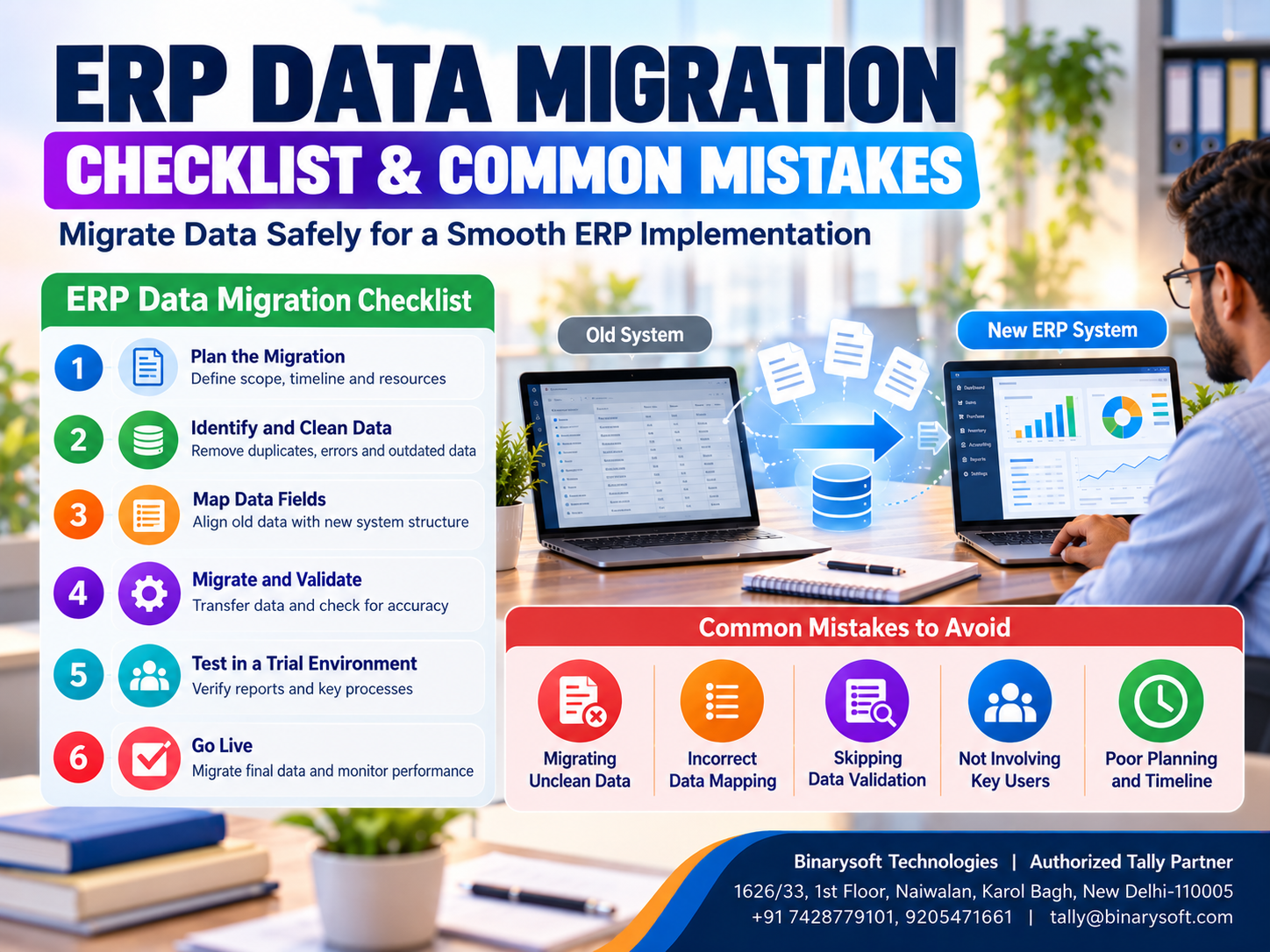
Introduction: Why ERP Data Migration Is Critical for Business Success
Imagine running a successful business for ten years and suddenly discovering that your customer balances, inventory records or financial transactions are missing after switching accounting software.
For many business owners, this is one of the biggest concerns during ERP implementation.
Every organization depends on historical business information, including customer details, supplier balances, invoices, stock quantities, purchase records and financial statements.
When a company adopts new Enterprise Resource Planning (ERP) software, transferring this information accurately becomes essential.
ERP data migration is the process of moving business information from an existing system into a new ERP environment.
However, successful migration involves much more than copying files.
Businesses must review existing records, identify errors, remove duplicates, prepare compatible data formats and verify information after transfer.
Without proper planning, migration problems can lead to incorrect financial reports, inventory discrepancies, GST-related issues and operational disruptions.
For Indian small and medium enterprises, Tally Prime offers accounting, inventory, invoicing and financial reporting capabilities that can support organized business management.
This guide explains how to prepare an ERP data migration checklist, avoid common mistakes and complete the transition with greater confidence.
A Business Owner's Story: The Day His Accounting Data Almost Disappeared
Rajesh owned a wholesale electrical equipment business in Delhi.
For more than twelve years, he had supplied cables, switches and electrical accessories to retailers across Sadar Bazar, Karol Bagh and Bhagirath Palace.
His business had grown steadily.
He maintained thousands of customer transactions, supplier records and inventory entries.
However, his existing accounting software had become difficult to manage.
Reports took longer to prepare, employees frequently used spreadsheets and inventory information was not always accurate.
Rajesh decided to introduce a new accounting system.
He expected the migration process to be simple.
His employee exported several files from the old software and imported them into the new application without checking their accuracy.
The following morning, the accounting team discovered a serious problem.
Several customer outstanding balances did not match the previous records.
Some stock items appeared twice, while others were missing.
Rajesh became worried.
He had supplier payments due, customers waiting for invoices and employees depending on accurate financial information.
For the first time in years, he feared that a software change could disrupt the business he had worked so hard to build.
Instead of continuing with unreliable records, he stopped the migration and sought professional assistance.
The team created verified backups, reconciled customer and supplier balances, cleaned inventory masters and tested the migration using sample data.
Only after confirming the results did they begin regular operations in the new system.
Rajesh learned an important lesson.
Business data represents years of hard work, customer relationships and financial history. Protecting that information must be the first priority during ERP migration.
1. What Is ERP Data Migration?
ERP data migration is the process of transferring relevant business information from an existing accounting application, ERP system, spreadsheet or database into a new ERP environment.
The objective is to ensure that the new system contains accurate information required for business operations.
Migration may involve transferring:
-
Customer and supplier information
-
Accounting ledgers
-
Opening balances
-
Outstanding invoices
-
Inventory masters
-
Stock quantities and valuations
-
Sales and purchase transactions
-
GST-related information
-
Financial records
-
Relevant historical transactions
The exact information transferred depends on the software, migration method and business requirements.
Some organizations migrate complete transaction histories, while others begin with verified opening balances and retain historical records separately.
Both approaches require careful planning.
2. Why ERP Data Migration Is Important
Maintaining Financial Accuracy
Incorrect opening balances can affect financial statements and customer outstanding reports.
Accurate migration helps maintain continuity between the old and new accounting systems.
Protecting Customer Relationships
Missing customer records or incorrect outstanding amounts can create billing disputes.
Verified customer information supports reliable invoicing and payment tracking.
Improving Inventory Accuracy
Inventory migration requires careful verification of stock quantities, units of measurement and valuations.
Incorrect information may affect purchasing and sales decisions.
Supporting GST Compliance
Businesses must maintain appropriate tax records and supporting documentation.
Migration should preserve information needed for applicable GST reporting, reconciliation and record-retention requirements.
Reducing Operational Disruption
A planned migration allows employees to continue business activities with fewer interruptions.
Supporting Reliable Management Reporting
Accurate financial and operational data helps management make informed decisions.
3. Types of ERP Data Migration
Businesses may follow different migration approaches depending on their requirements.
Complete Data Migration
This approach involves transferring extensive historical information into the new system.
It may be suitable when the new application supports the required data structures and historical records are necessary for ongoing operations.
However, complete migration can require significant validation and transformation work.
Opening Balance Migration
Businesses transfer verified opening balances rather than every historical transaction.
For accounting systems, this may include ledger balances, stock information and outstanding invoices.
Historical records can be retained in the old system or in an accessible archive.
Phased Migration
Information is transferred in stages.
For example, accounting masters may be migrated first, followed by inventory and other relevant records.
This approach allows businesses to test individual components.
Parallel Migration
The old and new systems operate simultaneously for a defined period.
Transactions and reports are compared to identify differences.
Parallel operation can improve confidence but may increase workload.
Big-Bang Migration
The organization switches to the new system on a planned date.
This approach can reduce the transition period but requires extensive preparation and testing.
4. Complete ERP Data Migration Checklist
A structured checklist helps businesses manage migration activities systematically.
Step 1: Define Migration Objectives
Identify why the business is changing software.
Objectives may include improving accounting efficiency, integrating inventory records, supporting additional users or obtaining better financial reports.
Step 2: Identify Data Sources
Prepare a list of systems containing relevant business information.
These may include accounting software, spreadsheets, inventory applications and databases.
Step 3: Decide What Data Must Be Migrated
Determine which records are required in the new system.
Avoid transferring unnecessary or obsolete information without a clear business purpose.
Step 4: Create Reliable Backups
Before modifying or exporting existing information, create verified backups.
Store backups securely and confirm that they can be restored.
Step 5: Clean Existing Records
Review customer names, supplier details, stock items, accounting ledgers and transaction information.
Identify duplicates, missing fields and inconsistent classifications.
Step 6: Reconcile Financial Balances
Verify customer outstanding balances, supplier balances, bank accounts and other relevant ledger information.
Step 7: Verify Inventory Records
Compare recorded stock quantities with physical inventory or other reliable records.
Review units of measurement and stock valuations.
Step 8: Prepare Data Mapping
Identify how information from the old system corresponds to fields in the new ERP software.
Step 9: Conduct Test Migration
Transfer a limited dataset into a test environment.
Verify whether records appear correctly.
Step 10: Validate Migrated Information
Compare financial balances, stock quantities and relevant reports between the source and destination systems.
Step 11: Train Employees
Explain new transaction procedures and reporting methods.
Step 12: Plan the Final Migration
Select a suitable cutover date and establish responsibilities.
Step 13: Perform Final Reconciliation
Verify the final opening balances and other critical information.
Step 14: Approve Go-Live
Management should approve deployment only after important issues have been resolved.
Step 15: Monitor Post-Migration Operations
Review transactions and reports during the initial operating period.
5. ERP Data Migration Checklist Table
| Migration Activity | Verification Requirement | Priority |
|---|
| Data Backup |
Backup created and restore tested |
Critical |
| Customer Masters |
Names and details verified |
High |
| Supplier Masters |
Duplicate records reviewed |
High |
| Accounting Ledgers |
Groups and balances checked |
Critical |
| Opening Balances |
Reconciled with source records |
Critical |
| Inventory Masters |
Stock codes and units verified |
High |
| Stock Quantities |
Reconciled with reliable records |
Critical |
| GST Information |
Relevant tax details verified |
Critical |
| Outstanding Invoices |
Bill-wise balances checked |
Critical |
| Data Mapping |
Source and destination fields matched |
High |
| Test Migration |
Sample records validated |
Critical |
| Employee Training |
Users trained on relevant tasks |
High |
| Final Reconciliation |
Differences investigated |
Critical |
| Go-Live Approval |
Management authorization obtained |
Critical |
Businesses can adapt this checklist according to their operational requirements.
6. Common ERP Data Migration Mistakes to Avoid
Mistake 1: Migrating Incorrect Data
One of the most common problems is transferring existing errors into the new system.
Duplicate ledgers, incorrect balances and inconsistent inventory records may continue causing problems after migration.
Best Practice: Clean and reconcile information before migration.
Mistake 2: Not Creating Backups
Migration activities can involve data conversion, restructuring or replacement.
Without reliable backups, recovering from errors may become difficult.
Best Practice: Create secure backups and test restoration procedures.
Mistake 3: Ignoring Data Mapping
Different software applications may use different fields and classifications.
Incorrect mapping can place information in the wrong accounts or categories.
Best Practice: Document field mappings and verify them through test imports.
Mistake 4: Migrating Unnecessary Information
Transferring outdated or irrelevant records increases migration complexity.
Best Practice: Establish a clear migration scope while preserving legally required historical information.
Mistake 5: Skipping Test Migration
Businesses sometimes attempt to transfer all information directly into the live system.
This increases the risk of unexpected problems.
Best Practice: Test migration procedures using representative sample records.
Mistake 6: Ignoring Inventory Reconciliation
Stock quantities and valuations may differ between systems.
Best Practice: Verify stock balances and investigate discrepancies before go-live.
Mistake 7: Overlooking Outstanding Invoices
Incorrect customer or supplier bill references can create collection and payment problems.
Best Practice: Reconcile bill-wise outstanding information.
Mistake 8: Inadequate Employee Training
Even accurate data may be used incorrectly if employees do not understand the new software.
Best Practice: Train users before regular operations begin.
Mistake 9: Rushing the Migration Timeline
Unrealistic deadlines may encourage teams to skip important verification activities.
Best Practice: Allocate sufficient time for testing, corrections and reconciliation.
Mistake 10: Not Planning for Recovery
Unexpected technical problems may occur during cutover.
Best Practice: Prepare a documented rollback or recovery procedure.
7. How Tally Prime Can Help During Accounting Data Migration
Tally Prime supports accounting, inventory management, GST-related transactions and financial reporting.
Businesses moving to Tally Prime should carefully evaluate the available migration options for their existing software.
Accounting Master Preparation
Businesses can organize ledger groups, customer accounts, supplier accounts and other accounting masters.
Opening Balance Configuration
Verified opening balances help establish continuity in the new accounting environment.
Inventory Master Management
Stock items, stock groups, units of measurement and relevant inventory classifications can be configured.
Outstanding Management
Customer and supplier outstanding information can be maintained according to the supported accounting structure.
GST Configuration
Relevant GST details should be configured and validated before recording live transactions.
Financial Reporting
After migration, financial reports can help verify accounting balances and identify discrepancies.
Import and Integration Capabilities
Tally Prime supports data import and integration capabilities for supported formats and scenarios.
However, not every legacy ERP format can be imported directly.
Some migrations may require data transformation, compatible import formats or specialized tools.
Businesses should verify compatibility with their existing software and the Tally Prime version being implemented.
8. Step-by-Step Approach to Migrating Data into Tally Prime
Step 1: Review the Existing Accounting System
Identify the software currently used and the information available for export.
Step 2: Confirm Migration Compatibility
Determine whether the required data can be transferred through supported import methods.
Step 3: Prepare Company Information
Create or configure the relevant company in Tally Prime.
Step 4: Organize Accounting Masters
Review ledger names, groups and opening balances.
Step 5: Prepare Inventory Masters
Verify stock items, units, groups and godown information.
Step 6: Transfer Supported Data
Use suitable supported import procedures or compatible migration tools.
Step 7: Verify Opening Balances
Compare the opening Trial Balance with verified source records.
Step 8: Reconcile Inventory
Check stock quantities and valuations.
Step 9: Validate Outstanding Transactions
Confirm customer and supplier balances.
Step 10: Test Business Operations
Record sample sales, purchases, receipts and payments.
Step 11: Review Financial Reports
Check whether the Balance Sheet, Profit and Loss Account and other relevant reports reflect expected information.
Step 12: Begin Live Operations
Proceed only after critical differences have been resolved and authorized personnel have approved the migration.
9. Case Study One: Accounting Data Migration for a Wholesale Distributor
Business: Illustrative electrical goods distributor, Sadar Bazar, Delhi
Business Challenge
A wholesale distributor maintained accounting information in an older application and inventory records in spreadsheets.
The company wanted to introduce Tally Prime for more organized accounting and inventory management.
However, its records contained duplicate stock items and inconsistent customer balances.
Migration Strategy
The business divided migration into four stages.
First, the accounting team created backups of existing records.
Second, employees reviewed customer and supplier ledgers.
Third, inventory masters were cleaned and organized.
Finally, verified information was transferred using suitable supported methods and reconciled against source records.
Results
The structured process helped the business identify discrepancies before regular operations began.
Employees gained more consistent accounting and inventory information.
Management also established procedures for reviewing outstanding balances.
Key Learning: Accurate data preparation is more important than transferring records as quickly as possible.
This is an illustrative case study.
10. Case Study Two: ERP Migration for a Manufacturing Business
Business: Illustrative packaging manufacturer, Bawana Industrial Area, Delhi
Business Challenge
A manufacturing company maintained raw material records, finished goods information and accounting data in separate systems.
Management wanted to improve financial reporting and inventory visibility.
The main challenge was ensuring that stock quantities and valuations remained accurate during migration.
Migration Strategy
The company began by identifying relevant data sources.
Raw material and finished goods records were reviewed separately.
The accounting team reconciled ledger balances, while inventory employees verified stock quantities.
The implementation team then tested the migration and compared destination records with approved source information.
Results
The company established a more organized accounting and inventory environment.
The testing process helped identify differences before the final transition.
Employees also received training on the new transaction procedures.
Key Learning: Manufacturing businesses should treat inventory reconciliation as a critical component of ERP migration.
This is an illustrative case study.
11. ERP Data Migration Timeline for Small Businesses
The duration of migration depends on transaction volumes, data quality and technical complexity.
The following schedule is illustrative.
| Stage | Estimated Duration |
|---|
| Migration Planning |
2–4 working days |
| Data Backup and Assessment |
2–5 working days |
| Data Cleaning |
3–10 working days |
| Data Mapping |
2–5 working days |
| Test Migration |
2–5 working days |
| Validation and Corrections |
3–7 working days |
| Final Migration |
1–3 working days |
| Post-Migration Monitoring |
5–10 working days |
Some stages may overlap.
Businesses with extensive historical records, custom software or multiple branches may require considerably longer.
12. How to Validate ERP Data After Migration
Data validation confirms that information has been transferred accurately.
Accounting Balance Verification
Compare the source and destination Trial Balances at the same cutover date.
Investigate differences in account classifications and opening balances.
Customer Outstanding Verification
Check customer-wise and invoice-wise outstanding amounts.
Supplier Balance Verification
Confirm payable balances and relevant bill references.
Inventory Reconciliation
Compare stock quantities, units and valuations.
GST Information Review
Verify relevant tax registrations, classifications and transaction information.
Financial Statement Comparison
Review Balance Sheet and other applicable financial reports.
Sample Transaction Testing
Enter representative transactions to confirm that accounting and inventory functions operate correctly.
Exception Reporting
Maintain a record of differences, corrective actions and approvals.
A migration should not be considered complete until material discrepancies have been investigated and resolved.
13. Data Security During ERP Migration
ERP migration involves handling confidential business information.
Businesses should implement appropriate safeguards.
Restrict Data Access
Only authorized personnel should access migration files and credentials.
Protect Backup Files
Store backups securely and limit access.
Use Secure Transfer Methods
Avoid transferring confidential business information through unprotected channels.
Verify Third-Party Access
If an external implementation team is involved, establish appropriate confidentiality and access arrangements.
Maintain Recovery Procedures
Ensure that reliable source records remain available until the migration has been accepted.
Remove Temporary Access
Revoke unnecessary migration-related permissions after project completion.
Data security should remain a priority throughout the migration process.
14. How to Reduce ERP Migration Costs
Migration expenses depend on the amount of data, software compatibility and professional services required.
Businesses can reduce unnecessary costs by preparing records in advance.
Cleaning duplicate masters before implementation reduces repeated correction work.
Defining the migration scope prevents unnecessary processing.
Testing sample records helps identify compatibility problems early.
Using standard software functionality where appropriate can reduce customization expenses.
Employee training also helps avoid operational errors after go-live.
However, businesses should not compromise essential verification or backup procedures to reduce costs.
15. ERP Migration Best Practices for Indian MSMEs
Small and medium enterprises should follow a practical, risk-based approach.
Begin with a clear migration plan.
Identify critical accounting and inventory information.
Reconcile source records before transferring them.
Document the cutover date and migration responsibilities.
Use supported import methods and test representative transactions.
Retain historical information according to applicable business and legal requirements.
Train employees before allowing unrestricted live operations.
Finally, review the new system during the initial operating period.
These practices help reduce disruption and improve confidence in the migrated records.
16. The Future of ERP Data Migration
ERP migration is evolving as businesses adopt cloud platforms, integrated applications and automated data-processing tools.
Modern migration solutions may provide improved field mapping, data transformation and validation capabilities.
Some systems also use intelligent tools to identify duplicate records or inconsistent information.
However, automation does not eliminate the need for human verification.
Financial balances, inventory valuations and compliance-related information must still be reviewed carefully.
For Indian businesses, reliable migration will continue to depend on accurate source records, suitable technology and disciplined implementation procedures.
Conclusion
ERP data migration is one of the most important stages of implementing new business software.
A successful migration protects financial information, maintains customer and supplier records and supports continuity in daily operations.
Businesses should not treat migration as a simple file-transfer exercise.
It requires careful planning, data cleaning, backups, mapping, testing and reconciliation.
For organizations implementing Tally Prime, preparing accurate accounting and inventory information can make the transition more reliable.
Businesses should verify supported migration methods, validate critical balances and train employees before going live.
The success of ERP migration is not measured by how quickly information moves from one system to another. It is measured by how accurately, securely and reliably that information supports future business operations.
Powered by Binarysoft Technologies
Authorized Tally Partner
Location: 1626/33, 1st Floor, Naiwalan, Karol Bagh, New Delhi – 110005, INDIA
Contact Us: +91 7428779101, 9205471661
Email: tally@binarysoft.com
Business Hours: 10:00 AM – 6:00 PM, Monday to Friday
Frequently Asked Questions
What is ERP data migration?
ERP data migration is the process of transferring relevant business information from an existing software system into a new ERP environment.
Why is ERP data migration important?
It helps maintain accurate accounting records, inventory information, customer balances and operational continuity during software changes.
Can accounting data be migrated into Tally Prime?
Yes, supported accounting information can be imported or migrated using compatible methods. The exact process depends on the source system, data format and product version.
How long does ERP data migration take?
Simple migrations may take several days or weeks, while complex projects involving extensive historical data and integrations may take months.
CA. Sagar Singh advises MSMEs on accounting accuracy, GST compliance, and internal controls. With exposure to high-volume transaction environments, he writes practical guidance on inventory management, billing discipline, and compliance-ready accounting systems.









