Call CA Tally HelpDesk
+91 9205471661,
7428779101
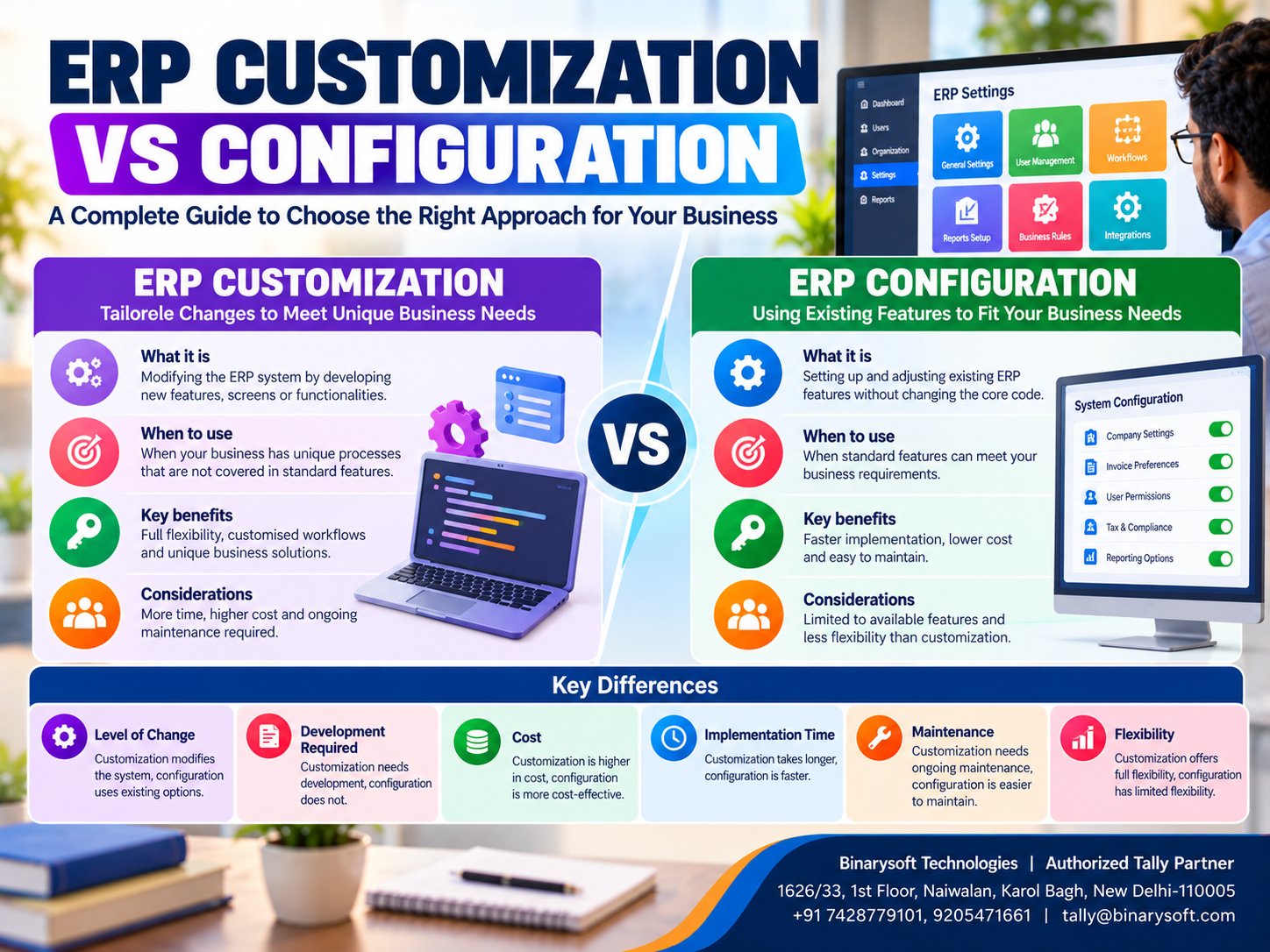
Introduction: Why ERP Customization and Configuration Matter
Every business operates differently.
A wholesale distributor may need detailed inventory reports, a manufacturing company may require production-related accounting, and a retail business may prioritize fast billing and stock management.
When organizations implement Enterprise Resource Planning (ERP) software, they often discover that the standard system does not perfectly match every business process.
This creates an important decision: Should the business configure the existing ERP features or invest in software customization?
Although these approaches sound similar, they involve different levels of complexity, investment and technical expertise.
ERP configuration involves adjusting available software settings without changing the underlying application code.
ERP customization involves developing or modifying functionality to meet requirements that standard settings cannot adequately address.
Choosing the right approach can influence implementation costs, employee productivity, software maintenance and future upgrades.
For Indian small and medium businesses, Tally Prime provides accounting, inventory, GST-related and reporting capabilities that can be configured according to many operational requirements.
When specialized functionality is needed, compatible customization solutions may extend its capabilities.
This guide explains the differences between ERP customization and configuration, their advantages, limitations and practical applications.
A Business Owner's Story: The Software Customization That Became an Expensive Mistake
Rakesh owned a growing electrical distribution business in Delhi.
His company supplied cables, switches and lighting products to retailers across Karol Bagh, Sadar Bazar and nearby markets.
As the business expanded, Rakesh decided to introduce modern accounting and inventory software.
During implementation, his employees requested several changes.
The sales team wanted a different invoice layout. The accounting team requested additional customer reports, while the warehouse department wanted improved stock visibility.
A software developer suggested creating customized functionality for every requirement.
Rakesh agreed, believing that more customization would make the software better.
However, the project became increasingly complicated.
Development expenses increased, implementation was delayed, and employees struggled to understand some of the new screens.
When the company later upgraded its software, certain customized features required additional testing and adjustments.
Rakesh became frustrated.
He had invested significant money but was still facing operational difficulties.
After reviewing the implementation, he discovered that several requested features could have been handled through existing software settings.
Only a small number of requirements genuinely needed custom development.
The company reorganized its implementation strategy.
Standard accounting, inventory and invoice settings were configured first.
Custom development was reserved for requirements that could not be addressed through built-in functionality.
The result was a simpler and more manageable business system.
Rakesh learned an important lesson:
Successful business software implementation is not about customizing everything. It is about using existing capabilities effectively and developing additional functionality only when necessary.
1. What Is ERP Configuration?
ERP configuration is the process of adjusting built-in software settings to match business requirements.
Configuration does not normally involve changing the application's underlying source code.
Instead, businesses select available features, define preferences and establish operational rules.
Examples of ERP Configuration
Common configuration activities include:
-
Creating accounting ledgers and groups.
-
Setting up customer and supplier records.
-
Defining stock items and inventory groups.
-
Configuring applicable tax details.
-
Selecting invoice formats.
-
Setting transaction preferences.
-
Configuring available user permissions.
-
Defining reporting preferences.
-
Establishing financial periods.
-
Setting up relevant cost centres.
The exact options depend on the ERP application.
Why Configuration Is Important
Configuration helps businesses adapt software to their operations without unnecessary development.
It generally requires less time and introduces fewer technical dependencies than extensive customization.
For many small businesses, proper configuration can address a substantial portion of their operational requirements.
2. What Is ERP Customization?
ERP customization involves creating, modifying or extending software functionality to meet specialized business requirements.
Customization may require programming, additional modules, integration development or changes to application behavior.
Examples of ERP Customization
Businesses may require:
-
Specialized invoice layouts.
-
Industry-specific reports.
-
Custom data-entry screens.
-
Additional validation rules.
-
Barcode-enabled processes.
-
Specialized production reports.
-
Integration with external applications.
-
Custom business calculations.
-
Automated transaction-processing functions.
-
Specialized approval workflows.
Not every customization requires changing the core application itself.
Some ERP platforms support extensions through documented development frameworks, APIs or add-ons.
These approaches can provide flexibility while reducing the risks associated with directly modifying core software.
When Customization Becomes Necessary
Customization may be appropriate when a business has an essential requirement that cannot be addressed through standard features or reasonable process adjustments.
However, the expected benefits should justify development and maintenance expenses.
3. ERP Customization vs Configuration: Key Differences
| Comparison Factor | ERP Configuration | ERP Customization |
|---|
| Meaning |
Adjusting existing settings |
Developing or extending functionality |
| Programming |
Usually not required |
Often required |
| Implementation Time |
Generally shorter |
Often longer |
| Initial Cost |
Usually lower |
Usually higher |
| Technical Complexity |
Lower |
Higher |
| Maintenance |
Generally simpler |
May require specialized support |
| Upgrade Compatibility |
Usually easier |
Requires compatibility testing |
| Flexibility |
Limited to supported settings |
Can address specialized requirements |
| Testing Requirements |
Standard functional testing |
Additional development and regression testing |
| Best Suited For |
Common business processes |
Unique or complex requirements |
The actual differences depend on the software architecture and the implementation approach.
Well-designed extensions can sometimes be maintained efficiently, while poorly planned configuration can also create operational problems.
4. Benefits of ERP Configuration
Faster Implementation
Configuration uses existing functionality, allowing businesses to establish operational processes without developing new software components.
Lower Initial Investment
Businesses generally spend less on programming and technical development.
Easier Employee Training
Standard software features often have established documentation and training resources.
Better Upgrade Compatibility
Built-in settings are generally easier to maintain when supported software versions are updated.
Reduced Technical Dependencies
Businesses are less dependent on individual developers for routine operations.
Standardized Business Processes
Configuration encourages organizations to establish consistent accounting, inventory and reporting procedures.
Improved Scalability
A properly configured system can provide a stable foundation for adding users, departments and transaction volumes.
5. Benefits of ERP Customization
Although configuration is often preferable for standard requirements, customization can provide important advantages.
Support for Unique Business Processes
Some businesses follow specialized procedures that standard software cannot adequately support.
Industry-Specific Functionality
Manufacturing, distribution, logistics and service businesses may require specialized reports or transaction handling.
Improved Productivity
A carefully designed customization can reduce repetitive work and simplify important activities.
Better Integration
Custom integration may connect ERP software with compatible external systems.
Specialized Reporting
Businesses can develop reports that reflect their management requirements.
Competitive Advantage
Unique business processes may justify specialized functionality when they create measurable value.
The benefits depend on proper development, testing, documentation and ongoing support.
6. Disadvantages and Risks of Excessive ERP Customization
Customization should be evaluated carefully because it can introduce additional responsibilities.
Higher Development Costs
Custom functionality may require specialized developers, testing and ongoing maintenance.
Longer Implementation Timelines
Complex requirements can delay software deployment.
Upgrade Compatibility Risks
Changes in software versions may affect customized features.
Increased Testing Requirements
Businesses must verify that custom functionality does not interfere with standard operations.
Developer Dependency
Poorly documented customization can create dependence on a particular developer.
Security Concerns
Custom code and integrations may introduce vulnerabilities if not properly designed and reviewed.
Maintenance Complexity
Organizations may need to update customized components when business requirements change.
These risks can be reduced through documented development practices and appropriate technical support.
7. How Tally Prime Supports ERP Configuration
Tally Prime provides various built-in settings that help businesses adapt accounting and inventory processes.
Accounting Configuration
Businesses can create accounting groups, ledgers, voucher types and relevant financial classifications.
Inventory Configuration
Stock groups, stock items, units of measurement, godowns and applicable inventory features can be configured.
GST Configuration
Businesses can maintain relevant tax information and configure supported GST-related transaction settings.
Invoice Configuration
Invoice appearance and printing preferences can be adjusted using available features.
Cost Centre Management
Cost centres can help businesses track relevant income and expenses according to their reporting requirements.
User Security
Available security levels and user management features help organizations control access to company information.
Financial Reporting
Tally Prime provides financial and operational reports with supported viewing and reporting options.
The exact configuration options depend on the product version and enabled features.
8. How Tally Prime Customization Can Help Businesses
Tally Prime supports specialized extensions through Tally Definition Language (TDL) and compatible add-on solutions.
TDL-based development can help businesses implement additional functionality where standard features are insufficient.
Customized Invoice Formats
Businesses may require invoice layouts containing specialized information or additional fields.
Custom Business Reports
Organizations can develop reports designed around specific management requirements.
Barcode-Related Functionality
Compatible solutions may support specialized barcode-enabled business processes.
Additional Validation Rules
Custom functionality can help verify transaction information according to defined business rules.
External System Integration
Suitable integrations can exchange information between Tally Prime and compatible external applications.
Specialized Industry Processes
Businesses may develop features for manufacturing, distribution, education or other sectors.
Important: Custom functionality should be evaluated for compatibility with the installed Tally Prime version, deployment environment and future upgrade requirements.
9. When Should Businesses Choose ERP Configuration?
Configuration is generally the preferred starting point when business requirements can be satisfied through existing features.
It is especially suitable when:
-
The organization follows standard accounting procedures.
-
Existing invoice settings meet business requirements.
-
Inventory can be managed using available stock features.
-
Standard financial reports provide sufficient information.
-
Implementation speed is important.
-
The business has a limited technology budget.
-
Future software upgrades are a priority.
-
Employees need straightforward training and support.
Businesses should first examine available settings before requesting custom development.
10. When Should Businesses Choose ERP Customization?
Customization may be justified when standard functionality cannot adequately support an essential requirement.
For example, a distributor may require a specialized report combining information in a format unavailable through standard reporting options.
A manufacturer may need a specific validation process related to its production activities.
A service organization may require an industry-specific billing calculation.
Before approving customization, management should ask:
-
Is the requirement essential?
-
Can standard software functionality address it?
-
Can the business process be simplified?
-
What measurable benefit will customization provide?
-
How much will development and maintenance cost?
-
Who will support the customization?
-
How will compatibility be tested after upgrades?
These questions help prevent unnecessary expenditure.
11. ERP Customization vs Configuration: Cost Comparison
The following table illustrates possible cost differences.
| Cost Component | Configuration | Customization |
|---|
| Requirement Analysis |
Usually limited |
May require detailed specifications |
| Development |
Minimal or none |
Additional development expense |
| Testing |
Standard testing |
Expanded testing |
| Employee Training |
Usually simpler |
May require specialized training |
| Maintenance |
Standard support |
Additional support may be required |
| Future Upgrades |
Generally straightforward |
Compatibility review may be needed |
Actual costs depend on the ERP platform, project complexity and implementation provider.
Businesses should request detailed quotations rather than relying on generic estimates.
Understanding Total Cost of Ownership
A proper cost comparison should include initial implementation, development, maintenance, testing, training and future upgrades.
A customization that appears inexpensive initially may become costly if it requires frequent modifications.
However, a well-designed customization may still provide excellent value when it eliminates significant operational inefficiencies.
12. Case Study One: Configuration for a Wholesale Trading Business
Business: Illustrative electrical goods distributor, Bhagirath Palace, Delhi
Business Challenge
A wholesale distributor managed hundreds of electrical products and numerous customer transactions.
Management wanted better stock tracking, GST invoicing and customer outstanding reports.
Initially, the company considered developing customized software.
Solution
After reviewing its requirements, the business discovered that many needs could be addressed through standard Tally Prime configuration.
The implementation team organized stock groups, configured relevant accounting masters and established invoice preferences.
Employees received training on inventory reports and outstanding management.
Results
The company established a more consistent accounting and inventory process without extensive custom development.
Implementation was easier to manage, and employees could use familiar software features.
Key Learning
Businesses should evaluate standard configuration capabilities before investing in customization.
This is an illustrative case study.
13. Case Study Two: Strategic Customization for a Manufacturing Business
Business: Illustrative packaging manufacturer, Bawana Industrial Area, Delhi
Business Challenge
A packaging manufacturer used Tally Prime for accounting and inventory management.
However, management required a specialized report combining selected production-related information with financial data.
The standard reporting options did not fully satisfy the requirement.
Solution
The company retained standard accounting and inventory configuration.
A compatible customized report was developed to address the specific management requirement.
The development team documented the report logic and tested it using representative business data.
Results
Management gained access to the specialized information it required.
The company avoided unnecessary changes to standard accounting processes.
Key Learning
Targeted customization can deliver value when it addresses a clearly defined business requirement without introducing unnecessary complexity.
This is an illustrative case study.
14. How to Decide Between ERP Customization and Configuration
Businesses can use a structured decision process.
Step 1: Identify the Business Requirement
Document the problem that needs to be solved.
Step 2: Review Existing Software Features
Determine whether built-in functionality can meet the requirement.
Step 3: Evaluate Process Changes
Consider whether the existing business workflow can be simplified.
Step 4: Estimate Development Costs
If customization is required, calculate implementation and maintenance expenses.
Step 5: Evaluate Business Benefits
Estimate potential improvements in productivity, accuracy or reporting.
Step 6: Assess Technical Risks
Review compatibility, security and support requirements.
Step 7: Test the Proposed Solution
Use representative business scenarios before deployment.
Step 8: Document the Final Decision
Record why configuration or customization was selected.
This process supports more transparent technology decisions.
15. Best Practices for ERP Customization Projects
Keep Customization Limited
Develop only the functionality required to address genuine business needs.
Use Supported Development Methods
Prefer documented extension mechanisms and compatible integration approaches.
Maintain Technical Documentation
Document custom features, dependencies and configuration requirements.
Test Before Deployment
Verify functionality using representative transactions.
Protect Business Data
Create backups before introducing significant changes.
Plan for Future Upgrades
Review compatibility whenever the underlying ERP software changes.
Assign Maintenance Responsibility
Identify who will support customized functionality.
Train Employees
Ensure users understand the purpose and operation of custom features.
These practices help reduce long-term maintenance risks.
16. ERP Customization and Configuration for Different Industries
Retail Businesses
Retailers often prioritize fast billing, inventory management and customer transactions.
Standard configuration may address many requirements.
Wholesale Distributors
Distributors may require stock groups, godown management, outstanding reports and specialized pricing processes.
Some requirements may justify additional functionality.
Manufacturing Companies
Manufacturers may need inventory tracking, material consumption accounting and specialized production reports.
The appropriate approach depends on production complexity.
Service Businesses
Service organizations may prioritize project accounting, customer billing and expense reporting.
E-Commerce Businesses
Online sellers may require integration with marketplaces or other applications.
Such requirements should be evaluated against available connectors and supported integration options.
17. Common Mistakes Businesses Should Avoid
One frequent mistake is requesting customization before exploring standard software capabilities.
Another is approving development without clearly documenting requirements.
Businesses also sometimes underestimate maintenance expenses.
Poor testing can create problems in accounting transactions or financial reports.
Inadequate documentation may make future changes difficult.
Finally, organizations should avoid assuming that every requested feature will improve productivity.
Software changes should solve measurable business problems rather than simply reproduce familiar manual processes.
18. Future of ERP Customization and Configuration
Business software is evolving toward greater flexibility, integration and automation.
Modern ERP platforms increasingly offer configurable settings, extension frameworks and integration capabilities.
These developments can help organizations adapt software without extensive changes to core applications.
However, specialized business requirements will continue to create demand for custom development.
For Indian small and medium enterprises, a balanced approach is often the most practical.
Businesses should use standard features wherever possible and introduce carefully designed custom functionality when necessary.
This approach supports manageable implementation costs, operational stability and future expansion.
Conclusion
ERP customization and configuration are two important approaches to adapting business software.
Configuration uses existing settings and features, making it generally faster and easier to maintain.
Customization extends software capabilities to support specialized requirements, but it can introduce additional costs and technical responsibilities.
For most Indian small and medium businesses, configuration should be the starting point.
Tally Prime provides accounting, inventory, invoicing, GST-related and reporting features that can be configured according to many business requirements.
When standard functionality is insufficient, compatible TDL-based customization and add-on solutions may provide additional capabilities.
Businesses should evaluate requirements, implementation costs, technical risks and long-term benefits before deciding.
The most effective ERP strategy is not to customize everything. It is to configure what already works and customize only what genuinely creates business value.
Powered by Binarysoft Technologies
Authorized Tally Partner
Location: 1626/33, 1st Floor, Naiwalan, Karol Bagh, New Delhi – 110005, INDIA
Contact Us: +91 7428779101, 9205471661
Email: tally@binarysoft.com
Business Hours: 10:00 AM – 6:00 PM, Monday to Friday
Frequently Asked Questions
What is the best ERP implementation approach?
For many businesses, the most practical approach is to use standard configuration for common requirements and reserve customization for clearly justified, high-value needs.
When should businesses choose ERP customization?
Customization may be appropriate when essential requirements cannot be met through standard software functionality.
What is the main difference between ERP customization and configuration?
Configuration uses existing features and settings, while customization introduces additional functionality through development or extensions.
What is ERP configuration?
ERP configuration involves adjusting built-in software settings to meet business requirements without modifying the underlying application code.
CA. Rohin Mehtaal is a Chartered Accountant with experience in accounting systems, audit support, and GST compliance. He has assisted businesses in adopting structured financial processes and improving inventory accuracy. His writing emphasizes clarity, control, and data-driven decision making.









