Call CA Tally HelpDesk
+91 9205471661,
7428779101
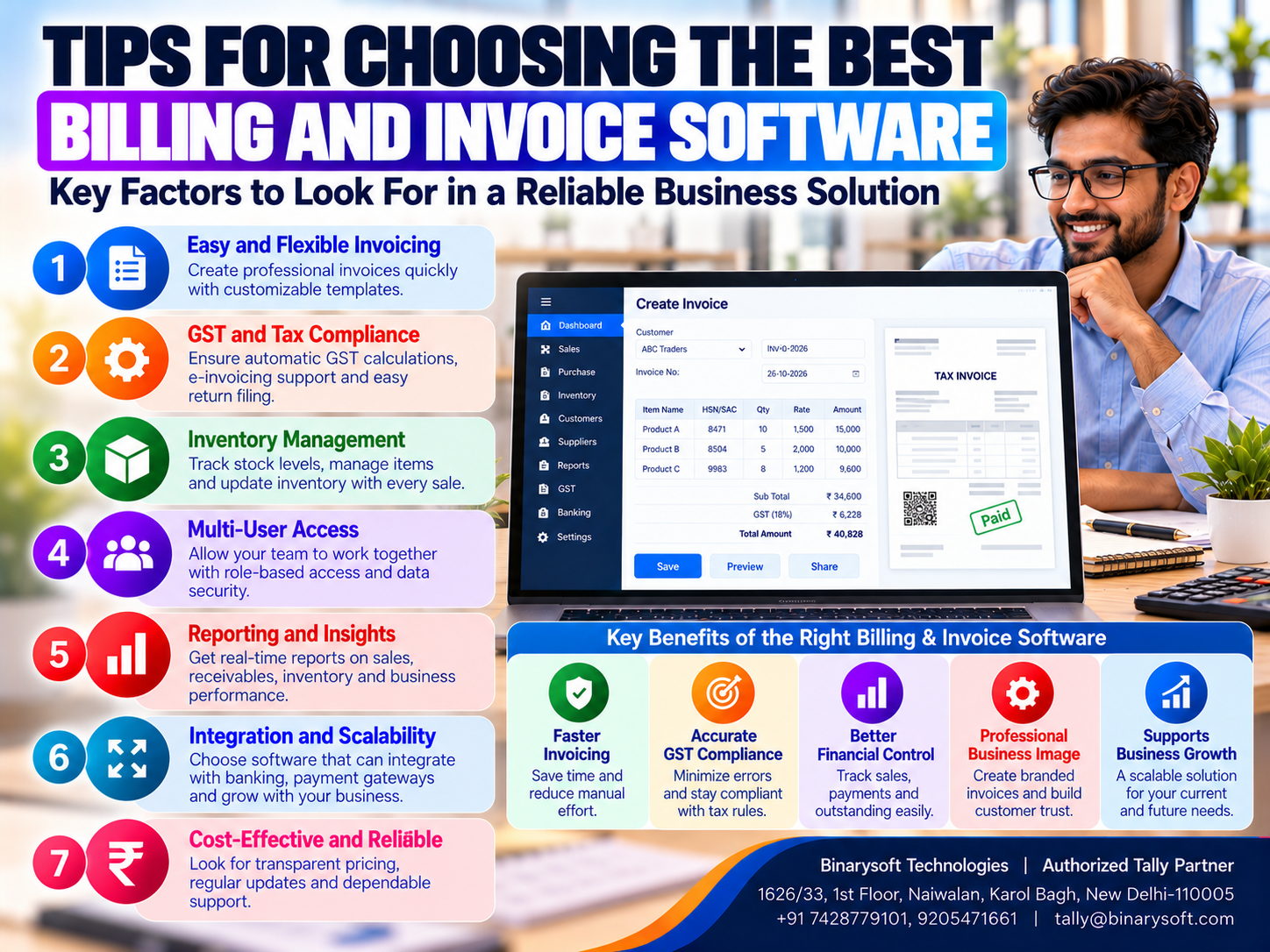
Introduction: Why Choosing the Right Billing Software Matters More Than Ever
Every successful business depends on accurate billing, timely customer payments and organized financial records.
Whether you operate a retail shop in Karol Bagh, a wholesale distribution business in Sadar Bazar, a manufacturing unit in Bawana or a service company in Connaught Place, invoicing is an essential part of daily operations.
However, preparing invoices is only one responsibility.
Businesses must also manage GST calculations, customer outstanding balances, product pricing, inventory movements, purchase transactions and financial reporting.
When these activities are handled manually or through disconnected applications, businesses may experience billing errors, delayed payments and unnecessary administrative work.
Choosing the best billing and invoice software can help solve these challenges.
The right application should make invoice preparation easier while supporting accurate accounting and efficient business operations.
For Indian businesses, GST-related functionality, inventory integration and customer payment tracking are particularly important.
Tally Prime provides accounting, invoicing, inventory and GST-related capabilities that can support many small and medium business requirements.
However, selecting billing software requires more than comparing product prices.
This guide explains 15 important factors businesses should evaluate before purchasing invoicing software in 2026.
A Business Owner's Story: The Invoice Mistake That Nearly Cost Him His Biggest Customer
For twelve years, Rakesh had operated an electrical accessories wholesale business in Bhagirath Palace, Delhi.
His company supplied switches, lighting products, cables and electrical fittings to retailers throughout Delhi NCR.
Rakesh had built the business through hard work and personal relationships.
Many customers had known him for years.
However, as the company expanded, invoice preparation became increasingly difficult.
His employees used spreadsheets to prepare bills.
Product prices were maintained in separate files, while customer balances were recorded by the accountant.
One afternoon, an important customer called Rakesh.
The customer had received an invoice containing incorrect product quantities and pricing.
The mistake affected the customer's accounting records and delayed payment approval.
Rakesh immediately asked his employees to investigate.
They discovered that an outdated price list had been used.
Another employee had entered the wrong quantity while preparing the invoice.
The customer was frustrated.
He questioned whether future orders would be handled accurately.
Rakesh felt deeply disappointed.
He remembered how much effort he had invested in building the customer's trust.
That evening, he remained in his office long after the employees had left.
He realized that the business had grown, but its billing procedures had not improved at the same pace.
He decided to introduce a structured invoicing and accounting system.
The company organized product masters, standardized customer information and trained employees to prepare invoices consistently.
Customer balances and inventory records were also reviewed more regularly.
Gradually, billing became more organized.
Rakesh could focus more attention on customer relationships instead of repeatedly correcting invoices.
His experience highlights an important lesson:
An invoice is more than a payment document. It represents the professionalism, accuracy and reliability of your business.
1. What Is Billing and Invoice Software?
Billing and invoice software is a digital application that helps businesses prepare invoices, record sales transactions and manage related financial information.
Depending on the product, it may also provide accounting, GST-related calculations, inventory management, payment tracking and financial reporting.
Basic invoicing applications focus primarily on generating bills.
More comprehensive business management applications connect invoicing with accounting and inventory.
Common Functions of Billing Software
Billing software may help businesses:
-
Generate sales invoices.
-
Maintain customer information.
-
Record product prices.
-
Apply discounts.
-
Calculate applicable taxes.
-
Track customer outstanding balances.
-
Maintain sales records.
-
Record credit notes.
-
Support inventory management.
-
Prepare relevant financial reports.
Businesses should evaluate which functions are essential for their operations.
2. Fifteen Important Tips for Choosing the Best Billing and Invoice Software
Tip 1: Understand Your Business Requirements
Before purchasing billing software, identify the problems you want to solve.
A retail shop may prioritize quick invoice preparation.
A wholesale distributor may need multiple price lists and customer credit tracking.
A manufacturer may require integration between sales invoices and finished goods inventory.
A service company may need flexible invoice descriptions and payment terms.
Questions to Ask
How many invoices does your business generate daily?
Do you sell products, services or both?
Do you require GST invoicing?
Do you maintain inventory?
Do customers purchase goods on credit?
Do multiple employees prepare invoices?
The answers will help determine the appropriate software category.
How Tally Prime Helps
Tally Prime provides accounting, invoicing and inventory capabilities that can support many Indian business requirements.
Tip 2: Establish a Realistic Software Budget
Software affordability should be evaluated carefully.
The cheapest application may not provide essential functionality.
Similarly, expensive enterprise software may be unnecessary for a small business.
Consider Total Ownership Costs
Evaluate:
A suitable solution should provide measurable business value at a sustainable cost.
Practical Recommendation
Compare the total expected cost over at least one to three years rather than focusing only on the initial purchase price.
Tip 3: Choose Easy-to-Use Billing Software
Employees should be able to prepare invoices without unnecessary complexity.
Complicated software can increase training requirements and slow daily operations.
Important Usability Factors
Invoice creation should be straightforward.
Product and customer information should be easy to locate.
Common transactions should require minimal repetitive entry.
Reports should be accessible without complicated procedures.
How to Evaluate Ease of Use
Ask employees who regularly prepare invoices to test the software.
Observe how long they take to complete common tasks.
A practical demonstration provides better information than promotional claims.
Tip 4: Verify GST Billing Capabilities
GST-related invoicing is essential for many registered businesses in India.
Software should support the information required for applicable tax invoices.
Important GST Features
Evaluate support for:
-
GSTIN information.
-
HSN and SAC classifications.
-
Applicable tax rates.
-
CGST, SGST and IGST calculations.
-
Place-of-supply information.
-
Credit and debit notes.
-
Relevant GST reports.
-
E-invoicing where applicable.
-
E-way bill workflows where required.
How Tally Prime Helps
Tally Prime provides GST-related accounting and invoicing features.
Supported versions also offer relevant connected-service capabilities.
Businesses must verify current statutory requirements and applicable feature availability.
Tip 5: Look for Invoice Customization Options
Different businesses require different invoice formats.
A retailer may prefer a compact invoice.
A wholesale distributor may need detailed item descriptions, quantities and pricing.
A service company may require information about work completed and payment terms.
Important Customization Requirements
Evaluate whether the software supports relevant business information, invoice descriptions, terms and conditions, and suitable formatting.
How Tally Prime Helps
Tally Prime provides configurable invoice formats and relevant printing options.
Advanced design requirements may need additional configuration or compatible customization.
Businesses should test their preferred invoice layout before purchasing.
Tip 6: Select Software With Integrated Accounting
Billing and accounting are closely connected.
When businesses use separate applications, employees may need to enter the same transaction multiple times.
This can increase administrative work and create inconsistencies.
Benefits of Integrated Accounting
Sales invoices contribute to relevant accounting records.
Customer balances can be reviewed more consistently.
Financial reports can be prepared using recorded transactions.
How Tally Prime Helps
Tally Prime integrates supported sales invoicing and accounting processes.
This makes it useful for businesses seeking a combined billing and accounting environment.
Tip 7: Evaluate Inventory Management Integration
Inventory integration is particularly important for businesses selling physical products.
When invoices and stock records are maintained separately, discrepancies may occur.
Important Inventory Features
Look for:
-
Stock item management.
-
Units of measurement.
-
Purchase and sales recording.
-
Stock movement information.
-
Multiple godown support where required.
-
Batch-related features where applicable.
-
Inventory reports.
How Tally Prime Helps
Tally Prime provides inventory functionality that can support stock management alongside invoicing.
Businesses should configure inventory masters and transaction procedures carefully.
Tip 8: Check Customer Outstanding and Payment Tracking
Generating invoices does not guarantee timely payment.
Businesses offering credit sales need accurate information about unpaid customer balances.
Important Payment Tracking Features
Software should support relevant customer ledgers, invoice balances, payment allocation and outstanding reports.
How Tally Prime Helps
Tally Prime supports bill-wise accounting and customer outstanding management.
Businesses can review relevant pending balances and use this information for payment follow-up.
Automatic reminder delivery and payment collection integrations should be evaluated separately according to the available product features and services.
Tip 9: Prioritize Data Security
Invoices and accounting records contain sensitive business information.
Unauthorized access or data loss can create serious operational problems.
Important Security Requirements
Evaluate:
How Tally Prime Helps
Tally Prime provides security-related functionality for controlling access to company information.
Businesses should configure permissions and maintain reliable backups.
Tip 10: Evaluate Automation Features
Billing software can reduce repetitive administrative work.
For example, a properly configured system may reuse existing customer and product information.
Some applications also support recurring invoices, automated reminders or other specialized workflows.
Questions to Ask
Can the software reuse product prices?
Can it calculate configured taxes?
Can it maintain invoice numbering?
Can it record relevant accounting entries?
Can it support repeated billing requirements?
How Tally Prime Helps
Tally Prime supports structured invoicing and integrated accounting processes.
Businesses requiring specialized recurring billing or automated communication workflows should verify the exact functionality available.
Tip 11: Consider Scalability
A business may generate only a few invoices daily when starting operations.
As sales increase, transaction volumes and employee requirements may grow.
Software should support reasonable expansion.
Important Scalability Factors
Evaluate:
Practical Recommendation
Select software that meets current needs while providing suitable expansion options.
Avoid paying for unnecessary complexity.
Tip 12: Review Integration Capabilities
Businesses may use separate systems for e-commerce, inventory, payments or customer management.
Billing software should fit into the overall technology environment.
Integration Questions
Can the application exchange data with existing systems?
Are compatible connectors available?
Will additional customization be required?
How will duplicate records be prevented?
How Tally Prime Helps
Tally Prime supports certain integration and data exchange capabilities.
Specific integrations may require compatible applications, configuration or development.
Businesses should verify integration feasibility before committing to implementation.
Tip 13: Evaluate Customer Support and Training
Reliable support is important, especially during implementation.
Employees may require assistance with configuration, invoice formats and accounting procedures.
Important Support Factors
Review implementation assistance, employee training, response arrangements and ongoing technical support.
Why Training Matters
Even capable software can produce unreliable results when employees use incorrect procedures.
Businesses should provide practical training using representative transactions.
Tip 14: Compare Multiple Software Options
Avoid selecting billing software after viewing only one demonstration.
Compare products using a consistent evaluation framework.
Sample Software Evaluation Scorecard
| Evaluation Criteria | Suggested Weight |
|---|
| GST Invoicing |
20% |
| Ease of Use |
15% |
| Accounting Integration |
15% |
| Inventory Management |
15% |
| Outstanding Tracking |
10% |
| Security and Backup |
10% |
| Customer Support |
10% |
| Total Cost |
5% |
| Total |
100% |
Businesses can adjust these weights according to their priorities.
A service company may place less emphasis on inventory and greater emphasis on invoice flexibility.
A wholesale distributor may prioritize inventory and customer outstanding management.
Tip 15: Test the Software Before Making a Final Decision
A practical software trial is one of the most valuable evaluation steps.
Instead of testing only basic invoice creation, use realistic business transactions.
Recommended Test Scenarios
Create a GST sales invoice.
Apply a product discount.
Record a customer payment.
Review an outstanding invoice.
Create a credit note.
Check the inventory impact of a sale.
Generate a relevant sales report.
Review user access settings.
Test backup and recovery procedures.
Final Evaluation
Record the results of each test.
Identify missing functionality and potential implementation costs.
Choose software based on demonstrated performance rather than promotional claims.
3. Why Integrated Billing and Accounting Software Is Better for Growing Businesses
As transaction volumes increase, disconnected systems become harder to manage.
For example, a business may prepare invoices in one application and maintain accounting records in another.
Employees must then transfer information between systems.
This creates additional work and increases the possibility of inconsistencies.
Integrated billing and accounting software can simplify this process.
Better Transaction Consistency
Relevant sales information contributes to accounting records.
Improved Financial Visibility
Management can review customer balances and financial reports.
Reduced Duplicate Entry
Employees may avoid entering the same transaction repeatedly.
Better Inventory Information
Suitable integrated systems update relevant stock records through supported transactions.
Easier Financial Review
Business owners can evaluate sales and accounting information more efficiently.
Tally Prime offers integrated functionality that can support these requirements.
4. Billing Software vs Invoice Software vs Accounting Software
Although these terms are often used interchangeably, their functionality may differ.
| Software Type | Primary Purpose | Common Features |
|---|
| Billing Software |
Prepare bills and sales transactions |
Invoices, pricing, discounts |
| Invoice Software |
Create and manage invoices |
Invoice records, payment status |
| Accounting Software |
Maintain financial records |
Ledgers, reports, receivables |
| Integrated Business Software |
Connect several business functions |
Accounting, billing, inventory, reporting |
The distinction depends on the actual product.
Some invoicing applications include accounting features, while comprehensive accounting software may provide extensive billing functionality.
Businesses should compare features rather than relying only on product categories.
5. How Tally Prime Helps With Billing and Invoice Management
Tally Prime provides business management features that can support invoicing and accounting requirements.
Sales Invoice Preparation
Businesses can record relevant sales transactions and generate invoices.
GST-Related Billing
Supported GST functionality helps maintain applicable tax details.
Multiple Price Levels
Relevant price list and pricing features can support different customer categories and business requirements.
Inventory Integration
Sales transactions can affect inventory records according to the configured accounting and stock processes.
Customer Outstanding Management
Bill-wise accounting helps businesses track relevant unpaid invoices.
Credit and Debit Notes
Supported accounting vouchers help businesses record relevant adjustments.
Financial Reporting
Sales and accounting information contributes to available financial reports.
Multi-User Operations
Suitable licensing arrangements can support multiple authorized users.
Security
User access controls help protect accounting information.
Businesses should verify product edition, licensing and version-specific capabilities before implementation.
6. How to Set Up Billing in Tally Prime
A structured setup helps businesses maintain accurate invoice records.
Step 1: Create the Company
Enter the relevant business information.
Step 2: Configure Accounting Features
Set up the accounting environment according to business requirements.
Step 3: Configure GST Information
Where applicable, enter the relevant GST registration and tax settings.
Step 4: Create Customer and Supplier Ledgers
Maintain accurate business partner information.
Step 5: Create Stock Items
For product-based businesses, configure relevant inventory masters.
Step 6: Configure Pricing
Set up appropriate product prices and supported pricing arrangements.
Step 7: Review Invoice Formats
Ensure that the invoice contains the required business and transaction information.
Step 8: Test Transactions
Create representative sales invoices and verify calculations.
Step 9: Review Accounting and Inventory Reports
Confirm that relevant transactions are reflected correctly.
Step 10: Train Employees
Provide practical training before regular billing begins.
7. Case Study One: Faster Billing for an Electrical Wholesale Distributor
Business: Illustrative electrical goods distributor, Bhagirath Palace, Delhi
Business Challenge
A wholesale distributor processed numerous daily invoices.
Product prices were maintained in spreadsheets.
Employees sometimes used outdated pricing information, resulting in invoice corrections.
Customer outstanding balances were also maintained separately.
Solution
The business introduced Tally Prime for relevant billing, accounting and inventory processes.
Stock items and customer ledgers were organized.
Pricing information was reviewed, and employees received training.
Business Benefits
The company established more consistent invoice preparation procedures.
Management gained clearer visibility into customer balances.
Employees could review relevant accounting and inventory information more efficiently.
Key Learning
Integrated billing, pricing and accounting records can help wholesale businesses reduce administrative complexity and improve customer service.
This is an illustrative case study.
8. Case Study Two: GST Billing for a Small Manufacturing Company
Business: Illustrative packaging manufacturer, Bawana Industrial Area, Delhi
Business Challenge
A packaging manufacturer prepared sales invoices manually.
The accounting team maintained GST-related information separately.
Invoice preparation became more complicated as the company began serving additional customers.
Solution
The business introduced structured GST-related invoicing and accounting using Tally Prime.
Relevant customer, product and tax information was configured.
Employees received training on invoice preparation and transaction review.
Business Benefits
The company improved consistency in its billing procedures.
The accounting team could review relevant sales and tax-related information more efficiently.
Management also established clearer procedures for verifying invoice details.
Key Learning
Accurate billing and organized GST-related records provide an important foundation for growing manufacturing businesses.
This is an illustrative case study.
9. How Billing Software Helps Improve Cash Flow
Cash flow is one of the most important financial concerns for businesses.
Even profitable companies may experience difficulties when customer payments are delayed.
Billing software can support better payment management.
Timely Invoice Preparation
Preparing invoices promptly reduces unnecessary delays in starting the payment process.
Clear Payment Terms
Invoices should communicate agreed payment conditions.
Accurate Customer Balances
Outstanding reports help businesses identify unpaid amounts.
Regular Follow-Up
Management can establish procedures for reviewing overdue invoices.
Better Financial Planning
Accounting information helps businesses understand expected collections and upcoming obligations.
Tally Prime supports relevant accounting and outstanding reports that can assist with these activities.
10. Affordable Billing Software for Small Businesses
Small businesses should avoid purchasing unnecessarily complex systems.
Their essential requirements may include:
A suitable application should provide these functions at a manageable total cost.
Businesses should compare licensing, implementation, training and maintenance expenses.
The lowest-priced application is not always the most economical over time.
11. Billing Software for Different Industries
Retail Businesses
Retailers often prioritize fast billing, stock management and transaction accuracy.
Wholesale Distributors
Wholesalers commonly require customer credit tracking, pricing flexibility and inventory integration.
Manufacturing Companies
Manufacturers may need product invoicing, finished goods records and accounting integration.
Service Businesses
Service providers may prioritize invoice descriptions, expense tracking and customer outstanding management.
E-Commerce Sellers
Online sellers may require order data exchange, reconciliation and marketplace integration.
The right solution depends on the business model and existing technology environment.
12. Common Mistakes When Choosing Billing Software
Choosing Software Only Because It Is Cheap
Low initial costs may be offset by missing functionality or additional charges.
Ignoring GST Requirements
Businesses should verify applicable tax-related features.
Overlooking Inventory Integration
Product-based businesses may struggle when billing and inventory remain disconnected.
Ignoring Customer Outstanding Tracking
Invoice preparation alone does not provide complete payment visibility.
Failing to Test Software
Businesses should evaluate real transactions before purchasing.
Underestimating Training
Employees need practical guidance to use the application correctly.
Ignoring Data Security
Accounting information requires suitable protection and backups.
Purchasing Unnecessary Features
Complexity can increase costs without improving business operations.
13. How to Calculate the ROI of Billing Software
Businesses can estimate the financial value of billing software by comparing measurable benefits with implementation costs.
ROI (%) = [(Total Measurable Benefits − Total Software Costs) ÷ Total Software Costs] × 100
For example, assume a business spends ₹24,000 on software, setup and related expenses during a defined period.
If the business identifies ₹36,000 in measurable administrative savings during that period:
ROI = [(₹36,000 − ₹24,000) ÷ ₹24,000] × 100
ROI = 50%
This is an illustrative calculation, not a statement of Tally Prime pricing or guaranteed results.
Actual benefits depend on transaction volumes, employee adoption and business processes.
14. Cloud-Hosted Billing and Accounting Software
Businesses with multiple offices or employees working remotely may benefit from cloud-hosted accounting environments.
Compatible Tally Prime cloud-hosting arrangements can support remote access to the accounting application.
Potential Benefits
Authorized users may access relevant accounting information from suitable locations.
Businesses may reduce dependence on a single office workstation.
Important Considerations
Evaluate:
Cloud hosting should be selected according to operational requirements and total cost.
15. Future of Billing and Invoice Software in India
Billing software continues to evolve as businesses adopt digital accounting, connected services and more integrated business applications.
Important developments include improved invoice workflows, digital payment options, reconciliation capabilities and integration with accounting systems.
Some applications also provide automation features that reduce repetitive administrative work.
However, businesses should evaluate these capabilities carefully.
Advanced technology is useful only when it addresses genuine operational requirements.
For Indian MSMEs, accurate invoicing, reliable accounting, GST-related recordkeeping and customer payment visibility remain essential.
Businesses that establish these foundations can adopt additional functionality as their requirements expand.
Conclusion
Choosing the best billing and invoice software is an important decision for every growing business.
The right application should simplify invoice preparation while supporting accurate accounting, customer payment tracking and relevant GST requirements.
Businesses should evaluate usability, inventory integration, security, scalability, support and total ownership costs.
They should also test the software using realistic transactions before making a final decision.
For Indian retailers, wholesalers, manufacturers and service providers, Tally Prime offers integrated accounting, invoicing, inventory and GST-related capabilities worth evaluating.
However, successful implementation depends on correct configuration, employee training and regular financial review.
The best billing software is not necessarily the product with the most features. It is the solution that helps your business create accurate invoices, maintain customer trust, manage payments and operate efficiently as it grows.
Powered by Binarysoft Technologies
Authorized Tally Partner
Location: 1626/33, 1st Floor, Naiwalan, Karol Bagh, New Delhi – 110005, INDIA
Contact Us: +91 7428779101, 9205471661
Email: tally@binarysoft.com
Business Hours: 10:00 AM – 6:00 PM, Monday to Friday
Frequently Asked Questions
What is the best billing and invoice software for small businesses?
The best billing software depends on business requirements, transaction volumes, GST needs, inventory management and budget. Tally Prime is one option worth evaluating for integrated accounting and invoicing.
What features should billing software include?
Important features include invoice preparation, GST-related billing, customer management, payment tracking, security and financial reporting.
Is free billing software suitable for small businesses?
Free software may be suitable for basic requirements, but businesses should evaluate feature limitations, support and future expansion needs.
How should businesses choose billing software in 2026?
Businesses should identify requirements, establish a budget, compare essential features, evaluate support and security, and test the software using real business transactions before purchasing.
CA. Aaryan Kanodia focuses on GST reporting, bookkeeping systems, and financial process improvement. He works with businesses to simplify routine accounting activities and maintain records suitable for compliance and internal review.









