Call CA Tally HelpDesk
+91 9205471661,
7428779101
Introduction: Why Understanding the Accounting Cycle Is Essential for Every Business
Every successful business depends on accurate financial information. Whether you operate a small retail shop, a manufacturing company, a wholesale distribution business or a growing service organization, understanding your financial position is essential for making informed decisions.
Every day, businesses handle numerous financial transactions, including purchases, sales, customer payments, supplier invoices, salaries, expenses and tax obligations. Managing these transactions without a structured accounting system can quickly become complicated.
This is where the accounting cycle becomes important.
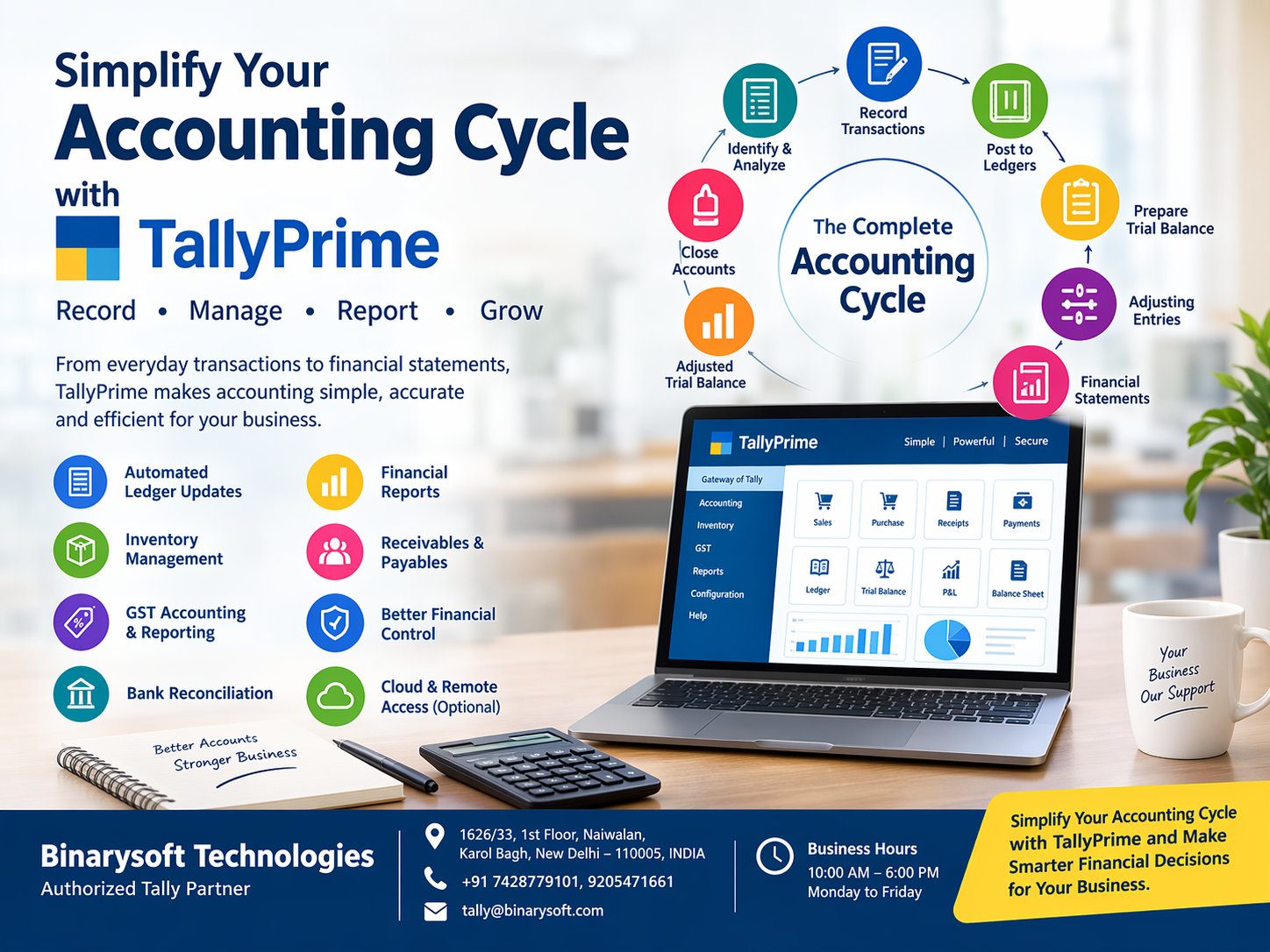
The accounting cycle is a systematic process that helps businesses identify, record, classify, summarize and report financial transactions during a specific accounting period.
It provides a clear framework for maintaining financial records and preparing reliable financial statements.
However, traditional accounting processes often involve repetitive data entry, manual calculations, spreadsheet management and time-consuming reconciliation activities.
Modern accounting solutions such as TallyPrime simplify these activities by integrating transaction recording, ledger management, inventory accounting, taxation and financial reporting into a centralized system.
With an organized accounting cycle and the right accounting software, businesses can improve financial accuracy, reduce administrative workloads and make better decisions.
In this comprehensive guide, we will explore the accounting cycle, its major steps, practical examples, benefits, common challenges and how TallyPrime helps businesses manage accounting operations more efficiently.
1. What Is the Accounting Cycle?
The accounting cycle is a sequence of accounting activities performed during a financial period to record business transactions and prepare financial statements.
It begins when a financial transaction occurs and concludes after financial statements are prepared and temporary accounts are closed, where applicable.
The primary objective is to ensure that financial information is accurate, organized, complete and available for business decision-making.
For example, consider a business that purchases goods worth ₹50,000 from a supplier.
This transaction must be recorded in the accounting system, classified under the appropriate accounts and reflected in the relevant financial reports.
Similarly, when the business sells products, receives customer payments or pays operating expenses, those transactions must be recorded and processed correctly.
The accounting cycle organizes these activities into a structured workflow.
Main Objectives of the Accounting Cycle
The accounting cycle helps businesses:
- Maintain accurate records of financial transactions.
- Organize accounting information systematically.
- Identify accounting errors and discrepancies.
- Prepare reliable financial statements.
- Monitor income, expenses, assets and liabilities.
- Support tax compliance and financial audits.
- Evaluate profitability and financial performance.
- Make informed financial decisions.
A properly maintained accounting cycle also helps business owners understand where their money comes from, how it is spent and whether the organization is financially stable.
2. Why Is the Accounting Cycle Important for Businesses?
The accounting cycle is more than a bookkeeping procedure. It forms the foundation of effective financial management.
Accurate Financial Records
Every financial transaction must be recorded correctly to maintain reliable books of accounts.
A structured accounting cycle reduces the possibility of missing entries, incorrect classifications and inconsistent financial information.
Better Financial Planning
Financial reports generated through the accounting cycle help businesses evaluate profitability, expenses, outstanding liabilities and available resources.
These insights support budgeting, investment planning and operational decisions.
Improved Cash Flow Management
Businesses need to understand how much money they expect to receive and how much they must pay.
Accurate accounting records help identify outstanding customer payments, supplier obligations and upcoming expenses.
Easier Tax Compliance
Businesses subject to GST and other applicable tax requirements need organized transaction records.
A systematic accounting process helps maintain sales, purchase and tax information required for compliance activities.
Financial Transparency
Reliable accounting records improve transparency for business owners, management teams, auditors, lenders and other authorized stakeholders.
Business Growth
As transaction volumes increase, maintaining financial discipline becomes increasingly important.
An organized accounting cycle supports business expansion without allowing financial management to become unnecessarily complicated.
3. Understanding the Eight Major Steps of the Accounting Cycle
The accounting cycle is commonly explained through eight major steps. Some accounting frameworks divide or combine these activities differently.
Step 1: Identify and Analyze Financial Transactions
The first step involves identifying transactions that affect the financial position of a business.
Examples include:
- Purchasing inventory from suppliers.
- Selling products to customers.
- Receiving payments.
- Paying employee salaries.
- Purchasing business equipment.
- Paying rent and utility expenses.
- Receiving loans.
- Making supplier payments.
Every transaction should be supported by appropriate documentation, such as invoices, receipts, payment records or bank statements.
Example:
A furniture retailer purchases office equipment worth ₹40,000 through a bank payment.
The business must identify the accounts affected by this transaction.
The equipment account increases, while the bank balance decreases.
How TallyPrime Helps
TallyPrime allows businesses to record transactions using suitable voucher types, including purchase, sales, payment, receipt, journal and contra vouchers.
This helps organize financial transactions according to their nature.
Step 2: Record Transactions in Journal Entries
After identifying a transaction, the next step is recording it in the accounting system.
Traditional accounting uses journal entries based on the double-entry bookkeeping principle.
Under this principle, every transaction affects at least two accounts, and total debits must equal total credits.
Example:
A business purchases furniture worth ₹25,000 through its bank account.
| Account | Debit | Credit |
|---|
| Furniture Account |
₹25,000 |
|
| Bank Account |
|
₹25,000 |
This entry increases the value of furniture and reduces the bank balance.
How TallyPrime Helps
TallyPrime supports double-entry accounting through its voucher-based transaction system.
Businesses can record transactions through appropriate vouchers, while the software updates the relevant accounting ledgers.
This reduces the need to maintain separate manual journal registers for routine transactions.
Step 3: Post Transactions to Ledger Accounts
After recording transactions, their financial effects are reflected in the respective ledger accounts.
A ledger organizes transactions according to account categories.
Common ledger accounts include:
- Cash Account
- Bank Account
- Sales Account
- Purchase Account
- Customer Accounts
- Supplier Accounts
- Salary Account
- Rent Account
- Fixed Assets Account
Ledger accounts help businesses track the movement and balance of individual financial accounts.
How TallyPrime Helps
TallyPrime automatically updates relevant ledgers when vouchers are recorded.
Business owners and accountants can review ledger reports to examine transaction histories, balances and accounting details.
This improves financial visibility and reduces repetitive posting activities.
Step 4: Prepare an Unadjusted Trial Balance
A trial balance summarizes ledger balances at a particular date.
Its main purpose is to check whether total debit balances equal total credit balances.
For example:
| Account | Debit | Credit |
|---|
| Cash |
₹50,000 |
|
| Inventory Purchases |
₹80,000 |
|
| Rent Expense |
₹20,000 |
|
| Sales |
|
₹1,00,000 |
| Capital |
|
₹50,000 |
| Total |
₹1,50,000 |
₹1,50,000 |
A balanced trial balance indicates that total debits and credits agree.
However, it does not guarantee that every transaction has been recorded correctly. Errors such as omissions or incorrect account classifications may still exist.
How TallyPrime Helps
TallyPrime provides trial balance reports based on recorded transactions.
Accountants can review balances, investigate unusual figures and identify entries requiring correction.
Step 5: Record Adjusting Entries
At the end of an accounting period, certain adjustments may be required to reflect the correct financial position.
Common adjusting entries include:
- Depreciation on fixed assets.
- Outstanding expenses.
- Prepaid expenses.
- Accrued income.
- Provision for doubtful debts.
- Inventory adjustments.
- Other period-end accounting adjustments.
Example:
A business has an outstanding electricity expense of ₹5,000.
An adjustment is required to recognize the expense and the corresponding liability.
| Account | Debit | Credit |
|---|
| Electricity Expense |
₹5,000 |
|
| Outstanding Electricity Expense |
|
₹5,000 |
How TallyPrime Helps
TallyPrime supports journal vouchers and other relevant accounting entries for recording period-end adjustments.
Accountants can review updated financial reports after making these adjustments.
Step 6: Prepare an Adjusted Trial Balance
After recording adjustment entries, businesses prepare an adjusted trial balance.
This report includes the effects of period-end adjustments.
It helps verify that debit and credit balances remain equal before financial statements are prepared.
The adjusted trial balance forms an important basis for preparing final accounts.
How TallyPrime Helps
TallyPrime updates accounting balances based on recorded adjustment vouchers.
Businesses can review the revised trial balance and investigate discrepancies before finalizing their financial reports.
Step 7: Prepare Financial Statements
Financial statements summarize the financial performance and position of a business.
The major statements include:
Profit and Loss Account
Shows income, expenses and profit or loss during a particular period.
Balance Sheet
Displays assets, liabilities and owners' equity at a specific date.
Cash Flow Statement
Explains cash inflows and outflows from operating, investing and financing activities.
These reports help management understand business performance and financial stability.
How TallyPrime Helps
TallyPrime provides financial reports such as Profit & Loss A/c, Balance Sheet and Cash Flow.
Businesses can analyze financial information without manually preparing every report from separate accounting registers.
Step 8: Close the Accounting Period
The final step involves completing the accounting activities for the reporting period.
In traditional accounting, temporary accounts such as revenue and expense accounts are closed so that the next accounting period can begin with appropriate opening balances.
The exact closing process depends on the accounting system and applicable reporting requirements.
How TallyPrime Helps
TallyPrime supports financial-year-based accounting and the continuation of business records across periods.
Businesses can manage financial-year transitions, carry forward applicable balances and maintain historical accounting information.
TallyPrime does not require users to manually perform every traditional journal-closing procedure used in textbook accounting.
4. A Real-Life Story: How One Business Owner Regained Control of His Finances
For nearly twelve years, Rajesh had been running a successful electrical equipment distribution business in Delhi.
His business had loyal customers, reliable suppliers and a growing number of orders.
From the outside, everything appeared successful.
However, Rajesh was constantly worried about one question:
“If my sales are increasing every month, why is there never enough money in my bank account?”
His accounting records were maintained across notebooks, spreadsheets and manually prepared invoices.
Some customer payments were recorded late. Supplier balances were difficult to verify, and expenses were sometimes entered several days after payment.
At the end of every month, Rajesh spent hours trying to understand his actual financial position.
One evening, his accountant informed him that several customers had outstanding balances that had not been properly followed up.
Meanwhile, important supplier payments were approaching their due dates.
Rajesh realized that the problem was not necessarily poor sales. It was the absence of a structured accounting process.
He decided to reorganize his accounting operations using TallyPrime.
His team started recording transactions regularly, maintaining customer and supplier ledgers, reviewing outstanding reports and reconciling bank transactions.
Within a few months, the business had better visibility into its receivables, expenses and financial commitments.
Rajesh could now review his financial reports instead of depending entirely on scattered spreadsheets.
The biggest improvement was not simply faster bookkeeping.
It was the confidence of knowing what was happening inside his business.
This is an illustrative story created to explain how a structured accounting cycle can improve financial management.
5. How TallyPrime Simplifies the Complete Accounting Cycle
Traditional accounting processes can become time-consuming when businesses handle hundreds or thousands of transactions.
TallyPrime helps simplify the accounting cycle by connecting transaction recording, ledger management, financial reporting and other accounting activities.
5.1 Centralized Financial Accounting
TallyPrime allows businesses to maintain accounting information within a centralized company dataset.
Sales, purchases, expenses, receipts and payments can be recorded through appropriate vouchers.
This reduces dependence on multiple disconnected spreadsheets.
5.2 Automated Ledger Updates
When a transaction is recorded, the relevant ledger accounts are updated.
For example, recording a credit sale affects the customer's account and the relevant sales and tax accounts.
Accountants can review ledger balances without separately posting every transaction into manual registers.
5.3 Inventory and Accounting Integration
Businesses dealing with physical products need to maintain accurate inventory information.
TallyPrime supports inventory management alongside accounting.
Depending on the configuration, businesses can manage:
- Stock items and stock groups.
- Units of measurement.
- Purchase and sales transactions.
- Stock movement.
- Inventory valuation.
- Godown or location-wise inventory.
- Batch-wise inventory where applicable.
Integrating inventory and accounting information helps businesses understand how stock transactions affect financial performance.
5.4 GST Accounting and Reporting
GST compliance is an important requirement for registered businesses in India.
TallyPrime supports GST-related accounting activities, including tax configuration, transaction recording and GST reports.
Businesses can use relevant features to review GST information and identify potential inconsistencies.
However, correct GST compliance still depends on accurate transaction data, appropriate tax classifications and applicable legal requirements.
5.5 Financial Reporting
TallyPrime provides reports that help businesses understand financial performance.
These include:
Profit & Loss A/c: Helps evaluate business profitability.
Balance Sheet: Displays assets, liabilities and capital.
Trial Balance: Provides a summary of ledger balances.
Cash Flow: Helps analyze cash movements.
Outstanding Reports: Help monitor customer receivables and supplier payables.
These reports allow management to evaluate financial performance without manually consolidating numerous accounting registers.
5.6 Bank Reconciliation
Bank reconciliation is essential for verifying accounting records against bank transactions.
TallyPrime supports bank reconciliation processes, helping accountants identify unreconciled transactions.
Depending on the product release and banking integration available, additional banking features may simplify reconciliation activities.
5.7 Better Financial Control
TallyPrime provides tools for reviewing accounting transactions, outstanding balances and financial reports.
Regular review helps businesses identify unusual transactions, overdue payments and accounting discrepancies.
This improves financial control and supports more reliable decision-making.
6. Practical Example: Understanding the Accounting Cycle in a Trading Business
Consider a wholesale trading business that begins a month with ₹2,00,000 in its bank account and an equal amount of owner's capital.
During the month, the following transactions occur:
| Transaction | Amount |
|---|
| Opening Bank Balance |
₹2,00,000 |
| Goods Purchased on Credit |
₹80,000 |
| Goods Sold for Cash |
₹1,20,000 |
| Rent Paid |
₹15,000 |
| Supplier Payment |
₹50,000 |
| Electricity Expense Paid |
₹5,000 |
For simplicity, assume that GST does not apply to this illustration and all purchased goods are sold during the period.
Recording Transactions
The business records purchase, sales and payment vouchers.
Relevant accounting ledgers are updated.
Reviewing Accounts
The accountant reviews the bank account, purchase account, sales account and supplier ledger.
Preparing Financial Reports
The business calculates its operating result.
| Particulars | Amount |
|---|
| Sales Revenue |
₹1,20,000 |
| Cost of Goods Sold |
₹80,000 |
| Gross Profit |
₹40,000 |
| Rent Expense |
₹15,000 |
| Electricity Expense |
₹5,000 |
| Net Profit |
₹20,000 |
The closing bank balance is ₹2,50,000, while ₹30,000 remains payable to the supplier.
The business has earned ₹20,000 in profit, but its bank balance also reflects the opening capital and the unpaid supplier amount.
This illustrates an important accounting principle:
Profit and available cash are not necessarily the same.
TallyPrime helps businesses review these financial elements through appropriate accounting reports.
7. Case Study 1: How a Retail Business Improved Accounting Accuracy
Business Background
A growing retail business operated three outlets selling electronic accessories.
The company handled daily sales, purchases, inventory movements and supplier payments.
Its accounting team maintained several spreadsheets for different stores.
Challenges
The business experienced difficulties with:
- Consolidating daily sales.
- Tracking supplier balances.
- Maintaining accurate inventory information.
- Preparing monthly financial reports.
- Identifying accounting discrepancies.
The finance team frequently spent additional time comparing reports from different locations.
Solution Using TallyPrime
The company introduced a more structured accounting workflow using TallyPrime.
Sales and purchase transactions were recorded through appropriate vouchers.
Inventory records were organized using stock groups and stock items.
Customer and supplier ledgers were maintained systematically.
The accounting team also introduced monthly procedures for reviewing trial balances, bank reconciliations and financial statements.
Business Results
The new workflow reduced dependence on manual spreadsheet consolidation.
Management gained better visibility into store-level transactions, inventory records and outstanding payments.
The finance team could identify discrepancies earlier and prepare reports more consistently.
Key Learning: A disciplined accounting cycle supported by integrated accounting software can improve financial accuracy and operational efficiency.
This is an illustrative case study, not a documented customer implementation.
8. Case Study 2: How a Manufacturing Business Improved Financial Visibility
Business Background
A small manufacturing company produced packaging materials for local businesses.
The organization purchased raw materials, managed production activities and supplied finished products to customers.
As order volumes increased, accounting became more complicated.
Challenges
The business struggled to monitor raw material purchases, operating expenses, customer payments and overall profitability.
Management also found it difficult to understand the financial impact of production-related costs.
Solution Using TallyPrime
The company reorganized its accounting process.
Raw material purchases and sales were recorded systematically.
Relevant inventory features were configured to support stock tracking.
Expense ledgers were organized according to business requirements.
The accountant reviewed financial statements and outstanding reports at regular intervals.
Where applicable, inventory and cost-related configurations helped management analyze business operations more effectively.
Business Results
The business gained clearer visibility into purchase expenses, sales revenue, outstanding customer payments and financial performance.
Management could review accounting information more frequently instead of waiting until the end of the financial year.
This supported better purchasing decisions and financial planning.
Key Learning: Integrating accounting, inventory and financial reporting helps manufacturing businesses make more informed operational decisions.
This is an illustrative case study intended to demonstrate potential business benefits.
9. Common Challenges Businesses Face During the Accounting Cycle
Even experienced accounting teams encounter challenges while managing financial transactions.
Manual Data Entry Errors
Incorrect amounts, duplicate transactions and missing entries can affect financial reports.
Using appropriate accounting software and verification procedures helps reduce these risks.
Delayed Transaction Recording
When transactions are recorded several days after they occur, financial reports may not reflect the latest business position.
Regular transaction recording improves accuracy.
Incorrect Ledger Classification
Posting transactions to incorrect ledger accounts can distort financial reports.
Businesses should maintain a properly structured chart of accounts.
Incomplete Bank Reconciliation
Differences between bank statements and accounting records can remain unnoticed without regular reconciliation.
Monthly or more frequent reconciliation helps identify these differences.
Missing Adjustment Entries
Failure to record depreciation, outstanding expenses or other necessary adjustments may result in inaccurate financial statements.
Period-end review procedures are therefore important.
Lack of Financial Review
Preparing reports is not enough.
Business owners and accountants should analyze financial information and investigate unusual balances or trends.
10. Best Practices for Managing the Accounting Cycle Efficiently
Businesses can improve accounting accuracy by adopting consistent procedures.
Record transactions regularly. Daily recording reduces the possibility of forgotten transactions and missing documents.
Maintain supporting documents. Preserve invoices, receipts, bank records and other relevant documents according to applicable requirements.
Use appropriate ledger classifications. A well-organized chart of accounts improves financial reporting.
Reconcile bank accounts. Compare accounting records with bank statements regularly.
Review outstanding payments. Monitor customer receivables and supplier obligations.
Verify inventory records. Businesses dealing with physical goods should compare stock records with actual inventory periodically.
Perform period-end adjustments. Record applicable depreciation, accruals, provisions and other adjustments.
Review financial statements. Analyze profitability, liquidity, expenses and liabilities.
Protect accounting information. Implement appropriate access controls, backup procedures and data protection practices.
Following these practices helps businesses maintain a reliable accounting cycle.
11. Traditional Accounting Cycle vs Accounting Cycle with TallyPrime
| Accounting Activity | Traditional Manual Process | Using TallyPrime |
|---|
| Transaction Recording |
Manual journal entries |
Voucher-based accounting |
| Ledger Posting |
Separate manual posting |
Relevant ledgers updated through vouchers |
| Trial Balance |
Manual preparation |
Generated from recorded balances |
| Financial Statements |
Manual compilation |
Built-in financial reports |
| Inventory Tracking |
Separate stock registers |
Integrated inventory features |
| GST Accounting |
Manual calculations and records |
GST accounting and reporting features |
| Outstanding Payments |
Manual follow-up registers |
Customer and supplier outstanding reports |
| Bank Reconciliation |
Manual statement comparison |
Bank reconciliation functionality |
| Financial Analysis |
Spreadsheet-based calculations |
Accounting and management reports |
| Accounting Adjustments |
Manual journal entries |
Adjustment vouchers and updated reports |
TallyPrime does not eliminate the need for accounting knowledge or verification.
However, it can reduce repetitive activities and make accounting information easier to manage.
12. How the Accounting Cycle Supports Better Business Decisions
The accounting cycle is not limited to preparing annual financial statements.
It also provides information that supports everyday business decisions.
Understanding Profitability
Businesses can compare revenue with expenses to determine whether operations are profitable.
Controlling Expenses
Expense reports help identify areas where costs are increasing.
Management can investigate unusual expenditure and introduce appropriate cost-control measures.
Managing Customer Credit
Outstanding reports help businesses identify customers with overdue balances.
This supports timely follow-up and better credit management.
Planning Purchases
Accurate inventory and financial information helps businesses make purchasing decisions based on operational requirements and available resources.
Evaluating Business Expansion
Financial statements help business owners assess whether sufficient resources are available for expansion.
Supporting Loan Applications
Reliable accounting records and financial statements can support discussions with banks and financial institutions.
By maintaining an organized accounting cycle, businesses can make decisions based on recorded financial information rather than assumptions.
13. The Role of Technology in Modern Accounting
Accounting technology has transformed how businesses record and analyze financial information.
Traditional bookkeeping required extensive manual work.
Today, accounting software helps automate repetitive calculations, maintain connected records and generate financial reports.
Greater Efficiency
Automated ledger updates reduce repetitive posting activities.
Improved Accuracy
Built-in accounting controls and structured voucher entry can reduce certain manual errors.
Faster Reporting
Businesses can access updated financial reports without manually consolidating multiple registers.
Better Collaboration
Appropriately configured multi-user environments allow authorized team members to work with accounting information according to their responsibilities.
Remote Access Possibilities
Businesses requiring remote access may consider suitable hosted or cloud-based TallyPrime arrangements.
Such arrangements should be evaluated for licensing, security, availability, backup and operational requirements.
Improved Business Continuity
Regular backups, access controls and documented recovery procedures help protect accounting records.
Technology delivers the greatest benefits when combined with accurate data entry and disciplined accounting practices.
14. Why Growing Businesses Should Use TallyPrime for Accounting Management
As businesses expand, the volume and complexity of financial transactions increase.
A company handling a few transactions daily may initially manage its accounts using spreadsheets.
However, when transaction volumes grow, disconnected accounting records can create operational difficulties.
TallyPrime provides an integrated environment for managing several important accounting activities.
Its major benefits include:
- Organized transaction recording.
- Double-entry accounting.
- Ledger management.
- Financial reporting.
- Inventory accounting.
- GST-related accounting features.
- Receivables and payables tracking.
- Bank reconciliation.
- Business performance analysis.
These capabilities help businesses maintain a structured accounting process.
For organizations that require access from multiple locations, suitable TallyPrime hosting arrangements may also support remote working.
However, software selection should consider transaction volumes, business complexity, licensing requirements, security and implementation costs.
15. How Binarysoft Technologies Helps Businesses Manage Accounting with TallyPrime
Implementing accounting software successfully requires more than installing an application.
Businesses need properly configured accounting ledgers, suitable transaction workflows and reliable reporting procedures.
Binarysoft Technologies, an Authorized Tally Partner, helps businesses explore TallyPrime solutions according to their accounting and operational requirements.
Businesses can seek assistance with areas such as:
TallyPrime Setup and Configuration
Organizing company information, accounting ledgers, voucher types and relevant business settings.
Accounting Workflow Guidance
Understanding how daily transactions should be recorded and reviewed.
Inventory Configuration
Setting up relevant inventory features based on business requirements.
GST Accounting
Configuring applicable GST-related settings and accounting workflows.
Financial Reporting
Understanding how to access and interpret accounting reports.
TallyPrime Cloud and Remote Access
Exploring suitable hosting arrangements for businesses requiring remote accounting access.
Backup and Data Management
Reviewing appropriate backup and data protection practices.
A properly planned implementation can help businesses use accounting software more effectively.
16. Conclusion: Build a Stronger Business with an Organized Accounting Cycle
The accounting cycle is one of the most important foundations of financial management.
It ensures that business transactions are systematically recorded, classified, adjusted and summarized into meaningful financial reports.
From identifying transactions to preparing financial statements, every stage contributes to accurate financial information.
For small businesses, a disciplined accounting cycle helps maintain control over income, expenses and outstanding payments.
For growing organizations, it provides the financial visibility required to support expansion and operational decisions.
However, managing accounting activities manually can become increasingly difficult as transaction volumes grow.
TallyPrime simplifies many accounting-cycle activities by integrating voucher recording, ledger management, inventory accounting, GST-related features and financial reporting.
Businesses can use these capabilities to reduce repetitive accounting work, improve financial visibility and support more informed decision-making.
Ultimately, the accounting cycle is not just about maintaining books.
It is about understanding the financial health of a business and using that knowledge to build a more stable and sustainable future.
Powered by Binarysoft Technologies
Authorized Tally Partner
Location:
1626/33, 1st Floor, Naiwalan, Karol Bagh, New Delhi – 110005, INDIA
Contact Us:
+91 7428779101, 9205471661
Email Us:
tally@binarysoft.com
Business Hours:
10:00 AM – 6:00 PM, Monday to Friday
Frequently Asked Questions
Is accounting software necessary for completing the accounting cycle?
Accounting software is not mandatory for every business. However, it can significantly simplify transaction recording, ledger management and financial reporting, particularly when transaction volumes are high.
Can TallyPrime help manage customer outstanding payments?
Yes. TallyPrime provides receivables and outstanding reports that help businesses monitor customer balances and identify overdue payments
Can TallyPrime be used for inventory accounting?
Yes. TallyPrime supports inventory-related features, including stock items, stock groups, inventory transactions and stock reports.
Can businesses access TallyPrime remotely?
Businesses may use suitable remote-access or hosted TallyPrime arrangements, depending on their licensing, infrastructure and security requirements.
CA. Ishaan Bagaria works closely with traders and service enterprises on accounting systems, GST compliance, and reporting processes. His focus is on improving record accuracy and simplifying day-to-day financial management.