Call CA Tally HelpDesk
+91 9205471661,
7428779101
Introduction: Why Businesses Are Moving Towards the Cloud
Imagine arriving at your office on Monday morning and discovering that the computer storing your company's accounting records has stopped working.
Employees cannot access customer balances, pending invoices or inventory information. Important transactions remain unfinished, and management worries about recovering essential business data.
For organizations dependent on a single computer or local server, such interruptions can create serious operational difficulties.
Cloud computing offers an alternative approach.
Instead of relying entirely on infrastructure located inside an office, businesses can use professionally managed computing resources to host applications, store information and support remote operations.
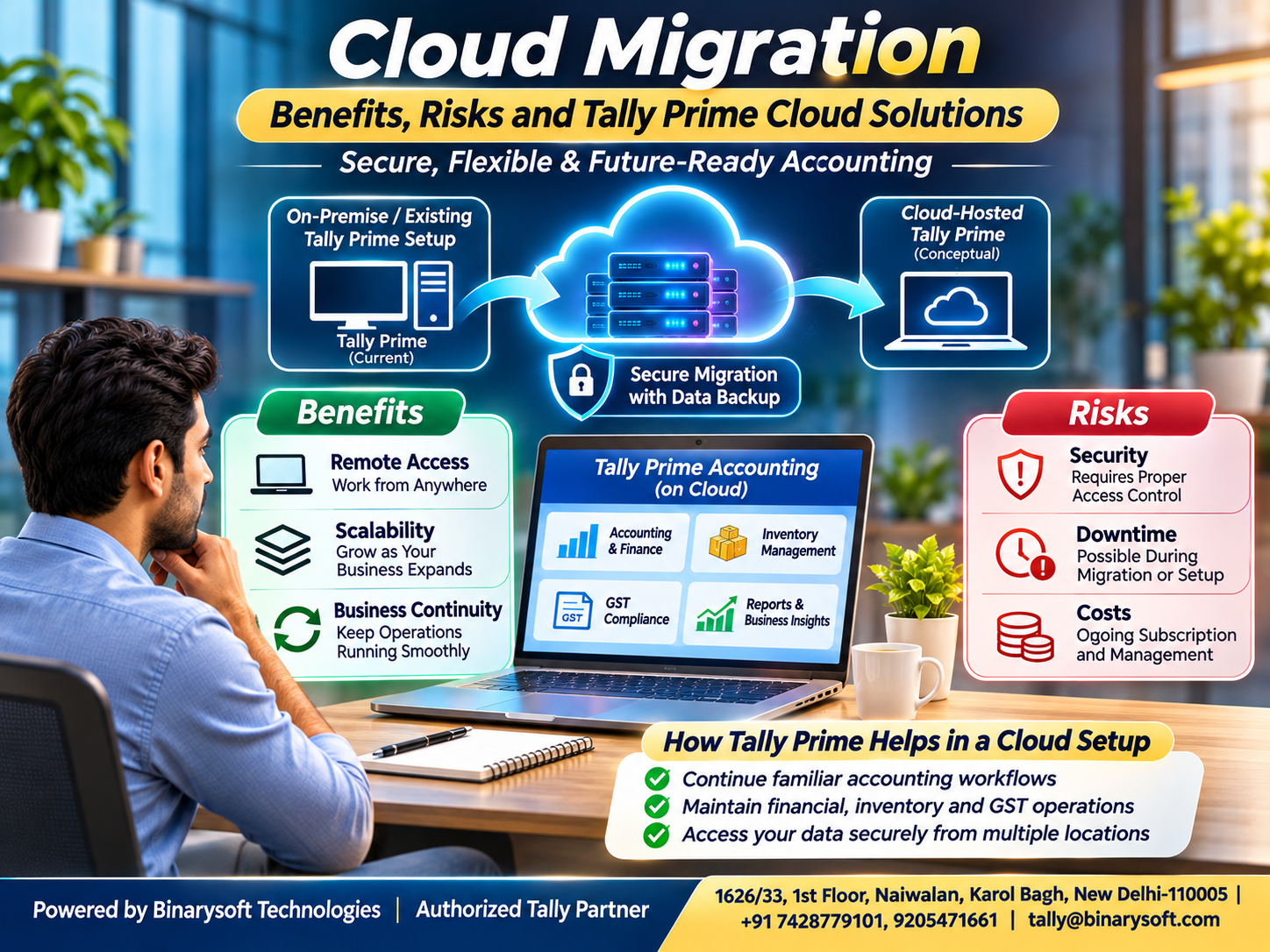
Cloud migration is the process of moving applications, databases, workloads or infrastructure from an existing environment to a cloud-based environment.
When implemented correctly, migration can improve flexibility, scalability and business continuity.
However, moving to the cloud does not automatically eliminate security threats, technical failures or operational costs.
For businesses using Tally Prime, a suitable cloud-hosting arrangement can support authorized remote access to accounting information while maintaining established financial workflows.
Understanding cloud migration benefits and risks is essential before making this important technology decision.
1. What Is Cloud Migration?
Cloud migration involves transferring digital resources from existing infrastructure to a cloud environment.
These resources may include business applications, databases, documents, operating systems and supporting services.
Organizations may migrate from physical office servers, traditional hosting arrangements or one cloud provider to another.
The objective is generally to improve how technology resources are managed, accessed and maintained.
Common Cloud Migration Approaches
On-Premises to Cloud: Moving applications from office infrastructure to cloud-hosted servers.
Cloud-to-Cloud Migration: Transferring workloads between cloud providers.
Hybrid Migration: Maintaining some systems locally while operating others in the cloud.
Application Modernization: Modifying applications to take advantage of cloud-native services.
Not every business requires a complete migration.
Some organizations benefit from moving selected applications while retaining other systems locally.
The appropriate approach depends on operational requirements, application compatibility and financial considerations.
2. Understanding Different Cloud Deployment Models
Before migrating, businesses should understand the main cloud deployment options.
Public Cloud
Public cloud infrastructure is operated by a service provider and shared across customers using appropriate logical isolation.
Businesses typically pay according to selected services and usage.
Private Cloud
A private cloud provides dedicated infrastructure or a dedicated cloud environment for one organization.
It may offer greater configuration control but can involve higher management costs.
Hybrid Cloud
A hybrid arrangement combines local infrastructure with cloud resources.
For example, a business may maintain certain internal applications locally while hosting other workloads remotely.
Multi-Cloud
Multi-cloud strategies use services from more than one cloud provider.
This can support specific operational requirements but may increase integration and management complexity.
Organizations should select deployment models according to security, performance, compliance and budget requirements.
3. Major Benefits of Cloud Migration for Businesses
Cloud migration can provide several advantages when the selected services match business needs.
Greater Accessibility
Authorized employees can access cloud-hosted applications from supported locations and devices.
This can benefit businesses with multiple offices or remote accounting teams.
Flexible Infrastructure
Cloud resources can often be adjusted according to changing workloads.
Reduced Dependence on Office Hardware
Businesses may reduce reliance on locally maintained servers and associated infrastructure.
Improved Collaboration
Centralized systems can help authorized teams work with consistent information.
Business Continuity Opportunities
Appropriate backup, redundancy and recovery arrangements can improve resilience.
Potential Cost Efficiency
Cloud hosting may reduce some upfront infrastructure expenses.
However, total cost depends on subscriptions, storage, support, network usage and operational requirements.
Easier Infrastructure Maintenance
Managed hosting services may simplify selected server maintenance responsibilities.
These benefits depend on service quality, configuration and ongoing administration.
4. Important Risks and Challenges of Cloud Migration
Although cloud technology offers flexibility, migration introduces risks that require careful management.
Data Security Risks
Business information may be exposed through weak passwords, incorrect permissions or insecure configurations.
Encryption, access controls and monitoring are important safeguards.
Data Loss
Incomplete transfers, accidental deletion or inadequate backups can threaten critical information.
Operational Downtime
Applications may become temporarily unavailable during migration.
Unexpected Expenses
Storage growth, network transfers, licensing and support can increase total costs.
Application Compatibility
Older software may require specific operating systems, dependencies or configuration changes.
Vendor Dependence
Moving away from a hosting provider can become difficult when systems rely heavily on proprietary services.
Internet Connectivity
Remote access generally depends on reliable network connections.
Compliance Requirements
Businesses must consider applicable data protection, contractual and regulatory obligations.
A successful migration strategy identifies these risks before moving production workloads.
5. Cloud Migration Strategies: Choosing the Right Approach
Organizations commonly evaluate several migration strategies.
Rehosting
Rehosting moves an application to cloud infrastructure with relatively limited changes.
It is sometimes called lift-and-shift migration.
Replatforming
Replatforming introduces selected infrastructure improvements without fundamentally redesigning the application.
Refactoring
Refactoring modifies application architecture to take advantage of cloud capabilities.
Repurchasing
Repurchasing replaces an existing application with another suitable product or service.
Retaining
Some applications remain in their existing environment because migration is unnecessary or unsuitable.
Retiring
Unused or redundant applications can be discontinued.
Businesses should assess each application separately rather than applying the same strategy to every workload.
6. An Emotional Story: When a Server Failure Threatened Years of Hard Work
Sanjay owned a family-run wholesale business in Karol Bagh, New Delhi.
His father had started the business with limited savings and a strong commitment to customer service.
Over the years, Sanjay expanded operations, introduced computerized accounting and built relationships with suppliers across India.
The company's accounting information was maintained on an office computer.
One summer morning, that computer suddenly stopped functioning.
Employees could not retrieve important records, and the team struggled to confirm customer outstanding balances.
Sanjay remembered the years his father had spent carefully recording transactions in handwritten registers.
He feared that one technical failure could disrupt the business his family had worked so hard to establish.
Fortunately, an earlier backup helped the team recover much of the information.
However, the incident exposed weaknesses in the company's technology arrangements.
Sanjay decided to review the business's infrastructure.
After consulting technical professionals, he evaluated a managed cloud-hosting solution for the accounting environment.
The migration plan included verified backups, user permissions, security controls and a recovery procedure.
Employees tested the new arrangement before it became the primary working environment.
Over time, the business developed a more disciplined approach to data protection and continuity planning.
One evening, Sanjay explained the changes to his father.
His father listened carefully and said that protecting business records was another way of protecting the trust customers had placed in them.
Sanjay realized that technology investments were not only about convenience.
They were about protecting employees, customer relationships and the future of a family business.
This fictional story illustrates why reliable backup, recovery and infrastructure planning matter.
7. How Tally Prime Can Be Used in a Cloud Environment
Tally Prime supports accounting, invoicing, GST-related records, inventory and financial reporting.
Businesses can explore suitable cloud-hosting arrangements that allow authorized users to access their Tally Prime environment remotely.
It is important to distinguish cloud hosting from a completely browser-native accounting application.
Tally Prime remains desktop accounting software; cloud access depends on the hosting architecture, licensing, supported remote-access technology and configuration.
Remote Accounting Access
Authorized employees may connect to a properly configured hosted environment from supported locations.
Centralized Accounting Operations
Businesses with multiple offices can potentially work through a centrally managed accounting environment.
GST and Invoicing
Users can continue performing supported GST-related accounting and invoicing activities within their hosted Tally Prime installation.
Inventory Management
Stock information and inventory transactions remain available through the configured accounting environment.
Financial Reporting
Authorized users can review accounting statements and business reports without depending on a particular office workstation.
Backup Management
A managed hosting arrangement can incorporate scheduled backups and documented recovery procedures.
Access Control
User permissions, authentication policies and infrastructure security help protect business information.
Cloud hosting should be implemented only after verifying application compatibility and applicable licensing requirements.
8. Benefits of Tally Prime on Cloud for Growing Businesses
A properly configured cloud-hosted accounting environment can support several practical requirements.
Multi-Location Operations
Businesses operating from different offices may benefit from centralized access to their accounting environment.
Flexible Working Arrangements
Authorized accountants and managers may access relevant information without being physically present in the office.
Reduced Local Infrastructure Dependence
Hosting can reduce the need to maintain certain server resources within business premises.
Centralized Maintenance
Managed environments may simplify operating system maintenance and selected infrastructure tasks.
Improved Recovery Planning
Suitable backup and recovery services can reduce the impact of certain equipment failures.
Scalable Hosting Resources
Businesses may be able to adjust server capacity as requirements change.
These advantages depend on internet quality, hosting performance, software configuration and service arrangements.
9. Case Study One: Cloud Migration for a Distribution Business
Illustrative Case Study
Business Background
A medium-sized electrical goods distributor operates from three locations.
Its accounting team uses Tally Prime for sales, purchases, inventory and financial reporting.
The Challenge
Employees rely on office-based infrastructure, making access difficult when staff members work from different locations.
Hardware maintenance also creates occasional interruptions.
The Migration Approach
The organization evaluates a managed cloud-hosting environment.
Its implementation plan includes:
-
Reviewing Tally Prime compatibility and licensing.
-
Preparing verified accounting backups.
-
Establishing user access permissions.
-
Configuring suitable remote connectivity.
-
Testing application performance.
-
Preparing rollback and recovery procedures.
The Expected Outcome
A centrally managed environment could simplify authorized access across locations and reduce dependence on a particular office computer.
Business Lesson
Cloud migration should address genuine operational requirements rather than being adopted solely because the technology is popular.
10. Case Study Two: Protecting Accounting Continuity in a Manufacturing Company
Illustrative Case Study
Business Background
A manufacturing company uses Tally Prime for accounting and inventory records.
Management depends on timely financial information for purchasing and supplier payment decisions.
The Challenge
The company maintains its accounting environment on aging office hardware.
Management is concerned about equipment failure and prolonged recovery time.
The Migration Approach
The organization plans a controlled move to suitable cloud-hosted infrastructure.
The team prepares independent backups, tests recovery procedures and validates important accounting reports after migration.
User permissions and access security are reviewed before production use.
The Expected Outcome
The proposed arrangement could improve infrastructure resilience and establish more predictable recovery procedures.
Business Lesson
Business continuity depends on tested recovery processes, not simply on moving information to a remote server.
11. Step-by-Step Cloud Migration Checklist
A structured migration plan helps businesses reduce operational risks.
Step 1: Assess Existing Infrastructure
Identify applications, databases, dependencies and hardware limitations.
Step 2: Define Migration Objectives
Determine whether the priority is remote access, scalability, cost control or business continuity.
Step 3: Evaluate Hosting Requirements
Review processing capacity, memory, storage, connectivity and application compatibility.
Step 4: Review Security and Compliance
Establish authentication, access permissions, encryption and applicable data-handling requirements.
Step 5: Prepare Verified Backups
Create complete backups and confirm that they can be restored successfully.
Step 6: Develop a Migration Plan
Define responsibilities, expected downtime, testing procedures and rollback conditions.
Step 7: Test the Environment
Validate applications, integrations, user access and performance.
Step 8: Perform Controlled Migration
Move approved workloads according to the implementation plan.
Step 9: Verify Business Data
Reconcile critical records and confirm application functionality.
Step 10: Monitor and Maintain
Review security, performance, costs, backup results and recovery readiness.
This process is particularly important for systems containing financial records.
12. Security Best Practices for Cloud Migration
Cloud security requires shared responsibility between the service provider and the organization.
Important practices include strong authentication, least-privilege permissions, encryption and regular access reviews.
Businesses should also maintain independent backups, monitor unusual activity and apply security updates.
For accounting environments, employees should receive access only to the information and functions necessary for their responsibilities.
Administrative access should be restricted and monitored.
Backup retention and recovery procedures should be documented.
Organizations should also evaluate the provider's service commitments, incident response processes and data protection arrangements.
No hosting environment is completely risk-free.
Security depends on careful configuration, ongoing monitoring and responsible operational practices.
13. Understanding Cloud Migration Costs
Cloud migration expenses extend beyond monthly server charges.
Organizations should consider several cost categories.
Hosting Infrastructure: Computing resources, storage and network services.
Software Licensing: Application and operating system licensing requirements.
Migration Services: Planning, configuration and data transfer.
Security: Authentication, monitoring and protection services.
Backup and Recovery: Storage, retention and recovery arrangements.
Technical Support: Maintenance and troubleshooting assistance.
Training: Employee orientation and operational documentation.
Businesses should compare the total cost of ownership with their existing infrastructure expenses.
A lower initial investment does not always result in lower long-term costs.
14. The Future of Cloud Migration and Business Accounting
Cloud technology continues to influence how organizations deploy applications and manage infrastructure.
Businesses are increasingly exploring hybrid environments, managed services, automated monitoring and improved disaster recovery capabilities.
Cloud-hosted accounting environments may also support integration with approved business applications and reporting tools.
For Tally Prime users, suitable hosting arrangements can provide greater flexibility in accessing accounting information.
However, future-ready infrastructure requires more than remote connectivity.
Organizations must maintain reliable financial records, suitable security controls and tested recovery procedures.
The strongest technology strategies balance flexibility with operational stability.
Conclusion
Cloud migration can help businesses improve accessibility, infrastructure flexibility and business continuity.
However, successful migration requires careful planning around security, application compatibility, downtime, costs and data recovery.
For organizations using Tally Prime, an appropriately configured cloud-hosting solution can support authorized remote accounting access and centralized operations.
The decision to migrate should be based on practical business requirements, verified technical compatibility and realistic financial expectations.
Cloud migration delivers lasting value when it protects business information, supports employees and enables dependable operations.
Powered by Binarysoft Technologies
Authorized Tally Partner
Binarysoft Technologies supports businesses with Tally Prime solutions, accounting software implementation, customization, technical assistance and cloud-based accounting requirements.
We help organizations evaluate suitable accounting environments and improve operational flexibility while maintaining reliable business records.
Location:
1626/33, 1st Floor, Naiwalan, Karol Bagh, New Delhi – 110005, INDIA
Contact Us:
+91 7428779101, 9205471661
Email:
tally@binarysoft.com
Business Hours:
10:00 AM – 6:00 PM, Monday to Friday
Frequently Asked Questions
Is Tally Prime on Cloud the same as browser-based accounting software?
No. A cloud-hosted Tally Prime environment generally provides remote access to desktop accounting software rather than converting it into a fully browser-native application.
Is cloud-hosted accounting secure?
It can be secured using appropriate authentication, encryption, access controls, monitoring and backup procedures. Security depends on implementation.
Can multiple employees access Tally Prime remotely?
Suitable hosting arrangements may support authorized multi-user access, subject to licensing, configuration and infrastructure capacity.
Does cloud migration eliminate the need for backups?
No. Businesses still require reliable backups, appropriate retention policies and tested recovery procedures.
CA. Dhruv Bhandekar works with businesses on bookkeeping controls, GST reporting, and month-end accounting processes. His focus is on creating structured financial workflows that improve accuracy and reduce reconciliation issues.