Call CA Tally HelpDesk
+91 9205471661,
7428779101
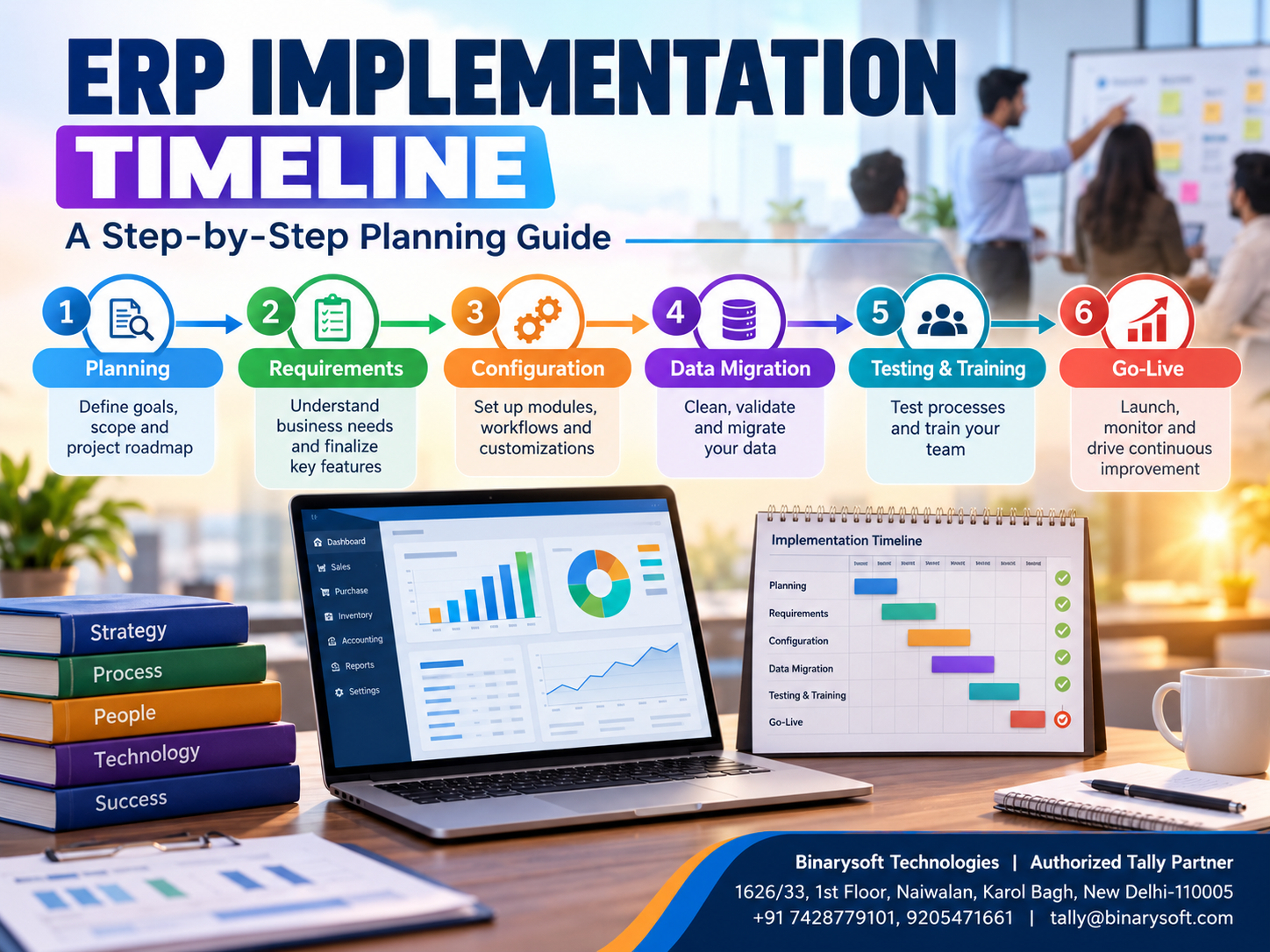
Introduction: Why Successful ERP Implementation Begins With Proper Planning
Implementing Enterprise Resource Planning (ERP) software is an important step for businesses that want to improve accounting accuracy, inventory management, financial reporting and operational efficiency.
However, purchasing ERP software is only the beginning.
The real challenge is implementing the system without disrupting daily business activities.
Many organizations underestimate the time required for data preparation, software configuration, employee training and testing.
As a result, ERP projects may experience delays, unexpected expenses and operational difficulties.
A well-structured ERP implementation timeline helps businesses organize every stage of deployment, from initial planning to successful operation.
For Indian small and medium enterprises, solutions such as Tally Prime can simplify accounting, GST billing, inventory management and financial reporting when implemented correctly.
This guide explains the ERP implementation process, realistic project timelines, common challenges and practical strategies for achieving a successful deployment.
A Business Owner's Story: The ERP Project That Nearly Stopped His Business
Sanjay operated a wholesale electronics business in Delhi.
For more than ten years, he had managed his company using spreadsheets, handwritten stock registers and basic accounting software.
As customer orders increased, maintaining accurate financial and inventory records became increasingly difficult.
His employees frequently struggled to identify available stock, reconcile customer payments and prepare financial reports.
Sanjay decided to introduce a new business management system.
He expected the entire implementation to be completed within one week.
However, when the installation team started reviewing the company's records, several problems appeared.
Customer ledgers contained duplicate entries. Stock quantities did not match warehouse records. Some supplier balances had not been reconciled for months.
Employees were also unfamiliar with the new software.
The implementation took longer than expected.
During the transition, Sanjay worried about delayed invoices, frustrated employees and dissatisfied customers.
He eventually realized that the software itself was not the main problem.
The business had started implementation without preparing its data or planning employee training.
Sanjay reorganized the project into smaller stages, assigned responsibilities and introduced regular testing.
Gradually, the business moved toward a more reliable accounting and inventory system.
His experience highlights an important lesson:
ERP implementation success depends not only on choosing suitable software but also on preparing people, processes and data before deployment.
1. What Is ERP Implementation?
ERP implementation is the process of introducing an enterprise resource planning system into an organization.
It involves configuring software, preparing business information, transferring relevant records, training employees and integrating the system into daily operations.
The purpose is to establish a reliable environment for managing business activities.
A typical ERP implementation may include accounting, purchasing, sales, inventory management, financial reporting and other operational functions.
The exact scope depends on the software and business requirements.
Why ERP Implementation Matters
A properly implemented ERP system can help businesses:
- Maintain consistent financial records.
- Improve inventory visibility.
- Reduce repeated manual data entry.
- Standardize business processes.
- Strengthen internal controls.
- Generate useful management reports.
- Support future business expansion.
However, these benefits depend on accurate configuration and consistent employee usage.
2. How Long Does ERP Implementation Take?
ERP implementation timelines vary according to business size, software complexity, data quality and integration requirements.
A small business implementing standard accounting and inventory functionality may require only a few weeks.
A medium-sized organization with multiple departments may require several months.
Large enterprises implementing extensive manufacturing, supply chain and financial management systems may require substantially longer.
Estimated ERP Implementation Timeline
| Business Type | Illustrative Timeline | Typical Requirements |
|---|
| Small Retail Business |
1–3 weeks |
Accounting, billing, inventory |
| Wholesale Trading Business |
2–6 weeks |
Purchases, sales, inventory, GST |
| Small Manufacturing Unit |
4–8 weeks |
Accounting, materials, inventory |
| Medium-Sized Business |
2–6 months |
Multiple departments and integrations |
| Large Enterprise |
6–18+ months |
Complex processes and customization |
These are planning estimates rather than guaranteed implementation periods.
Actual timelines depend on project scope, software capabilities and organizational readiness.
3. Seven Important Phases of ERP Implementation
Phase 1: Business Requirement Analysis
Estimated Duration: 3–10 working days for a small business
The first stage involves understanding existing business processes.
Management should identify operational challenges and determine which functions need improvement.
For example, a wholesale distributor may prioritize stock accuracy and customer outstanding management.
A manufacturer may require better raw material accounting and production cost visibility.
Important activities include reviewing existing workflows, interviewing employees, identifying reporting requirements and defining implementation objectives.
Phase 2: ERP Software Selection
Estimated Duration: 1–3 weeks
Businesses should compare available software solutions against their operational requirements.
Important considerations include accounting functionality, inventory management, GST support, usability, security, scalability and technical assistance.
An ERP vendor evaluation scorecard can help organizations compare solutions objectively.
For businesses primarily requiring accounting, invoicing, inventory and GST-related functionality, Tally Prime may be worth evaluating.
Phase 3: Project Planning
Estimated Duration: 3–7 working days
After selecting the software, the organization should prepare a detailed implementation plan.
The plan should identify project responsibilities, milestones, resources, risks and expected completion dates.
Management should also determine whether implementation will occur across the entire organization or through individual departments.
Phase 4: Data Preparation and Migration
Estimated Duration: 1–4 weeks
Data migration is often one of the most important implementation activities.
Businesses may need to transfer customer information, supplier records, opening balances, stock items and outstanding transactions.
Before migration, records should be reviewed for duplicates, inaccuracies and missing information.
Historical data should be retained or migrated according to business, audit and regulatory requirements.
Phase 5: Software Configuration
Estimated Duration: 3–15 working days
Configuration involves setting up the software according to business requirements.
For Tally Prime, this may include company creation, ledger groups, stock masters, units of measurement, GST details, voucher settings and user permissions.
Additional configuration may be required for godowns, batches, cost centres or other applicable features.
Phase 6: Testing and Employee Training
Estimated Duration: 1–3 weeks
Employees should test common business activities before the system becomes fully operational.
Testing may include sales invoices, purchase entries, receipts, payments, stock transfers and financial reporting.
Training should focus on the actual responsibilities of each employee.
Phase 7: Go-Live and Post-Implementation Support
Estimated Duration: 1–4 weeks for initial stabilization
Go-live is the stage when the business begins using the new system for regular operations.
Management should monitor transaction accuracy, system performance and employee difficulties.
The implementation team should remain available to resolve problems and provide additional guidance.
4. Sample Eight-Week ERP Implementation Plan
For a small business implementing standard accounting and inventory functions, the following schedule provides an illustrative starting point.
| Week | Implementation Activity | Expected Outcome |
|---|
| Week 1 |
Business analysis and planning |
Approved requirements |
| Week 2 |
Software selection and project preparation |
Finalized implementation scope |
| Week 3 |
Data cleaning and master preparation |
Verified accounting and inventory records |
| Week 4 |
Software installation and configuration |
Configured application |
| Week 5 |
Data migration and verification |
Reconciled opening information |
| Week 6 |
Transaction testing |
Validated business processes |
| Week 7 |
Employee training and final corrections |
Operational readiness |
| Week 8 |
Go-live and initial monitoring |
Live accounting environment |
Some activities can overlap. For example, employee training can begin while the implementation team is testing the software.
Businesses requiring extensive customization or integrations should allow additional time.
5. How Tally Prime Simplifies ERP Implementation for Indian Businesses
Tally Prime provides integrated business management capabilities that can help small and medium enterprises organize accounting, inventory, invoicing and financial reporting.
Accounting Configuration
Businesses can create company records, accounting groups, ledgers and voucher types.
This establishes the foundation for recording financial transactions.
Inventory Management
Tally Prime supports stock items, stock groups, units of measurement, godowns and other inventory features.
Businesses can configure these functions according to their operational requirements.
GST Accounting
GST-related features help businesses record taxable transactions and prepare relevant reports.
Correct tax classification and configuration are essential.
Sales and Purchase Management
Businesses can maintain sales invoices, purchase transactions, customer balances and supplier accounts.
Financial Reporting
Tally Prime provides reports such as Balance Sheet, Profit and Loss Account, stock summaries and outstanding statements.
Multi-User Operations
Suitable licensing arrangements allow multiple authorized users to work with company data.
Cloud Hosting
Businesses requiring remote access can evaluate compatible cloud-hosting arrangements.
Hosting costs, security requirements and licensing should be reviewed separately.
6. Case Study One: ERP Implementation for a Wholesale Trading Business
Business: Illustrative electrical goods distributor, Sadar Bazar, Delhi
Business Challenge
A wholesale distributor handled hundreds of stock items and numerous customer transactions.
The company maintained inventory records in spreadsheets while accounting transactions were recorded separately.
Management experienced difficulties with stock reconciliation and customer outstanding tracking.
Implementation Plan
The business prepared a six-week implementation schedule.
During the first week, management reviewed existing accounting and inventory procedures.
The second week focused on cleaning customer, supplier and stock records.
During the third and fourth weeks, the implementation team configured Tally Prime and verified opening information.
The fifth week involved employee training and transaction testing.
During the sixth week, the company began regular operations using the configured system.
Business Benefits
The new process provided clearer inventory information and more consistent accounting records.
Employees could prepare invoices and review customer balances more efficiently.
Key Learning: Careful data preparation and employee training can make ERP implementation smoother for wholesale businesses.
This is an illustrative case study.
7. Case Study Two: ERP Implementation for a Manufacturing Company
Business: Illustrative packaging manufacturer, Bawana Industrial Area, Delhi
Business Challenge
A small manufacturing company struggled to maintain accurate records of raw materials, finished goods and production-related expenses.
Different departments used separate registers, creating reconciliation difficulties.
Implementation Strategy
The company adopted a phased implementation approach.
The first phase focused on accounting and financial reporting.
The second phase introduced organized inventory masters and material tracking.
The third phase involved testing manufacturing-related inventory accounting and training employees.
Management reviewed transaction accuracy before approving the final deployment.
Business Benefits
The company gained better visibility into inventory movement and financial performance.
The structured implementation also helped employees understand their responsibilities.
Key Learning: Manufacturing businesses can reduce implementation risks by introducing functionality in manageable stages.
This is an illustrative case study.
8. Common Reasons ERP Implementation Projects Get Delayed
Unclear Business Requirements
When project objectives are not properly defined, implementation teams may need to repeat configuration work.
Poor Data Quality
Duplicate customer records, inaccurate stock quantities and unreconciled balances can delay migration.
Excessive Customization
Unnecessary customization increases development, testing and maintenance requirements.
Insufficient Employee Training
Employees may struggle to adopt new processes without appropriate guidance.
Lack of Management Involvement
ERP projects require timely decisions and cooperation between departments.
Inadequate Testing
Skipping transaction testing can create operational problems after go-live.
Unrealistic Deadlines
Overly aggressive schedules may leave insufficient time for data verification and training.
Businesses should include contingency time for unexpected problems.
9. How to Reduce ERP Implementation Costs
ERP implementation costs depend on software licensing, business complexity, customization, infrastructure and professional services.
Businesses can manage expenses through careful planning.
Prioritize Essential Features: Implement critical accounting and operational requirements first.
Prepare Data Early: Clean existing records before migration begins.
Avoid Unnecessary Customization: Use standard software functionality wherever practical.
Train Employees Effectively: Well-trained employees require less ongoing assistance.
Choose Suitable Infrastructure: Compare local installation and cloud hosting based on actual requirements.
Monitor Project Progress: Review milestones regularly to identify delays and unexpected expenses.
Cost control should not come at the expense of data accuracy, security or proper testing.
10. ERP Implementation Checklist Before Go-Live
Before launching the new system, management should verify the following:
- Business requirements have been approved.
- Company and accounting information is configured correctly.
- Customer and supplier records have been verified.
- Opening balances have been reconciled.
- Inventory quantities have been checked.
- Applicable GST details have been reviewed.
- User permissions have been configured.
- Important business transactions have been tested.
- Employees have completed relevant training.
- Backup and recovery procedures have been verified.
- Critical issues have been resolved.
- Management has approved the go-live decision.
A documented checklist reduces the possibility of overlooking important requirements.
11. Cloud ERP vs On-Premise ERP Implementation
Businesses must also decide where their ERP software will operate.
Cloud ERP Implementation
Cloud-hosted environments can reduce the need for dedicated office server infrastructure.
However, businesses must evaluate connectivity, hosting security, service agreements and application compatibility.
On-Premise ERP Implementation
On-premise deployments provide direct control over local infrastructure.
Businesses are generally responsible for maintaining hardware, operating systems, backups and network security.
Choosing the Right Deployment
The best approach depends on employee locations, IT resources, budget and operational requirements.
For Tally Prime users, compatible cloud hosting can provide remote access, while local installations may remain suitable for businesses operating primarily from one office.
12. How to Measure ERP Implementation Success
Successful implementation should be evaluated using measurable business outcomes.
Transaction Accuracy
Compare accounting and inventory errors before and after implementation.
Invoice Processing Time
Measure how quickly employees prepare and complete invoices.
Inventory Visibility
Review whether stock information is available accurately and consistently.
Financial Reporting Efficiency
Evaluate the time required to prepare financial statements and management reports.
Employee Adoption
Monitor whether employees can complete their responsibilities without frequent technical assistance.
System Reliability
Review application availability, performance and recovery arrangements.
Customer Service
Assess whether the system helps employees respond more efficiently to customer inquiries.
Management should compare results against objectives established during project planning.
13. Best Practices for Successful ERP Implementation
A successful ERP project requires coordination between management, employees and implementation professionals.
Businesses should appoint a responsible project leader who can coordinate decisions and monitor progress.
Requirements should be documented before configuration begins.
Data migration should include verification and reconciliation.
Employee training should focus on actual business transactions.
Testing should cover both normal activities and exceptional situations.
Finally, businesses should continue reviewing the system after implementation.
ERP deployment is not simply a technical installation. It is an operational improvement project that requires continuous attention.
14. The Future of ERP Implementation for Indian MSMEs
Indian small and medium businesses are increasingly adopting digital accounting and management systems.
Cloud hosting, connected banking, electronic invoicing and improved reporting capabilities are influencing implementation requirements.
Businesses are also exploring integrations and automation to reduce repetitive administrative work.
However, successful digital transformation still depends on accurate information and clearly defined processes.
Organizations should prioritize reliable accounting, inventory control and employee adoption before introducing advanced functionality.
For many MSMEs, implementing a suitable system in manageable stages is more practical than attempting a complex transformation immediately.
Conclusion
ERP implementation is an important investment in business efficiency, financial accuracy and long-term growth.
A realistic implementation timeline helps organizations coordinate software selection, data preparation, configuration, testing, employee training and deployment.
Businesses should avoid rushing implementation or overlooking important operational requirements.
For Indian small and medium enterprises, Tally Prime provides useful accounting, inventory, GST and financial reporting capabilities that can support structured business management.
With proper planning, accurate data and suitable employee training, organizations can improve operational visibility and reduce dependence on disconnected manual processes.
Successful ERP implementation is not measured only by how quickly the software goes live. It is measured by how effectively the system supports everyday business operations.
Powered by Binarysoft Technologies
Authorized Tally Partner
Location: 1626/33, 1st Floor, Naiwalan, Karol Bagh, New Delhi – 110005, INDIA
Contact Us: +91 7428779101, 9205471661
Email: tally@binarysoft.com
Business Hours: 10:00 AM – 6:00 PM, Monday to Friday
Frequently Asked Questions
Is employee training necessary during ERP implementation?
Yes. Training helps employees understand transaction procedures, reduce errors and use the software effectively.
What is ERP data migration?
ERP data migration involves transferring relevant business records from existing systems into a new software environment.
What happens after ERP implementation?
Businesses should monitor system performance, review transaction accuracy, support employees and continuously improve operational processes.
Why do ERP implementation projects fail?
Common causes include unclear requirements, poor data quality, inadequate training, excessive customization and insufficient testing.
CA. Rishaan Lodha focuses on accounting controls, taxation, and financial reporting for trading and service organizations. He helps businesses improve transaction recording, reconciliations, and documentation for efficient financial management.